Freedom251 › Software Update Tools
Ninite Updater
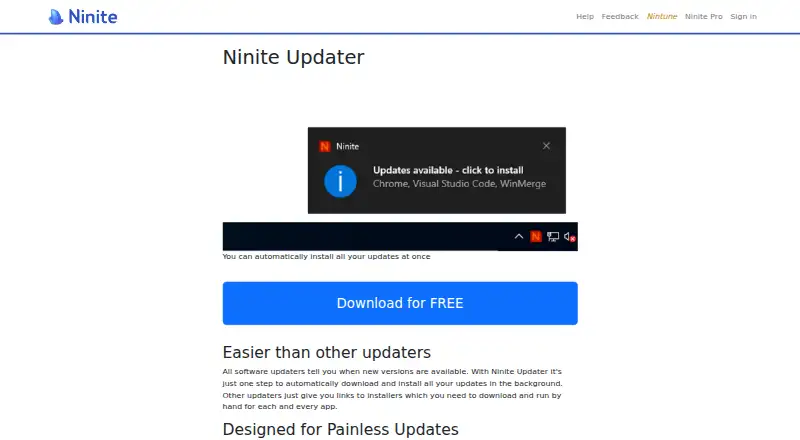
What Ninite Updater is
Ninite Updater checks Windows PCs for outdated software and helps install selected updates. It alerts users when any of the 150 Ninite-supported apps are out of date, whether or not they were installed through Ninite, and detects supported apps added later. Checks run in the background. Users can install selected updates together with one click or skip an app and update the rest. Ninite says updates need no installer prompts and do not add browser toolbars or junkware. The download requires no account or login. The plan is free and covers 150 supported apps on a Windows PC with one-click updates. Ninite says its executables are company-signed, downloads are checked against SHA-256 hashes or publisher signatures, and updates fail if validation does not pass. Programs come from publishers' official mirrors, with Ninite's mirror as a fallback when an official mirror is unreliable. Ninite describes Updater as a set-and-forget option for helping friends and family and says it can suit small businesses. For more complicated networks, it points users to Pro, which it describes as offering advanced reporting and updates that do not require end users to start them.
Who it suits
Ninite Updater may suit Windows users who help friends or family keep supported apps current, as well as small businesses. Ninite directs users with more complicated networks to Pro.
What it does well
- Checks 150 supported apps in the background
- Detects supported apps installed outside Ninite
- Users can skip individual apps
- No account or login required
- Updates do not require installer prompts
What to know first
- Windows-only
- Custom app support is not available
- No free trial
- Covers only Ninite-supported apps
Limits
The free plan covers 150 supported apps on a Windows PC. Custom app support is not included.
Plans
| Plan | Billed and limits | Price |
|---|---|---|
| Ninite Updater | 150 supported apps · Windows PC · one-click updates | Free |
As ninite.com lists them, read 3 Oct 2026. The maker's own page has the final word.
Getting started
- Visit the Ninite Updater website.
- Download the Windows app.
- Run it without creating an account or logging in.
- Review the supported apps it identifies and select updates to install together.
Verdict
Ninite Updater is a free Windows option for checking and installing updates across its supported apps. Its coverage does not extend to custom apps, and Ninite points more complex networks toward Pro.
Questions
How much does Ninite Updater cost?
The listed plan is free.
Is there a free trial?
No free trial is offered; the plan is free.
Which operating system does it support?
Ninite Updater is Windows-only.
Do I need an account?
No. Updater is a download that does not include an account or login.
Which apps does it update?
It checks 150 Ninite-supported apps, including apps installed without Ninite, and notices supported apps added later.
Who makes Ninite Updater?
The site identifies Secure By Design Inc. as the company and lists an address in New York, NY.
Facts from Ninite Updater's own pages
- Account requirement
- Updater is a download and does not include an account or login. · ninite.com, 3 Oct 2026
- Automatic detection
- It detects supported apps whether or not they were installed with Ninite and notices newly added apps automatically. · ninite.com, 3 Oct 2026
- Background updates
- Update checking happens in the background, and a user can install selected updates together with one click. · ninite.com, 3 Oct 2026
- Download sources
- Ninite says programs are downloaded from publishers’ official mirrors, with its own mirror as a fallback when an official mirror is unreliable. · ninite.com, 3 Oct 2026
- Founded
- Ninite says it was founded by Patrick Swieskowski and Sascha Kuzins; the page gives no founding year. · ninite.com, 3 Oct 2026
- Headquarters
- New York, NY, United States · ninite.com, 28 Sept 2026
- Intended users
- Ninite describes Updater as a set-and-forget option for friends and family support and says it can suit small businesses. · ninite.com, 3 Oct 2026
- Low-interruption installs
- Ninite says its updates need no installer prompts and do not add browser toolbars or junkware. · ninite.com, 3 Oct 2026
- Maker
- The site identifies Secure By Design Inc. as the company and lists an address in New York, NY. · ninite.com, 3 Oct 2026
- More complex IT
- For more complicated networks, Ninite points users to Pro, which it describes as offering advanced reporting and updates without end-user interaction to start them. · ninite.com, 3 Oct 2026
- Purpose
- Ninite Updater checks installed software for outdated versions and helps install updates. · ninite.com, 3 Oct 2026
- Security checks
- Ninite says its executables are company-signed, downloads are checked against SHA-256 hashes or publisher signatures, and updates fail if validation fails. · ninite.com, 3 Oct 2026
- Skip updates
- Users can skip an app they do not want to update and update the rest. · ninite.com, 3 Oct 2026
- Support contact
- Ninite lists [email protected] for questions on its About page. · ninite.com, 3 Oct 2026
- Supported apps
- It alerts users when any of the 150 Ninite-supported apps are out of date. · ninite.com, 3 Oct 2026
Where Ninite Updater stands on Freedom251
- Software Update Tools#13 of 29