Freedom251 › Checklist Software

AssignRight
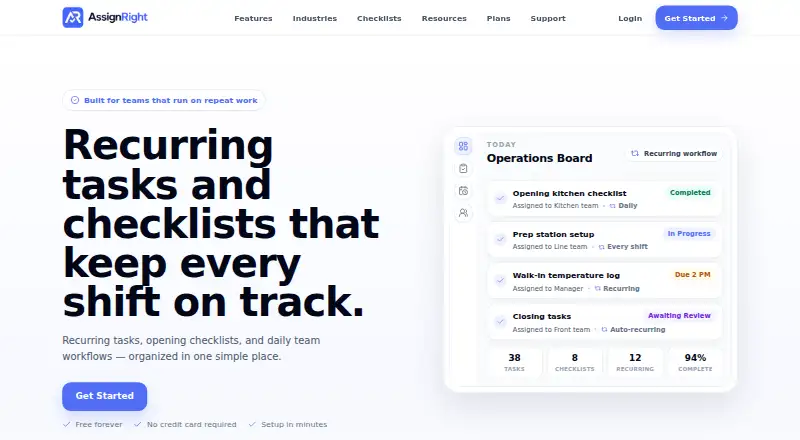
What AssignRight is
AssignRight is a web-based tool for delegating work, scheduling recurring tasks, and turning team standards into step-by-step checklists. Tasks can include due dates, notes, priorities, and responsible team members. Recurring schedules cover routines such as opening, closing, safety, and cleaning. The product organizes employees, managers, and teams with permissions for day-to-day operations, while reports show completion trends, overdue work, and team accountability. AssignRight is presented for restaurants and other teams with repeatable operational work, including cafes, retail stores, cleaning teams, and warehouses. Its Free plan costs nothing and includes up to 3 users, 1 team, basic task management and checklists, and 30-day history. The Team plan costs $29/month for up to 25 users and 10 teams, adding recurring tasks, checklist templates, notifications, and 1-year history. Business costs $99/month for up to 100 users and 30 teams, with unlimited activity history and evidence retention, priority support, enhanced reporting, and early access features. AssignRight says it uses administrative, technical, and organizational safeguards designed to protect information.
Who it suits
AssignRight suits restaurants, cafes, retail stores, cleaning teams, warehouses, and other groups with repeatable operational work. The free tier is limited to small teams, while paid plans support more users and teams.
What it does well
- Tasks can include due dates, priorities, and assigned team members.
- Recurring schedules cover common operational routines.
- Reports show overdue work and completion trends.
- The free plan includes basic tasks and checklists.
What to know first
- The free plan is limited to 3 users and 1 team.
- Free plan history is limited to 30 days.
- Team costs $29/month.
- Business costs $99/month.
Limits
The Free plan is limited to 3 users and 1 team, basic task management and checklists, and 30-day history. The Team plan supports up to 25 users and 10 teams, with 1-year history. Business supports up to 100 users and 30 teams; its activity history and evidence retention are unlimited.
Plans
| Plan | Billed and limits | Price |
|---|---|---|
| Free | $0/month · Up to 3 users · 1 team · Basic task management · Basic checklists · 30-day history | Free |
| Team | $29/month · Up to 25 users · Up to 10 teams · Recurring tasks · Checklist templates · Notifications · 1-year history | $29 a month |
| Business | $99/month · Up to 100 users · Up to 30 teams · Unlimited activity history · Unlimited evidence retention · Priority support · Enhanced reporting · Early access features | $99 a month |
As assignright.com lists them, read 9 Oct 2026. The maker's own page has the final word.
Getting started
- Visit the AssignRight website.
- Choose the Free, Team, or Business plan.
- Set up employees, managers, and teams with day-to-day permissions.
- Create tasks with due dates, notes, priorities, and responsible team members.
- Set recurring schedules and create checklists for operating routines.
AssignRight is a web-based tool for assigning work and managing recurring operational routines. It is best suited to teams such as restaurants, cafes, retailers, cleaning crews, and warehouses that need staff to follow consistent procedures. Choose it for task accountability and repeatable checklists; its free plan is small, and mobile platforms are not offered.
Overview
Tasks can include due dates, notes, priorities, and a responsible team member, while managers can organize employees into teams with day-to-day permissions. Reports show completion trends, overdue work, and team accountability. That makes AssignRight a focused option for keeping routine work on track, rather than a broad project-management choice.
Its appeal is the combination of delegation and recurring procedures: managers can assign work and track whether it gets done. Teams that need only occasional task lists may not benefit enough from that operational focus to justify a paid plan.
Key features
Recurring work and checklists
Schedules cover opening, closing, safety, cleaning, and other repeatable routines. Teams can turn standards into step-by-step checklists, which can help staff carry out procedures consistently. The distinction between plans matters: recurring tasks and checklist templates begin with Team, so Free supports basic task and checklist use but not the more structured recurring workflow.
Assignments and oversight
Due dates, priorities, notes, and named assignees give managers several ways to define responsibility. Completion and overdue-work reporting helps identify routines that are slipping. Business adds enhanced reporting, which is more relevant to larger operations needing more oversight than to a small team with straightforward tasks.
Pricing
AssignRight has a free plan and two paid monthly plans. The free tier is a narrow starting point; paid plans expand capacity and add the recurring-work features that make the product more useful for sustained operations.
- Free — free (billed $0/month): Up to 3 users, 1 team, basic task management, basic checklists, and 30-day history. It can suit a very small team trying basic task delegation, but the user and team caps rule it out for a larger operation, and short history limits longer-term review.
- Team — $29 a month (billed $29/month): Up to 25 users, 10 teams, recurring tasks, checklist templates, notifications, and 1-year history. This is the practical step up for a growing team that needs repeatable routines and more than one work group. It still caps team size and history, and it does not include the unlimited history and evidence retention or enhanced reporting offered by Business.
- Business — $99 a month (billed $99/month): Up to 100 users, 30 teams, unlimited activity history, unlimited evidence retention, priority support, enhanced reporting, and early access features. It fits larger operations that need broader capacity and deeper oversight; smaller teams may find Team sufficient if they can work within its limits.
The plans are billed monthly at the stated amounts. AssignRight says paid subscription billing is handled through Stripe and that it does not store full payment card details.
Platforms
AssignRight is available on the web. Teams looking for Android or iOS access should consider a product with those platforms instead.
Who it's for
Restaurants, cafes, retail stores, cleaning teams, and warehouses are the clearest fit: each can use recurring schedules and checklists to keep routine work consistent across employees. A team of up to three users can start on Free, while teams needing recurring tasks, templates, or more than one team must move to Team. For retail-specific options, see Retail Store Operations Software; for checklist-focused tools, see Checklist Software.
Pros and cons
- Pro: Assignments combine due dates, notes, priorities, and a named owner, making responsibility clearer than an unassigned checklist alone.
- Pro: Recurring schedules and step-by-step checklists suit operational routines such as opening, closing, safety, and cleaning.
- Pro: Reports surface completion trends and overdue work, giving managers a way to monitor team accountability.
- Con: Free is limited to 3 users, 1 team, and 30-day history, so it is not a durable option for many growing teams.
- Con: Recurring tasks and checklist templates require the $29/month Team plan, placing the central repeat-work features behind a paid tier.
- Con: Web is the only supported platform, which may not suit teams that require dedicated mobile apps.
Alternatives
Choose Amply if mobile access, offline use, or store-focused operations matter more: its free Starter plan supports up to 2 stores and includes a communication feed, task scheduler, no-code SOP builder, and mobile app with offline mode.
ZebraDesigner is a different kind of option for teams whose need is barcode label and tag design and printing; its free Essentials 3 plan supports Zebra Link-OS and Link-OS Basic printers.
Rytual offers a 7-day trial with full module access for one user and one store, making it a possible fit for someone who wants to evaluate that product in a tightly limited setup before paying.
Movista, OrderGrid Store Operations OS, VisitBasis, Hubler, and OPSCENTER are other options to compare for store or operations needs.
Verdict
AssignRight is a sensible choice for managers who need to assign recurring operational work, standardize it with checklists, and monitor completion in one web-based tool. Its strongest reason to choose it is the link between repeatable procedures and accountability. Look elsewhere if your team needs mobile apps, or if the free tier’s three-user and one-team limits are too restrictive and the paid plans do not fit your budget.
Verdict
AssignRight focuses on repeatable team operations, with task assignments, recurring schedules, checklists, and reporting. Its free tier has strict user, team, and history limits; paid plans raise those limits at listed monthly prices.
Questions
How much does AssignRight cost?
Free costs nothing. Team costs $29 a month, and Business costs $99 a month.
What is included in the Free plan?
It includes up to 3 users, 1 team, basic task management, basic checklists, and 30-day history.
Which platforms does AssignRight support?
AssignRight is listed for the web.
Who is AssignRight for?
It is presented for restaurants and teams with repeatable operational work, including cafes, retail stores, cleaning teams, and warehouses.
What does the Team plan add?
Team supports up to 25 users and 10 teams, and includes recurring tasks, checklist templates, notifications, and 1-year history.
How are paid subscriptions billed?
AssignRight says Stripe handles paid subscription billing. Its privacy policy says full payment card details are not stored by AssignRight.
Facts from AssignRight's own pages
- Checklists
- Teams can turn standards into step-by-step checklists for consistent work. · assignright.com, 9 Oct 2026
- Free plan limits
- The free plan includes up to 3 users, 1 team, basic task management and checklists, and 30-day history. · assignright.com, 9 Oct 2026
- Integrations
- The privacy policy names Stripe as the service used to handle paid subscriptions and billing workflows. · assignright.com, 9 Oct 2026
- Privacy and payments
- The privacy policy says paid subscription billing is handled through Stripe and full payment card details are not stored by AssignRight. · assignright.com, 9 Oct 2026
- Purpose
- AssignRight provides task delegation, recurring tasks, checklist management, team assignments, and operational workflows. · assignright.com, 9 Oct 2026
- Recurring work
- Recurring schedules support opening, closing, safety, cleaning, and other operational routines. · assignright.com, 9 Oct 2026
- Reporting
- Reports show completion trends, overdue work, and team accountability. · assignright.com, 9 Oct 2026
- Security
- AssignRight says it uses administrative, technical, and organizational safeguards designed to protect information. · assignright.com, 9 Oct 2026
- Support
- Users can send a support request through the support page, and the team says it will get back to them. · assignright.com, 9 Oct 2026
- Task assignment
- Tasks can have due dates, notes, priorities, and responsible team members. · assignright.com, 9 Oct 2026
- Team management
- The product organizes employees, managers, and teams with permissions for day-to-day operations. · assignright.com, 9 Oct 2026
- Who it serves
- AssignRight is presented for restaurants and other teams with repeatable operational work, including cafes, retail stores, cleaning teams, and warehouses. · assignright.com, 9 Oct 2026
Where AssignRight stands on Freedom251
- Checklist Software#2 of 29
- Retail Store Operations Software#4 of 28