Freedom251 › Screenshot Annotation Software

Arrowbox
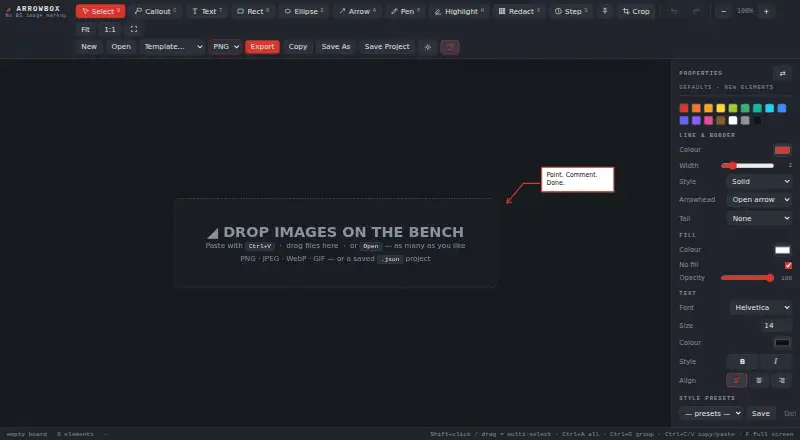
What Arrowbox is
Arrowbox is a free browser-based tool for marking up and redacting screenshots and other images. Its annotation tools include arrows, callouts, text, shapes, highlighting, freehand drawing, and numbered step stamps. Redaction can pixelate, blur, or cover selected areas with solid black. A board can contain multiple images for arranging into one export, available as PNG, JPEG, or PDF. The maker says images and projects are not uploaded and that the page makes no network calls after loading. Saving the page as an HTML-only file allows offline use on a local device. Arrowbox requires no account or sign-up and has no telemetry or watermark. Desktop browsers work best, with Chrome or Edge recommended; mobile use is not good yet. Saved JSON projects retain the original image and editable redactions, so exports are safer to share. The tool is donation-supported, with no paid tier stated.
Who it suits
Arrowbox suits people who need to annotate screenshots, combine images, or hide sensitive areas before sharing. It is most suitable for desktop-browser use and offline workflows.
What it does well
- Blur, pixelate, or black out image areas
- Exports PNG, JPEG, and PDF
- Supports multiple images on one board
- Works offline after saving the HTML file
- No account, telemetry, or watermark
What to know first
- Mobile use is not good yet
- Desktop browsers work best
- Saved JSON retains original editable image
- No browser extension
Plans
| Plan | Billed and limits | Price |
|---|---|---|
| Free | Donation-supported · no paid tier stated | Free |
As arrowbox.app lists them, read 11 Oct 2026. The maker's own page has the final word.
Verdict
Arrowbox focuses on screenshot markup and redaction without requiring an account. Its offline operation and multiple export formats are useful, but mobile support is currently limited and project files can preserve unredacted originals.
Facts from Arrowbox's own pages
- Accounts and telemetry
- The maker says Arrowbox requires no account or sign-up and has no telemetry or watermark. · arrowbox.app, 11 Oct 2026
- Annotation tools
- Its tools include arrows, callouts, text, shapes, highlighting, freehand drawing, and numbered step stamps. · arrowbox.app, 11 Oct 2026
- Browser extension
- No · arrowbox.app, 20 Sept 2026
- Browser support
- The maker says desktop browsers work best, recommends Chrome or Edge, and says mobile is not good yet. · arrowbox.app, 11 Oct 2026
- Export formats
- It exports flattened PNG, JPEG, or PDF files and can copy a flattened image to the clipboard. · arrowbox.app, 11 Oct 2026
- Free plan
- Yes · arrowbox.app, 20 Sept 2026
- Funding
- Arrowbox is donation-supported, with PayPal donation buttons on the page. · arrowbox.app, 11 Oct 2026
- Multiple images
- A board can hold multiple images for composition into one export. · arrowbox.app, 11 Oct 2026
- Offline use
- The page can be saved as an HTML-only file and used offline from a local device. · arrowbox.app, 11 Oct 2026
- Privacy
- The page says it makes zero network calls after loading and that images and projects are not uploaded. · arrowbox.app, 11 Oct 2026
- Purpose
- Arrowbox is a free browser-based image markup tool for annotating and redacting screenshots and other images. · arrowbox.app, 11 Oct 2026
- Redaction
- Redaction can pixelate, blur, or cover image areas with solid black. · arrowbox.app, 11 Oct 2026
- Redaction limitation
- Saved JSON projects retain the original image with editable redactions, so the maker advises sharing exports rather than project files. · arrowbox.app, 11 Oct 2026
- Support
- The maker welcomes enquiries and bug reports at [email protected]. · arrowbox.app, 11 Oct 2026
Where Arrowbox stands on Freedom251
- Screenshot Annotation Software#52 of 76