Freedom251 › Screenshot Annotation Software
TrarrenShot
What TrarrenShot is
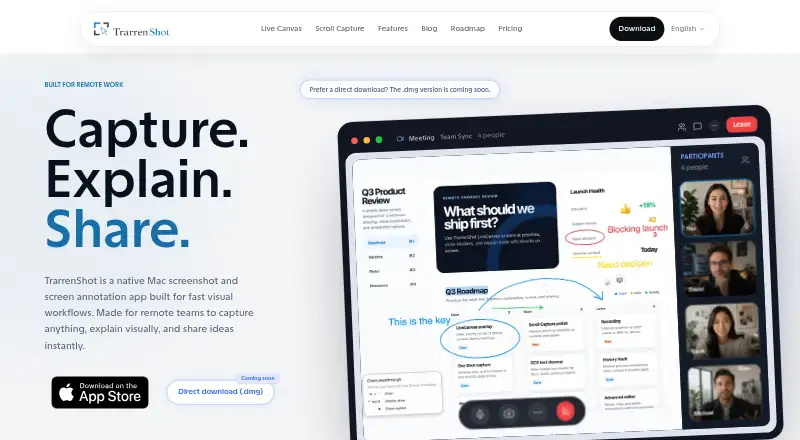
TrarrenShot is a macOS screenshot and screen-annotation app for visual workflows, including remote work. One Shot captures a region, window or fullscreen view for copying, saving, annotating or sharing. Its editor provides arrows, shapes, text, highlighting, pixelation, magnification and step annotations. Live Canvas draws over the live Mac desktop while clicks continue through to underlying apps. Scroll Capture joins manually scrolled frames into one long screenshot. Local OCR offers Auto and 11 selectable language modes, while QR detection displays values for copying or opens supported links. A color picker copies an sRGB HEX value with the C key. The Mac App Store app requires macOS 14 or later. Screenshots and annotations are processed locally unless explicitly shared or exported. Basic is free; Plus is listed at $7.99 per month, and Lifetime Plus at $7.99 once, with App Store regional pricing potentially varying.
Who it suits
TrarrenShot suits Mac users creating annotated screenshots, walkthroughs or visual documentation. It fits people who want local OCR and capture tools, including remote-work workflows.
What it does well
- Captures regions, windows and fullscreen views
- Live Canvas supports click-through drawing
- OCR runs locally with 11 language modes
- Includes QR detection and color sampling
- Free Basic plan available
What to know first
- Requires macOS 14 or later
- Basic branding and feature restrictions apply
- Advanced Editor and History are not yet available
- Screen recording is planned, not available
Plans
| Plan | Billed and limits | Price |
|---|---|---|
| Basic | Standard One Shot capture and core screenshot workflow · Advanced Annotation may carry a watermark · Scroll Capture has a TrarrenShot logo header · Live Canvas shows a TrarrenShot logo · Customize Toolbar and Preview Quick Access not included | Free |
| Plus | A one-time Lifetime Plus purchase. No recurring subscription required. · Lifetime purchase · Customize Toolbar · Preview Quick Access · Applicable branding removal · Current and future local Plus features | $7.99, paid once |
| Plus — Lifetime Plus | One-time purchase; no recurring subscription. Website price is a reference and App Store price may vary by region. · Customize Toolbar · Preview Quick Access · Removes applicable branding · Current and future local Plus features; cloud or separately operated online services are excluded | $7.99, paid once |
As trarrenshot.com lists them, read 11 Oct 2026. The maker's own page has the final word.
Verdict
TrarrenShot combines capture, annotation, scrolling screenshots and local recognition in a Mac-focused workflow. The free plan covers core capture, while Plus removes applicable branding and adds toolbar controls.
Facts from TrarrenShot's own pages
- Capture
- One Shot lets users capture a region, window, or fullscreen view, then copy, save, annotate, or share the result. · trarrenshot.com, 11 Oct 2026
- Color sampling
- The One Shot color picker copies an sRGB HEX color value when the user presses C. · trarrenshot.com, 11 Oct 2026
- Feature limitations
- The FAQ says Advanced Editor and screenshot History are coming soon, while screen recording is planned for the future. · trarrenshot.com, 11 Oct 2026
- Free plan
- Yes · trarrenshot.com, 24 Sept 2026
- Integrations
- The privacy policy says the app does not currently integrate third-party services that collect or process user data. · trarrenshot.com, 11 Oct 2026
- Live Canvas
- Live Canvas overlays drawing on the live Mac desktop and supports click-through interaction with apps underneath. · trarrenshot.com, 11 Oct 2026
- Local processing
- The privacy policy says screenshots, annotations, and captured images are processed locally and are not uploaded to external servers unless the user explicitly shares or exports them using macOS system sharing. · trarrenshot.com, 11 Oct 2026
- Maker
- TrarrenShot is independently developed by Ray Lin. · trarrenshot.com, 11 Oct 2026
- Markup
- The editor includes arrows, shapes, text, highlighter, pixelate, magnify, and step annotation tools. · trarrenshot.com, 11 Oct 2026
- OCR
- OCR runs locally on the Mac and supports Auto plus 11 selectable language modes. · trarrenshot.com, 11 Oct 2026
- Platform and requirement
- The app is distributed through the Mac App Store and supports macOS 14 or later. · trarrenshot.com, 11 Oct 2026
- Privacy and security
- The policy says TrarrenShot does not collect personally identifiable information and uses secure system APIs and macOS sandbox rules where applicable. · trarrenshot.com, 11 Oct 2026
- Product
- TrarrenShot is a macOS screenshot and screen annotation app intended for visual workflows, including remote work. · trarrenshot.com, 11 Oct 2026
- QR detection
- QR detection can show decoded values for copying or open supported HTTP, HTTPS, and TrarrenShot links. · trarrenshot.com, 11 Oct 2026
- Redaction tools
- Yes · trarrenshot.com, 24 Sept 2026
- Scroll Capture
- Scroll Capture stitches frames into one long screenshot while the user scrolls manually. · trarrenshot.com, 11 Oct 2026
- Support
- The maker offers support, bug reports, and feedback by email or X, and asks users to include macOS and app versions and reproduction steps. · trarrenshot.com, 11 Oct 2026
Where TrarrenShot stands on Freedom251
- Screenshot Annotation Software#48 of 76