Freedom251 › Error Monitoring Software

Airbrake
What Airbrake is
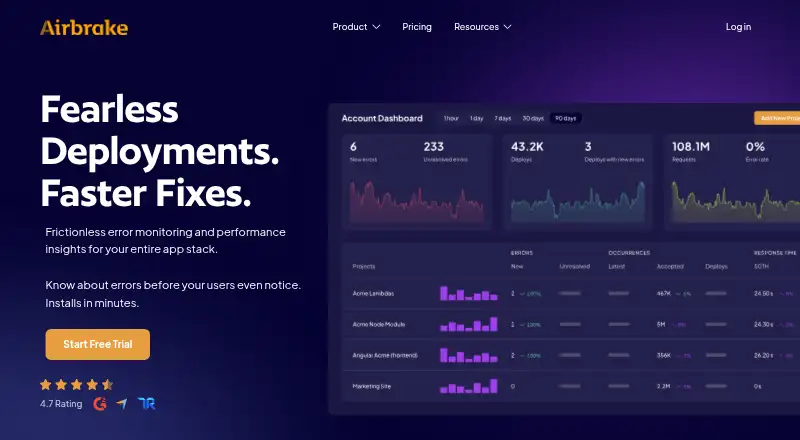
Airbrake monitors application errors and performance, watching an application stack and sending alerts as issues occur. Error groups, hotspots, breadcrumbs, backtraces, and aggregations give technical teams context for investigating and resolving problems. Deployment Tracking counts errors resolved or introduced with each deployment, while Apdex Scores indicate user satisfaction with monitored applications. Airbrake supports more than 50 languages, frameworks, and libraries, with agentless, serverless notifiers designed for near-zero application impact. It offers web and API access, alongside Android and iOS support; its mobile notifier also supports Swift and React Native. Listed integrations include Bitbucket, GitHub, GitLab, Jira, LogRocket, Slack, Trello, and Zapier. The free plan includes 50,000 events per month. Paid plans start at $17/mo billed annually, and a 30-day trial includes unlimited errors and performance events with 30 days of data retention. Accounts have monthly quotas, and excess usage is billed at on-demand rates.
Who it suits
Airbrake suits developers and technical teams who need error and performance monitoring across supported application technologies. Its deployment tracking, alert context, and integrations may help teams investigating issues and managing releases.
What it does well
- Supports more than 50 languages, frameworks, and libraries.
- Deployment Tracking counts errors resolved or introduced.
- Trial includes unlimited errors and performance events.
- Two-factor authentication is available on all current plans.
What to know first
- Free plan has a 50,000-event monthly quota.
- Paid plans start at $17/mo billed annually.
- Excess usage is charged at on-demand rates.
Limits
The Free Developer plan has a quota of 50,000 events per month. The 30-day trial includes unlimited errors and performance monitoring events, with 30 days of data retention; paid accounts have monthly quotas, and excess usage is charged at on-demand rates.
Plans
| Plan | Billed and limits | Price |
|---|---|---|
| Free Developer | free developer tier | Free |
| Dev + errors | annually · 25,000 errors · 1 user · 1 team · unlimited projects · unlimited integrations | $17 a month |
| Basic + errors | annually · unlimited users · 3 teams · unlimited projects | $34 a month |
| Pro + errors | annually · unlimited users · unlimited teams · unlimited projects · audit logs · spike forgiveness | $68 a month |
As airbrake.io lists them, read 30 Sept 2026. The maker's own page has the final word.
Getting started
- Visit https://airbrake.io/.
- Choose the Free Developer tier or review the paid plans.
- Use the 30-day trial for unlimited errors and performance monitoring events.
- Connect a supported application using an Airbrake notifier.
- Configure integrations or mobile notifier support for your stack.
Overview
Airbrake is a cloud service for monitoring application errors and performance, built around real-time alerts and investigation context. It suits development teams that want to connect errors with deployments and performance signals; teams with tight usage budgets should weigh its monthly quotas and excess charges carefully.
Error groups, hotspots, breadcrumbs, backtraces, and aggregations help developers investigate issues, while Apdex Scores add a user-satisfaction measure. Deployment Tracking reports errors resolved or introduced by each deployment, giving teams a practical way to assess release impact. Airbrake supports more than 50 languages, frameworks, and libraries, with agentless and serverless notifiers designed for near-zero application impact.
Key features
- Error investigation: Multiple layers of diagnostic context make Airbrake more useful than a basic alert feed when developers need to triage and resolve errors.
- Deployment and release visibility: Deployment Tracking quantifies errors added or resolved per deployment; release tracking, frontend monitoring, and source-map support extend that visibility to client-side work.
- Performance signals: Apdex Scores and performance monitoring events complement error tracking, though teams should account for event quotas as well as error quotas.
- Integrations: Connections include Bitbucket, GitHub, GitLab, Jira, LogRocket, Okta, OneLogin, PivotalTracker, Slack, Trello, Webhooks, and Zapier. That breadth can fit teams already using these tools for code, identity, collaboration, or workflow.
- Mobile support: The mobile notifier supports Android, iOS, Swift, and React Native, useful for teams monitoring native and cross-platform apps.
- Security and compliance: Airbrake uses TLS 1.2 and 1.3 in transit and encrypts customer data at rest, including backups. It maintains GDPR compliance and offers a Data Protection Addendum for EU customers. Two-factor authentication is available on all current plans, as is GitHub single sign-on.
Pricing
Airbrake has a free developer tier, paid plans from $17 a month billed annually, and a 30-day free trial. The trial includes unlimited errors and performance monitoring events, with 30 days of data retention; it is a substantial evaluation window, but its unlimited trial usage should not be mistaken for the paid plans' ongoing quotas.
- Free Developer: free. The free tier allows 50,000 events per month and 30 days of retention, making it a starting point for an individual evaluating or running a modest workload. The event cap limits its fit for higher-volume production use.
- Dev + errors: $17 a month billed annually, with 25,000 errors, 1 user, 1 team, unlimited projects, and unlimited integrations. This is the lowest paid option for a solo developer; the single seat and team make it a poor fit for a shared team workflow.
- Basic + errors: $34 a month billed annually, with unlimited users, 3 teams, and unlimited projects. It removes the entry plan's user bottleneck and suits small organizations needing several teams, though it does not include the Pro plan's stated audit logs or spike forgiveness.
- Pro + errors: $68 a month billed annually, with unlimited users, teams, and projects, plus audit logs and spike forgiveness. It best fits larger or more structured teams that need those capabilities alongside room for multiple teams.
All accounts have monthly error or event quotas, and excess usage incurs on-demand charges. Account or project usage caps can be configured to control exposure, an important safeguard for teams whose traffic fluctuates. Compare the quota relevant to your workload before choosing a plan, since the listed plan details do not give a general error or event allowance for every tier.
Platforms
Airbrake supports Android, iOS, web, and API use. It is cloud-hosted on Amazon Web Services facilities, rather than offered as a self-hosted deployment.
Who it's for
Airbrake is a strong fit for developers and technical teams that want error triage, deployment comparisons, and performance monitoring in one service, particularly across a broad mix of supported technologies. Its quota-based billing makes it less suitable for teams that need predictable costs without monitoring usage or managing caps. Support contact: [email protected].
Pros and cons
- Pro: Error context and deployment-level counts help teams move beyond notification toward investigation and release assessment.
- Pro: More than 50 supported languages, frameworks, and libraries, plus mobile notifiers and numerous integrations, give varied technical stacks room to use the service.
- Pro: The 30-day trial includes unlimited errors and performance events, allowing a meaningful evaluation of a team's workload.
- Con: Monthly quotas and on-demand excess charges mean costs can rise with usage; caps can limit that risk but require active configuration.
- Con: The $17 a month billed annually plan is restricted to one user and one team, so a team may need to move up to share access.
Alternatives
Compare error monitoring software if you want to consider the wider category. Backtrace is worth considering for teams looking for a free developer plan capped at 25,000 monthly errors, with one-month retention and 10 GB storage. BugSnag may suit a single user who wants a free tier with 7.5K events and 1M spans per month, plus support for more than 50 platforms and 30-plus integrations. Sankofa Catch offers a $9 a month Starter plan with 25k errors and 50k performance events monthly, alongside profiles and replay views. Embrace User Session Insights is an alternative for teams focused on mobile and web session insights. Firebase Cloud Messaging is a no-cost option for teams seeking cloud messaging rather than Airbrake's error and performance monitoring. Rollbar is another freemium error-monitoring alternative. Measure is a freemium option for teams that prioritize fully open-source software with publicly available source code. AppSignal has a free plan with 30K requests, 1GB logging, and five-day retention for teams whose needs fit those limits.
Verdict
Choose Airbrake if your development team needs actionable error context tied to deployments, with performance signals and broad technology coverage in the same cloud service. Its strongest case is the combination of investigation detail and release insight; look elsewhere if you need a self-hosted option, or if usage-based excess charges and the one-user entry plan do not fit your operating model.
Verdict
Airbrake combines error context, deployment tracking, and performance monitoring for technical teams. Check monthly quotas and on-demand excess charges when choosing a plan.
Questions
Does Airbrake have a free plan?
Yes. Airbrake offers a Free Developer tier with a stated quota of 50,000 events per month.
How much do paid plans cost?
Dev + errors costs $17/mo billed annually, Basic + errors costs $34/mo billed annually, and Pro + errors costs $68/mo billed annually.
What is included in the trial?
The 30-day trial includes unlimited errors, unlimited performance monitoring events, and 30 days of data retention.
Which platforms does Airbrake support?
Airbrake lists Android, iOS, API, and web platforms. Its mobile notifier supports Android, iOS, Swift, and React Native.
Which integrations are available?
Listed integrations include Bitbucket, GitHub, GitLab, Jira, LogRocket, Okta, OneLogin, PivotalTracker, Slack, Trello, Webhooks, and Zapier.
What are the plan limits?
Accounts have monthly error or event quotas, and excess usage is charged at on-demand rates. The Dev + errors plan includes one user and one team.
Facts from Airbrake's own pages
- Compliance
- Airbrake maintains GDPR compliance and offers a Data Protection Addendum for EU customers. · docs.airbrake.io, 30 Sept 2026
- Deployment insight
- Deployment Tracking quantifies how many errors were resolved versus introduced with each deployment. · docs.airbrake.io, 30 Sept 2026
- Error context
- Error groups, hotspots, breadcrumbs, backtraces, and aggregations provide context for triaging and resolving errors. · docs.airbrake.io, 30 Sept 2026
- Founded
- 2008 · airbrake.io, 28 Sept 2026
- Headquarters
- Santa Barbara, California, United States · airbrake.io, 28 Sept 2026
- Hosting
- Airbrake is hosted on Amazon Web Services facilities. · docs.airbrake.io, 30 Sept 2026
- Integrations
- Listed integrations include Bitbucket, GitHub, GitLab, Jira, LogRocket, Okta, OneLogin, PivotalTracker, Slack, Trello, Webhooks, and Zapier. · airbrake.io, 30 Sept 2026
- Mobile support
- The mobile notifier supports Android, iOS, Swift, and React Native. · docs.airbrake.io, 30 Sept 2026
- Performance metric
- Airbrake provides Apdex Scores for understanding user satisfaction with monitored applications. · docs.airbrake.io, 30 Sept 2026
- Security encryption
- Airbrake supports TLS 1.2 and 1.3 for data in transit and encrypts all customer data at rest, including backups. · docs.airbrake.io, 30 Sept 2026
- Support contact
- Airbrake lists [email protected] as its support contact. · airbrake.io, 30 Sept 2026
- Supported technologies
- Airbrake supports more than 50 languages, frameworks, and libraries, and its notifiers are agentless and serverless with near-zero application impact. · airbrake.io, 30 Sept 2026
- Target users
- Airbrake describes itself as an error and performance monitoring tool created by developers for developers and intended to help technical teams deploy fearlessly and fix bugs faster. · airbrake.io, 30 Sept 2026
- Trial access
- The 30-day free trial provides unlimited errors, unlimited performance monitoring events, and 30 days of data retention. · airbrake.io, 30 Sept 2026
- Two-factor authentication
- Two-factor authentication is available on all current plans and can also be used through GitHub single sign-on. · docs.airbrake.io, 30 Sept 2026
- Usage limits
- Accounts have monthly error or event quotas; excess usage is charged at on-demand rates, and account or project usage caps can be configured. · airbrake.io, 30 Sept 2026
- What it does
- Airbrake is an error monitoring and application performance monitoring service that continuously monitors an application stack and provides real-time alerts. · docs.airbrake.io, 30 Sept 2026
Where Airbrake stands on Freedom251
- Error Monitoring Software#1 of 30
- Error Tracking#1 of 25
- Runtime Monitoring Software#4 of 56
- Debugging Software#3 of 30