Freedom251 › Error Monitoring Software

Embrace User Session Insights
What Embrace User Session Insights is
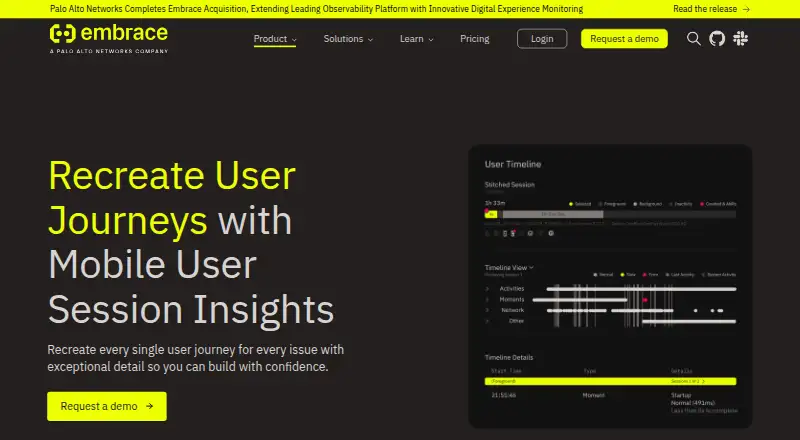
Embrace User Session Insights helps teams investigate issues by reconstructing mobile user journeys from production data. Its session timelines combine technical and behavioral details such as vitals, webviews, taps, network calls, crashes, and push notifications. Teams can search and filter timeline events, view session duration and a technical summary, and segment sessions by tags including device, location, OS version, and app version. For issues, errors, and crashes, user impact analysis provides a view across the user base. Embrace describes sessions as unsampled and user data as compliant and anonymized. The cloud product supports Android, iOS, and web, with frontend monitoring, release tracking, source-map support, and session replay. The Free plan allows up to 1 million sessions per year and five users, with three days of event data retention; ingestion stops at either cap unless the customer upgrades. Pro costs $0.80 per 1,000 sessions with an 80 USD monthly minimum, up to 10 users, and 14 days of retention. A 30-day Pro trial is available. Enterprise pricing is custom, with unlimited users and 30 days of retention.
Who it suits
It suits teams investigating mobile app issues who need session timelines and user impact analysis. The Free plan is limited to five users and one million sessions a year, so teams beyond either cap need to upgrade to continue ingestion.
What it does well
- Session timelines combine technical and behavioral events.
- Segments sessions by device, location, OS, or app version.
- Free plan includes up to 1 million sessions yearly.
- 30-day Pro trial available.
What to know first
- Free ingestion stops at 1 million sessions or five users.
- Free event data retention is three days.
- Pro has an 80 USD monthly minimum.
- Storage region cannot be changed after app creation.
Limits
The Free plan allows up to 1 million sessions per year and five users, with three days of event data retention; ingestion stops at either cap unless the customer upgrades. Pro has a minimum spend of $80 per month, up to 10 users, and 14 days of retention.
Plans
| Plan | Billed and limits | Price |
|---|---|---|
| Free | Up to 1 million sessions/year · 3 users · 3-day event retention · up to 50 GB/year logs · no traces or API access | Free |
| Pro | per 100,000 sessions for 1M–5M sessions; $70/100k at 20M; $50/100k at 25M · Up to 10 users · 14-day event retention · traces · API/data export · error logs free · info/warning/system logs $0.50/GB | $80, paid once |
| Enterprise | Unlimited users · 30-day event retention · traces · API/data export · custom metrics · code owners, tagging and workflow features · gold-tier support | On request |
As embrace.io lists them, read 15 Oct 2026. The maker's own page has the final word.
Getting started
- Visit the User Session Insights website.
- Choose US or EU application data storage when creating an app; the region cannot be changed afterward.
- Start on the Free plan or begin the 30-day Pro trial.
- Upgrade if data ingestion reaches the Free plan's session or user cap.
- Connect workflow tools such as Slack, Teams, or Jira as needed.
Overview
Embrace User Session Insights is a cloud service for reconstructing mobile journeys from production data to investigate issues. It is best suited to teams that need session context alongside technical signals; the key trade-off is a low-cost entry point with firm ingestion caps and short retention.
Key features
Session timelines bring app vitals together with webviews, taps, network calls, crashes and push notifications, helping teams follow an issue across a journey rather than inspect events in isolation. Sessions are unsampled, and user data is described as compliant and anonymized. Filtering by device, location, OS version and app version helps narrow investigations to relevant users.
The User Timeline combines session duration and a technical summary with searchable, filterable event details. One-click impact analysis shows how issues, errors and crashes affect the user base, a useful way to prioritize problems by reach. Frontend monitoring, release tracking, source-map support and session replay support a broader investigation workflow.
Embrace’s OpenTelemetry-based SDKs can send telemetry to OTLP-compatible backends. Workflow connections support issue creation, task assignment and alerts through Slack, Teams, Jira and other tools; the plan comparison places Jira, Slack and PagerDuty integrations on Pro and Enterprise. Security measures include encryption in transit and at rest, including AES-256 at rest, and annual external penetration testing. Customers choose US or EU application-data storage when creating an app, and cannot change the region afterward.
Pricing
Free: free, billed Pay-as-you-go. It allows up to 1 million sessions per year, up to 5 users and 3 days of event-data retention. Community Slack Channel support is included. This is a sensible trial ground for small teams, but ingestion stops when either the session or user cap is reached unless the customer upgrades.
Pro: $0.80 a month, billed at $0.80 per 1,000 sessions, with a minimum spend of $80/month. It supports up to 10 users, 14 days of event-data retention and standard customer support; session discounts are available with annual contracts. This is the practical step up for teams exceeding Free limits, though the minimum monthly spend matters even at modest usage. A 30-day Pro trial starts when the customer begins using the product.
Enterprise: custom pricing, billed Custom, with an $80 minimum spend and an annual contract. It includes unlimited users, 30 days of event-data retention and Gold-tier support. It suits larger teams that need more seats and longer retention, but the annual term is a commitment and the price depends on a custom quote.
Platforms
Embrace supports Android, iOS and web, with cloud deployment. Its mobile-session focus makes it a stronger fit for teams investigating app journeys than for buyers seeking a general-purpose monitoring product across a wider set of platforms.
Who it's for
Choose Embrace if your team needs to connect mobile behavior with technical events and understand how widely an issue affects users. It is less suitable when your usage is likely to exceed Free’s annual session or seat caps but you cannot accommodate Pro’s $80/month minimum, or when 14 days of retention is too short.
Pros and cons
- Pro: Unsampled session timelines combine behavioral and technical events, giving investigations context that isolated error records lack.
- Pro: One-click user-impact analysis helps teams judge issue reach, while device, location and version filters narrow the investigation.
- Pro: OpenTelemetry support and workflow integrations connect telemetry and issue handling to existing systems.
- Con: Free ingestion stops at 1 million sessions per year or 5 users, so growth beyond either cap requires an upgrade.
- Con: Free retains event data for only 3 days; Pro extends that to 14 days but carries an $80/month minimum.
- Con: Enterprise requires an annual contract, and its US or EU storage choice cannot be changed after app creation.
Alternatives
For a broader error-monitoring shortlist, see Error Monitoring Software and Mobile App Monitoring.
- Backtrace is another freemium option, with a Developer plan for a single developer and up to 25k monthly errors.
- BugSnag may suit teams seeking broad platform coverage; its Free plan includes one user and 7.5K events and 1M spans per month.
- Sankofa Catch offers a $9 a month Starter plan with error and performance-event allowances, profiles and replay views.
- Airbrake is worth considering for an error-focused workflow, with a free developer tier and a Dev + errors plan at $17 a month billed annually.
- Firebase Cloud Messaging is a no-cost choice when the need is messaging rather than session investigation.
- Rollbar is another freemium option with Essentials occurrence, replay and credit ranges shown on its page.
- Measure is a freemium alternative that says its software is fully open source, with source code publicly available on GitHub.
- AppSignal offers a free plan with 30K requests, 1GB logging and 5-day retention, as well as a paid plan.
Verdict
Embrace is a strong choice for mobile teams that need unsampled session context, technical event detail and a quick read on user impact in one investigation workflow. Its main drawback is the cost-and-retention step up from Free: ingestion halts at hard caps, Pro starts at $80/month, and even Pro keeps event data for only 14 days. Pick it when session-led mobile diagnosis is central; look elsewhere if those limits or the minimum spend do not fit.
Verdict
User Session Insights brings session events and user impact views together for issue investigation. The Free plan has firm usage limits, while Pro's listed minimum spend is 80 USD per month.
Questions
Is there a free plan?
Yes. Free includes up to 1 million sessions per year, up to five users, and three days of event data retention. Ingestion stops when either the session or user cap is reached unless the customer upgrades.
How much does Pro cost?
Pro is billed at $0.80 per 1,000 sessions, with a minimum spend of $80/month. Session discounts are available for annual contracts.
Is there a free trial?
Yes. Embrace offers a 30-day Pro trial from the time a customer starts using the product.
Which platforms does it support?
The listed platforms are Android, iOS, and web.
Which integrations are available?
The pricing comparison lists Jira, Slack, and PagerDuty integrations on Pro and Enterprise. Embrace also says it can sync with Slack, Teams, Jira, and other workflow tools for issue creation, task assignment, and alerts.
Can customers choose where application data is stored?
Customers can select US or EU storage when creating an app. The region cannot be changed afterward.
Facts from Embrace User Session Insights's own pages
- Acquisition
- Palo Alto Networks announced its Embrace acquisition on July 21, 2026, and reported that it closed on August 27, 2026. · paloaltonetworks.com, 15 Oct 2026
- Changelog
- The June 2026 changelog added histogram widgets, broader aggregation functions and release-health version comparison capabilities. · embrace.io, 15 Oct 2026
- Company founding and headquarters
- Crunchbase lists Embrace as founded in 2016 and headquartered in Los Angeles, California. · crunchbase.com, 15 Oct 2026
- Company legal name
- Embrace identifies itself as Embrace Mobile, Inc. · embrace.io, 15 Oct 2026
- Context capture
- Timelines can combine vitals, webviews, taps, network calls, crashes and push notifications to explain what happened. · embrace.io, 15 Oct 2026
- Cross-state journeys
- The product traces journeys across foreground, background, inactivity, webviews and extensions in one view. · embrace.io, 15 Oct 2026
- Dashboard
- The dashboard reports active users, total sessions, network errors, user-flow statuses and alerts, plus mobile crash-free metrics and web Core Web Vitals. · embrace.io, 15 Oct 2026
- Data handling
- The Trust Center says Embrace collects device environment data, technical events and user actions, with AWS listed as a subprocesser in the United States and European Union. · trust.embrace.io, 15 Oct 2026
- Data location
- Customers can select US or EU storage for application data when creating an app, and the region cannot be changed afterward. · embrace.io, 4 Oct 2026
- Documentation depth
- Documentation includes platform installation, API references, OpenTelemetry integration, data forwarding, custom metrics, dashboards, troubleshooting and changelog pages. · embrace.io, 15 Oct 2026
- Forwarding types
- Embrace forwards aggregated metrics and network spans carrying W3C traceparent headers for distributed tracing. · embrace.io, 15 Oct 2026
- Founded
- 2016 · embrace.io, 28 Sept 2026
- Funding
- Embrace announced a $45 million Series B led by New Enterprise Associates. · embrace.io, 15 Oct 2026
- Installation options
- iOS integration supports Swift Package Manager, deprecated CocoaPods and manual XCFramework installation. · embrace.io, 15 Oct 2026
- Integrations
- Telemetry forwarding supports Cortex XCOR, Datadog, Dynatrace, Elastic, Grafana Cloud, Honeycomb, New Relic, Observe and Splunk. · embrace.io, 15 Oct 2026
- iOS requirements
- The Apple SDK requires iOS, iPadOS, tvOS and macOS 13 or newer, watchOS 6 or newer, Xcode 14 or newer and Swift 5.7 or newer. · embrace.io, 15 Oct 2026
- Issue indicators
- Indicator icons identify sessions containing issues, errors or potentially important moments without requiring a query. · embrace.io, 15 Oct 2026
- Limit: dashboard search
- A Capterra reviewer rated features 2/5 and said data-search dashboarding was practically nonexistent compared with Datadog. · capterra.com, 15 Oct 2026
- Limit: interface and filtering
- G2 reviewers report that navigation and the user interface could be more user-friendly and that data-filtering flexibility is limited. · g2.com, 15 Oct 2026
- Limit: missing mobile dashboard app
- A G2 reviewer wanted a dedicated Embrace mobile app for checking errors and dashboards away from a computer. · g2.com, 15 Oct 2026
- OpenTelemetry
- Embrace says its SDKs are built on OpenTelemetry and can send telemetry to OTLP-compatible backends. · embrace.io, 4 Oct 2026
- Praise: session debugging
- G2 reviewers repeatedly praise detailed session-level context for tracing crashes, exceptions, ANRs and user journeys. · g2.com, 15 Oct 2026
- Praise: support
- Several G2 reviewers describe Embrace support as responsive and helpful during evaluation and issue resolution. · g2.com, 15 Oct 2026
- Pricing availability
- The Free plan includes up to 1 million sessions per year and up to 5 users; the pricing FAQ says data ingestion stops at either cap unless the customer upgrades. · embrace.io, 4 Oct 2026
Where Embrace User Session Insights stands on Freedom251
- Error Monitoring Software#5 of 30
- Mobile App Monitoring#7 of 23