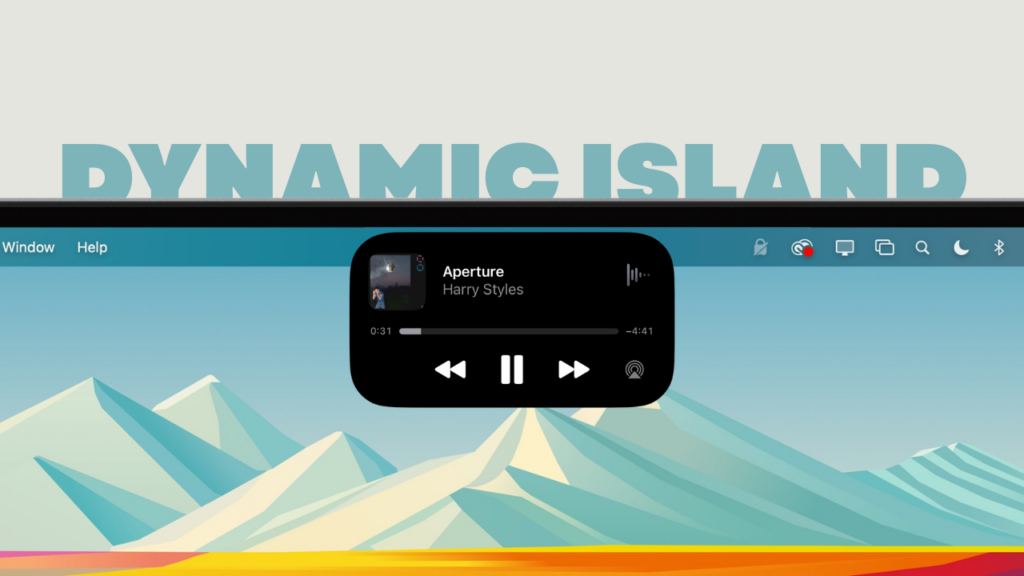
Apple is reportedly lining up a major MacBook Pro redesign for late 2026, bringing OLED displays, full touchscreen support, and yes, a Mac version of Dynamic Island. And honestly, this might be the most Apple way possible to say, “Fine, touchscreens are happening… but we’ll do it our way.”
According to Bloomberg’s Mark Gurman, Apple is targeting 2026 for its first OLED MacBook Pro models with a redesigned macOS interface that adapts depending on whether you are using a trackpad or tapping the screen.
As an Amazon Associate I earn from qualifying purchases.
The current notch could be replaced with a smaller cutout wrapped inside a Dynamic Island style UI element. It is worth noting that when Gurman goes on record, it usually means the direction is locked internally.
Recommended Free Tools
The OLED transistion is not just cosmetic. This would be the first major display technology upgrade for the MacBook Pro since the move to mini LED. OLED means deeper blacks, better contrast, potentially thinner panels, and of course a marketing-friendly spec that Apple can build an entire keynote around.
#1 Best Overall

- 💻 ❌ Not for MacBook Neo or 11", 12" macbooks (see our "universal" version - it is smaller). Fit is perfect for any MacBooks Air and Pro, iMacs, and Mac Minis—regardless of CPU type or macOS version.
- 💻 Master Mac Shortcuts Instantly – Learn and use essential Mac commands without searching online. This sticker keeps the most important keyboard shortcuts visible on your device, making it easy to boost your skills and speed up everyday tasks. ⚠️ Note: The “⇧” symbol stands for the Shift key.
- 💻 Perfect for Beginners and Power Users – Whether you're new to Mac or a seasoned user, this tool helps you work faster, learn smarter, and avoid frustration. Ideal for students, professionals, creatives, and seniors alike.
- 💻 New adhesive – stronger hold. It may leave a light residue when removed, but this wipes off easily with a soft cloth and warm, soapy water. Fewer air bubbles – for the smoothest finish, don’t peel off the entire backing at once. Instead, fold back a small section, line it up, and press gradually as you peel more. The “peel-and-stick-all-at-once” method does NOT work for stickers like ours.
- 💻 Made in the USA – Trusted Quality – Designed, printed, and packaged in the USA. Backed by responsive customer support and a satisfaction guarantee.
Samsung Display is widely tipped to supply the panels, which aligns with earlier supply chain chatter about Apple preparing for a late 2026 OLED transition. But the more interesting change is touch.
For years, Apple’s stance was clear. Touch belongs on iPad. The Mac is built around precision, keyboard, and trackpad. Meanwhile, every Windows OEM shipped touchscreen laptops and moved on with life. Now Apple appears ready to blur that line, but in typical Apple fashion, it wants to do it with a philosophy shift rather than just slapping touch on macOS.
The reports describe a version of macOS that dynamically adapts to input. If you tap, UI elements become more touch-friendly. Menus enlarge. Contextual controls shift. If you go back to trackpad, the traditional precision interface returns.
Rank #2

- 5-in-1 Connectivity: Equipped with a 4K HDMI port, a 5 Gbps USB-C data port, two 5 Gbps USB-A ports, and a USB C 100W PD-IN port. Note: The USB C 100W PD-IN port supports only charging and does not support data transfer devices such as headphones or speakers.
- Powerful Pass-Through Charging: Supports up to 85W pass-through charging so you can power up your laptop while you use the hub. Note: Pass-through charging requires a charger (not included). Note: To achieve full power for iPad, we recommend using a 45W wall charger.
- Transfer Files in Seconds: Move files to and from your laptop at speeds of up to 5 Gbps via the USB-C and USB-A data ports. Note: The USB C 5Gbps Data port does not support video output.
- HD Display: Connect to the HDMI port to stream or mirror content to an external monitor in resolutions of up to 4K@30Hz. Note: The USB-C ports do not support video output.
- What You Get: Anker 332 USB-C Hub (5-in-1), welcome guide, our worry-free 18-month warranty, and friendly customer service.
On paper, that sounds smart. Apple is not turning the Mac into an iPad. It is trying to make touch feel like an optional accelerator rather than a replacement.
That approach is key. Most touchscreen laptops feel like a feature checkbox. You use it occasionally to scroll or zoom, then forget it exists. If Apple executes this correctly, touch could genuinely enhance workflows like video editing scrubbing, timeline adjustments, quick annotations, zooming documents, tapping small UI elements, or interacting with system controls faster than moving a cursor.
Now let us talk about the Dynamic Island. This is where I’m skeptical. On iPhone, Dynamic Island turned an unavoidable hardware cutout into a status hub for live activities. It worked because it embraced the limitation and made it useful.
Rank #3

- Massive Expansion: Expand your MacBook's 2 USB-C ports into 1 multi-function USB-C port, 1 USB-C data port, 2 USB-A ports, 1 HDMI port, 1 SD card slot, and 1 microSD card slot—all from one ultra-compact hub.
- High-Speed, High-Def: A multi-function USB-C port supports huge charging power up to 100W, data transfer up to an astounding 40 Gb/s, and media display at resolutions up to 5K.
- Multi-Monitor Display: The HDMI port supports a resolution of 4K@60Hz while the multi-function port supports 5K@60Hz. Connect to both simultaneously to enjoy crystal-clear streaming or mirroring across 2 displays. Note: M1, M2 and M3 MacBooks do not support dual external display.
- Designed for the Latest MacBooks: Works with the latest MacBook Air and MacBook Pro, and is designed specially to avoid obstructing your MacBook's MagSafe port. Note: this hub is not compatible with MacBook Neo.
- What You Get: Anker 547 USB-C Hub (7-in-2, for MacBook), welcome guide, worry-free 18-month warranty, and friendly customer service.
On a MacBook Pro, though, we are talking about a larger display with a persistent menu bar that already handles background activity indicators. Wrapping a hole punch camera in a Dynamic Island interface sounds clever in theory, but it also risks feeling like Apple trying to justify another display interruption.
Also Read: Apple’s March 4 Event Could Be About Macs, But It Feels Bigger Than That
I do see the upside. The Mac is inherently multitasking heavy. Uploads, background exports, calls, AirDrop transfers, recording sessions, timers, live deliveries, file syncs, all of that could sit inside a dynamic top zone that expands when needed. If Apple gives developers a clean API and avoids turning it into chaos, it could become a genuinely modern control surface.
Rank #4

- Sleek 7-in-1 USB-C Hub: Features an HDMI port, two USB-A 3.0 ports, and a USB-C data port, each providing 5Gbps transfer speeds. It also includes a USB-C PD input port for charging up to 100W and dual SD and TF card slots, all in a compact design.
- Flawless 4K@60Hz Video with HDMI: Delivers exceptional clarity and smoothness with its 4K@60Hz HDMI port, making it ideal for high-definition presentations and entertainment. (Note: Only the HDMI port supports video projection; the USB-C port is for data transfer only.)
- Double Up on Efficiency: The two USB-A 3.0 ports and a USB-C port support a fast 5Gbps data rate, significantly boosting your transfer speeds and improving productivity.
- Fast and Reliable 85W Charging: Offers high-capacity, speedy charging for laptops up to 85W, so you spend less time tethered to an outlet and more time being productive.
- What You Get: Anker USB-C Hub (7-in-1), welcome guide, 18-month warranty, and our friendly customer service.
But here is the danger. We’ve been here before. The Touch Bar was also positioned as contextual magic. In reality, it was inconsistent, developer adoption was uneven, and many users ignored it. If Dynamic Island on Mac becomes flashy but functionally shallow, it will feel like Touch Bar energy moved to the top of the screen.
Also, MacBook Pros often display static UI for hours, including the menu bar and dock. With the new OLED panels, Apple will need aggressive pixel shifting, brightness management, and compensation techniques to avoid long term degradation.
Free tools Windows power users keep installed
One-click scans. No signup required.
If anyone can solve it at scale, it is Apple. But this is not an iPhone that refreshes content constantly. Pro users leave the same interface elements on screen all day.
Best Value

- TRUSTABLE MAGNETIC & EASY OPERATION- With built-in robust N52 Magnets. The laptop phone holder allows a stable phone fixing on any flat monitor (desktop, laptop or monitor in a car). With the alignment card, you can easily locate the magnetic ring to your phone. Easy to operate.
- BOOST 50% EFFICIENCY for MULTI-TASK - To streamline workflows by fixing your phone on the monitor, reducing 80% unnecessary phone-repositioning time. Enable above 50% FASTER processing speed. The laptop phone mount keeps you ORGANIZED, FOCUSED, EFFORTLESS &PRODUCTIVE when handling multi-threaded work switching. Hands available for anything else. NO fumbling & Keep everything in perfect control.
- VERSATILE COMPATIBILITY& SAFE DRIVING: This car and laptop phone mount seamlessly works with a bare iPhone( 12-18 series)/ iPhone with a MagSafe case. For non-MagSafe phones, attach the metal ring(INCLUDED) to the phone case to hook up the magnet. It perfectly fits Tesla cars (3/X/Y/S, etc.) touchscreen, keeping you MORE FOCUSED and guaranteeing a SAFE DRIVING.
- LIGHTWEIGHT & GRAB-AND-GO CONVENIENCE: The laptop phone holder is built with lightweight & compact appearance, saving space and making “GRAB AND GO ANYWHERE” with the holder attached on your laptop. It is the perfect choice for travel, business or other daily occasions.
- What's in The Box: 1 x Laptop Phone Holder(NO wireless charging), 1 x Alignment Card for Phone, 1 x 3M Adhesive (Non-Removable), 1 x Magnetic Ring, 1 x Gift Box. Correct Installation: Please keep the arrow upwards while installing.If the installation is incorrect, the phone may fall off. Please wait at least 6 hours before use.
For years, Apple kept Mac and iPad philosophically separate. The iPad slowly became more like a laptop. Now the Mac is slowly adopting touch. The wall is not collapsing overnight, but it is clearly thinning. This years redesign feels less like a one off experiment and more like a deliberate convergence strategy.
If Apple commits fully to adaptive macOS and delivers meaningful use cases for touch, this could be the most significant MacBook Pro UX evolution in a decade. If it half commits and treats touch as a novelty, we will be talking about this as another well marketed detour.
Personally, I’m cautiously excited. OLED is overdue. Touch, if done right, is genuinely useful. The Dynamic Island idea is bold, maybe slightly risky, but not automatically doomed. Apple just needs to remember one thing. Hardware can impress. UI has to earn trust. And on the Mac, trust is everything.
Windows Errors? Fix Them Before They Spread
Repair common Windows errors and clear accumulated junk for a smoother, more stable PC - no reinstall needed.Free scan · no reinstallOutdated Drivers Are Slowing You Down
One free scan finds every outdated or missing driver and matches the right update for your exact hardware.Free scan · exact hardware matchQuick Recap
Product prices and availability are accurate as of the date/time indicated and are subject to change. Any price and availability information displayed on Amazon at the time of purchase will apply.
Independent reader supportYour contribution helps us test, update, and keep practical guides available for everyone.

Freedom 251
Freedom 251
Freedom251 phone