Recommended Free Tools
Some links on this page are affiliate links: if you buy through them we may earn a commission, at no extra cost to you.
An AI shopping agent helps you decide what to buy; a comparison tool helps you check where to buy it; and a price tracker helps you decide when to buy a known item. They solve different parts of the shopping process, so for a complicated or expensive purchase, the most useful approach is often to use them in sequence—not to treat one as a substitute for all the others.
What each tool is designed to do
The names can blur together because one shopping service may offer recommendations, product listings, and alerts in the same place. The important distinction is the tool’s primary job and the evidence behind its result.
As an Amazon Associate I earn from qualifying purchases.
The Tool Desk
Outbyte PC Repair FREEClear out junk files and repair common Windows errorsFree Scan →Outbyte Driver Updater FREEScan for outdated or missing drivers - takes under a minuteDriver Scan →AI shopping agent: discover and narrow down choices
An AI shopping agent starts with a need expressed in ordinary language: for example, a laptop for travel, schoolwork, and light photo editing under a set budget. It can ask follow-up questions, interpret constraints, compare product specifications and reviews, explain trade-offs, and return a shortlist with reasons. Some experiences may also help set a price alert or complete an eligible purchase, but those actions depend on the service and the transaction.
OpenAI describes its shopping-research experience as a way to handle “comparisons, trade-offs, or multiple constraints.” Its documentation describes an interactive process that can adapt as a shopper clarifies preferences and produces a buyer’s guide with rationales, trade-offs, merchant links, and side-by-side attributes. That is a recommendation and synthesis—not, by itself, proof that every offer has been checked or that a listed price remains available.
#1 Best Overall

- 【No Monthly Fee】Our vehicle tracking device is compatible only with iOS and the “Find My” app. No additional subscriptions are required, ensuring your privacy is protected. Note: This device is designed exclusively for iOS users and is not compatible with Android.
- 【What's Included】The package includes 2 car trackers, 2 magnetic protective cases, and a user manual. With a standby time of up to 1 year, your car tracker will always be ready for use and can be replaced at any time.
- 【Using the Find Me app】Press the function button to activate your item locator - it will beep to confirm. Open the Find My app, tap "+" and then tap "Add another item". Place your locator near your phone, follow the prompts to connect, name and assign an emoji, then confirm your identity to complete the setup.
- 【Lost Mode】Car Tracker keeps your car safe, even when out of range. With Notify When Found, if another Find My device detects your car, you'll receive a location update, giving you peace of mind and a quick reunion. The Find My app will notify you if your item is forgotten and you lose connection with your iOS device.
- 【Wide Application】Tracker can be used for cars, cats, wallets, backpacks, keys, suitcases. Bring convenience and peace of mind to your life and stop worrying about loss.
Price-comparison tool: inspect offers for products you already have in mind
A comparison tool generally starts with a product, category, or search query and presents offers from participating merchants. Its useful output is a view of current listed prices and related details such as seller, shipping, availability, and product attributes. It can help reveal that two apparently similar listings differ in delivery cost, stock status, or seller, but it cannot establish that the cheaper option best fits your needs.
Google says Shopping results use relevance, search terms, and other Google activity, and that AI-generated recommendations draw on Shopping data. It also cautions that the quality of generative-AI information may vary. A comparison result is therefore something to inspect, not a guarantee of complete market coverage or a final checkout quote.
Price tracker: monitor an exact item over time
A tracker follows a known product or listing and records price changes. You set a target, budget, or qualifying condition; the service can notify you when its recorded offer meets that condition. It is especially useful if you have already chosen a particular model and can wait rather than repeatedly checking the listing yourself.
In a November 2025 announcement, Google described price tracking with constraints such as a product’s size, color, and spending limit, with a notification when the price falls within budget. That announcement also reported more than 50 billion product listings in Google’s Shopping Graph, with 2 billion updated every hour. Those figures are Google’s dated description of its own platform, not a measure of all shopping data or a promise that every product or retailer is covered.
How the tools differ at a glance
| Question | AI shopping agent | Price-comparison tool | Price tracker |
|---|---|---|---|
| Primary job | Discover suitable products and explain trade-offs | Compare current offers for a product, category, or query | Monitor a known product or listing and alert on a price condition |
| Typical input | A natural-language need, constraints, budget, and preferences | A product name, category, or search query | A saved product, model, or listing, plus a target or budget condition |
| Typical output | A buyer’s guide, rationale, and shortlist | A set of merchant offers and listed offer details | A price history, alert, or target-price notification |
| Best at answering | “Which options fit what I need?” | “Where can I find this, and what are the current offers?” | “Has this item reached my target price yet?” |
| Main limitation | Recommendations can rely on incomplete or stale information and may not expose every relevant offer | Listings may be incomplete or change before checkout; a low price does not establish suitability | It follows the chosen item rather than finding the right product or judging its quality |
| Possible automation | Recommendations and, in some experiences, alert setup or eligible purchase actions | Usually offer discovery and comparison; additional actions depend on the service | Monitoring and notifications when a recorded condition is met |
The table describes the tools’ roles, not a universal feature checklist. Merchant coverage, geography, update frequency, available actions, and product data vary by service. A tracker’s alert is evidence that its system recorded a qualifying price; an agent’s recommendation is a synthesis that can depend on data coverage, personalization, and how the model interprets your request.
Which should you use for your shopping question?
Use an AI assistant when you have not settled on a product
Start with an agent if your request is really a decision problem: you are unfamiliar with the category, have several constraints, or need help translating specifications into practical differences. State what the product must do, what matters most, what you can spend, and what compromises you will accept. The better the constraints, the more useful the shortlist is likely to be.
Rank #2

- FIND YOUR ITEMS ON FIND MY — AirTag (2nd generation) helps you keep track of what matters. Attach one to an item you want to keep track of using the Find My app.*
- EXPANDED PRECISION FINDING ON IPHONE AND APPLE WATCH — Get step-by-step directions to your lost item on iPhone and, now, Apple Watch.*
- ENHANCED SPEAKER — With a 50% louder speaker and a new, distinctive chime, it’s easier than ever to hear and find AirTag.*
- PING FROM FAR AND WIDE — Upgraded Ultra Wideband and Bluetooth chips allow you to find your items from even farther away than ever before.*
- SHARE ITEM LOCATION — Share AirTag location access temporarily and securely with trusted contacts, third parties, or over 50 airline partners if you lose something important.
For example, “Find a lightweight laptop” leaves the agent to guess what matters. A more actionable request would specify your approximate budget, the software you need to run, how often you carry it, and whether battery life, screen size, or performance matters most. Ask the agent to explain why each option made the shortlist and identify the trade-off that could make you reject it. Treat the answer as a starting point for verification, not a purchase order.
Use a comparison tool once you have a product or shortlist
When you know the model or have a small set of candidates, compare the offers. Check that each listing refers to the same model and configuration; a similar product name can conceal a different size, capacity, color, or included accessory. Compare the seller and delivery details as well as the headline price. If the tool does not show a material charge or term, check it on the merchant’s listing.
Google notes that the merchant confirms the final price and that price may vary by location. A comparison page can help you identify an offer worth investigating, but your checkout page is where to confirm the amount you will actually pay and whether the item is available for your address.
Use a tracker when you know the exact item and can wait
Save the exact product or listing, then choose a target that reflects what you are willing to pay. Where supported, specify relevant product attributes such as size or color so an alert for a different variant does not look like a deal on the one you want. A notification means the tracker has detected a qualifying recorded price; it does not establish that the offer is still live, that the seller is trustworthy, or that the price is unusually low compared with the product’s full history.
Trackers are most helpful when waiting has little downside. They are less useful when you need the item immediately, when a listing is new or poorly indexed, or when the product itself may not be the right choice. They can answer a timing question about a known item, not resolve a discovery question on their own.
A practical three-stage buying workflow
For a purchase with meaningful cost or several requirements, separate choosing, checking, and timing. You can stop after any stage if you have enough confidence to buy; no single service has to control the whole decision.
Rank #3

- 🔐🔐【2026 NEW UPGRADED ITEM FINDER】Item Finder sets a new standard for Bluetooth trackers with its sleek design, robust features, and seamless integration with the ecosystem. Whether you’re keeping track of your keys, wallet, or any other valuable item, this smart tag offers peace of mind and convenience in one compact package.
- 🔐🔐【LIGHTWEIGHT AND EASY TO CARRY】The design of the Tracker Tag is both stylish and functional, with a sleek, compact form factor that easily attaches to keychains, bags, or any other item you want to keep track of. Tracker Tag Exquisite and compact design, easily attached to keychains, occupying no space and not affecting daily use. Tracker Tag operates for up to a year on a standard CR2032 battery (included), and replacing the battery is a breeze.
- 🔐🔐【EASY TO USE】One of the standout features of the Item Finder is its impressive range and reliability. Key Finders Using Bluetooth Low Energy technology, it allows you to track your belongings with precision, even in crowded or indoor environments. The accompanying Findmy app provides real-time location updates, making it easy to pinpoint the exact whereabouts of your items with just a few taps on your smartphone.
- 🔐🔐【ADVANCED TECHNOLOGY】It’s pretty easy to link up with your iPhone with the “Find My” app(compatible with iOS ONLY). Our smart Key Finders uses the latest Bluetooth tracking technology to easily bind your keys and track their location at any time. With just a gentle tap on the mobile app, no matter where the keys are hidden in the house or accidentally forgotten in the office, they can be quickly located, making searching simple and efficient.
- 🔐🔐【DON'T WORRY ABOUT LOSING ITEM】Each package includes key rings in addition to the tracker tag for keys. When the key leaves the preset safe range, the phone immediately sounds an alarm to remind you to retrieve it in a timely manner, effectively preventing the key from being lost and safeguarding your life. Our Bluetooth item finder leverages the vast Find My network, ensuring privacy while tracking your Wallet Finder.
- Discover: Describe the problem, must-have requirements, budget, and preferences to an AI shopping agent. Ask for a shortlist, the reason each option fits, and the most important trade-off for each. If the response misses a constraint, clarify it and ask the agent to revise the options.
- Verify: Search for the exact models or products in a comparison tool. Confirm model identifiers and configurations, then inspect each merchant’s current offer, seller identity, shipping, taxes, stock, return terms, and warranty details. Use the retailer’s page to confirm the final price before paying.
- Time: If you can wait, save the specific item in a tracker and set a target or budget condition. When an alert arrives, reopen the offer and confirm the price, variant, seller, and terms are still valid. Buy when the verified offer and timing suit you, not simply because a notification appeared.
An agent may combine more than one stage—for instance, it might surface offers or help configure an alert. That convenience does not make the underlying evidence interchangeable: a recommendation, a current listing, and a historical price record answer different questions.
What to verify before trusting a recommendation, offer, or alert
Shopping data can be incomplete, personalized, or out of date. The verification effort should be proportional to the cost of being wrong. Before buying an expensive or technically specific product, check these details at the merchant:
- Exact identity: Match the manufacturer’s model number and the configuration you intend to buy. Compare capacity, size, generation, included parts, and other attributes that change the product or its price.
- Seller: Determine who is actually selling the item, not just which marketplace hosts the listing. Check whether the seller is the retailer, the manufacturer, or a third party.
- Delivered cost: Confirm shipping, taxes, and any other charges at checkout. A listed price may not be the amount charged for your location.
- Availability: Verify that the desired variant can be purchased and delivered to your address. An offer or alert may no longer reflect live inventory.
- Returns and warranty: Read the applicable return terms and warranty information for the specific seller and product. A low price alone says nothing about the support attached to an offer.
- Reviews and recommendations: Look at what a review summary is based on and whether it reflects the exact model. An agent’s explanation can help interpret evidence, but it is not a substitute for checking important claims.
OpenAI advises shoppers using its shopping-research experience to confirm final price, taxes, fees, shipping, availability, and return or warranty terms on the retailer’s site. Google likewise says the merchant confirms the final price. These checks matter even when the first result appears precise.
Independent reader supportYour contribution helps us test, update, and keep practical guides available for everyone.Are AI shopping recommendations better than price alerts?
They are better at different tasks. A recommendation can help you choose among products when your needs are not yet mapped to a model. An alert can tell you that a tracker detected a price condition for the item you selected. Neither result proves, by itself, that you have found the best product at the best available price.
The distinction also explains why a recommendation can be useful without being a deal signal. An agent may judge that a product’s features suit your constraints, while a tracker may report that its listed price has fallen to your target. To decide whether to buy, you still need to confirm that the product is right, the offer is current, and the total cost and terms work for you.
IAB/Talk Shoppe’s 2025 study provides evidence that shoppers used AI for both kinds of tasks, but it does not establish that AI recommendations outperform alerts or save a particular amount. Among surveyed AI shoppers, 57% said they used AI to compare multiple products or brands; 53% for product-specific questions; 53% for price tracking or deal alerts; 49% for customer-review summaries; 38% for personalized product recommendations; and 35% for style, fit, or sizing advice. The study reported a survey base of 600 consumer respondents and 150 ethnographic qualitative participants. These figures describe reported uses, not controlled measurements of accuracy, savings, or comparative performance.
Quick wins for a faster PC:
Fix the driver behind crashes, sound loss and screen glitchesFind Drivers →Clear out junk files and repair common Windows errorsFree Scan →Rank #4
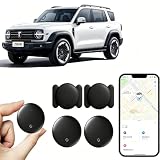
- 【Free Tracking】: No monthly fees, no contracts, and no SIM card required. Simply pair the car tracker with your iPhone to start tracking immediately using Apple’s “Find My” app. No hidden fees—making vehicle tracking simple, reliable, and worry-free.
- 【Precise Location Tracking & Privacy Protection】Once paired with your iOS device via Apple’s “Find My” app, this car tracker leverages Apple’s global network of devices to provide fast and reliable location updates. The tracker remains hidden from unauthorized users, and only authorized devices can access its location data, effectively protecting your privacy.
- 【Magnetic Housing & IP67 Waterproof Design】This tracker features a magnetic, waterproof housing that attaches easily and securely to your vehicle. The housing is IP67-rated for water and dust resistance, effectively withstanding harsh outdoor conditions such as rain, snow, and car washes, ensuring the tracker operates reliably in any weather.
- 【Package Contents】This set includes two vehicle trackers, two magnetic storage cases, and a user manual. With a battery life of up to 365 days, this car tracker makes long-term tracking easier and more convenient.
- 【Wide Range of Applications】The ZBHB tracker can be used to track cars, pets, valuables, luggage, wallets, bicycles, electric bikes, and lost packages. It provides convenience and peace of mind, eliminating worries about losing your belongings.
No reviewed evidence establishes that AI agents universally save shoppers a particular percentage more money or are universally more accurate than comparison tools or trackers. Results depend on the category, the data each service can access, how recently it was updated, and what the shopper considers a good outcome.
Coverage, transparency, privacy, and incentives
Coverage and freshness determine what the tool can show
A tool can only compare or monitor the products and merchants represented in its data. Its coverage may vary by retailer, geography, product category, and update frequency. A missing offer is not proof that no other offer exists, and a displayed offer is not proof that stock or price will persist until checkout. Before relying on a result, consider whether the service identifies its merchant coverage and how it handles location-specific offers.
Historical monitoring has a related limitation: a tracker needs a recognizable listing and a usable record to show a price history. New, changed, or poorly indexed listings may have little or no history. A short chart should not be mistaken for a complete record of the product’s pricing.
Check where the explanation and ranking come from
For an AI-generated shortlist, look for cited or linked sources, the reasoning behind the ranking, and whether the explanation addresses your stated constraints. For comparison results, inspect seller identity and the separation between organic listings and any sponsored placement where the service discloses it. For reviews, consider whether the summary identifies its underlying review sources and the exact product variant. The available information and disclosure differ across services, so do not assume a ranking is independent or comprehensive without evidence.
What’s actually slowing this PC down?
Pick the symptom - the matching free tool is one click away.
Personalization can help, but it changes what you see
Some shopping results may use search terms, browsing activity, remembered preferences, or other personal signals. Google says Shopping results can use search terms and other Google activity. Personalization may make suggestions more relevant, but it also means two shoppers can see different recommendations. Check the service’s current privacy controls and settings if you do not want shopping personalization to use particular activity or preferences; exact controls and labels vary by service and may change.
Commercial relationships are worth checking
Sponsored labels, retailer partnerships, and referral relationships can affect how offers or recommendations are presented. A tool’s presence of a merchant link does not establish whether the service receives a commission, and the available evidence here does not verify affiliate programs, commissions, cookies, or eligibility for any particular service. Look for the service’s disclosures and the retailer’s terms rather than assuming a ranking is wholly organic or that every offer is included.
Common mistakes and how to avoid them
- Buying the first AI recommendation: Use the explanation to generate a shortlist, then check the exact product and offer independently.
- Comparing different configurations: Match model numbers and variants before treating two prices as directly comparable.
- Treating the lowest listed price as the cheapest purchase: Add shipping and taxes, and assess seller and return terms before deciding.
- Assuming an alert means the price is still available: Open the retailer’s offer and verify the live price, stock, and variant when the notification arrives.
- Reading a price chart as a quality rating: Price history can inform timing, but it does not judge reliability, suitability, or support.
- Expecting a tool to cover every merchant: Coverage varies. If the purchase matters, check relevant retailer listings directly as well as the tool’s results.
- Confusing an AI-generated answer with a recorded price: A model’s summary is an interpretation of available data; a tracker’s alert is a recorded condition. Verify both against the merchant when making a purchase.
Choosing the right tool for the job
If you are still defining what to buy, start with an AI shopping agent and use it to make your requirements explicit. If you already know the product or have a shortlist, compare current merchant offers and delivered costs. If you know the exact item and can wait, add a tracker with a realistic target. For a high-stakes purchase, use the tools to reduce the search and monitoring work, then make the final decision from verified product details and retailer terms.
Features, merchant participation, geography, ranking policies, privacy settings, and purchase automation change over time. Google’s Shopping Graph figures and price-tracking announcement cited above are from 2025; they should be read as dated descriptions of Google’s platform rather than guarantees about present coverage. Availability of any particular feature should be checked with the service in the shopper’s region.
Quick Recap
Product prices and availability are accurate as of the date/time indicated and are subject to change. Any price and availability information displayed on Amazon at the time of purchase will apply.

