Some links on this page are affiliate links: if you buy through them we may earn a commission, at no extra cost to you.
The Acer Aspire C24 is the kind of all-in-one desktop built for people who want a tidy, affordable PC without turning a desk into a tangle of cables. It combines the computer and display in one slim package, making it an easy fit for a home office, student bedroom, kitchen workstation, or shared family space.
Its appeal is practical rather than flashy: a clean design, a large enough screen for everyday tasks, built-in webcam and speakers, and performance aimed at browsing, documents, video calls, streaming, and schoolwork. The price is the main draw, but that also means some compromises in materials, display quality, upgrade options, and overall power.
As an Amazon Associate I earn from qualifying purchases.
Quick wins for a faster PC:
Fix the driver behind crashes, sound loss and screen glitchesFind Drivers →Clear out junk files and repair common Windows errorsFree Scan →For buyers who need a simple Windows desktop that looks neat and handles routine workloads without costing too much, the Aspire C24 makes a sensible case. The question is whether its budget-friendly balance of convenience and capability is strong enough to outweigh its limitations.
Design and build quality
The Acer Aspire C24 follows the usual budget all-in-one formula: put the PC behind the display, keep the footprint small, and make it look presentable enough for a kitchen desk, dorm room, or spare-bedroom office. It is not trying to look like a premium iMac rival, but Acer has done a decent job of making it feel clean and modern from the front. The slim bezels around the display help it avoid the chunky look that cheaper all-in-ones sometimes have, and the simple stand keeps visual clutter to a minimum.
Popular on Amazon

- Uncompromising Performance: The Intel Core i3-1305U processor and Intel UHD graphics distribute performance where you need it most. With 8 GB DDR4 memory and 256 GB PCIe SSD storage—the Aspire C24 is made to do it all.
- Display and Comfort: The brilliant 23.8" FHD IPS display with 120 Hz refresh rate boasts narrow bezels and a 90.71% screen-to-body ratio. It’s also featuring Acer VisionCare technology providing flickerless technology, BluelightShield and low dimming for comfortable viewing.
- Smooth Visuals: The 120Hz refresh rate speeds up the frames per second to deliver ultra-smooth 2D motion scenes. With a rapid refresh rate of 120Hz, our monitors shorten the time it takes for frame rendering, lower input lag and provide gamers an excellent in-game experience.
- Stay Connected: Experience ultra-fast, stable connectivity with Wi-Fi 6, along with Display Port, HDMI, USB Type-C, a headphone jack and plenty of USB Type A ports.
- Easy Access: Experience unparalleled convenience with front I/O access on your All-in-One (AIO) system. Swiftly connect peripherals, charge devices, and access audio inputs without reaching behind your desktop. Simplify your workspace and enhance accessibility
The chassis is largely plastic, which is expected at this price, and that shows if you press around the rear shell or adjust the screen with too much force. It does not feel fragile in normal use, but it lacks the dense, rigid feel of more expensive all-in-ones with metal-heavy construction. The upside is that the Aspire C24 is light enough to move from one room to another without much effort, making it practical for families or students who may need to reposition it between a desk, dining table, or study corner.
Compact desk presence
One of the Aspire C24’s biggest design strengths is how little space it takes up compared with a separate desktop tower and monitor. The 24-inch class screen is a sensible size for everyday work: large enough for web browsing, documents, video calls, and streaming, but not so large that it overwhelms a small desk. The stand has a compact base, leaving room for books, a keyboard, and other accessories in front of it. Cable mess is also reduced, since you mostly deal with the power cable plus any USB peripherals you choose to connect.
PC Slower Than It Used to Be?
A free scan shows the junk files, broken settings and background clutter dragging Windows down - then fixes them in one click.Free scan · Windows 10 & 11Crashes, No Sound, or Screen Glitches?
Random freezes, missing sound and display glitches usually trace back to one bad driver. Find and replace yours safely.Free scan · under a minuteErgonomics are more basic. The display typically offers tilt adjustment, but not height adjustment, swivel, or rotation. That means some users will need a monitor riser or a stack of books to get the screen to eye level. For long work sessions, this matters more than the Aspire C24’s clean appearance. It is best suited to a fixed desk setup where you can dial in a comfortable height once and leave it there.
- Best design trait: compact, tidy footprint that works well in small rooms and shared spaces.
- Main compromise: plastic construction and limited stand adjustment.
- Practical benefit: fewer cables and less desk clutter than a tower PC setup.
- Who will notice the limits: users who want premium materials, heavy-duty hinges, or ergonomic flexibility.
The rear of the unit is plain and functional rather than decorative. Since most of the ports and hardware live behind the screen, access can be less convenient than on a traditional desktop tower, especially if the back of the PC faces a wall. Still, for the kind of setup this machine is meant for—printer attached, keyboard and mouse connected, perhaps an external drive now and then—the design is workable. The Aspire C24 looks better than its budget status suggests from the front, while its cost-saving materials and basic adjustability remind you where Acer kept the price in check.
Display, webcam, and speakers
The Acer Aspire C24 keeps things straightforward with a 23.8-inch Full HD display, which is the right size and resolution for this class of all-in-one. At 1920 x 1080, text looks clean enough for web browsing, email, school assignments, spreadsheets, and streaming video, though it does not have the extra sharpness of a 1440p or 4K panel. For a budget family PC or home office machine, the screen gives you enough space to keep two windows open side by side without making the desktop feel crowded.
Image quality is best described as practical rather than premium. The matte finish helps reduce reflections, which is useful if the PC sits near a window or under bright overhead lighting. Colors are fine for everyday use: photos, websites, YouTube, video calls, and office documents all look acceptable. Where the panel shows its price is in contrast, brightness, and color depth. Dark scenes in movies can look a little flat, and anyone doing serious photo editing, design work, or color-sensitive content creation will want a better external monitor or a higher-end all-in-one.
Good for daily viewing, less suited to creative work
Viewing angles are generally usable for a single person sitting in front of the machine, and they are wide enough for a parent and child to look at the screen together. Still, the Aspire C24 is not trying to be an entertainment centerpiece. It works well for watching a lecture, joining a Teams meeting, helping with homework, or catching up on Netflix in a bedroom or kitchen, but it lacks the punch and immersion of brighter, higher-resolution displays found on more expensive systems.
- Best uses: web browsing, office apps, homework, video calls, streaming, online shopping, and light media viewing.
- Weak spots: color-critical editing, HDR content, gaming visuals, and bright rooms where extra screen brightness would help.
- Practical benefit: the anti-glare coating makes long work sessions easier than a glossy panel in many home setups.
The webcam is adequate for remote work, online classes, and casual family calls. Expect a serviceable image in good lighting, with softer detail and more noise as the room gets darker. It is a step above having no camera at all, but it will not flatter you like a good external 1080p webcam. If you spend hours on client calls or record presentations, a separate USB camera is still a worthwhile upgrade. For occasional Zoom, Google Meet, or Microsoft Teams use, the built-in camera gets the job done without adding clutter to the desk.
Audio follows the same pattern: convenient, clear enough, and limited by the slim chassis. Voices come through with acceptable clarity, so calls, tutorials, and podcasts are easy to follow. Music and movies sound thin, with modest bass and only a small sense of stereo separation. The speakers are fine for background audio while working or for a quick video, but headphones or compact desktop speakers make a noticeable difference if this PC will double as a media station. Taken together, the display, webcam, and speakers match the Aspire C24’s role well: they are built for everyday communication and general home use, not for creators, gamers, or home theater enthusiasts.
Everyday performance and thermals
The Acer Aspire C24 is built for the kind of computing most households and home offices actually do: browser tabs, email, Microsoft Office or Google Workspace, video calls, streaming, light photo management, and school portals. In that role, it feels responsive enough, especially in configurations with a recent Intel Core i5 or Core i3 processor and 16GB of memory. Windows boots quickly from the SSD, apps open without much delay, and switching between a browser, Word, Spotify, and a messaging app is generally smooth.
Free tools Windows power users keep installed
One-click scans. No signup required.
As with many budget all-in-ones, the experience depends heavily on the configuration. Models with 8GB of RAM are usable, but they can feel squeezed if you keep Chrome or Edge loaded with many tabs while running a video meeting and background cloud sync. A 16GB model is the better buy if the C24 is expected to last several years or serve mulle family members. Storage is also worth watching: a 512GB SSD gives more breathing room for photos, downloads, and school files than a 256GB drive, though either will feel much faster than an older hard-drive-based desktop.
Best suited workloads
- Home office: spreadsheets, documents, browser-based tools, email, PDFs, and video conferencing.
- Student use: research, online classes, homework apps, light creative projects, and media playback.
- Family desktop: web browsing, bill paying, recipe viewing, photo backups, and shared everyday accounts.
The Aspire C24 is not aimed at demanding creative or gaming workloads. Integrated graphics can handle casual games, web games, and older titles at modest settings, but modern 3D games and GPU-heavy apps are outside its comfort zone. Large Photoshop projects, 4K video editing, 3D rendering, and heavy multitasking will expose the limits of its mobile-class components. The slim chassis looks tidy on a desk, but it also means Acer has less room for cooling hardware than in a traditional tower PC.
Thermals are handled well for daily use. During ordinary browsing, document editing, and streaming, the system stays quiet enough to fade into the background. Fan noise can become more noticeable during long software updates, large file transfers, or sustained multi-core workloads, but it is more of a soft whoosh than a distracting whine. The rear of the chassis may warm up under load, yet the keyboard and desk area remain unaffected because the computing hardware sits behind the display rather than under your hands.
Performance consistency is acceptable for its class, but sustained speed is not the main strength here. Under heavier loads, the Aspire C24 may reduce clock speeds to keep heat and noise under control, which is common for thin all-in-one desktops. That trade-off is easy to accept if the machine is being used as a clean, affordable family or office PC. Buyers who regularly compile code, edit long videos, play current games, or run specialist engineering and media software should look at a more powerful desktop or a higher-end all-in-one with stronger cooling and dedicated graphics.
Keyboard, mouse, ports, and connectivity
Acer includes a basic wireless keyboard and mouse with the Aspire C24, which helps keep the desk setup clean and makes the system feel ready to use out of the box. The keyboard is full-size, with a number pad, so it works well for spreadsheets, school assignments, household budgeting, and general office work. The typing feel is light and serviceable rather than premium: fine for emails and documents, but not especially satisfying if you write all day. The mouse is similarly simple, with a compact shape and standard buttons that are adequate for web browsing, coursework, and casual use.
The port selection is practical for a budget all-in-one, though it reflects the Aspire C24’s mainstream focus. You typically get a mix of USB-A ports for older peripherals, a USB-C port for newer accessories, HDMI output for attaching a second display, Ethernet for a wired network connection, and a 3.5mm audio jack for headphones or speakers. That covers the basics: printer, external drive, webcam accessory, wired headset, or a second monitor. What you should not expect is a workstation-style spread of high-speed ports, mulle display outputs, or Thunderbolt-class flexibility.
Port placement is one of the areas where the design shows its price-conscious roots. Rear-facing ports keep cables hidden and help the Aspire C24 maintain its tidy all-in-one look, but they can be awkward to reach if you frequently plug in flash drives, SD card readers, or temporary accessories. A side-mounted USB port would have made day-to-day use more convenient. For a desktop that may sit against a wall or in a shared family area, it is worth connecting a small USB hub if you expect to swap devices often.
Connectivity in daily use
Wireless connectivity is well suited to the Aspire C24’s target audience. Wi-Fi handles streaming, video calls, web apps, cloud storage, and online classes without needing a cable running across the room, while Bluetooth is useful for pairing headphones, speakers, or a preferred keyboard and mouse. Families and students will appreciate the uncluttered setup, especially in bedrooms, kitchens, dorms, and small home offices where the appeal of an all-in-one is reducing cable mess.
The Tool Desk
Outbyte PC Repair FREEClear out junk files and repair common Windows errorsFree Scan →Outbyte Driver Updater FREEScan for outdated or missing drivers - takes under a minuteDriver Scan →Also popular on Amazon
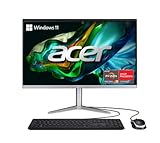
- SLIM. PREMIUM. STUNNING: This premium AIO PC pair’s unmatched speed with Windows 11 Home for daily productivity. Enjoy crisp colors that this cool, 23.8" Full HD PC delivers. It features the latest AMD Ryzen 3 7320U Processor, Radeon graphics and fast Wi-Fi 6E connectivity.
- AMD Ryzen 3 7320U Quad-Core Processor 2.4GHz with Precision Boost up to 4.1GHz (Up to 4MB L3 Cache) | AMD Radeon 610M Graphics
- 23.8" Full HD Widescreen IPS LED Back-lit Screen | 250nit Brightness; 16:9 Aspect Ratio; Tiltable from -5° to 25°
- 8GB LPDDR5 Onboard Memory | 512GB M.2 2280 PCIe SSD
- Wi-Fi 6E (802.11ax) supports dual-stream Wi-Fi in the 2.4GHz, 5GHz and 6GHz bands, including 2x2 MU-MIMO Technology | Bluetooth 5.2 | 10/100/1000 Gigabit Ethernet LAN
- Best suited for: wireless keyboard and mouse use, printers, external storage, headphones, and a second monitor.
- Less ideal for: users who need frequent front-facing access to ports or multiple high-bandwidth accessories.
- Easy improvement: add a compact USB hub to make temporary connections more convenient.
Overall, the Aspire C24 gets the fundamentals right. The bundled input devices are not luxurious, and the port layout could be easier to access, but the package is sensible for the price. For home office users, students, and families who want a neat desktop for everyday tasks, the included keyboard, mouse, and connectivity options are enough to get started without extra purchases. The compromises mainly show if you expect a more premium typing experience or regularly connect a wide range of accessories.
Independent reader supportYour contribution helps us test, update, and keep practical guides available for everyone.Upgradeability and maintenance
The Acer Aspire C24 is not built like a traditional desktop tower, so expectations for upgrades need to be realistic. Its slim all-in-one chassis saves desk space and reduces cable clutter, but that same design limits how much you can change later. For most buyers considering this machine for home office work, school assignments, web browsing, video calls, and family use, the main question is whether the configuration you buy today will still feel comfortable in a few years.
Memory and storage are the areas that matter most. Depending on the exact model sold in your region, the Aspire C24 may use laptop-style SO-DIMM RAM and an M.2 SSD, with some configurations offering a 2.5-inch drive bay as well. That means certain versions can be upgraded beyond their factory specification, which is useful if you start with an entry-level 8GB RAM model or a smaller SSD. Moving to 16GB of memory is the most sensible improvement for multitasking, especially if the PC will regularly handle lots of browser tabs, Microsoft Office apps, cloud storage syncing, and video meetings at the same time.
Access is the trade-off. Unlike a mini PC or tower, the Aspire C24 does not invite casual tinkering. Opening the rear panel requires care, the right tools, and patience around clips and internal cabling. It is not the sort of machine where you pop off a side panel and swap parts in a few minutes. Users who are comfortable working inside laptops should find the layout familiar, but anyone uncertain should consider buying the desired RAM and storage configuration upfront or using a repair shop for upgrades.
What’s actually slowing this PC down?
Pick the symptom - the matching free tool is one click away.
What can and cannot be changed
- RAM: Often the most useful upgrade, particularly on lower-cost configurations with 8GB installed.
- SSD: Storage may be replaceable or expandable depending on the model, with M.2 NVMe drives being the most likely format.
- Processor and graphics: These are effectively fixed. The CPU is not a practical upgrade, and graphics performance is tied to the integrated GPU.
- Display: The built-in panel is part of the all-in-one design, so upgrading means using an external monitor if supported.
- Wireless card: It may be replaceable on some revisions, but this is not a common upgrade path for typical owners.
Maintenance is straightforward from the outside. Keeping the rear vents clear, leaving space behind the unit for airflow, and occasionally removing dust from visible openings will help the system run quietly and consistently. Since the Aspire C24 uses modest-power mobile-class components, it generally does not produce the heat of a gaming desktop, but blocked ventilation can still lead to fan noise and reduced performance during longer workloads. The stand and screen should also be handled carefully when moving the unit, because the whole PC is built into the display enclosure.
In practice, the best approach is to treat the Aspire C24 as a mostly fixed appliance with a little room to grow. Buy enough RAM and storage for the lifespan you expect, keep external backups, and rely on USB drives or cloud storage for easy expansion. That fits the product’s role well: a tidy, affordable family or study desktop that can be maintained sensibly, but not a platform for frequent hardware upgrades.
Price, competition, and value
The Acer Aspire C24 makes the most sense when judged as a low-cost, low-fuss desktop for everyday use rather than as a miniature workstation. Its appeal is straightforward: you get a full Windows PC, a built-in display, speakers, webcam, wireless connectivity, and a bundled keyboard and mouse in a single package that takes up very little desk space. For a family kitchen desk, a student bedroom, a reception counter, or a home office used mostly for email, documents, video calls, web apps, and streaming, that all-in-one convenience is a major part of the value.
Pricing varies by configuration, but the Aspire C24 is usually positioned below more polished all-in-ones from HP, Lenovo, and Dell, and far below premium options such as Apple’s iMac. The best-value versions are typically the models with a modern Intel Core i3 or Core i5-class processor, 8GB or 16GB of RAM, and a solid-state drive. Entry-level versions can look tempting if the sticker price is especially low, but shoppers should be careful with configurations that include limited memory or small storage capacities. A cheap all-in-one becomes less appealing if it starts to feel cramped after a few months of browser tabs, cloud-sync folders, photos, and Windows updates.
Against a separate budget mini PC and monitor, the Aspire C24 wins on simplicity. There are fewer cables, fewer buying decisions, and no need to match a webcam, speakers, display, and peripherals. That matters for buyers who want something that can be unboxed, placed on a desk, connected to Wi-Fi, and used the same day. A mini PC setup may offer better repairability, a nicer monitor, or more flexibility over time, but it will often cost more once comparable accessories are included. The Aspire C24 is strongest when the clean setup is part of the purchase decision.
Where the compromises affect value
- Performance headroom: it is fine for office work, schoolwork, browsing, and calls, but not ideal for demanding creative workloads, large media projects, or modern gaming.
- Display quality: the screen is practical for daily use, though buyers expecting high brightness, wide color coverage, or a premium panel should look higher up the market.
- Peripherals: the included keyboard and mouse are functional, but they feel like cost-saving extras rather than accessories you would buy separately.
- Longevity: upgrade options help, but the compact all-in-one format still limits future flexibility compared with a tower desktop.
Compared with rival budget all-in-ones, the Acer’s value depends heavily on sale pricing. If an HP All-in-One, Lenovo IdeaCentre AIO, or Dell Inspiron All-in-One is available with a better screen, more RAM, or a larger SSD for similar money, that deal may be stronger. If the Aspire C24 undercuts them while keeping a decent processor, SSD storage, and enough memory, it becomes one of the easier budget desktops to recommend. The sweet spot is not the absolute cheapest version, but the configuration that avoids obvious bottlenecks while staying comfortably below premium all-in-one prices.
For home office users, students, and families, the Aspire C24 delivers value by being tidy, affordable, and competent. It is not exciting hardware, and it does not pretend to be. Its strengths are the things many buyers actually need every day: a compact footprint, a usable screen, acceptable call quality, quiet operation, and enough speed for ordinary tasks. Its weaknesses show when you push beyond that brief, but at the right price, those trade-offs are reasonable.
Frequently Asked Questions
Is the Acer Aspire C24 fast enough for working from home or schoolwork?
Yes, it is well suited to everyday tasks like web browsing, email, Microsoft Office, video calls, streaming, and light multitasking. It is not a good choice for heavy creative work, modern gaming, or demanding apps that need a powerful dedicated graphics card.
Can you upgrade the Acer Aspire C24 after buying it?
Upgrade options are limited compared with a tower desktop, but some configurations may allow access to memory or storage depending on the exact model. Buyers should check the specific SKU before purchase, because all-in-one designs are generally harder to open and maintain than standard desktops.
How good is the display on the Acer Aspire C24?
The display is fine for office work, school assignments, browsing, and watching videos, especially at this price. Its compromises are more noticeable if you need high brightness, wide color accuracy, or a premium panel for photo and video editing.
Does the Acer Aspire C24 work well for video calls?
It is adequate for Zoom, Teams, Google Meet, and family video chats, with built-in webcam and speakers that keep the setup simple. The image and audio quality are serviceable rather than impressive, so a separate webcam or headset is worth considering if you take frequent professional calls.
Who should buy the Acer Aspire C24 instead of a laptop or mini PC?
It makes sense for users who want a simple, tidy desktop setup with the screen, speakers, webcam, and PC built into one unit. It is best for home offices, students, and family rooms where affordability and convenience matter more than portability or high-end performance.
Do these 3 things before closing this tab:
1Fix the driver behind crashes, sound loss and screen glitches2Repair Windows errors before they cause bigger problems3Scan for outdated or missing drivers - takes under a minuteBottom Line
The Acer Aspire C24 is a sensible budget all-in-one for everyday computing, especially if you want a tidy desk setup without paying for premium hardware. Its slim design, solid 24-inch display, dependable performance for office work, school tasks, browsing, and streaming, plus useful ports make it a strong fit for home offices, students, and family spaces.
Its compromises are clear: modest speakers, a basic webcam, limited upgrade options, and performance that is not meant for gaming or heavy creative workloads. If your needs are practical and price matters most, the Aspire C24 delivers good value—just choose a configuration with enough RAM and storage to keep it comfortable over time.

