Free tools Windows power users keep installed
One-click scans. No signup required.
If you mean the wire attached to a Wi-Fi antenna, it is usually an antenna feed: a coaxial cable or small internal RF lead linking the antenna to the device’s wireless radio. It carries radio-frequency signals, not internet traffic or website data. The exact part and connector depend on the device; many Wi-Fi antennas are built inside and have no visible wire.
How the antenna wire fits into a Wi-Fi connection
The wireless radio generates and receives radio-frequency signals. The antenna converts those signals into radio waves for transmission and converts received radio waves back into signals the radio can process. Where the antenna is separate, its feed cable connects it to the radio.
As an Amazon Associate I earn from qualifying purchases.
Cisco describes the path as running from a transmitter through cable to an antenna, across the air (or an obstruction) to a receiving antenna, then through cable to the receiving radio. The feed is therefore one part of the radio link—not a cable that carries your internet connection in the way an Ethernet cable does. Cisco’s Wireless RF Reference Guide explains the broader signal path.
Recommended Free Tools
Where you might find the wire
Inside a laptop or desktop computer
A computer’s Wi-Fi adapter may connect to one or more antennas using thin micro-coaxial leads. Intel describes an M.2 wireless-card receptacle measuring 2 × 2 mm, with a 1.5 mm outer diameter. The plug, cable diameter, and allowable mating height must suit the particular assembly; the small size alone is not enough to identify a compatible replacement.
#1 Best Overall
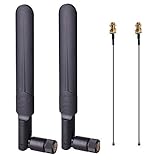
- OMNI-DIRECTIONAL WIFI ANTENNA- This 8dBi omni-directional is with 2.4GHz and 5.8GHz dual band, high gain and can extend wireless range to dead spot
- PIGTAIL SPECIFICATIONS- Connector type: IPEX MHF4 to RP-SMA Female,Length: 15cm/5.9”
- STABLE SIGNAL TRANSFER- The WIFI antenna is used high quality circuit board which ensures maximum and stable signal quality. Easy to install and increase signal strength
- WORK WITH- This wireless antenna works with most wireless devices, such as Mini PCIe Wireless Card Routers / Repeater / Range Extender / Desktop PC / Mini ITX Build / PCI Card / FPV UAV Drone / PS4 Build. WARM NOTICE: this wireless router antenna only use for MINI PCI-E Interface, Do Not Use for M.2 (NGFF) Interface, please check your connectors before purchasing
- PACKAGE INCLUDES- 2X 8dBi WIFI antenna+ 2X 15CM U.FL/ IPEX to RP-SMA Female Pigtail Cable
Intel suggests searching for parts using terms such as “M.2 wireless antenna” or “NGFF antenna,” but compatibility still needs to be checked against the card and computer. See Intel’s guidance on antenna connectors for Intel wireless cards.
On a router or access point
Some routers and access points have external antennas connected by coaxial cable. Connector families can include RP-TNC, RP-SMA, N-type, or designs specific to a manufacturer. Some supported Cisco equipment uses DART connectors that can carry multiple RF connections and antenna-identification data; DART-4 and DART-8 are not interchangeable.
Rank #2

- Dual Band WiFi: 2.4GHz (2400 - 2485 MHz),5GHz/5.8GHz (5150 - 5850 MHz); Gain: 6dBi; Direction: Omni-directional; Antenna Connector: RP-SMA Male Connector; Accessories Cable: 15cm Bulkhead Mount 1.13mm Coaxial Pigtail Cable;
- Package List: 2 x WiFi Antenna, 2 x Coaxial Pigtail Cable, Notice: This pigtail cable only use for Mini PCI-E interface network cards, can not fit M.2 NGFF interface network cards, please check your network cards before purchasing.
- The Accessoried Coaxial Pigtail Cables are Compatible with Most Laptop and Computer Mini PCI Network Card and Most Computer Motherboard that Built-in WiFi Network Card with External Antenna Connector Interface.
- Compatible with: Wireless Network Router, WiFi AP Hotspot Modem, WiFi USB Adapter, Desktop PC Wireless Mini PCI Express PCIE Network Card Adapter;
- Compatible with: WiFi IP Security Camera; Wireless Video Surveillance DVR Recorder; Truck RV Van Trail Rear View Camera, Reverse Camera, Backup Camera, Industrial Router IoT Gateway Modem, M2M Terminal, Remote Monitoring and Control, Wireless Video, Wireless Extender;
A connector that looks similar may have a different size, gender, keying, or electrical role. For example, TP-Link notes that some of its outdoor antennas use N female connectors while certain SOHO router connections use RP-SMA, so that combination needs an appropriately terminated pigtail. That example applies to the specified equipment, not every router or antenna. TP-Link’s connector guidance describes the example.
What affects the wireless signal
Antenna feed, antenna, radio, placement, and surroundings all contribute to the link. Distance, physical obstructions, and radio-frequency interference can affect reception. Direction and placement matter particularly for a directional antenna, which is designed to focus its coverage rather than radiate equally in every direction.
Rank #3

- Connector 1:SMA Female straight
- Connector 2: U.FL-1 Connector
- Impendence :50 ohm
- Cable Length: 6 inch (15cm)
Cable length and routing matter too. Cisco advises keeping coaxial runs short because loss increases with cable length and frequency. Its installation guidance also warns that sharply bending or crimping the specified antenna cable can degrade performance. Follow the instructions for the actual equipment; these points do not establish one universal loss figure or mean that a longer or higher-gain antenna will always improve Wi-Fi. See Cisco’s cable information for the AIR-ANT2413P2M-N antenna.
How to identify or replace a Wi-Fi antenna wire
- Identify the device and wireless card. Record the exact model numbers for the router, access point, computer, and—if accessible—the wireless adapter. A description such as “little Wi-Fi wire” does not identify the connector or approved part.
- Check the manufacturer’s service or parts information. Confirm whether the antenna or lead is replaceable and which part is supported. Intel advises asking the equipment manufacturer about approved replacements and regulatory requirements.
- Match both ends of the connection. Check connector family, size, gender, and any keyed or proprietary design. A cable must mate correctly at both the radio and antenna ends.
- Confirm the antenna and radio configuration. Match the replacement to the device’s supported radio bands and antenna arrangement. Do not assume a generic “Wi-Fi antenna wire” will work.
- Install and route it as specified. For external coax, avoid pinching or sharp bends and keep the run as short as practical. Use the equipment’s instructions for antenna placement and attachment.
Changing an antenna may count as a wireless integration and can be subject to country-specific requirements. Intel recommends consulting the equipment manufacturer before choosing a replacement; physical fit alone does not establish that a part is supported or compliant.
Rank #4

- Application : Use this ipex4 to sma jumper cable to connect antenna to PCB receptacle. Compatible with most RF devices, for example wifi adapter, router, modem, MiFi hotspot, GPS receiver, M.2 wireless card, etc. Impedance 50 ohm
- M.2 WiFi Antenna Cable : The u.fl4/ipex4/mhf4 to sma cable conductor is made of solid copper, providing efficient signal transmission and low loss. It connects to pcb receptacle where it needs ipex4 mhf4 antenna
- Cable Type : RF1.13 cable 8 inches (20 cm), u.fl-4/ipex-4/mhf-4 on one end, RPSMA Female with pin on the other end. The ufl rpsma bulkhead connectors are qualified for salt spray test and durable use
- Package Includes: 2 x RP-SMA Female to UFL4/IPX4/MHF4 wifi antenna cable (Connector 1: RP SMA bulkhead connector, Connector 2: IPX-4 UFL-4 connector, Cable type: 8 inches RF1.13 coax cable)
- Note: IPEX-4 connector does fit M.2 NGFF network card, but does not fit Mini PCIe Network card. Please check the connector type on your device before buying
Why there is no universal Wi-Fi antenna wire
Wi-Fi devices use different antenna arrangements, radio bands, connectors, and installation designs. An internal computer lead may be a tiny micro-coax plug, while an external access-point setup may use a larger coax connector or a manufacturer-specific interface. The right replacement is the one approved for the exact device and configuration—not simply the one that looks close or promises greater range.
Quick wins for a faster PC:
Fix the driver behind crashes, sound loss and screen glitchesFind Drivers →Repair Windows errors before they cause bigger problemsFix Now →Scan for outdated or missing drivers - takes under a minuteDriver Scan →Quick Recap
Best Value
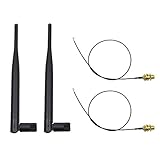
- 100% Brand New and High Quality
- Kit includes 2x 6DBi Omni-directional Antenna + 2 x 20cm U.FL / IPEX to RP-SMA Pigtail Antenna WiFi Cable
- This kit allows you to add high gain external antennas to many wireless routers that do not normally support removable antennas
- RP-SMA Female connector, works with most indoor wireless AP/Router
- IPEX cables have bulkhead gold plated connector (8mm/5/16")
Product prices and availability are accurate as of the date/time indicated and are subject to change. Any price and availability information displayed on Amazon at the time of purchase will apply.




