What’s actually slowing this PC down?
Pick the symptom - the matching free tool is one click away.
Playwright usually appears to “lose” login cookies because each screenshot run creates a fresh, isolated browser context. A new context does not inherit cookies from the previous one. For repeatable runs, save authentication state after login and load it into each new context; if the app relies on session storage or IndexedDB, handle those separately.
Why a new Playwright context starts logged out
A Playwright page belongs to a browser context, and cookies belong to that context. The ordinary browser.newContext() method creates an isolated, non-persistent context: its browsing data is not automatically written to disk or shared with a later context. A screenshot script that creates a new context on every run therefore starts a separate session unless it explicitly loads saved authentication state. See Playwright’s Browser API documentation.

As an Amazon Associate I earn from qualifying purchases.
This is usually expected isolation, not a screenshot-specific cookie bug. The same issue occurs whenever a script or test creates a new context and assumes it will reuse the previous run’s in-memory session.
Free tools Windows power users keep installed
One-click scans. No signup required.
Recommended for repeatable runs: save and restore storage state
Playwright’s documented authentication workflow is to log in once, save the context’s storage state, then use that state when creating later contexts or configuring tests. The state file can include cookies and local storage. Protect it like a credential: anyone who obtains usable authentication state may be able to impersonate the account. Avoid committing it to source control, publishing it as an artifact, or printing cookie values in logs. See Playwright’s authentication guide.
#1 Best Overall

- Secure & Scratch-Free Protection - Rubber cradle pads protect your mouse from scratches while holding it securely in place.
- Non-Slip Stability - Integrated rubber feet prevent the stand from sliding or shifting on your desk.
- Slim, Space-Saving Profile - Low-profile design keeps your workspace clean and clutter-free—perfect for compact desks and minimalist setups.
- Durable 3D-Printed Construction - Made from strong PLA plastic with rubber components for long-lasting everyday use.
- Multiple Color Options - Available in Black, White, Grey, Pink, Ice Blue, Blue, Matcha, Dandelion, Red, Purple, Coffee, and Orange to match any setup or gaming aesthetic.
Save state after login finishes
Do not snapshot state merely because a login button was clicked. Wait for the redirect to finish or for a reliable signed-in indicator to appear, then save:
const { chromium } = require('playwright');

(async () => {
  const browser = await chromium.launch();
  const context = await browser.newContext();
  const page = await context.newPage();

  await page.goto('https://example.com/login');
  await page.getByLabel('Email').fill(process.env.TEST_EMAIL);
  await page.getByLabel('Password').fill(process.env.TEST_PASSWORD);
  await page.getByRole('button', { name: 'Sign in' }).click();

  // Replace with a stable signal for your application.
  await page.waitForURL('**/dashboard');
  await page.getByText('Account').waitFor();

  await context.storageState({ path: 'playwright/.auth/user.json' });
  await browser.close();
})();
Replace the example URL, selectors, and signed-in check with ones that match the application. If the app completes login through a redirect, wait for the final destination or a page element that is only present after authentication. A premature save can produce a valid-looking file that contains no authenticated session.
Rank #2

- SECURE & STABLE HOLD – Non-slip rubber feet and an integrated protective rubber strip keep your mouse firmly in place while preventing scratches and unwanted movement.
- UNIVERSAL COMPATIBILITY – Designed to fit most popular gaming and computer mice, making it ideal for daily use, quick device swaps, or clean desk organization.
- DURABLE 3D-PRINTED BUILD – Crafted from high-quality PLA plastic for a strong, lightweight, and long-lasting stand that holds up to everyday use.
- PERFECT FOR GAMERS & COLLECTORS – Display your favorite mouse, showcase your collection, or keep multiple mice easily accessible without desk clutter.
- DESIGNED BY DESK COOKIES – Purpose-built for clean setups and functional displays. Great for gaming desks, streaming setups, and office workstations.
Load that state into every screenshot context
Pass the same state file when creating the next context. Resolve its path consistently so a different working directory or project location does not silently select another file:
PC Slower Than It Used to Be?
A free scan shows the junk files, broken settings and background clutter dragging Windows down - then fixes them in one click.Free scan · Windows 10 & 11Crashes, No Sound, or Screen Glitches?
Random freezes, missing sound and display glitches usually trace back to one bad driver. Find and replace yours safely.Free scan · under a minuteconst { chromium } = require('playwright');
const path = require('path');
(async () => {
const browser = await chromium.launch();
const authFile = path.resolve('playwright/.auth/user.json');
const context = await browser.newContext({ storageState: authFile });
const page = await context.newPage();
await page.goto('https://example.com/account');
await page.screenshot({ path: 'account.png', fullPage: true });
await browser.close();
})();For Playwright Test, the same saved state can be set in the test configuration’s use.storageState option. The authentication guide documents both context-level and test configuration approaches. Confirm that the screenshot process uses the intended configuration; a separate script that launches its own browser and context will not automatically inherit a test runner’s settings.
Rank #3

- SECURE & STABLE HOLD – Non-slip rubber feet and an integrated protective rubber strip keep your mouse firmly in place while preventing scratches and unwanted movement.
- UNIVERSAL COMPATIBILITY – Designed to fit most popular gaming and computer mice, making it ideal for daily use, quick device swaps, or clean desk organization.
- DURABLE 3D-PRINTED BUILD – Crafted from high-quality PLA plastic for a strong, lightweight, and long-lasting stand that holds up to everyday use.
- PERFECT FOR GAMERS & COLLECTORS – Display your favorite mouse, showcase your collection, or keep multiple mice easily accessible without desk clutter.
- DESIGNED BY DESK COOKIES – Purpose-built for clean setups and functional displays. Great for gaming desks, streaming setups, and office workstations.
Check whether authentication uses storage beyond cookies
A state file can be loaded correctly and still fail to authenticate if the application keeps its token somewhere other than cookies or local storage. Identify the storage mechanism used by the application before changing the screenshot code.
IndexedDB
Some applications keep authentication tokens in IndexedDB. The current BrowserContext API provides an IndexedDB option for storage-state capture; enable it when saving state if the installed Playwright version supports it. Check the API documentation for your version and use the option supported there: BrowserContext storageState.
Rank #4
Session storage
Session storage is not included in the ordinary storage-state persistence workflow. Playwright’s authentication guide says it does not provide an API to persist session storage, and demonstrates manually saving it and restoring it with an initialization script. If the app depends on session storage, that separate capture-and-restore step is required; loading cookies and local storage alone will not recreate it. See the session storage section of the authentication guide.
Quick wins for a faster PC:
Clear out junk files and repair common Windows errorsFree Scan →Fix the driver behind crashes, sound loss and screen glitchesFind Drivers →Repair Windows errors before they cause bigger problemsFix Now →Choose between reusable state and a persistent browser profile
| Approach | Best suited to | What to account for |
|---|---|---|
Fresh context initialized from storageState |
Repeatable test and screenshot runs that need a known authenticated starting point. | Save state after login, load the correct file for each context, and separately handle session storage if required. It makes account and context isolation easier to manage. |
| Persistent context with a user data directory | Workflows that intentionally need browser-profile persistence across launches. | Profile data remains tied to that directory. Do not try to launch simultaneous browser instances against the same user data directory. See BrowserType launchPersistentContext. |
For automated tests, Playwright documents storage-state reuse as the authentication approach. Use a persistent profile when profile-level persistence is an actual requirement, rather than expecting a regular isolated context to behave like one.
Best Value
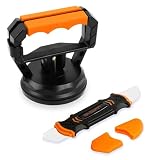
- Stronger Suction: Designed for screen opening during phone repair, it provides up to 10kg of suction power, double that of a regular type. It is easy to disassemble your phone when replacing the screen, cleaning, changing the battery, or upgrading components. Additionally, it is also suitable for iPad tablets and other electronic devices.
- No Slipping: The suction cup is made of denser high-quality rubber instead of ordinary, and five times that of a regular one. This maintains good airtightness, reducing the risk of slippage that could damage your phone during disassemble.
- Beginner Friendly: Use with Illustrated Instructions. Just attach to the screen and press down slightly then close the handle. This eliminates the cumbersome process of repeatedly pressing to expel air when using a regular cell phone screen opener.
- Spudger: The spudger features two differently shaped and flexible metal tips that can reach into any crevice of electronic devices to assist with disassembly without scratching them. Suitable for various mobile phones, including iPhone, Samsung, Motorola, TCL, and more.
- Compact Size: The suction cup set is easy to store and takes up as much space as a lemon. Whether you keep it at home or carry it out, it won't be a burden. Please enjoy the joy of simple repair!
Troubleshoot a screenshot run that is still logged out
- Trace context creation. Log which code path launches the browser and creates each context. Verify that the screenshot context receives the intended
storageStateoption; a saved file does nothing by itself. - Verify the save timing. After the login action, wait for the final URL or a reliable authenticated UI element before calling
storageState(). - Verify the file and origin. Check that the resolved file path is the one you expect and that its state corresponds to the site origin being opened. Inspect cookie names and origins locally, but do not expose cookie values in logs or shared artifacts.
- Check the application’s storage mechanism. If tokens are in IndexedDB, enable its capture option where supported. If the app uses session storage, implement the documented manual save and initialization-script restore.
- Check the persistence model. If you need an ordinary fresh context for each run, load saved state into it. If you need a browser profile to persist, use a persistent context and avoid concurrent launches against the same user data directory.
- Check version-specific API support. Playwright’s APIs evolve. Confirm the option names supported by the version installed in the project rather than copying an option from documentation for a different version.
Or skip the browser setup
If you only need a website screenshot rather than a Playwright-controlled authenticated session, ScreenshotNeo offers a screenshot API and MCP server. Its one-call endpoint can return an image or PDF; it is not a substitute for reproducing a private, logged-in browser session. For a public page, for example:
Quick Recap
curl -G "https://api.screenshotneo.com/v1/shot" -d access_key=YOUR_API_KEY --data-urlencode url=https://stripe.com -o shot.webpSee the ScreenshotNeo API documentation for options and response details. Cookie banners, popups, and chat widgets are removed before capture; bot checks, blank pages, and failed loads are never billed. An MCP server lets AI agents take screenshots. The Free plan includes 1,000 screenshots per month with no card, and paid plans start at $5 for 3,000. Sign up for ScreenshotNeo free.
Product prices and availability are accurate as of the date/time indicated and are subject to change. Any price and availability information displayed on Amazon at the time of purchase will apply.




