Choose an AI inference accelerator by how well a complete system serves your model at the required quality, latency and scale—not by peak specifications alone. Define the workload, screen for model and memory fit, then compare shortlisted systems using the same serving stack and a representative test.
Define the workload before comparing hardware
A throughput figure is useful only if it reflects the work you need done. Write down the model and its size, precision or quantization, input-length distribution, expected output length, request rate, concurrency, quality target, and whether requests are interactive, batch, or a mix. Specify whether you expect to run on one node or scale across multiple accelerators or servers.
As an Amazon Associate I earn from qualifying purchases.
These choices affect memory needs, latency and useful throughput. A result from an unconstrained offline batch run does not show whether a system can meet an interactive response-time objective. For cross-platform comparisons, Google Cloud recommends vendor-agnostic models and tooling where possible; its guidance also warns that top hardware specifications do not guarantee application performance: Google Cloud’s AI accelerator performance and benchmarking guidance.
Do these 3 things before closing this tab:
1Fix the driver behind crashes, sound loss and screen glitches2Repair Windows errors before they cause bigger problems3Scan for outdated or missing drivers - takes under a minuteCheck model, precision and memory fit
Confirm that the complete model and serving configuration fit in accelerator memory, allowing room for runtime overhead and relevant serving state such as the key-value cache. Check how the chosen precision and serving engine affect the footprint, and whether the configuration requires partitioning or offloading that could change performance.
#1 Best Overall

- NVIDIA Volta GV100 Architecture — 4,608 CUDA Cores, 640 1st-Gen Tensor Cores delivering 14 TFLOPS FP32 and 112 TFLOPS deep learning performance for AI training, inference, HPC, and scientific computing workloads
- 32GB HBM2 ECC Memory — 900 GB/s Bandwidth — High-bandwidth memory on a 4096-bit bus with ECC error correction provides the memory capacity and throughput required for the largest AI models, simulations, and datasets
- PCIe 3.0 x16 Interface — 250W TDP — Standard PCIe Gen3 connectivity with passive cooling designed for enterprise rack server deployment in HPE ProLiant, Dell PowerEdge, and Supermicro platforms with adequate chassis airflow
- NVLink — Scale to 96GB Unified Memory — Connect two V100 GPUs via NVLink at 300 GB/s bi-directional bandwidth to scale GPU memory from 32GB to 96GB for larger AI training and HPC workloads
- Multi-Precision Computing — Supports FP64 (7 TFLOPS), FP32 (14 TFLOPS), FP16 (112 TFLOPS) and INT8 precision modes for flexible deployment across training, inference, and scientific simulation workloads
Capacity and bandwidth are screening measures, not workload results. AMD lists its Instinct MI300X with 192 GB of HBM3 and 5.3 TB/s of peak theoretical memory bandwidth. Those are manufacturer specifications, not independently measured production throughput: AMD Instinct MI300X specifications.
Compare latency and throughput at the same service target
For interactive inference, assess latency and throughput together at the concurrency you expect to serve. Record time to first token, token-generation latency and end-to-end latency percentiles, then measure throughput while staying within the latency budget. For batch inference, measure requests or tokens per second under a defined quality target and batch regime.
Do not treat a maximum-throughput batch result as equivalent to performance under an interactive service target. MLPerf Inference defines workloads by dataset and quality target and distinguishes benchmark scenarios. Its documentation page is labeled v3.1, so check the current rules and submission details before relying on leaderboard results: MLPerf Inference policies and rules.
What’s actually slowing this PC down?
Pick the symptom - the matching free tool is one click away.
Rank #2
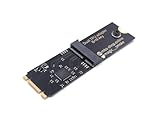
- Designed exclusively for Coral M.2 Accelerator with Dual Edge TPU modules to maximize AI inference performance.
- Fits standard M.2 2280 B-key or M-key slots (PCIe protocol only - not compatible with SATA M.2).
- Bidirectional Gen2 bandwidth: Upstream: ×1 PCIe Gen2 (5Gbps) Downstream: Dual ×1 PCIe Gen2 lanes
- Includes stainless steel mounting screw for vibration-resistant PCB fixation.
- Explicitly incompatible with Raspberry Pi CM4/USB enclosures - prevents buyer errors.
Test the software stack and scale-out behavior
Hardware fit is not enough if the required model architecture, precision, framework, inference engine, kernels or operational tools are unsupported. Test the stack you intend to deploy, rather than assuming support for one component establishes support for the complete serving path.
For multi-accelerator or multi-node deployments, benchmark compute, memory and networking separately, then test distributed collectives such as all-reduce or all-gather. Google Cloud recommends measuring how collective bandwidth and latency degrade as a cluster grows. A single-device result cannot establish how efficiently a larger system will scale.
Measure efficiency and compare full-system cost
Use power and cost figures that reflect the complete system and the service you need. MLPerf documents system power for Server and Offline scenarios, and energy per stream for Single Stream and Multi Stream; those measurements use average AC power for the complete system measured at the wall during the benchmark. They are tied to their specific scenarios and rules, not a blanket prediction of your facility’s energy use.
Rank #3

- 900-2G193-0000-000
Estimate cost per useful request or token at the target quality and latency. Include the accelerator and server or cloud charges, power, networking, software and operations, utilization, and capacity headroom. FLOPs per dollar or chip price alone cannot show the cost of meeting a service objective.
Vendor cost and performance reports can help identify configurations worth testing, but keep their conditions attached to the claim. NVIDIA’s inference hub reports $0.123 per million tokens at 116 tokens per second per user for GB300 NVL72, citing SemiAnalysis InferenceX as of April 2026. This is a vendor-published figure for a named configuration, not a universal price guarantee: NVIDIA inference performance hub.
OpenAI’s 2026 Jalapeño article reports 1.5 to 1.9 times more AI work per watt at peak throughput and 1.7 to 3.6 times lower end-to-end latency versus the systems it compared. OpenAI describes its use of public models and InferenceX and explains its power normalization; treat the results as vendor-reported evidence for those comparisons, not a general ranking: OpenAI’s Jalapeño article.
Rank #4

- High-Performance ML Accelerator: Integrates Edge TPU, delivering 4 TOPS (int8) peak performance for machine learning inference tasks.
- Strong Compatibility: Supports M.2 A+E key interface for easy integration into existing systems.
- Low Power Design: Provides 2 TOPS per watt, ideal for embedded and energy-efficient applications.
- Wide OS Support: Compatible with Linux (Debian 10/Ubuntu 16.04+) and Windows 10 (64-bit).
- Industrial-Grade Reliability: Operating temperature range of -20°C to +85°C, suitable for harsh environments.
Use benchmarks as evidence, not a buying verdict
Each benchmark answers only the workload, metric and conditions it measures. Independent benchmark rules can make comparisons more reproducible, while manufacturer specifications help screen compatibility and capacity. Neither replaces a test using your model, request mix and service target.
Vendor performance pages can reveal claimed configurations and setup details. Preserve the model, software stack, precision, batch or concurrency settings, date and comparison conditions when interpreting them. Intel’s cited resource, for example, publishes Xeon inference data with model, framework, precision, throughput, latency and batch-size fields; it is a CPU benchmark resource, not accelerator-card testing: Intel inference benchmark resource.
Run a procurement proof test on finalists
Once the workload and screening criteria are set, test the final candidates on the configuration you intend to buy. Use the same model, request distribution and serving stack wherever possible, and record enough detail to reproduce the result.
- Lock the workload: record model, precision, input and output lengths, request mix, concurrency, quality checks and latency objective.
- Record the system: note accelerator and server counts, software versions, framework, inference engine and relevant configuration settings.
- Measure service: capture throughput, time to first token, token-generation and end-to-end latency percentiles at the target concurrency; for batch jobs, record throughput under the defined quality target.
- Check scale and energy: where relevant, test collectives and network behavior at the intended node count, and measure whole-system power under the benchmarked workload.
- Verify procurement terms: obtain pricing for the exact configuration and confirm regional availability, delivery timing, support and service-level commitments with the supplier.
Compare candidates on consistent axes
Use the same workload and definitions for each option. A shortlist can be compared across these practical dimensions:
Quick Recap
- Model fit: architecture, precision, quality after quantization, memory footprint, and framework and inference-engine support.
- Memory: capacity, sustained bandwidth, and whether the model plus serving state fits without unwanted partitioning or offload.
- Interactive service: time to first token, token-generation latency, end-to-end latency percentiles, and throughput at target concurrency.
- Batch service: requests or tokens per second at the stated quality target and batch regime.
- Scale-out: interconnect topology and collective-operation performance, including latency and bandwidth changes as nodes are added.
- Efficiency and cost: wall power, energy per useful output, utilization assumptions, system or cloud charges, and cost at the required service target.
- Operational fit: software support, observability, reliability, security, service, availability and deployment constraints.
Product prices and availability are accurate as of the date/time indicated and are subject to change. Any price and availability information displayed on Amazon at the time of purchase will apply.




