MCP, or Model Context Protocol, is an open-source standard that gives AI applications a shared way to connect to external data, tools, and workflows. An AI application acts as the host; an MCP client inside it communicates with servers that offer capabilities. MCP standardizes that connection, but it does not provide every service or guarantee safe, correct actions.
Why MCP exists
An AI application may need information from another system or need to perform an action there. Without a shared interface, developers can build a separate, bespoke integration for each application and service. MCP defines a common protocol for those connections, with the aim of making different AI applications and external systems interoperable. The official introduction compares it to USB-C: the analogy is about a standardized interface, not a physical connector. Model Context Protocol: What is MCP?
As an Amazon Associate I earn from qualifying purchases.
How MCP works
MCP uses a client-server architecture. The host is the AI application; an MCP client within the host communicates with an MCP server, which exposes capabilities to the application. The protocol’s data layer uses JSON-RPC-based messages, while its transport layer carries those messages between client and server. MCP architecture overview
Quick wins for a faster PC:
Fix the driver behind crashes, sound loss and screen glitchesFind Drivers →Repair Windows errors before they cause bigger problemsFix Now →Scan for outdated or missing drivers - takes under a minuteDriver Scan →- Host: The AI application using MCP.
- Client: The component within the host that communicates with a server.
- Server: The component that makes capabilities available to the AI application.
What are MCP tools, resources, and prompts?
Servers can provide three kinds of capability. A database server, for example, might make a query tool available, offer its schema as a resource, and provide a reusable prompt with example queries.
#1 Best Overall

- All-in-One AI Learning Lab Powered by Raspberry Pi & Multi-LLMs. Turn Raspberry Pi (5 / 4B / 3B+ / 3B / Zero 2W) into a complete AI learning lab with support for multi-LLMs like ChatGPT, Gemini, Grok, DeepSeek, Qwen, Doubao, and Ollama. Includes Pan-Tilt HAT,10-axis (10DOF) module, camera, and high-quality components. Learn AI through guided video lessons created with educator Paul McWhorter. (Raspberry Pi not included)
- Build Fun Multi-Modal AI Projects with Voice, Vision & Sensors. Combine sensors, breadboard circuits, Multi-LLMs, voice recognition, and camera vision to create engaging multi-modal AI projects. Learn STT and TTS through hands-on programming, turning abstract AI concepts into interactive projects you can see, hear, and control—perfect for AI beginners
- AI Vision Tracking with YOLO, OpenCV, MediaPipe & Pan-Tilt HAT. Create intelligent vision projects using OpenCV and MediaPipe to detect and track objects, colors, and human movements. The Pan-Tilt HAT allows your projects to actively follow targets, helping learners understand how AI vision and motion work together in real systems
- Fusion HAT+ Power System with Voice AI Interaction. The Fusion HAT+ provides power, safe shutdown, and simplified hardware control via a unified Python library. With the Fusion HAT+ featuring a built-in speaker and microphone, easily build AI voice interaction projects by combining Multi-LLMs with sensors and electronic components
- Step-by-Step Learning with Video Lessons & Technical Support. Includes a structured, project-based curriculum with clear documentation, sample code, and video tutorials created with Paul McWhorter. Backed by responsive technical support and an active community, this kit helps beginners confidently progress from Python basics to AI and interactive projects
| Capability | What it provides | Database example |
|---|---|---|
| Tool | An action a model can request; servers describe tools and their input schemas, and clients can list and call them. | Run a database query. |
| Resource | Contextual data made available to the AI application. | Provide the database schema. |
| Prompt | A reusable interaction template, potentially with examples. | Offer a template for asking questions about the database. |
Tools are different from resources and prompts because invoking a tool can do something in an external system. The official tools specification says there “SHOULD always be a human in the loop with the ability to deny tool invocations.” It also recommends making tool activity visible. MCP does not impose one universal user-interface pattern, so the controls available depend on the client. MCP tools specification
What MCP does not guarantee
- It does not itself supply the connected service, data, or tool; servers expose those capabilities.
- It does not make every integration safe just because it uses the protocol. Tool calls may have real effects, so users should be able to see and deny them.
- It does not ensure that a model’s requested action or answer is correct.
Which MCP version do current implementation guides describe?
The latest release covered here is the MCP specification dated July 28, 2026. Its announcement highlights a stateless protocol core, multi-round-trip requests, header-based routing, cacheable list results, authorization hardening, a formal extensions framework, and updated Tier 1 SDKs. It retires the initialize/initialized exchange and the Mcp-Session-Id header in this version. The legacy HTTP+SSE transport is deprecated with a year-long offramp; Roots, Sampling, and Logging are deprecated but continue working for at least twelve months, according to the announcement. The 2026-07-28 Specification
Rank #2

- 【POWERFUL ESP32‑S3 CONTROLLER】Built‑in Xtensa 32‑bit LX7 dual‑core processor, 512KB SRAM, 8MB PSRAM, 16MB Flash for stable AI voice computing and multitask processing.
- 【Preloaded Dual AI Platforms】Comespre-installed with complete Deepseek and OpenAI voice dialogue projects.Experience intelligent voice interaction instantly. (Note: OpenAI functionality requires your own API key.)
- 【STABLE WIRELESS & CLEAR AUDIO】Integrated 2.4GHz Wi‑Fi + Bluetooth 5 (LE); dedicated audio decoding module for natural, responsive voice interaction.
- 【USER‑FRIENDLY VISUAL & PLUG‑AND‑PLAY】2” TFT‑SPI color screen shows real‑time chat; modular design, no extra wiring, ready to use after setup.
- 【FULL LEARNING SUPPORT】45 programmable GPIOs, rich interfaces, online web tutorials, free technical support for beginners & developers.
These are version-specific implementation details, not timeless setup instructions. When following a tutorial, check which specification version it targets rather than mixing older initialization or transport guidance with the 2026-07-28 release.
Recommended Free Tools
Quick Recap
Best Value
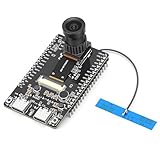
- 【Main Functions】BW21-CBV-Kit is a local AI vision recognition development board capable of independently running object recognition models
- 【Camera Specifications】Equipped with a 1920 x 1080 resolution, 2MP, 30fps wide-angle camera, a condenser microphone, and support for 2TB memory card storage
- 【Strong Communication Capabilities】Based on the RTL8735B chip, it supports dual-band 2.4GHz/5GHz WiFi and Bluetooth 5.1, providing high-performance wireless transmission capabilities for smoother image transmission
- 【Development Method】Utilizes the Arduino development approach, allowing you to easily implement your ideas, such as face recognition, gesture recognition, object recognition, component defect detection, people counting, pet recognition, etc
- 【Rich Interfaces】Two sets of 18-pin headers provide 30 programmable I/Os, facilitating project expansion. Combined with AI recognition, it unlocks limitless possibilities
Rank #4

- Complete Jetson Orin Nano Starter Kit: This jetson orin nano starter kit includes a 30-in-1 sensor board, 8MP camera, dual-servo gimbal, 128GB SD card, and essential accessories. It supports Avisual recognition and voice interaction, providing a complete AI application development experience
- 8MP AI Vision Camera with Gimbal: Equipped with an IMX219 8MP camera and dual-servo gimbal, the jetson orin nano development kit supports face tracking, object recognition, target tracking, and computer vision projects. Ideal for learning AI vision, edge computing, robotics, and intelligent automation applications
- 11.6-Inch HD Display & AI Voice Assistant: Features an 11.6-inch 1366×768 IPS screen, allowing users to develop and test projects without an external monitor. The built-in AI voice interaction system supports voice commands and intelligent conversations, creating a more engaging and interactive learning experience
- 30 Sensors and 38 Guided Python Tutorials: Features a 30-in-1 sensor board with temperature & humidity, ultrasonic ranging, gas, motion, and other commonly used sensors. Includes 38 guided Python tutorials covering sensor applications, embedded development, and AI visual recognition from beginner to advanced
- Portable All-in-One Design with Rich Expansion Options: The Jetson Orin Nano Dev Kit provides multiple expansion interfaces including I2C/UART/IO interfaces. A custom carrying case integrates all components, making it convenient for classroom teaching, laboratory projects, demonstrations, and mobile AI development
Rank #3

- VOICE AI & DISPLAY DEVELOPMENT KIT: Built-in dual microphones and speaker support voice interaction, combined with a 3.5" TFT display and DVP camera interface for AI-powered human–machine interaction projects.
- POWERFUL MCU & RICH INTERFACES: ARMv8-M (M33) MCU with WiFi 2.4GHz and Bluetooth LE 5.4, featuring 56 GPIOs, SPI, I2C, UART, I2S, USB, TF card, and camera interfaces for flexible hardware expansion.
- DEVELOPER RESOURCES AVAILABLE: Supports TuyaOS-based development. Hardware documentation, SDKs, and firmware examples are available for developers through the Tuya Developer Platform.
- DESIGNED FOR DEVELOPERS: Ideal for prototyping, evaluation, and embedded development. To access setup guides and sample projects, search: “T5AI-Board TuyaOS Developer Documentation”
- FOR IOT & SMART DEVICE PROJECTS: Suitable for smart home devices, voice control panels, AI terminals, and custom IoT solutions. This product is intended for development and testing purposes, not as a finished consumer device.
Product prices and availability are accurate as of the date/time indicated and are subject to change. Any price and availability information displayed on Amazon at the time of purchase will apply.




