Quick wins for a faster PC:
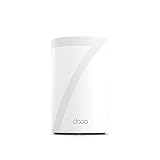
Clear out junk files and repair common Windows errorsFree Scan →Scan for outdated or missing drivers - takes under a minuteDriver Scan →The TP-Link Deco BE63 is a tri-band Wi-Fi 7 mesh system with a standout practical feature: four 2.5GbE auto-sensing WAN/LAN ports on each US unit. It suits homes that want broad mesh coverage and several multi-gig wired connections, but its BE10000 label is a theoretical combined link-rate class—not a promise that one device will reach 10 Gbps. Independent reviews report strong results, though your actual speeds and coverage depend on your home, broadband service, placement, and client devices.
What the Deco BE63 offers
TP-Link markets the system as the Deco 7 Pro BE10000. It combines three Wi-Fi bands with mesh networking, multiple high-speed Ethernet ports, and support for Wi-Fi 7 features such as Multi-Link Operation (MLO) and 320 MHz channels. The US datasheet also lists router and access-point modes, guest and IoT networks, MU-MIMO, OFDMA, Multi-RU, and BSS Color.
As an Amazon Associate I earn from qualifying purchases.
Wi-Fi 7 features only benefit devices that support them, and available channels vary by region. TP-Link says its 9.5 Gbps MLO figure requires a Wi-Fi 7 client that supports MLO and 6 GHz. The manufacturer’s product information and US specifications are available on TP-Link’s Deco BE63 page and in its US datasheet.
The Tool Desk
Outbyte PC Repair FREERepair Windows errors before they cause bigger problemsFix Now →Outbyte Driver Updater FREEScan for outdated or missing drivers - takes under a minuteDriver Scan →How fast is the Deco BE63?
TP-Link lists maximum physical link rates of 5,188 Mbps on 6 GHz, 4,324 Mbps on 5 GHz, and 574 Mbps on 2.4 GHz. Added together, those rates produce the BE10000 class label. They are theoretical band rates, not a speed-test result for one client or a guarantee of internet speed. Real throughput depends on the client, connection, network traffic, signal conditions, and other factors.
#1 Best Overall

- 𝐅𝐞𝐚𝐭𝐮𝐫𝐞-𝐑𝐢𝐜𝐡 𝐖𝐢-𝐅𝐢 𝐁𝐮𝐢𝐥𝐭 𝐭𝐨 𝐋𝐚𝐬𝐭: Get expansive whole-home coverage, fast Wi-Fi 7 speeds, and a future-ready 10G WAN/LAN port that stays ahead as your network grows. Ideal for both everyday users and performance-focused homeowners.
- 𝗩𝗮𝘀𝘁 𝗠𝗲𝘀𝗵 𝗖𝗼𝘃𝗲𝗿𝗮𝗴𝗲 & 𝗗𝗲𝘃𝗶𝗰𝗲 𝗖𝗮𝗽𝗮𝗰𝗶𝘁𝘆: The 2-pack mesh system covers up to a vast 5,800 sq.ft. and supports over 200 devices without compromising performance, ensuring seamless connectivity.
- 𝐁𝐄𝟏𝟎𝟎𝟎𝟎 𝐓𝐫𝐢-𝐁𝐚𝐧𝐝 𝐖𝐢-𝐅𝐢 𝟕 𝐒𝐩𝐞𝐞𝐝𝐬: Delivers up to 5,188 Mbps (6 GHz), 4,324 Mbps (5 GHz), and 574 Mbps (2.4 GHz) speeds for 4K/8K streaming, AR/VR gaming, and more. Performance varies by conditions, distance to devices, & obstacles such as walls.
- 𝗙𝗼𝘂𝗿 𝟮.𝟱𝗚 𝗪𝗔𝗡/𝗟𝗔𝗡 𝗣𝗼𝗿𝘁𝘀: Includes four 2.5G WAN/LAN ports and a USB 3.0 port, making it an ideal choice for future-proofing your home network.
- 𝐒𝐢𝐦𝐮𝐥𝐭𝐚𝐧𝐞𝐨𝐮𝐬 𝐖𝐢𝐫𝐞𝐝 & 𝐖𝐢𝐫𝐞𝐥𝐞𝐬𝐬 𝐁𝐚𝐜𝐤𝐡𝐚𝐮𝐥: Tri-band Wi-Fi 7 and 10G Ethernet work together to balance traffic between Deco units for faster, more stable whole-home coverage. Backhaul requires at least two Deco units.
In Tom’s Guide’s testing, the BE63 reached a peak of 1.821 Gbps at 15 feet; the publication reported a maximum range of 100 feet under its test conditions. Those figures describe that review’s setup, not an expected result in every home. Tom’s Guide characterizes the system as competitive rather than the fastest available, noting the contribution of 6 GHz, 320 MHz channels, and MLO. Read its Deco BE63 review for its testing context.
Four 2.5GbE ports make the wired side unusually flexible
Each US BE63 unit has four 2.5 Gigabit auto-sensing WAN/LAN ports and one USB port. Any Ethernet port can be assigned as WAN or LAN, but only one port can serve as WAN at a time. This gives a node room to connect a multi-gig internet service and several wired devices, such as a desktop, network storage, or a wired access point, without immediately adding a switch.
Rank #2

- 𝐃𝐞𝐜𝐨 𝟕 𝐒𝐮𝐩𝐞𝐫𝐜𝐡𝐚𝐫𝐠𝐞𝐝: Deco BE63 delivers up to 5,188 Mbps (6 GHz), 4.324 (5 GHz), and 574 Mbps (2.4 GHz) speeds while the Deco BE25-Outdoor delivers up to 4,324 Mbps (5 GHz) and 688 Mbps (2.4 GHz) speeds◇. Performance varies by conditions, distance to devices, & obstacles such as walls.
- 𝐒𝐞𝐚𝐦𝐥𝐞𝐬𝐬 𝐖𝐡𝐨𝐥𝐞-𝐇𝐨𝐦𝐞 𝐂𝐨𝐯𝐞𝐫𝐚𝐠𝐞: Covers up to 9,800 sq. ft. for over 150 devices with the option to expand anytime by adding another Deco router. All Deco routers work together.
- 𝐌𝐮𝐥𝐭𝐢𝐩𝐥𝐞 𝐎𝐮𝐭𝐝𝐨𝐨𝐫 𝐏𝐥𝐚𝐜𝐞𝐦𝐞𝐧𝐭 𝐎𝐩𝐭𝐢𝐨𝐧𝐬 - Place the outdoor unit on a tabletop or mount it easily using the included kit, which provides pole and wall setup accessories. Supports both wireless and wired backhaul and can be powered via PoE+ or AC power supply.
- 𝐒𝐢𝐦𝐮𝐥𝐭𝐚𝐧𝐞𝐨𝐮𝐬 𝐖𝐢𝐫𝐞𝐝 & 𝐖𝐢𝐫𝐞𝐥𝐞𝐬𝐬 𝐁𝐚𝐜𝐤𝐡𝐚𝐮𝐥: Wi-Fi 7 and 2.5G Ethernet work together to balance traffic between Deco units for faster, more stable whole-home coverage. Backhaul requires at least two Deco units.§
- 𝐄𝐚𝐬𝐲 𝐒𝐞𝐭𝐮𝐩 & 𝐌𝐚𝐧𝐚𝐠𝐞𝐦𝐞𝐧𝐭: Set up and control your network in minutes with the Deco App. Keep your WiFi performing at its best by keeping the firmware updated through the App. All Wi-Fi routers require a separate modem.⌂
TP-Link says wired and wireless backhaul can operate simultaneously. Wired backhaul can be useful when you can run Ethernet between nodes; it lets mesh traffic use a cable rather than relying only on a wireless link. The package includes one Ethernet cable per pack configuration, so installations with multiple wired nodes may need additional cabling.
Do these 3 things before closing this tab:
1Fix the driver behind crashes, sound loss and screen glitches2Repair Windows errors before they cause bigger problems3Scan for outdated or missing drivers - takes under a minuteCoverage claims depend on the home
TP-Link advertises up to 5,800 square feet of coverage for a two-pack in the US and support for up to 200 connected devices. These are manufacturer claims, not assured outcomes. TP-Link’s documentation says speed, coverage, and device capacity vary with ISP and network conditions, client limitations, building materials, obstacles, traffic density, and client placement. Its stated test environment—a 4,600-square-foot, two-story drywall villa with 2×2 MLO-capable clients—is a specific scenario, not a universal household result.
Rank #3

- 𝐅𝐞𝐚𝐭𝐮𝐫𝐞-𝐑𝐢𝐜𝐡 𝐖𝐢-𝐅𝐢 𝐁𝐮𝐢𝐥𝐭 𝐭𝐨 𝐋𝐚𝐬𝐭: Get expansive whole-home coverage, fast Wi-Fi 7 speeds, and a future-ready 10G WAN/LAN port that stays ahead as your network grows. Ideal for both everyday users and performance-focused homeowners.
- 𝗩𝗮𝘀𝘁 𝗠𝗲𝘀𝗵 𝗖𝗼𝘃𝗲𝗿𝗮𝗴𝗲 & 𝗗𝗲𝘃𝗶𝗰𝗲 𝗖𝗮𝗽𝗮𝗰𝗶𝘁𝘆: The mesh router covers up to a vast 3,000 sq.ft. and supports over 200 devices without compromising performance, ensuring seamless connectivity.
- 𝐁𝐄𝟏𝟎𝟎𝟎𝟎 𝐓𝐫𝐢-𝐁𝐚𝐧𝐝 𝐖𝐢-𝐅𝐢 𝟕 𝐒𝐩𝐞𝐞𝐝𝐬: Delivers up to 5,188 Mbps (6 GHz), 4,324 Mbps (5 GHz), and 574 Mbps (2.4 GHz) speeds for 4K/8K streaming, AR/VR gaming, and more. Performance varies by conditions, distance to devices, & obstacles such as walls.
- 𝗙𝗼𝘂𝗿 𝟮.𝟱𝗚 𝗪𝗔𝗡/𝗟𝗔𝗡 𝗣𝗼𝗿𝘁𝘀: Includes four 2.5G WAN/LAN ports and a USB 3.0 port, making it an ideal choice for future-proofing your home network.
- 𝐒𝐢𝐦𝐮𝐥𝐭𝐚𝐧𝐞𝐨𝐮𝐬 𝐖𝐢𝐫𝐞𝐝 & 𝐖𝐢𝐫𝐞𝐥𝐞𝐬𝐬 𝐁𝐚𝐜𝐤𝐡𝐚𝐮𝐥: Tri-band Wi-Fi 7 and 10G Ethernet work together to balance traffic between Deco units for faster, more stable whole-home coverage. Backhaul requires at least two Deco units.
Walls, floor layout, interference, and node placement can matter as much as the headline coverage number. Put nodes where they can maintain a reliable connection to one another, rather than placing a satellite at the edge of an existing dead zone. TP-Link’s product page describes its model and coverage claims.
BE63 vs. BE65 Pro: compare ports and tests, not just class numbers
The BE65 Pro has a higher BE11000 aggregate rating, while the BE63 is rated BE10000. Tom’s Hardware reports that the BE63 has four 2.5GbE ports, compared with the BE65 Pro’s two 5GbE ports and one 2.5GbE port. The Pro’s faster top-end Ethernet ports may matter for a setup built around 5GbE equipment; the BE63 offers more 2.5GbE ports per unit. The better fit depends on how many wired devices you need and what speeds those devices and your internet service support.
Rank #4
- 𝐅𝐞𝐚𝐭𝐮𝐫𝐞-𝐑𝐢𝐜𝐡 𝐖𝐢-𝐅𝐢 𝐁𝐮𝐢𝐥𝐭 𝐭𝐨 𝐋𝐚𝐬𝐭: Get expansive whole-home coverage, fast Wi-Fi 7 speeds, and a future-ready 10G WAN/LAN port that stays ahead as your network grows. Ideal for both everyday users and performance-focused homeowners.
- 𝗩𝗮𝘀𝘁 𝗠𝗲𝘀𝗵 𝗖𝗼𝘃𝗲𝗿𝗮𝗴𝗲 & 𝗗𝗲𝘃𝗶𝗰𝗲 𝗖𝗮𝗽𝗮𝗰𝗶𝘁𝘆: The mesh router covers up to a vast 3,000 sq.ft. and supports over 200 devices without compromising performance, ensuring seamless connectivity.
- 𝐁𝐄𝟏𝟎𝟎𝟎𝟎 𝐓𝐫𝐢-𝐁𝐚𝐧𝐝 𝐖𝐢-𝐅𝐢 𝟕 𝐒𝐩𝐞𝐞𝐝𝐬: Delivers up to 5,188 Mbps (6 GHz), 4,324 Mbps (5 GHz), and 574 Mbps (2.4 GHz) speeds for 4K/8K streaming, AR/VR gaming, and more. Performance varies by conditions, distance to devices, & obstacles such as walls.
- 𝗙𝗼𝘂𝗿 𝟮.𝟱𝗚 𝗪𝗔𝗡/𝗟𝗔𝗡 𝗣𝗼𝗿𝘁𝘀: Includes four 2.5G WAN/LAN ports and a USB 3.0 port, making it an ideal choice for future-proofing your home network.
- 𝐒𝐢𝐦𝐮𝐥𝐭𝐚𝐧𝐞𝐨𝐮𝐬 𝐖𝐢𝐫𝐞𝐝 & 𝐖𝐢𝐫𝐞𝐥𝐞𝐬𝐬 𝐁𝐚𝐜𝐤𝐡𝐚𝐮𝐥: Tri-band Wi-Fi 7 and 10G Ethernet work together to balance traffic between Deco units for faster, more stable whole-home coverage. Backhaul requires at least two Deco units.
Compare like-for-like kits: match the number of nodes, check current pricing, and look at independent throughput tests conducted at comparable distances. An aggregate Wi-Fi class does not replace those measurements. Tom’s Hardware’s BE63 review discusses the hardware comparison.
Recommended Free Tools
Choose the right pack and regional version
TP-Link’s US store lists one-, two-, and three-unit options, so select a pack based on the layout you need to cover rather than assuming a coverage estimate will hold in every building. The price and discounts can change; check the current US product listing before buying.
Best Value

- 𝐃𝐞𝐜𝐨 𝟕 𝐒𝐮𝐩𝐞𝐫𝐜𝐡𝐚𝐫𝐠𝐞𝐝 𝐰𝐢𝐭𝐡 𝟒-𝐒𝐭𝐫𝐞𝐚𝐦 𝐁𝐄𝟓𝟎𝟎𝟎 𝐃𝐮𝐚𝐥-𝐁𝐚𝐧𝐝 𝐖𝐢𝐅𝐢 𝟕: Delivers up to 4324 Mbps (5 GHz) and 688 Mbps (2.4 GHz) speeds for 4K/8K streaming, AR/VR gaming, and more◇. Performance varies by conditions, distance to devices, & obstacles such as walls.
- 𝐒𝐞𝐚𝐦𝐥𝐞𝐬𝐬 𝐖𝐡𝐨𝐥𝐞-𝐇𝐨𝐦𝐞 𝐂𝐨𝐯𝐞𝐫𝐚𝐠𝐞: Covers up to 6,600 sq. ft. for over 150 devices with the option to expand anytime by adding another Deco router. All Deco routers work together.
- 𝐒𝐢𝐦𝐮𝐥𝐭𝐚𝐧𝐞𝐨𝐮𝐬 𝐖𝐢𝐫𝐞𝐝 & 𝐖𝐢𝐫𝐞𝐥𝐞𝐬𝐬 𝐁𝐚𝐜𝐤𝐡𝐚𝐮𝐥: Wi-Fi 7 and 2.5G Ethernet work together to balance traffic between Deco units for faster, more stable whole-home coverage. Backhaul requires at least two Deco units.§
- 𝐄𝐚𝐬𝐲 𝐒𝐞𝐭𝐮𝐩 & 𝐌𝐚𝐧𝐚𝐠𝐞𝐦𝐞𝐧𝐭: Set up and control your network in minutes with the Deco App. Keep your WiFi performing at its best by keeping the firmware updated through the App. All Wi-Fi routers require a separate modem. ⌂
- 𝐎𝐮𝐫 𝐂𝐲𝐛𝐞𝐫𝐬𝐞𝐜𝐮𝐫𝐢𝐭𝐲 𝐂𝐨𝐦𝐦𝐢𝐭𝐦𝐞𝐧𝐭 - TP-Link is a signatory of the U.S. Cybersecurity and Infrastructure Security Agency’s (CISA) Secure-by-Design pledge. This device is designed, built, and maintained, with advanced security as a core requirement.
Model names and bundles can differ by market. TechRadar notes that its tested three-unit version may be labeled BE65 in the UK and Australia. Do not assume that a similarly named regional kit has the same specifications, included units, or ports as the US BE63. Confirm the exact local model and datasheet.
Software features and subscriptions
The US datasheet lists basic and advanced HomeShield features, with a paid subscription required for advanced features. TP-Link’s US store listing describes basic network security and parental controls among the free features, but availability and included controls can vary by region and feature. Check the current local listing to confirm whether a particular protection or parental-control function requires payment. TechRadar’s 2026 mesh roundup also notes subscription and regional caveats in its mesh Wi-Fi recommendations.
Who should buy the Deco BE63?
- Consider it if you want a Wi-Fi 7 mesh with 6 GHz and multiple 2.5GbE wired connections at each US node.
- It is a particularly practical fit for homes with multi-gig internet or wired devices that can use 2.5GbE, provided the rest of the network supports those speeds.
- Compare alternatives first if your priority is faster-than-2.5GbE Ethernet, a different node count, or particular subscription features.
- Set realistic expectations if you are buying primarily for a coverage number or BE10000 rating: neither specifies the speed a particular client will receive in your home.
TechRadar selected the BE63 as its overall mesh pick in a 2026 roundup and reported that its tested network used the broadband connection fully and maintained speed across locations in its test building. That is useful independent context, but—as with Tom’s Guide’s figures—it reflects the publication’s test setup rather than a guarantee for every house.
Quick Recap
Product prices and availability are accurate as of the date/time indicated and are subject to change. Any price and availability information displayed on Amazon at the time of purchase will apply.




