Do these 3 things before closing this tab:
1Scan for outdated or missing drivers - takes under a minute2Repair Windows errors before they cause bigger problems3Fix the driver behind crashes, sound loss and screen glitchesThe best time tracking app for Linux depends on what you need the hours for. If you want to start and stop a timer yourself and log project time, Clockify is the most direct fit. If you run client work or a team and need self-hosting, reports, invoices and an API, Kimai is built for that. If you want your computer to record which applications and windows you use and when you are idle, ActivityWatch does that automatically and keeps the data on your own device. The three tools solve different problems, so the choice comes down to tracking style, billing needs and where you are willing to store the data.
Quick comparison
The table below reflects the official product pages checked in early October 2026 (accessed 2026-10-07 UTC). Packaging, listed clients and sync status change, so confirm them before installing.
As an Amazon Associate I earn from qualifying purchases.
| Tool | Tracking style | Where data lives | Linux access | Account or setup |
|---|---|---|---|---|
| Clockify | User-started timers and manual entries, with an optional auto-tracker for apps and websites | Cloud service with a browser web app and a Linux desktop companion | Desktop app listed for Intel (64-bit) and ARM (64-bit); downloads for Debian/Ubuntu and Red Hat (CentOS/Fedora) | Account required; sign-in happens through the browser |
| Kimai | Project and team timesheets, with a punch-in/punch-out time clock | Your own server (Docker or manual installation) or Kimai’s SaaS offering | The server is accessed through a browser; Linux desktop clients are separate third-party integrations | Server installation or SaaS account; optional TOTP two-factor authentication |
| ActivityWatch | Passive capture of active application and window, idle status, and optional browser and editor watchers | On the device, according to the project’s own homepage | Linux and AppImage downloads listed on the official downloads page | No account described on the reviewed pages; synchronization is still being worked on |
Clockify: a timer for everyday project hours
Clockify is primarily a browser application. Its official Linux page describes a desktop app used mainly for time entry. From the desktop you can start or continue a timer, then add a description, project, task, tag and a billable flag. If you forget to start the timer, a manual mode lets you add the time afterwards. Reports, project management and timesheet review happen in the browser. The page also mentions an auto-tracker for app and website activity and a Ulauncher extension for launching the timer from a keyboard launcher.
Recommended Free Tools
Setup and limits
The Clockify help page for the Linux app states that you need an account and that you authenticate through the browser. The app supports live timer and manual-entry modes, continuing an earlier entry, and settings that start the timer when the app opens or stop it when the app quits.
#1 Best Overall

- DOUBLE POLE, SINGLE THROW (DPST) – Built for heavy-duty use, this time switch controls both lines of a 120V circuit with support for 40A resistive, inductive, and motor loads—ideal for pumps, HVAC units, and more.
Clockify should not be treated as an offline or fully native tool. Its own documentation describes it as primarily browser-based and requires a login. Its Linux page calls it “the most popular” tracker; that is promotional wording, and the official pages do not back it with an independent ranking.
Kimai: project timesheets for clients and teams
Kimai is open-source software licensed under AGPL 3. You can run it yourself with Docker or a manual installation, or use its SaaS offering, as described on the Kimai website. The feature set is aimed at billing work:
Rank #2

- PROVEN DURABILITY - The Intermatic T100 Series Mechanical Time Switch has a proven track record of durability, standing the test of time in industrial, commercial, and residential applications.
- HIGH LOAD CAPACITY - With the highest HP ratings in the industry, this time switch can handle electrical loads up to 40 A per pole, providing robust and reliable control for a wide range of applications.
- VERSATILE SCHEDULING - Enjoy direct 24-hour control with the flexibility of up to 12 ON/OFF operations per day. Set minimum ON/OFF times of one hour for precise and customizable scheduling
- CONVENIENT MANUAL OVERRIDE - The built-in manual override switch adds convenience, allowing you to take immediate control when needed, providing flexibility in managing your electrical loads
- TRIPPER INCLUDED - Each time switch comes equipped with one ON and one OFF tripper, offering a complete solution for 1 to 12 "On/Off" operations each day. Easy to set up and ready for reliable time-based control
- Analysis by user, customer, project, activity, tag and time period
- Configurable invoicing and exports in XLSX, PDF, CSV and HTML
- A JSON API for connecting other tools
- Optional TOTP two-factor authentication
- A customer portal
- A time-clock mode limited to punch-in and punch-out
Kimai’s time-clock mode records only punch-in and punch-out events. If you need to attach tasks to each entry, use the standard timer and manual entry screens instead.
Free tools Windows power users keep installed
One-click scans. No signup required.
Linux desktop clients
The Kimai server is not a conventional standalone Linux desktop application. Linux users reach it through the browser or through third-party clients listed on the Kimai integrations page. The page names these Linux-capable options:
Rank #3

- 【Maintenance】By using metal maintenance products at the positions of the timer's bearings and gears, the smoothness of the mechanical structure can be enhanced, effectively resolve issues such as timers failing to activate or deactivate automatically, gear stuttering, and bearing stuttering, upon receiving the timer, inspection and maintenance can be performed immediately.Note: The t101 timer is not interchangeable with the t104 timer and t104m timer models
- 【Stable Adaptation】T101 electromechanical timer switch with enclosure (Not Waterproof) is a pool pump timer suitable for 120V systems and rated for 40A resistive loads. This 24-hour timer features a SPST switch for dual-circuit control. Its mechanical 24-hour dial allows up to 12 ON/OFF cycles per day, with a minimum runtime of 1 hour for precise scheduling. Built with industrial-grade materials, the t101 timer is capable of withstanding extreme temperatures ranging from -40°F to 140°F
- 【Easy to install】 The 101 mechanical light timer is easy to install; the terminals (line, load, neutral, ground) are clearly marked, and the manual has the correct wiring diagram. The timer comes with a separate, externally mounted enclosure for reliable outdoor protection. When pulling out the dial to set the time, you must reposition and fully reinsert it into the gear mechanism for proper operation
- 【Convenient operation】T101 pool pump time clock features an intuitive 24-hour dial with 15-minute interval markings, allowing for precise and easy scheduling. A manual override switch lets you take instant control of your equipment without disrupting programmed settings. Each unit includes four ON/OFF switches, supporting up to 12 daily operations for flexible automation
- 【Widely Applications】T101 timers 24 hour has a wide range of uses, the timer is perfect for controlling pool pumps, light timer, fan, exhaust fans, water heater, and other devices. The pump timer switch's 40 amp capacity and SPST switch make it suitable for both residential and commercial applications. Whether you're managing a backyard pool or a large irrigation project, the heavy duty mechanical 40A timer provides consistent, reliable performance
- CodeTimer Desktop, free, listed for Windows, Mac and Linux
- Kemai, free, listed for Linux, Mac and Windows
- KimaiTray, free, listed for Linux, Mac and Windows
- A free Argos, Kargos or xbar plugin, listed for Linux and macOS
These clients connect to a Kimai instance. Before you recommend one, check its own release page for current maintenance and supported platforms, because listings on an integrations page do not guarantee active development.
ActivityWatch: automatic activity history
ActivityWatch is an open-source, cross-platform tracker that records activity without a start button. The official downloads page lists Linux and AppImage packages. Its preinstalled window watcher logs the active application and window, and its AFK watcher infers idle time from mouse and keyboard use. Optional browser watchers add website detail. The project homepage states that activity data stays on the device and that synchronization is still being worked on.
Rank #4
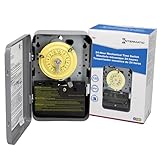
- 24-HOUR MECHANICAL CONTROL - The Intermatic T101 offers direct 24-hour control for a wide range of loads, providing reliability and precision in your daily operations.
- FLEXIBLE ON/OFF OPERATIONS - With the capability of up to 12 ON/OFF operations each day, and a minimum time interval of one hour, this mechanical time switch offers versatility to meet your specific scheduling needs.
- CONVENIENT MANUAL OVERRIDE - The T101 features a manual override switch, adding convenience and flexibility to your control options when needed.
- INCLUDED TRIPPERS - Each unit comes equipped with one ON tripper and one OFF tripper, ensuring a complete and ready-to-use package for your electrical control requirements.
- ROBUST AND TIME-TESTED DESIGN - Built for industrial, commercial, and residential applications, the T100 Series Mechanical Time Switch boasts the highest HP ratings in the industry, providing enduring performance and control for loads up to 40 amps.
What it is not
ActivityWatch produces an activity history and category view. It is not a billable timesheet. The official pages do not describe team approval, invoicing or payroll features, and passive capture cannot decide which hours a client should pay for. Treat its output as evidence you review and turn into entries yourself.
The Tool Desk
Outbyte PC Repair FREERepair Windows errors before they cause bigger problemsFix Now →Outbyte Driver Updater FREEFix the driver behind crashes, sound loss and screen glitchesFind Drivers →Privacy and monitoring
Window, website and idle tracking can reveal sensitive work patterns, including which projects you touch and when. Before you enable any watcher, check what it records and where it is stored. ActivityWatch’s stated local storage is an advantage for personal use. Clockify’s auto-tracker and Kimai’s server store records on the service you connect to. If you plan to use any of these tools to monitor employees, tell them what is captured and who can see it, and confirm that your jurisdiction and employment terms allow it.
Best Value

- Powerful Performance Characteristics--Equipped with a 40A high-capacity switch for robust performance, it features an SPST switch configuration and supports 120 VAC input voltage. The precision 24-hour timing mechanism supports up to 1-12 on/off operations daily, with a minimum on/off interval of 1 hour, ensuring accurate and reliable control
- Versatile Application Scenarios--Designed specifically for defrost systems in commercial refrigeration equipment, it is also widely suitable for indoor lighting, fans, pool pumps , irrigation systems, and water heater timing control. It provides direct 24-hour control for most loads, meeting diverse high-demand commercial and household needs
- Rugged and Durable Design--Constructed with six components made of advanced metal, it features a robust and durable overall structure. Designed to meet commercial standards, this timer can withstand more demanding working environments, ensuring long-term stable operation and effectively extending equipment service life
- Intuitive Programming Setup--The programming process is straightforward: simply pull out the clock dial to calibrate the current time, then fix the ON/OFF trippers to the desired time positions to complete the timing setup. The entire process is quick and simple, requiring no professional skills, enabling precise timing programming with ease
- Safety Assurance Design--Strictly complies with electrical safety standards, supporting solid or stranded copper wire connections and providing clear wiring guidance. The product features power-off protection: in case of a power failure, simply reset the time—all programmed settings remain intact, ensuring quick restoration of normal operation
Which tool to choose
- Freelancer who wants straightforward project timers: start with Clockify. Confirm that a cloud account and browser sign-in are acceptable, and check that the installer matches your distribution and architecture.
- Team or agency that bills clients: evaluate Kimai. Compare the effort of running a self-hosted server against its SaaS option, and if you want a desktop client, treat it as a separate integration and verify its maintenance first.
- Individual who wants to understand computer use: evaluate ActivityWatch. Expect automatic window and idle history, data kept on your device, and no finished sync feature according to the homepage.
Readers who need both accurate billing and a record of computer activity may run two tools side by side. Use the activity history as a reference and enter billable time in the timesheet tool.
Check each product’s current page before installing. Packaging, supported platforms and sync status can change after the October 2026 review.
Quick Recap
Product prices and availability are accurate as of the date/time indicated and are subject to change. Any price and availability information displayed on Amazon at the time of purchase will apply.
Quick wins for a faster PC:
Repair Windows errors before they cause bigger problemsFix Now →Scan for outdated or missing drivers - takes under a minuteDriver Scan →Clear out junk files and repair common Windows errorsFree Scan →



