If your rechargeable table fan will not charge, first check the model’s manual or label for its required cable and power input. Then reseat both cable ends, test a known-good cable and correctly rated power source, and look for visible debris or damage at the charging port. If it still will not charge with a compatible setup, contact the seller or manufacturer rather than opening the fan.
Check the fan’s charging requirements first
There is no single cable, adapter, indicator pattern, or charging time that applies to every rechargeable table fan. Check the label or the manual for your exact model to identify the port, cable ends, and required input. Portable-fan manuals document different charging arrangements, so do not assume that any USB cable or adapter will work (Westinghouse WSFT200A manual; Kogan NBMDTFANPHA manual; Daewoo COL1540 manual).
As an Amazon Associate I earn from qualifying purchases.
Work through the cable, power source, and port
- Reseat both connections. Disconnect the cable from the fan and power source, then reconnect each end securely. Check that the plug fits the fan’s port as specified in its instructions.
- Try a known-good cable and suitable power source. If available, substitute a cable you know works and a power source that meets the fan’s stated input requirements. A damaged cable, inactive power source, unsuitable voltage, or port issue can prevent charging (Portronics support; Westinghouse WSFT200A manual).
- Inspect the charging port. Look for visible lint, debris, or damage. Keep the check gentle: do not put liquid or metal objects into the port. If the port looks damaged, stop troubleshooting and seek service (Portronics support).
- Use only the model’s indicator instructions. Check the manual to learn whether the light should flash, change color, or become steady during charging. Indicator meanings vary by model.
Choose a replacement cable by matching both ends
Before buying a cable, confirm the connector that plugs into the fan, the connector that plugs into the power source, and the fan’s documented charging input. USB-A to USB-C is suitable only when those details match your model. For example, ARCTIC says some USB-C cable combinations may not work with its Summair Plus and recommends the included USB-A-to-USB-C cable; that compatibility guidance is specific to that fan (ARCTIC Summair Plus support).
Recommended Free Tools
Examples of model-specific charging instructions
These examples illustrate why the exact manual matters; their figures and light patterns should not be applied to other fans.
#1 Best Overall
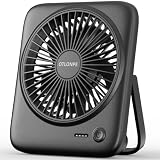
- [Small In Size, Big On Function] Combined with USB Fan + Battery Operated Fan + Emergency Charging function, Otlonpe S-F16B small desk fan would be an everyday-carry-essential fan to cool you off in hot day and is multifunctional to satisfy your diverse needs
- [5-23 Hours Cooling Time] Up to 23 hours cooling time in one full charge with battery mode OR USB mode for no stop working. 4000mAh battery powered fan allows you to enjoy it while travelling, sleeping, working and any other indoor or outdoor activities
- [4 Speed Adjustable Wind] Experience customizable cooling and comfort with the 4 speed settings of our rechargeable fan portable. From a gentle breeze to a powerful gust, each airflow is thoughtfully crafted to cater to your needs
- [Ultra Quiet Portable Fan] Size: 6.6x5.6x1.5 inches, weight: 9.3 oz, and foldable fan bracket making our small fan more easy to carry. Plus, the max noise of quiet table fan less than 35 db, it won't disturb working, studying, sleeping and meeting
- [Easy to Clean, Emergency Charging] Have you ever experienced the desktop fan is inconvenient to clean or cellphone is out of battery at important moments? If so, then our personal fan is a better choice. With a detachable fan frame and emergency charging design, it will bring you more convenience
| Fan | Manual’s stated setup or indication |
|---|---|
| Kogan NBMDTFANPHA | The manual describes a 5V-1A input and a supplied cable with USB-C at the fan end and USB-A at the adapter end. Its light flashes green while charging and turns solid green when full. The manual estimates about four hours for a full charge and says not to exceed eight hours. Kogan manual. |
| Daewoo COL1540 | The manual specifies the supplied micro-USB cable and a USB charger rated at 1A or higher. The light flashes red during charging and changes to white when full. It estimates two to three hours from flat. Daewoo manual. |
| ARCTIC Summair Plus | ARCTIC notes that some USB-C cable combinations may not work and recommends the included USB-A-to-USB-C cable. The support page does not state a general charge-time figure. ARCTIC support. |
When to contact the seller or manufacturer
If the fan remains unresponsive or does not charge after you have tried a working cable and a power source that matches its requirements, contact the manufacturer or seller. A battery malfunction is identified as a service issue in the CF2 instruction manual; internal battery faults are not a reason to open the fan or attempt an unsupported replacement (Geek Aire / Home Easy CF2 manual; Portronics support).
Quick Recap
Best Value
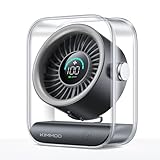
- Ultra-Quiet Operation: At its lowest setting (Speed 1), the fan operates at just 35dB, providing a whisper-quiet and comfortable breeze for undisturbed relaxation.
- Turbo Wind Technology: Equipped with an ultra-high-speed motor and 200% power boost, this fan instantly circulates air throughout the room for rapid cooling.
- 100-Speed Customizable Control: Adjust the fan speed precisely to your preference with 100 levels of wind intensity (Speed 1-100). The powerful motor delivers a wide RPM range (2000-2900) for both gentle breezes and strong airflow.
- LED Digital Display: The clear LED screen shows real-time battery status and wind speed settings for easy monitoring and control.
- Long-Lasting Battery & Fast Charging: Enjoy 8.5 hours of continuous cooling on a single charge, with quick 2.5-hour recharge time (5V/2A adapter). Perfect for both indoor and outdoor use.
Rank #4
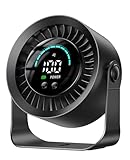
- 【Versatile 2-in-1 Design】Desk Fan & Wall-Mountable Fan – This small usb fan offers ultimate flexibility: use as a table fan on your nightstand or mount on the wall (free adhesive hook included) to save space. Compact size makes it a truly portable fan for travel—easily move from bedroom to office or carry in your bag. Whether you need a personal fan for work or a space-saving solution, this small fan for desk adapts to your life.
- 【Ultra-Long 17-Hour Battery Life】3000mAh Rechargeable Power – Never worry about outlets with this rechargeable fan. The 3000mAh battery delivers up to 17 hours cooling on low speed—perfect for all-night bedroom use or full-day office work. As a true cordless fan, enjoy wireless freedom anywhere. Ideal for travel, camping, or power outages. Charges easily via USB, making it a versatile usb fan for all devices.
- 【100 Speeds + 360° Rotation for Custom Cooling】Experience precise comfort with 100 stepless speed settings, from gentle breeze to powerful fan airflow. Unlike standard desk fans with 3 speeds, fine-tune wind strength to your exact preference. The 360° rotating head directs air up, down, or sideways—making it a truly adjustable fan. Perfect as an oscillating fan for home office or a cooling fan for bedroom use.
- 【Whisper-Quiet Operation】Sleep Better, Work Focused – Designed with noise reduction tech, this quiet bedroom fan operates at barely audible levels, minimizing disturbance during sleep or deep work. As a dedicated bedroom fan, it creates restful nights without humming. In the office, this office fan keeps you cool without interrupting calls. Ideal silent fan for nurseries, libraries, and shared spaces.
- 【Big Smart LED Display】Know Your Settings at a Glance – Stay in control with the built-in LED display. Clearly see current speed level and remaining battery power in real-time—never caught off guard. This intuitive feature makes it the smart choice for a small fan. As a portable fan, the battery indicator is essential for planning. Perfect usb desk fan for work or rechargeable desk fan for travel.
Rank #3

- Portable Desktop Fan: 100 wind speeds to meet a variety of needs.silent gears L1-20,to meet the office,sleep.large air volume L50-100,for outdoor camping cooling,personal travel essentials
- Long life & Battery Display: Battery 2000mah for 10 hours.5000mah for 25 hours.LED display shows remaining power after airflow adjustment.Small desk fans can be used when charging
- PURE MATERIAL & SAFETY: Pure ABS material,no odor.Fingers can't reach in safer, smaller gaps,denser and wider structure,simple but sturdy
- Suitable for Bedroom: Mini fan quiet and soft wind,little white noise.Great for home sleeping.Soft,low-light display.180 degree adjustable angle,flat bedside table or hanging
- WHATOOK brand after-sales service: WHATOOK adhering to the purpose of quality products and services. Strict control of products, rapid response. rechargeable usb fan replacement provided within one year
Rank #2

- 【24000mAh Super Large Battery】FRIZCOL Portable Rechargeable Fan with unique advanced cell technology. It is equipped with 24000mAh rechargeable batteries for 11-60 hrs super-long endurance. You can also use it for your phone, tablet, or laptop in an emergency.
- 【4 Speeds Powerful & Energy-efficient】This camping fan features a premium motor and ultra-thin fan blade to improve wind power while minimizing noise (<30 dB). It has a faster speed (3950 r/min) and stronger wind (5.2 m/s), which provide you with super airflow and keep the air circulation in the tent, and will not disturb your sleep or do anything.
- 【Adjustability / Versatility & Customize Comfort】3 timers give you the option to turn off the battery fan during a break; 2 levels of LED light give your eyes care in the darkness; Easy remote control when you have a distance to the fan; Vertically adjustable fan head to choose the optimal cool breeze you want; Hidden hook at the bottom for easy hanging from the top.
- 【Super Reliable & Stable】The outdoor fan is made from ABS material with sturdy and anti-drop design, you can take it anywhere you want to go on your adventures. The fan also equipped with non-slip pads on the bottom, which makes it more stable on the desktop.
- 【Embrace Outdoor Comfort】Stay cool and serene while conserving energy. Whether hiking, fishing, picnics, beaches, or hot sporting events, our multi-functional outdoor fan is the great camping essential accessory for a refreshing and comfortable experience in nature.
Product prices and availability are accurate as of the date/time indicated and are subject to change. Any price and availability information displayed on Amazon at the time of purchase will apply.
Independent reader supportYour contribution helps us test, update, and keep practical guides available for everyone.



