What’s actually slowing this PC down?
Pick the symptom - the matching free tool is one click away.
For competitive play, neither controller is a proven universal winner. The wireless Razer Wolverine V4 Pro is the more feature-forward choice if you want extra claw-grip bumpers, removable back buttons, adjustable trigger actuation and high-rate polling on PC. The Xbox Elite Wireless Controller Series 2 is a better fit if adjustable stick tension, four paddles, a broad interchangeable-parts setup and a clearly stated battery estimate matter more. This comparison is specifically about the wireless Wolverine V4 Pro: Razer also announced a separate, wired Wolverine V4 Tournament Edition, so “V4” alone does not identify one controller.
What differs between the Wolverine V4 Pro and Elite Series 2?
Both are configurable wireless controllers designed for Xbox and PC, but they emphasize different kinds of adjustment. The V4 Pro adds control surfaces and trigger tuning; the Elite Series 2 lets you change stick tension and swap physical components. The table compares the V4 Pro with the full Elite Series 2 bundle, not the less fully equipped Core version.

As an Amazon Associate I earn from qualifying purchases.
| Feature | Razer Wolverine V4 Pro | Xbox Elite Wireless Controller Series 2 |
|---|---|---|
| Extra controls | Four removable magnetic back buttons and two additional claw-grip bumpers; four onboard profiles. Razer product page | Four paddles; up to three custom profiles plus a default profile. Xbox product page |
| Stick adjustment | Razer describes capacitive/contactless thumbsticks. Its product-page FAQ also uses “Hall Effect,” while the main copy uses capacitive wording; the descriptions are inconsistent. Razer product page | Manually adjustable stick tension across three settings, with sensitivity curves configurable in the Xbox Accessories app. Xbox product page |
| Trigger adjustment | Trigger locks and adjustable trigger actuation. Razer product page | Shorter hair-trigger locks. Xbox product page |
| Polling or latency figures | Razer claims up to 8,000 Hz polling on PC and up to 250 Hz connectivity on Xbox Series X|S. Its newsroom footnote specifies a PC measurement using the Razer Hyper Wireless dongle at 8,000 Hz. Razer’s published response-time claims also differ between sources: sub-1 ms in its newsroom and sub-2 ms on the product page. These are manufacturer claims, not independent head-to-head results. Razer newsroom Razer product page | The reviewed Xbox product page does not state a directly comparable polling-rate or latency figure. Xbox product page |
| Battery claim | Razer’s product page states up to 27 hours in one section and up to 40 hours in its FAQ. The discrepancy is unresolved. Razer product page | Microsoft says up to 40 hours per charge, depending on usage and other factors; its battery testing used preproduction units. Xbox product page |
| Included components | Retail bundle details are not established by the reviewed Razer sources; check the exact regional listing. Razer product page | The full bundle lists paddles, additional thumbsticks and a D-pad, a charging dock, a cable and a case. The Core bundle includes fewer components. Xbox Elite controllers page |
Which controller’s controls suit your play style?
Choose the V4 Pro for more reachable inputs
Razer’s layout combines four removable magnetic back buttons with two extra bumpers positioned for claw-grip use. That gives players options for mapping actions away from the face buttons, but whether the positions feel natural depends on grip and hand size. Razer also offers trigger-actuation adjustment and four onboard profiles. Its newsroom says the capacitive sensors paired with a 16-bit ADC register approximately 3,000 movement steps; that is Razer’s technical claim, not an independent measurement of gameplay benefit. Razer newsroom
Quick wins for a faster PC:
Repair Windows errors before they cause bigger problemsFix Now →Scan for outdated or missing drivers - takes under a minuteDriver Scan →Clear out junk files and repair common Windows errorsFree Scan →Choose the Elite Series 2 for stick-tension and component changes
The Elite Series 2 offers four paddles, three manual stick-tension settings, interchangeable stick tops and a swappable D-pad. You can also adjust sensitivity curves in the Xbox Accessories app. These options may appeal if you want to tune resistance and physical contact points rather than add more bumpers. The full bundle provides a wider selection of included components than Core; compare the exact SKU because the names do not represent the same package.
#1 Best Overall

- 4 MOUSE CLICK BACK BUTTONS & 2 CLAW GRIP BUMPERS — Enjoy the same ultra-responsive actuation found in Razer's top gaming mice with 4 buttons built into the controller’s ergonomic, rubberized handles—topped with 2 claw grip bumpers for even more control
- PRO HYPERTRIGGERS — Set the triggers for instant actuation with zero travel time or ultra precise analog control—be fully immersed in the action and feel every trigger pull with integrated haptic vibrations
- HALL EFFECT PRECISION THUMBSTICKS — Experience analog thumbsticks that are not only more accurate than traditional models but are smoother, lighter, and more durable thanks to their anti-friction rings and pro grade materials
- HYPERSPEED WIRELESS — Delivering an ultra-low latency 2.4 GHz connection via its USB Type A dongle, experience fast, reliable performance that meets the demands of the most intense competitive players on Xbox and PC
- RAZER MECHA-TACTILE ACTION BUTTONS & 8-WAY FLOATING D-PAD — By combining the speed of microswitches with the cushioned comfort of a rubber membrane, compete with quicker inputs that feel just as comfortable to press
Does polling rate make the V4 Pro better for competitive play?
Not on the published figures alone. Razer advertises up to 8,000 Hz polling on PC with its Hyper Wireless dongle, but its newsroom lists up to 250 Hz connectivity on Xbox Series X|S. The PC figure is not an Xbox figure. Microsoft’s reviewed Elite Series 2 product page gives no directly comparable rate, and the available manufacturer materials do not establish that a polling-rate difference produces a measurable in-game advantage or makes one controller better for winning.
Razer’s product materials also contain different response-time claims: sub-1 ms in the newsroom and sub-2 ms on its product page. Treat both as vendor claims, not a shared testing standard. For a buying decision, prioritize the controls and connection profile you will actually use on your platform over a single headline number.
Rank #2

- 8K HZ HYPERPOLLING TECHNOLOGY — Experience ultra responsive performance with a true 8000 Hz polling rate; harness its blistering speed in wired or wireless mode and make every millisecond count
- TMR THUMBSTICKS WITH SWAPPABLE CAPS — Fine-tuned for the most precise in-game control, dominate with laser-sharp aim using anti-drift magnetic TMR thumbsticks that have evolved beyond typical Hall Effect designs
- RAZER’S LIGHTEST WIRELESS ESPORTS CONTROLLER — Experience zero hand fatigue with a form factor designed and refined with top esports players
- 4 MOUSE CLICK BACK BUTTONS & 2 CLAW GRIP BUMPER — Enjoy the same ultra-responsive actuation found in Razer's top gaming mice with 4 buttons built into the controller’s ergonomic, rubberized handles—topped with 2 claw grip bumpers for even more control
- PRO HYPERTRIGGERS — Always be first to fire with lightning fast mouse clicks found in our top gaming mice, or enable full analog control for enhanced precision—all with a flick of a switch
How do compatibility, battery and bundles affect the choice?
Platform and connection
Razer describes the V4 Pro as designed for Xbox and PC, with native Steam support and PC wireless polling features. The Elite Series 2 supports Xbox consoles and Windows PCs; Bluetooth also covers selected mobile devices, subject to platform caveats. Confirm the compatibility details for your device and intended connection before buying, especially if mobile play matters. Razer product page Xbox product page
Free tools Windows power users keep installed
One-click scans. No signup required.
Battery claims are not an even comparison
Microsoft’s estimate for the Elite Series 2 is up to 40 hours, with battery life varying by use and other factors; Microsoft says the testing used preproduction units. Razer’s product page gives two different estimates for the V4 Pro—up to 27 hours in a feature section and up to 40 hours in its FAQ—without explaining the difference. Do not treat the two Razer figures as interchangeable or as a settled comparison with Xbox’s estimate.
Rank #3

- HYPERSPEED WIRELESS: Delivers an ultra-fast 2.4GHz wireless connection via its included USB Type A dongle and ensures seamless performance that meets the demands of competitive gaming on PS5 consoles and PC
- MECHA-TACTILE ACTION BUTTONS: With a shorter actuation distance for quicker button presses and improved tactility to feel every input, the controller brings a whole new level of speed and consistency to gameplay
- 8-WAY MICROSWITCH D-PAD: Feel and hear every single directional press as microswitches are engaged, enabling accurate and intentional moves when doing intricate combos
- HYPERTRIGGER: Always be first to fire with triggers that can switch from measured, full-range pulls to lightning-quick clicks
- 6 REMAPPABLE BUTTONS: Map 4 extra triggers and 2 custom bumpers to preferred commands
Compare the exact Elite package and local price
The full Elite Series 2 bundle and Elite Series 2 Core differ in included accessories. Xbox Canada lists a Canadian suggested retail price of C$229.99 for the full Series 2 and a starting Canadian suggested retail price of C$159.99 for Core; these are regional suggested prices, not current US prices. Xbox Canada No reliable current US price pair for the V4 Pro and Elite Series 2 is established here. Check live prices and availability in your region, and compare like-for-like packages rather than assuming Core includes the full bundle’s accessories.
Independent reader supportYour contribution helps us test, update, and keep practical guides available for everyone.Which one should you buy for competitive play?
- Pick the Razer Wolverine V4 Pro if you want removable back buttons, extra claw-grip bumpers, adjustable trigger actuation, and PC-focused high polling claims—and you are comfortable evaluating those features by feel rather than treating them as proof of a performance advantage.
- Pick the Xbox Elite Series 2 if adjustable stick tension, four paddles, interchangeable controls, and a full bundle with a charging dock matter most. Check whether you are buying the full Series 2 or Core.
- For Xbox-only play, do not choose the V4 Pro on the strength of its 8,000 Hz PC number: Razer lists a separate, lower Xbox Series X|S figure.
- If battery certainty is important, Xbox provides a single up-to-40-hour estimate, while Razer’s own page currently gives conflicting estimates for the V4 Pro.
Published feature sheets support a preference-based decision, not a definitive competitive-performance ranking. Neither manufacturer’s cited product material supplies an independent head-to-head test proving one controller wins more consistently.
Quick Recap
Best Value
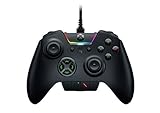
- INTERCHANGEABLE THUMBSTICKS and D PADS — swap between optimized thumbstick heights and shapes, and quickly change between a tilting or individual D Pad buttones
- 6 REMAPPABLE MULTI-FUNCTION BUTTONS — Comes with an additional 2 remappable multi-function bumpers and 4 multi-function triggers
- HAIR TRIGGER MODE plus TRIGGER STOPS — For a competitive edge, Automatic Hair Trigger Mode via two slide-locks on the underside of the controller that greatly reduce travel distance to the main triggers, enabling an ultra-fast rate of fire
- CHROMA RGB LIGHTING — Show off with Razer Chroma's wide selection of lighting effects and stunning profiles, completely customizable through Razer Synapse for Xbox
- ERGONOMIC DESIGN — that stays comfortable after hours of practice, and interchangeable parts so it adapts to different playstyle
Product prices and availability are accurate as of the date/time indicated and are subject to change. Any price and availability information displayed on Amazon at the time of purchase will apply.
Do these 3 things before closing this tab:
1Repair Windows errors before they cause bigger problems2Fix the driver behind crashes, sound loss and screen glitches3Clear out junk files and repair common Windows errors



