The Tool Desk
Outbyte PC Repair FREEClear out junk files and repair common Windows errorsFree Scan →Outbyte Driver Updater FREEFix the driver behind crashes, sound loss and screen glitchesFind Drivers →Kingdom Hearts Cloud Version on Nintendo Switch needs a stable, consistent high-speed internet connection, but Nintendo and Square Enix do not publish a Kingdom Hearts-specific minimum Mbps or latency target. Full Wi-Fi bars do not guarantee a fast connection: they show signal strength, not internet speed. If your stream lags or reports congestion, test the Switch connection, reduce competing network use, and compare wired Ethernet with Wi-Fi where possible.
There is also a time limit to consider: Square Enix says sales of the Switch Cloud titles ended June 9, 2026, and the service is scheduled to end June 9, 2027, both at 23:59 JST. Existing owners should check their own eShop for territory-specific access and any eligible digital-version offer.
As an Amazon Associate I earn from qualifying purchases.
What internet speed does Kingdom Hearts on Switch require?
Nintendo describes Cloud Version games as streamed from a server and requiring a stable, high-speed internet connection. If the connection becomes unstable, the service may disconnect after a few minutes. Neither Nintendo’s general Cloud Version FAQ nor Square Enix’s Kingdom Hearts support materials reviewed here specify a minimum download speed, upload speed, or latency target for this game. See Nintendo’s Cloud Versions of Games – FAQ and Square Enix’s Kingdom Hearts Switch FAQ.
Nintendo’s separate general Switch connection troubleshooting article uses 3 Mbps download and 1 Mbps upload as comparison figures. They are not a Kingdom Hearts streaming requirement or a guarantee that Cloud Version will run smoothly. You can run the console’s test at HOME Menu > System Settings > Internet > Test Connection; note the displayed speeds and whether it connects. Nintendo’s guidance is in How to Troubleshoot Slow Download or Upload Speeds.
#1 Best Overall
![KINGDOM HEARTS Collection [I–III] Amazon Exclusive Edition - Nintendo Switch 2](https://m.media-amazon.com/images/I/41-Ojve+89L._SL160_.jpg)
- KINGDOM HEARTS Collection [I–III] Amazon Exclusive Edition includes a double-sided poster.
- A value packed bundle featuring three collections: KINGDOM HEARTS -HD 1.5+2.5 ReMIX-, KINGDOM HEARTS HD 2.8 Final Chapter Prologue, and KINGDOM HEARTS III + Re Mind (DLC).
- This product is also included in other bundle sets. Please ensure you do not purchase the same content more than once.
- Platform-exclusive Keyblade "Long Night" included with purchase!
- GAME-KEY CARD. 128 GB – Full game download via internet required.
How to troubleshoot lag, congestion errors, or disconnects
- Run the Switch connection test. Open System Settings > Internet > Test Connection. Record the result and the displayed download and upload speeds. Treat Nintendo’s 3 Mbps down / 1 Mbps up figures only as general troubleshooting comparisons, not as a Cloud Version pass mark.
- Reduce other network traffic. Pause large downloads, video streams, or other heavy internet use on the home network, then test the game again. Nintendo notes that multiple devices using the network can contribute to slow connection performance.
- Try Ethernet while the Switch is docked. Nintendo recommends a wired connection to the router where possible. If your dock has no built-in LAN port, a compatible USB LAN adapter is needed. A wired test can help identify Wi-Fi signal or interference trouble; it will not resolve an ISP slowdown or a cloud-service problem.
- Improve Wi-Fi placement and compare bands. Nintendo recommends trying 5 GHz first, but advises testing 2.4 GHz if the connection is poor. Place the router and console in open, central locations with a clear path between them where practical. Move them away from walls, large metal objects, and electronics that can interfere.
- Do not treat Wi-Fi bars as a speed test. Square Enix explains that the Switch indicator shows wireless signal strength, not communication speed. A strong signal can coexist with slow internet communication and still produce lag or a congestion error.
- Use the trial if it is available, then contact the publisher if needed. Nintendo recommends trying a Cloud Version trial before buying, but one successful session cannot guarantee future stability as ISP and home-network conditions change. Nintendo directs unresolved Cloud Version problems to the publisher; for Kingdom Hearts, check current eShop access and Square Enix support.
These steps help isolate common causes; the official guidance does not establish port forwarding, DNS changes, a faster subscription tier, or replacing the router as guaranteed Kingdom Hearts fixes.
Ethernet, 5 GHz, or 2.4 GHz: which should you try?
| Connection option | What to try | Trade-off or limitation |
|---|---|---|
| Wired Ethernet | Connect the dock to the router; use a USB LAN adapter if the dock lacks a LAN port. | Useful for checking whether Wi-Fi conditions are the problem, but requires docking and suitable hardware. It cannot fix ISP congestion or service-side trouble. |
| Wi-Fi at 5 GHz | Try this first if the router offers the band and the connection is stable where the Switch is used. | Actual performance depends on the setup and obstacles; Nintendo does not say it is best in every home. |
| Wi-Fi at 2.4 GHz | Test it if 5 GHz performs poorly. | Nintendo explicitly recommends trying this alternative when the connection is poor; compare observed stability in your own location. |
Nintendo’s connection advice is in How to Improve Connection and Reduce Latency in Cloud Versions of Games and How to Troubleshoot Slow Download or Upload Speeds. There is no universal winner between Wi-Fi bands; obstacles, interference, and the router’s position affect the result.
Rank #2

- Embark on the story of kingdom HEARTS, including an all-new chapter.
- over 140 musical tracks and 20 characters.
- play solo, together in co-op, or battle online in multiplayer
Can you still play Kingdom Hearts Cloud Version on Switch?
According to Square Enix Japan’s notice dated June 10, 2026, sales of all Kingdom Hearts Switch Cloud titles ended on June 9, 2026 at 23:59 JST, and the service is scheduled to end on June 9, 2027 at 23:59 JST. Existing owners may play during the service period. Square Enix also says eligible owners can purchase corresponding digital versions for Switch 2 (and Switch for HD 1.5+2.5 ReMIX) at a discount and transfer cloud save data to digital versions. Because this notice is from Square Enix Japan, check your own eShop for local availability and eligibility: Square Enix service and sales notice.
Trial availability may also vary with the storefront. Square Enix Japan’s support FAQ describes up to two demo attempts, each lasting up to 10 minutes, except HD 1.5+2.5 ReMIX, whose demo lasts up to 15 minutes per attempt. These are limits stated in that regional FAQ, not a promise that a trial can still be downloaded. Nintendo says Cloud Version trials are brief and limited, and trial counts cannot be reset. See Square Enix Kingdom Hearts demo FAQ and Nintendo’s Cloud Version FAQ.
Quick Recap
Best Value
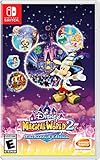
- Disney Magical World 2: Enchanted Edition is the latest installment in the popular Disney franchise - For the first time on Switch, the game lets players enjoy a variety of new adventures in six Disney-themed worlds
- Explore the world of Disney Frozen, dance with Disney princesses, or engage in quests and dungeons
- Players will encounter and interact with well-known characters like Mickey Mouse, Donald Duck, Goofy, Elsa, Anna, Olaf, Ariel. and run their own cafe
- Discover the area where you travel to new worlds, interact with different residents of Castleton and unlock new accessories
- DUNGEONS to defeat: come test your fieriness, help your residents of Castleton and win gems to use at the castle!
Rank #4

- Updated and reconstructed visuals to be far more realistic and richly textured vs the original game
- Upgraded models for each character, graphical updates for a more immersive environment
- Estimated gameplay hours: 40 to 50 per title
- Sound: Players will be able to choose between original sound and the new, re-arranged sound
Rank #3
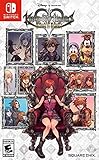
- Embark on the story of kingdom hearts, including an all-new chapter
- Over 140 musical tracks and 20 characters
- Play solo, together in co-op, or battle online in multiplayer
Product prices and availability are accurate as of the date/time indicated and are subject to change. Any price and availability information displayed on Amazon at the time of purchase will apply.




