For most home servers, Raspberry Pi 4 is the more flexible choice. It offers more memory options, built-in Gigabit Ethernet, and USB 3.0. A Raspberry Pi Zero 2 W can run a genuinely light service, but its 512MB of RAM, Wi-Fi-only networking, and single USB 2.0 OTG interface impose tighter limits. Here, “Pi Zero” means the Zero 2 W; the original Zero and Zero W are different models. These recommendations follow from the published specifications, not matched server tests.
What the hardware difference means for a home server
| Feature | Raspberry Pi Zero 2 W | Raspberry Pi 4 Model B | Why it matters |
|---|---|---|---|
| Processor | Quad-core Arm Cortex-A53 at 1GHz (Raspberry Pi Zero 2 W specifications) | Quad-core Arm Cortex-A72 at 1.8GHz (Raspberry Pi 4 specifications) | Pi 4 has higher-spec CPU hardware, but these specifications do not establish a server throughput ratio. |
| Memory | 512MB LPDDR2 (Raspberry Pi Zero 2 W specifications) | 1GB, 2GB, 3GB, 4GB, or 8GB, depending on version (Raspberry Pi 4 specifications) | Pi 4 gives more room for memory-hungry software or several services. |
| Networking | 2.4GHz Wi-Fi; no built-in Ethernet port (Raspberry Pi Zero 2 W specifications) | Gigabit Ethernet and dual-band Wi-Fi (Raspberry Pi 4 specifications) | Pi 4 can connect over wired Ethernet without an adapter; Zero 2 W relies on Wi-Fi unless you add a separate wired-network solution. |
| USB | One USB 2.0 OTG interface (Raspberry Pi Zero 2 W specifications) | Two USB 3.0 and two USB 2.0 ports (Raspberry Pi 4 specifications) | Pi 4 is more convenient for USB storage and peripherals. The Zero 2 W’s single interface can require an adapter and limits what you can attach at once. |
| Boot storage | microSD slot (Raspberry Pi Zero 2 W specifications) | microSD slot (Raspberry Pi 4 specifications) | Include a microSD card in either build; external data storage is an optional extra. |
| Power connection | micro-USB; Raspberry Pi recommends a 5V, 2.5A supply for Zero models (Raspberry Pi Getting Started guide) | USB-C; the specification page calls for 5V, 3A minimum (Raspberry Pi 4 specifications) | Choose a compatible supply and include its cost. These are supply capabilities, not continuous consumption figures. |
Can a Raspberry Pi Zero 2 W run a home server?
Yes, if the service is light and works within 512MB of RAM, Wi-Fi networking, and the board’s limited USB arrangement. It can be a reasonable compact option when those constraints fit the job. The published specifications do not support a universal limit for the number of users, services, or containers it can handle.
As an Amazon Associate I earn from qualifying purchases.
For a workload that may grow, needs wired networking, uses attached storage, or combines several services, the Pi 4’s memory choices and interfaces give it more useful headroom. This is a recommendation based on the documented hardware, not a claim from controlled testing of common server software.
Recommended Free Tools
How much faster is the Pi 4?
The Pi 4 has a higher-spec processor than the Zero 2 W, but the available official sources do not provide a matched Pi 4-versus-Zero 2 W benchmark for home-server tasks. That means there is no grounded multiplier to quote for file serving, web hosting, or other workloads.
#1 Best Overall

- Powerful Performance: Equipped with a quad-core 64-bit ARM Cortex-A53 processor, the Raspberry Pi Zero 2 W delivers a significant performance boost compared to its predecessor. And built-in Wi-Fi and Bluetooth support enable easy wireless communication and Internet access for your projects, five Times Faster.
- SANOOV Basic Starter Kit for Pi Zero 2 W Include: 1. Raspberry Pi Zero 2 W Board 2.Mini HDMI to Standard HDMI adapter 3.Micro-USB to Standard USB OTG Adapter 4.Aluminum Heatsink 5.40 Pin Header.NOTICE: The kit does NOT include , supply power, case, SD card, keyboard, mouse or monitor.
- SANOOV for Raspberry Pi Zero 2 W features: 1GHz quad-core, 64-bit ARM Cortex-A53 CPU VideoCore IV GPU 512MB LPDDR2 DRAM 802.11b/g/n wireless LAN Bluetooth 4.2 / Bluetooth Low Energy (BLE) MicroSD card slot Mini HDMI and USB 2.0 OTG ports Micro USB power HAT-compatible 40-pin header Composite video and reset pins via solder test points CSI camera connector.
- Video Output & Efficient Cooling: Supports 1080p30 video output via the mini HDMI port, making it ideal for multimedia applications and streaming.The aluminum heatsink helps dissipate heat, ensuring stable performance even under heavy workloads.
- Compact Size: The tiny size of the Raspberry Pi Zero 2 W makes it perfect for space-constrained projects and embedded applications.Ideal for a variety of uses, including IoT projects, home automation, media centers, educational tools, and more.
Raspberry Pi Ltd’s Zero 2 W launch announcement, dated 28 October 2021, says the Zero 2 W is “for multi-threaded sysbench it is almost exactly five times faster” than the original Zero. The announcement notes that gains vary by workload; this figure is not a comparison with Pi 4.
Which one uses less electricity?
Raspberry Pi’s hardware documentation lists 350mA for Zero 2 W and 600mA for Pi 4 (Raspberry Pi hardware documentation). These documented current figures are not matched wall-meter readings of equivalent servers at idle or under load. They do not establish annual energy use or cost.
Rank #2

- Latest Version: Higher core clock speed, double memory, more powerful Arm cores, optional RISC-V cores (compared to the 1 series) (This W version has onboard wireless LAN and Bluetooth)
- Switchable Cores: Allows users to choose between dual industry-standard Arm Cortex-M33 cores and dual open-hardware Hazard3 cores
- Compatibility: Delivers a significant performance boost, while retaining software- and hardware-compatible with the 1 series
- Detailed Tutorial: Provides step-by-step guide with MicroPython, C and Processing (Java) Code (The download link can be found on the product box) (No paper tutorial)
- Example Projects: Each project has schematics, wiring diagrams, complete code and detailed explanations (Need extra items)
The recommended supply ratings are also not measurements of what a board continuously draws: Raspberry Pi’s Getting Started guide recommends 5V at 2.5A for Zero models and 5V at 3A for Pi 4 (Raspberry Pi Getting Started guide). To compare running costs for your setup, measure wall power for each complete build under comparable conditions, then apply your electricity tariff. The available official figures do not establish which matched home-server build will cost less to run.
What does a complete setup cost?
Board prices alone do not give a fair build total. Add the compatible power supply and a microSD boot card, then include external storage or an adapter only if your setup needs them. The total depends on current local prices and chosen accessories; the cited manufacturer figures do not establish a current regional total.
Rank #3

- Orange Pi Zero 2W 1GB is powered by Allwinner H618 high-performance quad-core Cortex-A53 processor with up to 1.5GHz, integrated Mali G31 MP2 graphics processor, supporting OpenGL ES 1.0/2.0/3.2, OpenCL 2.0, Vulkan 1.1. It has 1GB LPDDR4 memory specification options, supports 16MB SPI Flash. Outperform the Raspberry Pi Zero 2W.
- Orange Pi Zero 2W 1G mini pc can be extended with USB2.0, 100M Ethernet, IR receiver, audio output, TV-out, power button, etc. via 24Pin connector with adapter board. In addition, the 40Pin expansion port on the board further enriches the motherboard's functional interfaces and enhances the development potential.
- Orange Pi Zero 2W 1gb adheres to the compact and exquisite design concept of the Zero series, with a PCB size of 30mm X 65mm X 1.2mm, and can be widely used in TV boxes, smart screen casting devices, smart home, smart gateway, IoT and other fields.
- Wi-Fi5+BT 5.0, with BLE support: 2.4G/5G dual-band Wi-Fi5 and Bluetooth 5.0 with BLE support, enjoy the wonderful network anytime, anywhere.
- Orange Pi Single Board Computers is open source.
| Price reference | What it establishes | What it does not establish |
|---|---|---|
| Raspberry Pi 4 product page: “From $35” (Raspberry Pi 4 product page) | The manufacturer page’s displayed starting price. | A current price in your country or the total cost of a working server build. |
| Zero 2 W launch announcement: $15 on 28 October 2021 (Raspberry Pi Zero 2 W launch announcement) | A dated launch price. | A current retail quote or a complete setup cost. |
Check local listings for the board and compatible power supply, and price the microSD card and any optional storage or adapter separately. Do not treat either official board figure as a current all-in price.
Independent reader supportYour contribution helps us test, update, and keep practical guides available for everyone.Which board should you choose?
- Choose Raspberry Pi 4 if you expect to run several services, want more memory headroom, prefer wired Gigabit Ethernet, or plan to connect USB storage or other peripherals.
- Choose Raspberry Pi Zero 2 W if the service is genuinely light, compact size matters, Wi-Fi is acceptable, and 512MB of RAM plus the limited USB setup are sufficient.
- If you are unsure, choose Pi 4 for its broader memory and interface options. This is a flexibility recommendation based on specifications, not a reliability finding.
Before buying, check the workload’s memory and CPU needs, whether wired networking matters, which peripherals must be connected, and the full local build cost. If you will keep important data on the server, assess the storage medium and make a separate backup plan; the board specifications do not establish storage durability.
Quick Recap
Best Value

- Broadcom BCM2711, quad-core Cortex-A72 (ARM v8) 64-bit SoC @ 1. 5GHz
- 2. 4 GHz and 5. 0 GHz IEEE 802. 11b/g/n/ac wireless LAN, Bluetooth 5. 0, BLE
- 2 × USB 3. 0 ports, 2 x USB 2. 0 Ports
- 2 × micro HDMI ports supproting up to 4Kp60 video resolution
- Micro SD card slot for loading operating system and data storage
Rank #4
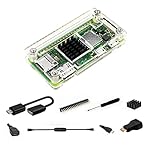
- Pi Zero Open Design Case
- Comes with 7 Including Items
- Use our Power Switch to make shut down easier
- Heatsink can make your Pi stay Cool
- Notice: Pi zero Board is not included
Product prices and availability are accurate as of the date/time indicated and are subject to change. Any price and availability information displayed on Amazon at the time of purchase will apply.
Quick wins for a faster PC:
Clear out junk files and repair common Windows errorsFree Scan →Fix the driver behind crashes, sound loss and screen glitchesFind Drivers →



