Use a QR code when you want a visible, familiar scan path that works through a phone camera; use an NFC tag when a deliberate tap suits the printed item and you can make the tap point and its benefit clear. Neither is a universal winner. The choice depends on the audience, material, interaction and fallback access you can provide.
How QR codes and NFC tags differ on a printed item
| Decision | QR code | NFC tag |
|---|---|---|
| What the reader does | Aims a camera at a visible symbol, then follows the link. Apple documents QR scanning through Camera or Code Scanner. | Brings a compatible phone near the tag. Apple describes this interaction for App Clip experiences, while Android documents operating-system handling of NFC tags. |
| What print production needs | The code is part of the printed artwork and must remain visible and legible. | A physical tag must be integrated with or attached to the printed item. |
| How readers find the interaction | The symbol is visible and can sit beside a short call to action. | The tag can be embedded or unobtrusive, so mark where to tap and explain what the reader will get. |
| Compatibility considerations | Camera-based QR scanning is documented by Apple, but device support and print conditions are not guaranteed universally. | NFC hardware, settings and operating-system behavior vary; Android says NFC can be disabled in settings. |
Both are physical ways to open online content. GS1 Digital Link is data-carrier agnostic and supports carriers including QR codes and NFC tags. GS1 says a QR code or NFC tag carrying a full URL can be used with a smartphone without an app specifically aware of Digital Link: GS1 Digital Link.
As an Amazon Associate I earn from qualifying purchases.
Choose QR for visible, broad-access scan journeys
A QR code is a practical default when a person can see the printed item, point a camera at it and follow a link. It works well for flyers, posters, menus, inserts and product details where the next action is easy to explain beside the code. Apple’s instructions cover scanning QR codes with Camera or Code Scanner on iPhone and iPad: Apple: Scan a QR code with your iPhone or iPad.
Do these 3 things before closing this tab:
1Fix the driver behind crashes, sound loss and screen glitches2Repair Windows errors before they cause bigger problems3Scan for outdated or missing drivers - takes under a minuteFor consumer engagement with product information, GS1 says it currently prefers QR Code with Digital Link because default camera apps can scan QR codes and connect to web resources. That guidance concerns this product-engagement context, not every printed campaign. GS1 also notes that some retail point-of-sale systems cannot yet scan and process 2D barcodes, so some product packaging use cases still need a 1D code during the transition: GS1: 2D barcodes.
#1 Best Overall

- Compact & Portable Design: Each package includes 50 NFC tags with a 1.0-inch round NTAG215 card, as small as a quarter coin, making it easy to carry and store. The adhesive backing ensures effortless attachment to various surfaces
- Durable & Waterproof: Made of high-quality PET material, these NFC tags are waterproof, durable, and designed to withstand wear and tear. They function perfectly even in wet conditions, ensuring reliable performance wherever you use them
- Easy Setup & User-Friendly: Simply hover your NFC-enabled device over the tag to initiate data transfer. Equipped with 504 bytes of NDEF memory, these tags allow quick writing and sharing of information. They also feature a read-write lock function for flexible use.(NOTE*. - It can not be edited or reset after setting it as a read-only tag. )
- Wide Compatibility: These NFC tags are compatible with devices such as NFC-enabled phones and TagMo Amiibo. They are rewritable, so you can store and update different data as needed. Note: Amiibo tags can only be edited once and cannot be reused
- Versatile Applications: Ideal for creating Amiibo cards, sharing social media links, music, connecting to Wi-Fi, or automating smart home tasks. These tags enable quick and easy data sharing for a variety of uses, from gaming to daily convenience
Choose NFC when the tap itself suits the experience
NFC can work well on a card, label or package when the reader is already holding or approaching the item and tapping feels natural. The NFC Forum describes retail uses such as checking product authenticity, opening manuals, reordering consumables, registering a warranty and contacting customer support. Its guidance is to mark the tap location and explain the benefit before asking for an interaction. It also recommends a limited-area pilot and measuring the results: NFC Forum white papers.
A tap alone is not a compelling reason to add NFC. The NFC Forum’s 2018 white paper says: “Only create an NFC experience when you are driving the consumer to a truly valuable experience.” Treat this as industry guidance, not independent evidence that NFC outperforms QR.
Rank #2

- 【Quantity and size】 Each package contains 20 round white NFC cards with 25mm (1 inch) diameter.
- 【With adhesive】The back of each card comes with adhesive, Easy to stick on tables, walls, cars ......More convenient to use!(Not applicable to metal surfaces)
- 【NFC chip type】NTAG215 chip, 504 bytes memory capacity, password protection authentication, high scanning strength, easy to program. With read/write lock function, can be repeatedly edited or read-only.write endurance: >100,000 times(A-mii-bo write only once and not repeatedly erase and rewrite).
- 【Safe material】: Made of durable PVC waterproof material, it can be placed outdoors or near water without the risk of losing its function, with a smooth and shiny surface, resistant to wear and tear, and stable, non-toxic and odorless, hygienic and safe, please feel free to buy.
- 【Compatibility】Compatible with Tagmo A-mii-bo and all NFC-enabled devices.(Easy to Operate:Please make sure your device has NFC function and the NFC switch is turned on before use. After installing the corresponding application, "write" or "enter data", put the NFC card close to the device sensing area, and the data will be automatically entered into your phone)
On Android, tag handling generally depends on supported hardware, tag data, operating-system version and app behavior. Android documentation says NFC tags are usually detected when the screen is unlocked unless NFC is disabled in Settings: Android Developers: NFC basics. Apple describes holding an iPhone near an NFC tag for App Clip experiences; that is a platform example, not proof that every phone or tag setup behaves alike: Apple: App Clips.
The Tool Desk
Outbyte Driver Updater FREEScan for outdated or missing drivers - takes under a minuteDriver Scan →Outbyte PC Repair FREEClear out junk files and repair common Windows errorsFree Scan →Use both only when each route earns its place
A printed QR code can provide a visible alternate for people whose phones lack NFC support or have NFC switched off, while a tag offers a tap route to readers who prefer it. GS1 US allows multiple carriers where appropriate, including line-of-sight QR Code or Data Matrix and non-line-of-sight carriers such as NFC: GS1 US: 2D barcodes.
Rank #3

- ★ Small NFC Coins: The package contains 50 pcs NTAG215 NFC coin tags, diameter 25mm/1 inch, each NFC tag comes with an adhesive back for easy attachment. Small and portable to carry. The quantity is just the right amount for fun and needs; good choice as a small gift for your friend or family. Note: The NFC coins is not anti-metal, and not suitable for use in strong magnetic environment.
- ★ Quality NFC Stickers: Thoughtfully designed and rigorously tested, constructed with durable, waterproof new PVC material while abrasion-resistant and non-toxic. with adhesive back for easy fixing, our NFC tags stickers can be placed virtually anywhere and even if near water without the risk of losing functionality. Note: not designed for use on metal surfaces.
- ★ Wide Application: Compatible with TagMo and most NFC-enabled Android phone & devices, you are able to write the NFC tag easily and make a tag for any weapon, pet, mount or fashion item you want. Quickly share your social messages, music, connect to WiFi,business card, URL, text, security, authentication purposes, ect. The NFC cards with sticker are rewritable, which means you can use them over and over again to store different data and information
- ★ NTAG215 Chip: High quality NTAG215 Chip, with 504 bytes of available NDEF memory. Providing enough storage space, you can quickly write the information you want. It has a read-write lock function that makes the NFC cards can be edited repeatedly or read-only, cannot be edited or reset after set as read-only tag. The blank NFC coins can be read and written over 100,000 times. (for amiiboss, the tags can only be edited once and cannot be reused)
- ★ Easy to Use: When the digital NFC stickers is close to the back of the NFC-enabled phone, the phone can read the information from the tag. No internal energy is required, no battery is required, and no manual pairing is required. From creating personalized shortcuts for your favorite apps to triggering specific actions on your smart devices, the potential is limitless. Explore the endless ways to enhance your digital lifestyle and make everyday tasks more efficient.
Do not add both simply to make a piece seem more interactive. Give each a clear role, ensure both reach the intended content, and avoid crowding the layout with competing instructions. If a QR code is the fallback, make it easy to find and scan.
Plan the campaign before specifying print
- Decide what the interaction delivers. Choose a concrete destination such as product details, a manual, warranty registration or a promotion. Make the benefit apparent before the scan or tap.
- Consider where and how the item will be used. A visible, accessible surface may favor a QR code; a card or package that readers handle may also suit a marked NFC tap point.
- Check the audience’s phones and settings. Test the expected devices and operating-system behavior. Do not treat one platform’s documentation as a guarantee for the whole audience.
- Choose a fallback. Consider a QR code or short printed URL for readers who cannot use the tag, cannot scan the code, or prefer another route.
- Confirm production fit. QR needs legible printed artwork; NFC needs a suitable physical tag integrated with or attached to the item. Obtain project-specific supplier estimates rather than assuming one option costs less.
- Test a representative sample. Check the printed code or tag with the phones and conditions expected in the campaign. For NFC, the NFC Forum recommends a limited-area pilot and measuring effectiveness before wider use.
- Review the destination and maintenance plan. Make sure links lead to a trustworthy, maintained destination and that someone owns updates to the content.
Security and performance depend on the implementation
Neither the label “QR” nor “NFC” guarantees a safe interaction. GS1 warns that QR codes can be misused; brands should maintain trustworthy destinations, and readers should review a link before proceeding: GS1 Digital Link. NFC Forum materials promote security advantages for NFC, but that industry comparison does not establish universal superiority. Consider the actual destination, tag controls and authentication design for the implementation.
Rank #4
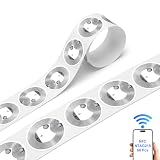
- Tear-Resistant, Splash-Proof & Metal-Friendly — Crafted from premium PET, extremely hard to tear; surface resists light spills and splashes. Enhanced anti-metal interlayer ensures stable signal on laptops, appliances, lockers, tool cabinets, and other metallic surfaces. 100,000+ rewrites keep data fresh for any project
- Massive 504-Byte User Memory — original NTAG215 chip delivers 504 bytes of user storage, the sweet spot for storing lengthy vCards, detailed product info, Wi-Fi credentials with passwords, multi-URL NDEF records, and even Amiibo game data — far beyond what NTAG213 can manage
- 32-Bit Password & ECC Originality Signature — Industrial-grade security with a 32-bit password to block unauthorized reads/writes, plus built-in ECC originality signature to verify authenticity and prevent cloning — ideal for access control, membership cards, and product authentication
- Instant Tap Response & Full Platform Coverage — Fast_Read command captures the complete NDEF message in a single scan, triggering URLs, texts, emails, SMS, WiFi links, and app actions instantly. Works with all NFC-enabled iPhones (iPhone 7 and newer), Android, and Windows smartphones
- Professional Tips for Smooth Writing — For best results: ① Use NXP TagWriter (iOS) or NFC Tools/TagMo (Android); ② Remove metal/magnetic phone cases for stable contact; ③ If write fails due to password protection, unlock first with 0x1B AUTH command; ④ For “tag not supported” errors on iPhone, erase/format NDEF via TagWriter before writing; ⑤ Keep tags away from bending or freezing during storage
There is no established universal cost or conversion advantage for either format in the sources cited here. Compare actual per-piece print and tag costs, setup and maintenance, then measure outcomes in a campaign-specific pilot rather than assuming that a tap or scan will perform better.
Quick Recap
Best Value
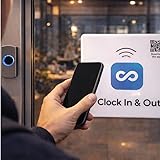
- Works directly with the Connecteam app No power or batteries required Includes an anti-metal layer allowing the tag to work on any surface, including metal High durability with epoxy coating Passive NFC tag – safe and maintenance-free
Product prices and availability are accurate as of the date/time indicated and are subject to change. Any price and availability information displayed on Amazon at the time of purchase will apply.




