Use Puppeteer to visit each authorized URL, set the same viewport before navigation, wait for a page state that suits the site, and save each capture under a unique filename. The script below processes URLs one at a time and closes each page and the browser even if a capture fails. Before automating or retaining screenshots, check the current terms for every publisher you plan to capture: some Indian publishers restrict automated access, copying, or archiving.
Check publisher terms before running a batch
A browser being able to load a page does not mean you have permission to automate access, copy its contents, or keep screenshots. The Indian Express terms dated December 27, 2021 restrict automated access, extraction, downloading, and storage without permission, and also address copying and archiving. The Hindu Group terms prohibit certain scraping or content-collection tools without prior written consent and prohibit caching or archiving. NDTV Profit’s terms restrict automated monitoring or copying and systematic retrieval. Hindustan Times terms surfaced in the available material also restrict automated access and certain copying, caching, archiving, or indexing, with a stated exception for public search engines subject to robots.txt.
As an Amazon Associate I earn from qualifying purchases.
These are examples, not a blanket rule for every Indian publisher or a legal determination. Check the current terms for each chosen domain and obtain publisher approval where required. Do not use Puppeteer to bypass a paywall, CAPTCHA, rate limit, or other access control. For an authorized workflow, use publisher-approved access and retain only what that authorization permits.
PC Slower Than It Used to Be?
A free scan shows the junk files, broken settings and background clutter dragging Windows down - then fixes them in one click.Free scan · Windows 10 & 11Outdated Drivers Are Slowing You Down
One free scan finds every outdated or missing driver and matches the right update for your exact hardware.Free scan · exact hardware matchInstall Puppeteer and prepare the URL list
This Node.js example uses Puppeteer’s JavaScript API and ES module imports. Create a project and install Puppeteer:
#1 Best Overall

- 【Fanless Design for Uninterrupted Stability】Perfect for noise-sensitive environments and 24/7 operation. This mini PC delivers completely silent performance with an efficient cooling system that prevents overheating. It reliably runs office software and HD video without slowdowns, making it ideal for focused offices, home theaters, and demanding industrial IoT applications
- 【Ultra-Portable & Ready for Any Screen】Extremely compact and lightweight, this is a full Windows 10/Ubuntu computer that fits in your pocket. It's the ultimate plug-and-play solution for business presentations on a projector, digital signage in classrooms, or entertainment on your home TV. Achieve true "work from anywhere" flexibility with one device for all scenarios
- 【Stunning UHD 600 Graphics】Experience vibrant, fluid visuals with 4K @ 60Hz output. Powered by Intel UHD 600 Graphics, this mini PC is your perfect home entertainment center for streaming movies, attending online classes, or hosting video conferences. It turns any display into a sharp, high-definition visual experience
- 【Versatile Ports for Easy Expansion】Tackle multiple tasks with ease using our comprehensive selection of ports. Connect storage, keyboards, monitors, and more simultaneously with 2x USB 3.0 ports, a Gigabit LAN port, and a TF card reader. With convenient USB-C charging, it becomes the effortless control center for your office or home setup
- 【Pre-Installed & Ready to Go】Get started immediately with the genuine Windows 10 Pro operating system pre-installed. Paired with 4GB LPDDR4 RAM and 64GB eMMC storage, it's fully equipped for everyday office tasks and HD content right out of the box. This hassle-free setup is perfect for businesses, schools, and users who want a simple, ready-to-run computer
npm init -y
npm install puppeteer
Save the script below as capture-news.mjs. Replace the sample URLs with pages you are authorized to capture. The sample domains are illustrative; they are not a recommendation to automate those publishers.
Runnable sequential screenshot script
import puppeteer from 'puppeteer';
import fs from 'node:fs/promises';

const urls = [
  'https://example.com/',
  'https://news.example.in/'
];

const outputDir = 'screenshots';
const viewport = { width: 1440, height: 900, deviceScaleFactor: 1 };
const navigationTimeoutMs = 45_000;

await fs.mkdir(outputDir, { recursive: true });
const browser = await puppeteer.launch();
const results = [];

try {
  for (const [index, url] of urls.entries()) {
    const page = await browser.newPage();
    const filename = `${outputDir}/site-${String(index + 1).padStart(2, '0')}.png`;
    const capturedAt = new Date().toISOString();

    try {
      await page.setViewport(viewport);
      page.setDefaultNavigationTimeout(navigationTimeoutMs);
      const response = await page.goto(url, { waitUntil: 'networkidle2' });

      if (!response) {
        throw new Error('Navigation returned no main-document response');
      }

      await page.screenshot({ path: filename, fullPage: true, type: 'png' });
      console.log(`Saved ${filename} (${response.status()})`);
      results.push({ url, filename, capturedAt, status: response.status(), outcome: 'saved' });
    } catch (error) {
      console.error(`Failed ${url}: ${error.message}`);
      results.push({ url, filename, capturedAt, outcome: 'failed', error: error.message });
    } finally {
      await page.close();
    }
  }
} finally {
  await browser.close();
}

await fs.writeFile(
  `${outputDir}/manifest.json`,
  JSON.stringify({ viewport, results }, null, 2)
);

if (results.some(result => result.outcome === 'failed')) {
  process.exitCode = 1;
}
Run it with node capture-news.mjs. It creates the screenshots directory if needed, saves one PNG per URL, and writes a manifest with each URL, filename, timestamp, viewport, status where available, and outcome. A failed URL is recorded and does not prevent later URLs from being attempted; the process exits with a failure code after the batch if any URL failed.
Choose viewport-only or full-page capture
Viewport-only image
Page.screenshot() captures the current viewport by default. To make that explicit, use fullPage: false. This is useful when comparing the visible top of each site or when you need captures with the same pixel dimensions.
The Tool Desk
Outbyte Driver Updater FREEScan for outdated or missing drivers - takes under a minuteDriver Scan →Outbyte PC Repair FREERepair Windows errors before they cause bigger problemsFix Now →Full-page image
Use fullPage: true to request an image of the full document. Puppeteer’s ScreenshotOptions reference defines fullPage as false by default, so set it explicitly when you need a full-page capture. A very tall page or a page that loads more content while scrolling may require site-specific handling; one full-page call is not a guarantee that every lazy-loaded item or dynamic module has appeared.
Capture one element
If you need a specific article card, headline block, or other element rather than the entire page, locate it and call ElementHandle.screenshot(). For example:
Rank #2
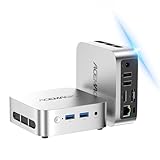
- 【Smooth Multitasking for Work & Data Review】Powered by Ryzen 5 3500U and 16GB RAM, this mini PC handles multiple data analysis spreadsheets, browser tabs, and operation strategy documents simultaneously without lag. The 256GB SSD cuts large file loading time down to seconds, making it a perfect fit for long hours of order performance review and daily office tasks.
- 【Dual 4K Display for Boosted Work Efficiency】Equipped with dual 4K video output, you can run your business metrics dashboard on one screen and draft work reports on the other at the same time. No more constant window switching, it helps you stay focused and get more done in less time during busy workdays.
- 【Palm-Sized & Travel-Ready for On-the-Go Use】This compact mini PC easily slips into your backpack, so you can take it between home, office, co-working spaces or even short trips. It supports stable Wi-Fi 6 connection, letting you join cross-border meetings and handle urgent work smoothly no matter where you are.
- 【Quiet & Low-Power for Daily Home & Entertainment】The near-silent cooling system never disturbs your focus or late-night rest. It delivers smooth 4K media playback and handles mainstream casual esports titles easily, while its low-power design keeps long-hour running costs at a very friendly level.
- 【Rich Ports & Solid Build for Long-Term Use】Built with a durable metal chassis and full-featured ports including Type-C, HDMI and USB, it works seamlessly with your monitors, controllers, speakers and other peripherals. It fits perfectly on any small desk, leaving plenty of space for your other daily gear.
const article = await page.$('article');
if (!article) throw new Error('Could not find the article element');
await article.screenshot({ path: 'screenshots/article.png' });
The selector is site-specific; inspect the page and choose a stable selector permitted by the publisher’s terms.
Keep the captures comparable
Set the viewport before navigation and use the same dimensions and device scale factor for each URL in a comparison batch. Responsive sites can change their layout when the viewport changes. Choose dimensions for the intended output rather than treating 1440 by 900 as a universal standard. A mobile capture is a separate responsive view, not simply a smaller desktop screenshot; use a consistent mobile viewport for every site in that batch.
What’s actually slowing this PC down?
Pick the symptom - the matching free tool is one click away.
Puppeteer’s viewport guidance recommends setting the viewport before navigating when a site may respond to viewport changes. If you change viewport after loading, the page may reflow and trigger additional behavior, making comparisons less consistent.
Choose a readiness condition that fits the page
The example waits for networkidle2, a navigation option that can be a useful starting point, not proof that a news page has fully settled. A publisher page may keep connections open, update modules dynamically, load ads, or defer images until they approach the viewport. Conversely, a page’s load event can occur before all content you care about is visible.
- For a mostly static page, try a navigation wait such as
domcontentloadedornetworkidle2, then verify the result on representative pages. - If a particular headline or container must be present, wait for a selector with
page.waitForSelector('selector')after navigation. - If content is lazy-loaded below the fold, controlled scrolling can prompt it to load, but the exact tactic must be validated on the target site; there is no generic guarantee for all news pages.
- Set a project-appropriate timeout and decide whether the batch should continue after an individual failure. The example records the failure and continues.
For instance, to wait for a known page element after navigation, add await page.waitForSelector('main article', { timeout: 15000 }); before taking the screenshot. Replace the selector with one that actually exists on your authorized target pages.
Rank #3

- 【Supports Linux and Win11】Micro PC win 11 equipped with Celeron J4105 (2GHz to 2.7GHz) processor, supports Win 11 Pro OS, supports Linux, Ubuntu as well. This portable and powerful fanless mini computer is a great helper for your business, office, entertainment, classroom, conference room, industrial IOT applications, home and more
- 【Low-noise fanless design and PC material】Mini PC fanless has a special cooling system and outer texture design (efficient heat dissipation) to simulate overheating, no fan no noise. Provides a quiet and stable computer environment when using, portable PC supports 7/24 hours operation
- 【USB-C and multiple interfaces】Desktop mini PC stick Win 11 Pro equipped with 1 x USB-C (wider compatibility), 2 x USB 3.0 ports, TF card reader, 1 x HDMI 2.0 ports, 1 x Gigabit LAN port, 1 x 3.5 mm audio jack, you can connect to multiple devices such as projector, NAS, monitor, keyboard mouse, etc., mini desktop supports USB PD 3.0 Charge 0 Charge 024 W)
- 【Dual band Wi-Fi & 4K @ 60Hz】Portable mini pc stick server built in 2.4/5GHz I/O ports, WiFi and Bluetooth 5.0, our fanless mini PC equipped with HDMI port together with the UHD 600 graphics, supports HDMI 4K UHD graphics output, which can improve your video images to be more vivid
- 【Storage and storage】Mini PC stick HDMI equipped with 8GB LPDDR4, 128GB eMMC, fully functional to perform Win11 and HD video, micro computer can be easily connected to other devices, so you can easily deal with multiple tasks and projects at the same time
Name files so URLs cannot overwrite each other
The script uses a zero-padded index in filenames, so two URLs on the same host still produce separate files. This avoids collisions that can happen when a filename is derived only from the hostname. The manifest keeps the original URL and capture outcome alongside each filename, making it easier to trace a file back to its source.
If you prefer host-based filenames, sanitize the hostname and retain an index as well; URLs may repeat a host or include paths that would otherwise collide. Avoid writing raw URLs directly into paths without sanitizing them.
Handle failures and clean up reliably
The inner finally closes the current page whether navigation or screenshot capture succeeds or throws. The outer finally closes the browser even if the loop fails. This prevents a failed site from leaving the browser process running.
The script treats a missing main-document response as a failure and logs HTTP status when a response exists. An HTTP error status does not necessarily mean navigation itself threw, so inspect the recorded status and the screenshot before treating a file as a valid page capture. If a browser launch fails, check that the runtime can start Puppeteer’s browser and that the host has the required system libraries.
PNG, JPEG, and output size
The sample writes PNG files, which preserve crisp text and avoid lossy compression. If smaller files matter more than lossless output, request JPEG and set a quality value, for example await page.screenshot({ path: filename, type: 'jpeg', quality: 80, fullPage: false });. Quality is relevant to JPEG; do not assume that a JPEG and PNG of the same page will have the same size or visual characteristics. Use the format and capture extent that suit the downstream use.
Rank #4

- 👍【Intel N150 Processor 】Beelink MINIS13 Mini PC has pre-installed with W11 home system, built-in Intel N150 Processor. up to 3.6 GHz,Greatly suitable for your home entertainment, streaming video, Web browsing, work
- 👍【16G DDR4 RAM+500G SSD】Beelink MINIS13 Mini PC built-in 16GB DDR4 RAM and 500G M.2 SATA3 2280 SSD, Another slot is M.2 PCIe 3.0 x1(NVMe)
- 👍【Intel Graphics 24EUs 1000MHzs】Beelink mini pc support HDMI (MAX 4K 60Hz). The Mini Computer uses Intel Graphics 24EUs 1000MHzs support 4K FPS video playback, which brings you first-class viewing experience
- 👍【Meet Daily work Needs】 The latest wireless connectivity with WiFi6 and LAN 2.5Gbps Ethernet allow for easy connectionsfreeing you from the constraints of cables while eliminating delays and disconnections, With Bluetooth 5.2, you can connect a mouse, stereo or headset to save space in the office
- 👍【Certification & Reliable Support Service】 All of Beelink Mini PCS obtained with FCC, CE, RoHS certification. All have passed strict inspection before shipping. If you have any questions about our mini pc, Please don't hesitate to contact us. We offer lifetime technical support, 3-year warranty and one on one customer service.
Performance and batch reliability
Sequential processing is a sensible default for a small batch: it is straightforward, limits simultaneous browser work, and makes failures easier to associate with a URL. It is an implementation choice, not a Puppeteer requirement. If you later add bounded concurrency, keep a limit rather than opening an unbounded number of pages, and confirm that your authorization and target site can support the request pattern.
Capture duration depends on the target site’s response, chosen readiness condition, and screenshot size; no single wait condition gives a universal completion time. For recurring jobs, retain the manifest, review failed entries, use an explicit timeout policy, and avoid retry loops that could repeatedly hit a publisher without permission.
Troubleshooting
Navigation times out
The page may have persistent network activity, a slow response, or a blocked request. Try a more suitable readiness event such as domcontentloaded, or wait for a page-specific selector after navigation. Set a timeout that reflects your workflow; do not simply remove time limits.
The screenshot is blank or missing expected modules
Check whether navigation returned a response and whether the target content exists before capture. A load or network-idle condition may not correspond to the content you need. Wait for a relevant selector and validate lazy-loaded behavior on that specific site.
Free tools Windows power users keep installed
One-click scans. No signup required.
Images below the fold are absent
Many pages defer images until they are near the viewport. A full-page screenshot request does not establish that every lazy image has loaded. If those images are necessary, use an authorized, site-validated scroll or readiness strategy before capturing.
Best Value

- 💡【Compact size & incredible performance】Beelink MINI S13 is equipped with processor N150 Max Turbo 3.6GHz( pre-installed with W-11 Home. The compact size makes the mini pc a top choice for your light OFFICE work
- 💡【Intel Graphics 】MINI S13 Mini Desktop Computer has equipped with Intel Graphics 24EUs 1000MHz Graphics supporting 4k video playback and web surfing. HDMI MAX 4K 60Hz lets you watch videos smoothly
- 💡【Storage Expansion Option & Efficient Heat Dissipation】Beelink MINI S13 Mini Desktop PC has built-in 16GB DDR4, 500GB M.2 SSD (Support up to 2TB M.2 SATA3/PCIe SSD 2280. It has combined with a quiet large fan, energy-saving, and low power consumption, suitable greatly for you woking
- 💡【Rich interfaces】The Mini Computer is designed with 5.5*2.5 DC Jack*1, USB2.0 480Mbps*1, USB3.2 Gen2(10Gbps)*3, LAN 2.5G*2, 3.5mm Phone Jack(Two-in-one)*1, HDMI(Max 4K 60Hz)*1, Locking*1
- 💡【Reliable Lifetime Service】We have been devoting to the production and R&D of Mini PC. Please feel free to contact us if you have any questions. We offer lifetime technical support, a 3-year warranty, and one on one customer service.
Files are overwritten
Use a unique index or another collision-resistant naming scheme. Host-only filenames can collide when capturing multiple URLs from one domain; the sample’s numbered filenames avoid that issue.
The browser does not close after a failure
Keep page closure in an inner finally and browser closure in an outer finally. Avoid removing those cleanup blocks when adding custom capture logic.
A publisher blocks automation or presents a CAPTCHA
Stop rather than attempting to evade the block. Confirm permission and use publisher-approved access methods; do not bypass CAPTCHAs, paywalls, rate limits, or access controls.
Do these 3 things before closing this tab:
1Repair Windows errors before they cause bigger problems2Fix the driver behind crashes, sound loss and screen glitches3Clear out junk files and repair common Windows errorsOr skip the browser setup
If an authorized workflow needs an API rather than a locally managed browser, ScreenshotNeo is a screenshot API and MCP server. Its endpoint can return a screenshot or PDF from a single GET request. The example below saves a WebP capture of the supplied URL; see the ScreenshotNeo API documentation for parameters and response details.
curl -G "https://api.screenshotneo.com/v1/shot" -d access_key=YOUR_API_KEY --data-urlencode url=https://example.com/ -o shot.webp- Cookie and consent banners are accepted before capture, and 60+ known consent platforms, newsletter popups, and chat widgets can be removed; each step can be turned off.
- Bot checks/CAPTCHAs, blank pages, timeouts, failed loads, and cache hits cost nothing; response headers identify the page verdict and whether it was billed.
- An MCP server provides
take_screenshot,get_page_info, andcapture_pdftools for AI agents and MCP clients. - The Free plan includes 1,000 shots per month with no card; paid plans start at $5 for 3,000 shots. Every feature is on every plan.
Sign up for 1,000 free screenshots a month, with no card required.
Frequently Asked Questions
Can I run the loop with several URLs from the same publisher?
Technically, yes, but first confirm that the publisher permits the access pattern and screenshot retention you intend. The numbered filenames prevent URLs from overwriting one another.
Does Puppeteer guarantee that a full-page screenshot includes every lazy-loaded item?
No. A full-page capture requests the document’s full extent, but lazy or dynamically inserted content may need a site-specific, validated readiness strategy.
Recommended Free Tools
Quick Recap
Product prices and availability are accurate as of the date/time indicated and are subject to change. Any price and availability information displayed on Amazon at the time of purchase will apply.




