What’s actually slowing this PC down?
Pick the symptom - the matching free tool is one click away.
You can publish to Medium without an API by signing in and using Medium’s web editor. A Chrome extension may offer a separate way to transfer content, but Medium’s documentation does not identify or endorse an extension for this job, or verify any extension’s compatibility or safety. If you need to move a published webpage, Medium also has a built-in URL import tool.
What Medium’s API policy means
Medium’s Help Center says it “will not be issuing any new integration tokens for our API and will not allow any new integrations.” The same guidance says existing tokens continue to work. This is a limit on new integrations, not a statement that all API use has stopped. See Medium’s API/Importing guidance.

As an Amazon Associate I earn from qualifying purchases.
How to publish without an API
Medium’s web editor is the documented no-API route. Sign in, create a draft, prepare the story in the editor, then review its settings and publish. Medium says drafts save automatically. Its first-story guide describes writing and publishing in the editor.
Do these 3 things before closing this tab:
1Clear out junk files and repair common Windows errors2Scan for outdated or missing drivers - takes under a minute3Repair Windows errors before they cause bigger problems- Sign in to Medium in your browser and choose Write to start a draft.
- Type or paste your text into the editor. Use Medium’s formatting and media controls to add headings, images, embeds, and other elements.
- Review the draft for formatting and missing content. If you are moving a post from another site, transfer only material you have the right to publish.
- Open the publishing menu, review the story settings, and publish when ready.
For content pasted from elsewhere, formatting and media may need attention. Medium’s import troubleshooting guidance recommends creating a draft, pasting the content, adding missing images or embeds, and formatting it manually if the importer does not work.
#1 Best Overall
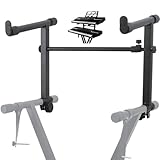
- 【Dual-Use Extension Stand】The keyboard stand is specially designed to heighten the original keyboard stand. It can work as a second-tier extension bracket mounting on the keyboard stand to place two keyboards, or can be installed on the second-tier bracket as a third-tier bracket, meeting diverse playing needs of users.
- 【16.54”-28.74” Adjustable Stand Width】The width of the stand can be freely adjusted from 16.54in to 28.74in to fit different types of electronic keyboards. With wide adjustment range, you can make it adapt better to your keyboard by releasing and tightening the knob, which can be done quickly within few seconds.
- 【Solid Construction】Made of high strength iron material, the extension adapter is sturdy and durable for long term use. Rugged structure works well to withstand heavy keyboards without bending or breaking and avoid wobbling to hold your keyboard stably, so that you can enjoy your performance with confidence.
- 【Easy to Use】The product is provided with an installation accessories set, together with pre-installed screws, helping you mount the extension stand easily through simple tightening of the knobs. Warm tips: it is only suitable for keyboard stands with 1in-wide round tubes. Please check your keyboard before purchase.
- 【Perfect for Keyboard Players】With exquisite workmanship, the metal stand is an excellent electronic keyboards accessory used at home, in the studio or on the stage. It is suitable for both beginners and professionals, allowing them to stand or sit on a stool for more wonderful playing experience.
When Medium’s URL import is the better fit
Medium’s “Import a story” feature is for a post that is already published on another website. Provide its URL, then review and edit the imported draft before publishing. Medium says the tool automatically backdates the post and adds a canonical URL pointing to the original source. Those behaviors distinguish importing an existing webpage from composing a new story or transferring material with an extension. See Medium’s importing guide.
If Medium cannot parse the webpage, its guidance is to move the content manually into a new draft, including any images or embeds that did not transfer.
Independent reader supportYour contribution helps us test, update, and keep practical guides available for everyone.What to verify before using a Chrome extension
A browser extension would be a third-party option, not a Medium-supported publishing path established by the documentation above. Medium says writing requires a supported browser, but its reviewed guidance does not specify Chrome versions or confirm compatibility with any extension. It also does not establish an extension’s permissions, privacy practices, or behavior.
Recommended Free Tools
Before relying on a particular extension, check its current Chrome Web Store listing and publisher, requested permissions, privacy terms, maintenance history, and documented or demonstrated behavior. Treat those details as specific to that extension, and do not assume Medium endorses it. If you cannot verify what it accesses or does with your content, use Medium’s editor or URL importer instead.
Quick Recap
Best Value

- ➤ USB EXTENSION CORD: Perfect for gaming, charging, office work, and everyday use. The long USB cable lets you use devices comfortably from a distance without dealing with short cables or hard-to-reach USB ports. It can also be used to extend surveillance cameras with a USB-A interface
- ➤ UNIVERSAL COMPATIBILITY: The USB male to female extension cable works seamlessly across with Windows, Mac OS, Linux, and Chrome OS. USB cable extender is compatible with VR headsets, Playstation, Xbox, keyboard, mouse, printer, scanner, webcam, USB flash drive, card reader, hard drive and more
- ➤ EXQUISITE WORKMANSHIP: USB extender cable is engineered with corrosion-resistant nickel-plated connectors and multiple layers of shielding to minimize interference. Premium aluminum alloy casing for better heat dissipation
- ➤ 480 MBPS DATA TRANSFER & CHARGING: Charging and data transmission two in one, the charging speed is up to 5V/1A and the data transfer rate of upto 480 Mbps. USB A Extension cable is backwards compatible with USB 1.1
- ➤ LIFETIME WARRANTY: BlueRigger cables are backed by a Lifetime Warranty and US-based customer support
Rank #4
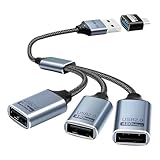
- Expand USB Ports Easily--The Duttek USB 2.0 Splitter 1 to 3 instantly adds three USB 2.0 female ports to your laptop, PC, or OTG-compatible device.Perfect for connecting keyboards, mice, printers, or flash drives simultaneously. Features a durable braided cable and supports 480Mbps high-speed data transfer—ideal for file sharing or peripheral expansion. An additional USB A to USB C Adapter is also given as a gift
- We also include an additional USB A to USB C adapter as a gift. This can be better switched to a USB C to 3 USB A splitter cable. You don't need to worry about port issues. One USB 2.0 splitter 1 to 3 + USB A to USB C adapter allows you to enjoy free use. this USB 2.0 adapter 1 to 3 simplifies your workspace. Use it with printers, LED lights, or controllers—supports up to 3 devices at once without extra power.
- This USB 2.0 Male to 3 Female Splitter delivers stable 480Mbps transfer speeds, ensuring quick file backups and smooth peripheral operation. OTG-enabled for compatibility with smartphones, tablets, and gaming consoles. The 3-port USB 2.0 hub eliminates port shortages without compromising performance.
- Plug-and-Play Convenience--No drivers needed!The Duttek 3-port USB splitter works instantly with Windows, macOS, Linux, and Chrome OS.Hot-swappable design lets you connect/disconnect devices safely.Backward compatible with USB 1.1 devices.
- Durable Braided Cable Design--Built with a tangle-free braided nylon cable, this USB 2.0 extension cable 3 port resists wear and fraying.The reinforced connectors provide a secure fit for multi-device charging and data syncing. Compact and lightweight for home,office, or travel use.
Rank #3
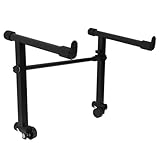
- This is for the 2 tier keyboard stand, X- style keyboard stand in the picture is not included. Must be used with a X- style keyboard stand. Note: random style accessory
- The telescopic stabiliser bar can be adjusted to the width of the keyboard stand. Adjustable width: 45- 75cm/ 16.5- 29.5Inch; Size: 33 x 31 cm/ 13 x 12.2Inch ( H x L )
- The round tube of the X- style/ keyboard stand must be 25mm in diameter, with no obstructions at the joints, so that it can be easily installed and used
- The left stand has a smaller hole, the right has a larger hole; the left telescopic pole is thinner. There is a rubber sleeve at the end of the tube to your instrument from damage
- Your black portable second tier keyboard stand extension is made of heavy duty durable metal and rubber
Which route fits your source content?
| Route | Best for | What to expect |
|---|---|---|
| Medium web editor | A new story or content you are transferring manually | Requires signing in; you add or check formatting and media in the editor. |
| Medium URL import | A post already published on another website | Medium says it backdates the imported post and sets a canonical URL to the original; review and edit before publishing. |
| Chrome extension | Depends on the particular extension | Medium’s reviewed documentation does not verify an extension’s features, permissions, compatibility, or safety. |
Product prices and availability are accurate as of the date/time indicated and are subject to change. Any price and availability information displayed on Amazon at the time of purchase will apply.




