Do these 3 things before closing this tab:
1Repair Windows errors before they cause bigger problems2Fix the driver behind crashes, sound loss and screen glitches3Clear out junk files and repair common Windows errorsGoogle Pixel’s Screen reactions feature records your display and front-facing camera together, placing your live selfie video over the screen capture. It’s a quick way to make a reaction or tutorial in one take; despite Google calling the result a “green screen,” the setup does not describe removing or replacing the background behind you.
What Pixel Screen reactions does
Screen reactions combines a full-display recording with a live front-camera view overlaid on the screen. You can interact with the phone normally while recording, and move or resize the selfie view during the take. Google describes it as a way to make a “green screen” without setting one up, but its instructions establish a picture-in-picture workflow—not chroma-key background removal. Google’s June 2026 Pixel Drop announcement calls it a Pixel-first experience; the May 12, 2026 Android creator announcement describes recording yourself and your screen at the same time.

As an Amazon Associate I earn from qualifying purchases.
How to record your face and screen on a Pixel
- Check that your phone is running Android 17 or newer. Screen reactions requires a full-display recording, not a recording limited to one app, according to Google’s June 2026 Pixel Drop instructions.
- Swipe down twice to open Quick Settings, then tap the screen-recording control.
- Turn on Show selfie camera. Google’s more detailed setup guide calls the capture option Selfie + audio; choose that mode to start recording. See the Google Store setup guide.
- Use your phone as usual while recording. Tap, drag, or resize the selfie overlay to position it on the screen.
- Stop the recording when finished. Google says the video saves to the device and can then be shared.
Which Pixel phones support it?
Google’s setup guide lists Pixel 6 and newer phones and requires Android 17. That eligibility does not guarantee the control is already available on every handset: rollout and menu availability can vary. Install available system updates, then check the screen recorder’s controls on your phone.
What to expect from the selfie overlay
- You can reposition and resize it: adjust the selfie view while the recording is in progress.
- Front-camera zoom is not supported: Google’s setup guide identifies this limitation for the mode.
- It is not documented as a background remover: the feature overlays your camera feed on the screen recording. Google’s “green screen” wording refers to the combined recording workflow, not a stated effect that cuts out your room.
Why it can help with reactions and tutorials
The practical benefit is making a single recording that shows both what is happening on the phone and your live reaction or explanation. For that basic result, Google presents Screen reactions as avoiding a separate green-screen setup. Its announcements do not give a topic-specific adoption or performance statistic, nor establish video quality or frame rate, so those should not be assumed from the feature description.
Quick Recap
Rank #4
Rank #3

- High-Quality Recording - The R1 digital voice recorder is equipped with dual microphones, one with high sensitivity and one with low sensitivity, along with a professional recording IC. Combined with DSP & RTC intelligent noise reduction technology, it provides a high-quality recording experience. It is highly suitable for journalists, students, singers, writers, office workers, lawyers, audio creators, and more
- Multiple Recording Modes - The R1 voice recorder offers multiple recording modes, utilizing different recording configuration to meet the needs of various recording scenarios, including General, Interview, Meeting, Lecture, and Pocket modes, to achieve the best recording quality. Additionally, it provides two types of automated recording: Scheduled Recording and Automatic Recording, to simplify your tasks
- Optional Automatic Backup - This digital recorder allows you to choose to back up recordings when saving them to prevent loss of files due to storage media failure. It is recommended to enable this feature for important recordings
- Offline Speech-to-Text - The R1 audio recorder features a built-in offline intelligent speech-to-text function, allowing you to obtain instant transcription while recording. Additionally, you can export STT document to maximize work efficiency
- Touchscreen Control - The R1 sound recorder is equipped with a 3.69-inch high-definition touchscreen, offering you full touchscreen control while also retaining traditional button functions. This greatly accommodates different control preferences
Rank #2

- Superior Audio Quality:Digital voice recorders deliver high-quality recordings with minimal background noise and interference, outperforming traditional analog tape recorders.
- User-Friendly Interface:Featuring a clear OLED display that provides essential information including recording status, battery level, and other operational data for easy navigation and control.
- Equipped with 64GB of storage space and supporting multiple compressed formats, this device accommodates extended recording sessions while minimizing storage concerns.
- Multi-Purpose Functionality:Ideal for various applications including lectures, meetings, interviews, podcasts, and personal memos.
- Extended Battery Performance:Through optimized power consumption and increased battery capacity, the recorder supports up to three days of continuous MP3 format recording.
#1 Best Overall
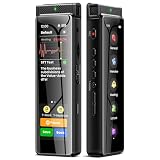
- High-Quality Recording - The R1 digital voice recorder is equipped with dual microphones, one with high sensitivity and one with low sensitivity, along with a professional recording IC. Combined with DSP & RTC intelligent noise reduction technology, it provides a high-quality recording experience. It is highly suitable for journalists, students, singers, writers, office workers, lawyers, audio creators, and more
- Multiple Recording Modes - The R1 voice recorder offers multiple recording modes, utilizing different recording configuration to meet the needs of various recording scenarios, including General, Interview, Meeting, Lecture, and Pocket modes, to achieve the best recording quality. Additionally, it provides two types of automated recording: Scheduled Recording and Automatic Recording, to simplify your tasks
- Optional Automatic Backup - This digital recorder allows you to choose to back up recordings when saving them to prevent loss of files due to storage media failure. It is recommended to enable this feature for important recordings
- Offline Speech-to-Text - The R1 audio recorder features a built-in offline intelligent speech-to-text function, allowing you to obtain instant transcription while recording. Additionally, you can export STT document to maximize work efficiency
- Touchscreen Control - The R1 sound recorder is equipped with a 3.69-inch high-definition touchscreen, offering you full touchscreen control while also retaining traditional button functions. This greatly accommodates different control preferences
Product prices and availability are accurate as of the date/time indicated and are subject to change. Any price and availability information displayed on Amazon at the time of purchase will apply.
Independent reader supportYour contribution helps us test, update, and keep practical guides available for everyone.



