The Tool Desk
Outbyte PC Repair FREERepair Windows errors before they cause bigger problemsFix Now →Outbyte Driver Updater FREEScan for outdated or missing drivers - takes under a minuteDriver Scan →You can’t overclock a CPU with MSI Afterburner: its overclocking controls are for graphics cards. It can show CPU monitoring statistics, but CPU tuning requires a supported motherboard BIOS setting or a platform utility such as Intel Extreme Tuning Utility (XTU) or AMD Ryzen Master. The right option depends on your exact processor, motherboard, and firmware.
What MSI Afterburner can—and can’t—do
MSI describes Afterburner as a GPU utility, with controls and guidance for graphics-card core and memory clocks, voltage, temperature, and its GPU OC Scanner. The guide’s references to CPU temperature monitoring do not mean that the program can change CPU clocks or voltage. See MSI’s Afterburner guide.
As an Amazon Associate I earn from qualifying purchases.
So, do not follow an Afterburner GPU overclocking tutorial expecting it to tune your processor. GPU clock controls, increments, and procedures are not CPU instructions.
Crashes, No Sound, or Screen Glitches?
Random freezes, missing sound and display glitches usually trace back to one bad driver. Find and replace yours safely.Free scan · under a minutePC Slower Than It Used to Be?
A free scan shows the junk files, broken settings and background clutter dragging Windows down - then fixes them in one click.Free scan · Windows 10 & 11Choose a CPU tuning method that supports your hardware
| Method | Where settings are applied | What to verify |
|---|---|---|
| Motherboard BIOS/UEFI | Firmware, before the operating system loads | Check the manual for your exact motherboard and processor. Available menus and options vary by board, CPU, and firmware. Intel outlines BIOS tuning in its BIOS overclocking guide; MSI’s BIOS manual likewise cautions that options vary. |
| Intel Extreme Tuning Utility (XTU) | Windows utility | Confirm that your specific processor and system support the utility and the tuning options you intend to use. Intel explains the platform-dependent process in its CPU overclocking guide. |
| AMD Ryzen Master | Windows utility | Confirm that your processor and system are supported, and follow AMD’s setup and safety guidance in the Ryzen Master user guide. |
These are possible routes, not interchangeable guarantees: a utility may not expose every control, and a motherboard may restrict or label settings differently. There is no universal best method without knowing the specific system.
#1 Best Overall
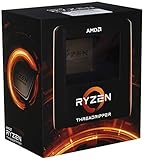
- An astonishing 32 cores and 64 processing threads for serious designers and artists
- Incredible 4. 5 GHz max boost frequency, with a huge 144MB cache
- Unlocked, with new automatic overclocking feature
- Quad-Channel DDR4 and 88 total PCIe 4. 0 lanes
- 280W TDP, Cooler not Included. OS Support : Windows 10 - 64-Bit Edition, RHEL x86 64-Bit, Ubuntu x86 64-Bit
Identify your system before changing CPU settings
- Find the processor model. Check your operating system’s system information or the processor documentation. Record the full model, not just the product family.
- Find the motherboard model and BIOS version. Check system information or the board’s firmware screen. If you have a prebuilt computer, also identify its manufacturer and model because its firmware may differ from retail-board guidance.
- Check the manufacturer’s documentation. Look up the exact processor and motherboard, confirm that the proposed tuning method and controls are supported, and read the instructions for saving settings and restoring defaults.
- Account for cooling and workload. Note your cooling setup and the tasks you want to run. A setting that behaves differently under sustained work may not be suitable just because the system starts successfully.
Without those details, it would be unsafe to prescribe a CPU ratio, voltage, temperature limit, or sequence of BIOS changes. Use only settings the documentation for your hardware supports; do not copy values from an unrelated PC.
Prepare for testing and recovery
- Record baseline temperatures and system behavior before tuning so you have a point of comparison.
- Know how to restore firmware defaults and how your particular board recovers from a failed boot before making changes.
- Make changes only through the documented controls for your system, then check temperatures and stability under the workloads you actually use.
- If the system becomes unstable, overheats, or fails to boot, stop testing and follow the board or computer maker’s documented recovery procedure.
Overclocking can cause instability or hardware damage. MSI’s BIOS manual warns that improper overclocking may void warranty or damage hardware. AMD’s Ryzen Master warning says operation outside official specifications or factory settings may damage components, cause instability or data loss, shorten component life, and may not be covered by AMD or the system maker’s warranty. The consequences and coverage depend on the hardware and warranty terms.
Rank #2

- Features 32 cores and 64 processing threads for demanding professional software applications
- Incredible 5.3 GHz Max Boost Frequency, with a huge 160MB Cache
- Unlocked, with automatic overclocking feature
- Eight-Channel DDR5 RDIMM support up to 2TB, and 128 usable PCIe 5.0 lanes for the ultimate bandwidth and I/O
- 350W TDP, Cooler Not Included
Download Afterburner only from a legitimate source
If you still want Afterburner for graphics-card tuning or monitoring, MSI warns about fake download sites and identifies MSI and Guru3D as legitimate download locations. MSI’s product page listed versions 4.6.6 Final and 4.6.7 Beta, both released in September 2026, when checked on October 7, 2026. These are release listings, not a claim that either version is right for every system; check the MSI Afterburner page for current availability.
What you need for a model-specific procedure
To choose the correct CPU tuning path and explain its documented controls, you need the exact CPU model, motherboard or computer model, BIOS version, and cooling setup. With no system details, a universal step-by-step overclocking recipe would risk giving you settings your hardware does not support.
Quick Recap
Best Value
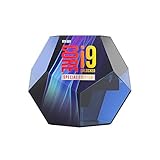
- Protection plan Offering peace of mind when overclocking select unlocked Intel Core processors
- Allows you to claim a replacement Processor in the unlikely event of your Processor failing due to overclocking
- Take advantage of the additional performance headroom of select unlocked Intel Core processors
Rank #4

- Incredible 12 Cores and 32 Threads of processing power
- 4.0 GHz precision boost (up to 4.2 GHz with XFR)
- 38MB of cache memory
- 64 PCIe Gen3 Lanes
- Quad channel DDR4 with support for ECC for reliable throughput
Rank #3
- Features 24 cores and 48 processing threads for demanding professional software applications
- Incredible 5.3 GHz Max Boost Frequency, with a huge 152MB Cache
- Unlocked, with automatic overclocking feature
- Eight-Channel DDR5 RDIMM support up to 2TB, and 128 usable PCIe 5.0 lanes for the ultimate bandwidth and I/O
- 350W TDP, Cooler Not Included
Product prices and availability are accurate as of the date/time indicated and are subject to change. Any price and availability information displayed on Amazon at the time of purchase will apply.




