Free tools Windows power users keep installed
One-click scans. No signup required.
I’m learning Elm for its ideas and its focused approach to frontend development—not because there is evidence that it is automatically better for AI-assisted coding. AI agents can help with Elm, but community reports point to a mixed picture: useful compiler feedback alongside limited examples, large-module context problems, and tools that can be fragile. The practical path is to learn from Elm’s official guide, use package documentation as needed, and treat an agent’s output as a draft to understand and verify.
Why I’m choosing to learn Elm
Elm is a frontend language with a distinct way of structuring programs. I’m interested in learning it for the programming ideas and the focused frontend experience, rather than treating it as a shortcut to faster AI-generated code.


As an Amazon Associate I earn from qualifying purchases.
There is also a human reason to explore it: in an October 5, 2026 post, Elm author Evan Czaplicki wrote, “Many people have such a nice time writing their frontend code with Elm that they end up wanting the same level of quality in their backend code as well.” That is his description of a motivation he has seen, not a claim that Elm is the right choice for every project.
How to start learning Elm
Begin with the official guide
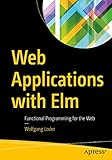
Elm’s official documentation recommends starting with its guide, then consulting documentation for the packages a project uses. The guide repository describes the introduction as a book that will remain freely available online. That makes the official guide a sensible first resource; there is no need to assume a paid course or book is required.
#1 Best Overall
- Work through the official guide. Follow its examples and build an understanding of the language before relying on an agent to generate unfamiliar code.
- Read package documentation when you add a dependency. Use the documentation for the specific packages your project adopts rather than guessing at APIs from generated code.
- Use compiler feedback as a learning loop. When a build reports an error, inspect what it means and why the code failed. A clean compile is useful evidence, not proof that the program expresses the behavior you intended.
The official starting point is the Elm Guide; the documentation guidance is on Elm’s documentation page.
Can AI agents write Elm well?
There is no controlled study in the sources reviewed that establishes how well coding agents perform on Elm, and no basis for calling Elm categorically better for AI-assisted programming. A March 2026 Elm Discourse discussion asks, “Is Elm a great language for AI to code in?” Community members report both helpful agent assistance and difficulties. Those are individual experiences, not systematic performance evidence.
Where Elm may help an agent
Some participants point to compiler feedback and structured JSON errors as useful in an agent workflow. A compiler can give an agent concrete problems to address, and structured errors may be easier to process than loosely formatted output. That advantage still depends on the agent understanding the intended behavior and the surrounding project.
The Tool Desk
Outbyte PC Repair FREERepair Windows errors before they cause bigger problemsFix Now →Outbyte Driver Updater FREEScan for outdated or missing drivers - takes under a minuteDriver Scan →Where the workflow can struggle
Community reports also cite fewer Elm examples in training data, large files that make it harder to keep relevant code in context, and fragile language-server tooling. Tests can miss intent, too: passing tests do not establish that an agent has implemented the right behavior if the tests fail to cover it.
These trade-offs suggest a practical boundary: use an agent to explain, draft, or help debug a focused change, but keep the task and expected behavior explicit. Review the code, check the package documentation, and run the relevant build and tests yourself. Compiler success is one checkpoint, not a substitute for human judgment.
What Elm’s recent development says—and does not say
Elm remains under incremental development, but that does not mean future features arrive on a predictable schedule. As of October 7, 2026, the official news page listed Elm 0.19.2 in July 2026 and 0.19.1 in October 2019; Evan Czaplicki announced Elm 0.19.3 on October 5, 2026. Check the project’s news page for the latest release information, since release status can change.
Czaplicki’s July 6, 2026 account of Elm 0.19.2 says that, in his experiment, it compiled 850,000 lines of Elm code from scratch in 5.7 seconds and took under 350 milliseconds for incremental builds. Those figures describe his particular experiment, not a general benchmark or a prediction of build times for an individual project.
The project roadmap is also explicit about uncertainty: “There is no timeline with exact dates.” It describes ports and custom elements as ways to work with web-platform capabilities when Elm packages are unavailable. That is useful context if you are considering a project that needs browser capabilities beyond its package ecosystem, but it is not a promise about when roadmap work will ship.
Best Value
How to decide whether Elm fits your agent-assisted project
Rather than asking whether Elm is universally good or bad for AI, consider the work in front of you:
- Task and ecosystem fit: Does the project suit Elm’s frontend focus, and are the packages you need available?
- Examples and documentation: Can you and your agent find relevant, current examples and package guidance?
- Feedback quality: Can you use compiler errors to refine a change while still checking its intended behavior?
- Code organization: Can the work stay in modules and files that are manageable for you and the agent?
- Tool reliability: Does your editor and language-server setup behave reliably enough for the workflow you want?
- Human direction: Are you prepared to specify intent, review changes, and test the result instead of accepting generated code on trust?
For someone learning Elm, those questions need not be settled before starting. The official guide provides a concrete way to learn the language, while small exercises let you see how compiler feedback and AI assistance work in your own setup. The community discussion is a reason to keep expectations realistic, not a substitute for evidence about your particular agent, editor, or project.
Quick Recap
Product prices and availability are accurate as of the date/time indicated and are subject to change. Any price and availability information displayed on Amazon at the time of purchase will apply.
Do these 3 things before closing this tab:
1Clear out junk files and repair common Windows errors2Fix the driver behind crashes, sound loss and screen glitches3Repair Windows errors before they cause bigger problems



