Do these 3 things before closing this tab:
1Clear out junk files and repair common Windows errors2Fix the driver behind crashes, sound loss and screen glitches3Repair Windows errors before they cause bigger problemsThe Eufy Indoor Cam S350 combines a 4K wide-angle lens with a 2K telephoto lens, motorized pan-and-tilt, and tracking. Its strongest case is flexible indoor coverage; the main catches are that a microSD card is sold separately, tracking or Dual View recording tops out at 2K, and it does not support Apple HomeKit or Google Home. The points below reflect Eufy’s specifications and support materials, not independent image-quality or reliability testing.
What the S350’s two cameras offer
Eufy identifies the Indoor Cam S350 as model T8416. It has a 4K wide-angle lens and a 2K telephoto lens, with Eufy listing 3× optical zoom and 8× digital zoom. The wide lens is suited to monitoring a room; the narrower telephoto view is intended to bring a distant area closer.
As an Amazon Associate I earn from qualifying purchases.
| Lens | Resolution | Field of view | Focal length |
|---|---|---|---|
| Wide-angle | 4K (3840 × 2160) | 130° diagonal; 110° horizontal; 58° vertical | 2.8 mm |
| Telephoto | 2K (2304 × 1296) | 46° diagonal; 41° horizontal; 23° vertical | 8 mm |
These figures, along with dual f/1.6 lenses and 15 fps, come from Eufy’s technical specifications. Zoom figures describe different methods: optical zoom uses the telephoto lens, while digital zoom enlarges the image electronically. Eufy’s specifications do not establish how either lens performs in an independent image-quality test.
PC Slower Than It Used to Be?
A free scan shows the junk files, broken settings and background clutter dragging Windows down - then fixes them in one click.Free scan · Windows 10 & 11Outdated Drivers Are Slowing You Down
One free scan finds every outdated or missing driver and matches the right update for your exact hardware.Free scan · exact hardware matchHow much of a room can it cover?
Eufy’s support specification gives the camera 360° of horizontal pan and 75° of vertical tilt. Its regional product-page material has also listed 355° horizontal travel, so the published horizontal figure varies by Eufy source; the support specification is the clearest technical reference. The camera can turn toward a monitored area rather than relying on a fixed view, and Eufy lists preset monitoring positions and two active zones for each preset.
#1 Best Overall

- 𝐃𝐮𝐚𝐥-𝐋𝐞𝐧𝐬 𝟒𝐊 𝐕𝐢𝐞𝐰𝐬 | See a full-room view and close-up details on one screen. Whether watching kids play or ensuring an elderly parent is safe, seamlessly zoom in on the action while viewing the whole room with 4K UHD clarity.
- 𝐂𝐚𝐩𝐭𝐮𝐫𝐞 𝐄𝐯𝐞𝐫𝐲 𝐃𝐞𝐭𝐚𝐢𝐥 𝐰𝐢𝐭𝐡 𝟖× 𝐇𝐲𝐛𝐫𝐢𝐝 𝐙𝐨𝐨𝐦 | The 4K wide-angle and 2K telephoto cameras work together. Easily zoom in to verify an elder’s medication or see what a toddler is holding, giving you the precision to protect your loved ones.
- 𝟑𝟔𝟎° 𝐂𝐨𝐯𝐞𝐫𝐚𝐠𝐞 𝐰𝐢𝐭𝐡 𝐀𝐮𝐭𝐨 𝐓𝐫𝐚𝐜𝐤𝐢𝐧𝐠 | Automatically track moving people and pets. Set auto-zoom presets for frequently checked spots (crib, pet bed, front door)—and jump there with a single tap. See every corner clearly.
- 𝐈𝐧𝐭𝐞𝐥𝐥𝐢𝐠𝐞𝐧𝐭 𝐒𝐨𝐮𝐧𝐝 𝐚𝐧𝐝 𝐌𝐨𝐭𝐢𝐨𝐧 𝐃𝐞𝐭𝐞𝐜𝐭𝐢𝐨𝐧 | Smart AI recognition sends alerts only for moments that matter. Perfect as a baby, pet, or elder monitor—get instant notifications when your baby cries, a dog barks, or an elder needs help.
- 𝐒𝐞𝐜𝐮𝐫𝐞 𝐋𝐨𝐜𝐚𝐥 𝐒𝐭𝐨𝐫𝐚𝐠𝐞 𝐚𝐧𝐝 𝐏𝐫𝐢𝐯𝐚𝐜𝐲 𝐰𝐢𝐭𝐡 𝐍𝐨 𝐌𝐨𝐧𝐭𝐡𝐥𝐲 𝐅𝐞𝐞 | Save over $300/year. Local SD card storage (not included) prevents online leaks and keeps moments private. A physical privacy mode ensures your family's life remains secure.
The two lenses do not mean that every recording mode retains the maximum resolution of both. Eufy’s FAQ says tracking or Dual View recording is limited to a maximum of 2K. That trade-off matters if you want the camera to follow movement: the feature prioritizes keeping a subject in view over recording at the wide lens’s full 4K resolution.
What detection and tracking features are included?
Eufy lists human, pet, crying, motion, and audio detection, as well as AI tracking, pet commands, and two-way full-duplex talk. In Eufy’s description, AI tracking moves the camera to keep a target within the field of view. Detection types and tracking are manufacturer-described features, not evidence of a particular recognition accuracy.
Rank #2

- 𝟒𝐊 𝐔𝐥𝐭𝐫𝐚-𝐂𝐥𝐞𝐚𝐫, 𝟐𝟒/𝟕 𝐑𝐞𝐜𝐨𝐫𝐝𝐢𝐧𝐠 | Capture every detail, day or night, with crystal-clear 4K recording. Stay connected with family, baby, nanny and pets using the built-in two-way audio for real-time communication.
- 𝟑𝟔𝟎° 𝐏𝐚𝐧𝐨𝐫𝐚𝐦𝐢𝐜 𝐕𝐢𝐞𝐰 | Easily navigate your home’s view with new app features like Quick Focus Tap and Panoramic View, allowing you to instantly switch focus by tapping the desired area on your screen.
- 𝐀𝐈-𝐏𝐨𝐰𝐞𝐫𝐞𝐝 𝐃𝐞𝐭𝐞𝐜𝐭𝐢𝐨𝐧 & 𝐒𝐦𝐚𝐫𝐭 𝐀𝐮𝐭𝐨 𝐓𝐫𝐚𝐜𝐤𝐢𝐧𝐠 | Harness the power of advanced on-device AI to distinguish humans, pets, audio cues, and crying sounds. The camera automatically tracks movement when a person or pet is detected, providing a complete view of their activity.
- 𝐂𝐨𝐥𝐨𝐫 𝐍𝐢𝐠𝐡𝐭 𝐕𝐢𝐬𝐢𝐨𝐧 𝐰𝐢𝐭𝐡 𝐁𝐮𝐢𝐥𝐭-𝐈𝐧 𝐒𝐩𝐨𝐭𝐥𝐢𝐠𝐡𝐭 | The integrated spotlight allows seamless switching between color night vision and infrared night vision for crystal-clear nighttime surveillance. The spotlight also doubles as a deterrent.
- 𝐒𝐦𝐚𝐫𝐭 𝐇𝐨𝐦𝐞 𝐂𝐨𝐦𝐩𝐚𝐭𝐢𝐛𝐢𝐥𝐢𝐭𝐲 | Works effortlessly with HomeKit, Alexa, and Google Assistant for enhanced home automation. (Note: HomeKit supports up to 1080P resolution.)
Eufy states that human detection works up to 30 ft, but labels this a lab result and cautions that actual results may vary between day and night. The same technical entry lists face detection up to 30 ft. These are Eufy’s figures, not independently measured ranges. For night vision, Eufy specifies two 850 nm infrared LEDs with illumination up to 40 ft (12 m); placement can affect the result because nearby surfaces may reflect infrared light.
Recording, microSD, and storage choices
The camera has no internal storage, and a microSD card is not included. Without a storage option, Eufy says you can still use live view, two-way talk, and motion notifications, but the camera will not save video clips. For local recording, Eufy recommends a separately purchased Class 10 microSD card of up to 128 GB. Eufy also lists HomeBase 3 and cloud storage as alternatives.
Rank #3
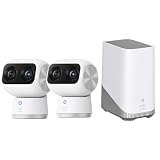
- Superior Clarity: With dual cameras and 4K UHD resolution, this indoor camera delivers clear and detailed views of your home. Whatever you use it to monitor, you'll see it with incredible clarity.
- Advanced Zoom Capabilities: The 4K wide-angle and 2K telephoto cameras work together to provide an impressive 8× hybrid zoom.
- Complete Coverage: The 360° Coverage capabilities ensure a complete view of your space without blind spots. This makes it an excellent dog camera or cat camera.
- Night Vision: With an f/1.6 aperture sensor and 2 high-powered infrared LED lights, faces can be seen clearly up to 32 ft away, even in low-light conditions.
- What's in box: 2 Cam kit of eufy Indoor Cam S350 and Homebase S380 (Homebase 3)
Eufy estimates that a 128 GB card can hold up to 120 hours (five days) when recording continuously at the highest resolution. The FAQ says duration depends on video-quality settings, so treat this as a conditional maximum rather than a guaranteed retention period. Continuous recording and event-based recording will also produce different totals.
Smart-home compatibility and connection
Eufy’s FAQ says the S350 does not support Apple HomeKit or Google Home. It does support Alexa and Google Assistant smart displays for showing live footage. HomeBase 3 compatibility requires firmware V3.3.2.6 or later, according to Eufy; firmware requirements may change.
Rank #4

- 𝐑𝐞𝐥𝐞𝐯𝐚𝐧𝐭 𝐑𝐞𝐜𝐨𝐫𝐝𝐢𝐧𝐠𝐬 | The on-device AI determines whether a human or pet is present and only records when an event of interest occurs.
- 𝐓𝐡𝐞 𝐊𝐞𝐲 𝐢𝐬 𝐢𝐧 𝐭𝐡𝐞 𝐃𝐞𝐭𝐚𝐢𝐥 | View every event in up to 2K clarity (1080P while using HomeKit) so you see exactly what is happening inside your home.
- 𝐒𝐦𝐚𝐫𝐭 𝐈𝐧𝐭𝐞𝐠𝐫𝐚𝐭𝐢𝐨𝐧 | Connect your IndoorCam to Apple HomeKit (download our HomeKit User guide in the product information section below), the Google Assistant, or Amazon Alexa for complete control over your surveillance.
- 𝐅𝐨𝐥𝐥𝐨𝐰𝐬 𝐭𝐡𝐞 𝐀𝐜𝐭𝐢𝐨𝐧 | Once motion is detected, the camera automatically locks onto and tracks the moving object. Its pan-and-tilt system delivers 360° coverage, letting you see the whole room clearly from corner to corner.
- 𝐂𝐨𝐦𝐦𝐮𝐧𝐢𝐜𝐚𝐭𝐞 𝐅𝐫𝐨𝐦 𝐘𝐨𝐮𝐫 𝐂𝐚𝐦𝐞𝐫𝐚 | Speak in real-time to anyone who passes via the camera’s built-in two-way audio.
Eufy specifies dual-band Wi-Fi 6 at 2.4 GHz and 5 GHz and advertises WPA3. The camera uses a 5 V/2 A USB-C power input. These are compatibility and hardware specifications; they do not amount to an independent assessment of network performance.
Privacy behavior and cloud handling
Eufy says Privacy mode turns the camera toward a wall or a chosen preset position, then turns the camera off and stops recording. This is a more explicit physical-camera behavior than simply muting notifications, but it depends on enabling the mode when you want monitoring paused.
Best Value

- 【𝟒𝐊 𝐔𝐥𝐭𝐫𝐚-𝐂𝐥𝐞𝐚𝐫, 𝟐𝟒/𝟕 𝐑𝐞𝐜𝐨𝐫𝐝𝐢𝐧𝐠】 Capture every detail, day or night, with crystal-clear 4K recording. Stay connected with family, baby, nanny and pets using the built-in two-way audio for real-time communication
- 【𝟑𝟔𝟎° 𝐏𝐚𝐧𝐨𝐫𝐚𝐦𝐢𝐜 𝐕𝐢𝐞𝐰】 Easily navigate your home’s view with new app features like Quick Focus Tap and Panoramic View, allowing you to instantly switch focus by tapping the desired area on your screen.
- 【𝐀𝐈-𝐏𝐨𝐰𝐞𝐫𝐞𝐝 𝐃𝐞𝐭𝐞𝐜𝐭𝐢𝐨𝐧 & 𝐒𝐦𝐚𝐫𝐭 𝐀𝐮𝐭𝐨 𝐓𝐫𝐚𝐜𝐤𝐢𝐧𝐠】 Harness the power of advanced on-device AI to distinguish humans, pets, audio cues, and crying sounds. The camera automatically tracks movement when a person or pet is detected, providing a complete view of their activity.
- 【𝐂𝐨𝐥𝐨𝐫 𝐍𝐢𝐠𝐡𝐭 𝐕𝐢𝐬𝐢𝐨𝐧 𝐰𝐢𝐭𝐡 𝐁𝐮𝐢𝐥𝐭-𝐈𝐧 𝐒𝐩𝐨𝐭𝐥𝐢𝐠𝐡𝐭】The integrated spotlight allows seamless switching between color night vision and infrared night vision for crystal-clear nighttime surveillance. The spotlight also doubles as a deterrent.
- 【𝐒𝐦𝐚𝐫𝐭 𝐇𝐨𝐦𝐞 𝐂𝐨𝐦𝐩𝐚𝐭𝐢𝐛𝐢𝐥𝐢𝐭𝐲】 Works effortlessly with HomeKit, Alexa, and Google Assistant for enhanced home automation. (Note: HomeKit supports up to 1080P resolution.)
Eufy says recordings are encrypted and bound to the Eufy account. Its FAQ also notes that cloud-based features, including Cloud Backup or thumbnail previews, may send video or thumbnail previews to the cloud as needed. These are the manufacturer’s descriptions; they are not a substitute for an independent security audit.
Setup and placement
Eufy’s user guide lists the camera, USB cable, power adapter, wall mount, positioning sticker, screw pack, and quick-start guide in the box. A screwdriver, drill, or ladder may be needed depending on where you install it. Disconnect power before mounting.
- Choose a position with a useful view of the room and access to power.
- Keep the camera at least 0.2 m (0.7 ft) from walls or other objects, as Eufy advises, to reduce infrared reflection that may affect night vision.
- If wall mounting, use the supplied mount and positioning materials, and disconnect power before installation.
- Connect the camera to power and configure its network, detection, storage, and privacy settings in the Eufy app.
Who should consider the Indoor Cam S350?
The S350 is most compelling for someone who wants to steer an indoor camera across a room, use a wide view and a telephoto view, and have local-card or hub storage options. Its tracking and dual-lens setup add flexibility, but tracking and Dual View recording are capped at 2K, and recording locally requires buying a card separately.
Free tools Windows power users keep installed
One-click scans. No signup required.
It is a less natural fit if Apple HomeKit or Google Home is essential, or if you expect a camera to save clips without adding storage. Eufy’s published specifications explain what the S350 is designed to do, but they do not provide independent evidence about image quality, reliability over time, or how it compares with other cameras.
Quick Recap
Product prices and availability are accurate as of the date/time indicated and are subject to change. Any price and availability information displayed on Amazon at the time of purchase will apply.




