AI predictive maintenance estimates whether an asset is moving toward failure, then turns that risk signal into an inspection, repair, parts reservation, schedule change or controlled shutdown. It works by combining condition sensors and machine or PLC telemetry with operating context, maintenance records and work orders. A model learns normal behavior for a specific asset and operating state, detects meaningful deviations and gives maintenance staff lead time to act.
The reliable approach is not to install one sensor and wait for a guaranteed failure date. Start with one critical asset and one failure mode, establish a contextual baseline, validate alerts with technicians and connect approved alerts to your CMMS or EAM workflow. Accuracy, savings and payback must be measured for the particular plant; official guidance does not support one universal percentage for every deployment.

As an Amazon Associate I earn from qualifying purchases.
What AI predictive maintenance does
Traditional preventive maintenance replaces or services equipment on a calendar or usage interval. Predictive maintenance instead uses evidence about the asset’s current condition. AI and machine-learning models compare new measurements with the asset’s learned operating envelope and estimate anomaly risk, a likely failure mode or remaining useful life.
Quick wins for a faster PC:
Clear out junk files and repair common Windows errorsFree Scan →Scan for outdated or missing drivers - takes under a minuteDriver Scan →The evidence can include vibration, temperature, acoustic or ultrasonic readings, pressure, flow and motor-current signatures. It can also include device identifiers, timestamps, status codes, production state, ambient conditions, previous maintenance, work orders and inspection results. IBM describes this combination of IoT data, maintenance history and environmental context as the basis for finding changes from normal behavior.
#1 Best Overall

- INDUSTRIAL VIBRATION METER – VM-424 WITH REMOTE SENSOR PROBE - Designed for vibration measurement on motors, pumps, compressors, gearboxes, fans and rotating machinery where direct placement of a handheld meter is difficult. The external sensor allows technicians to reach narrow measurement points while keeping the main unit at a safe and comfortable viewing position.
- 3-IN-1 VIBRATION MEASUREMENT – ACCELERATION VELOCITY DISPLACEMENT - Measures Acceleration 0.1–199.9 m/s² (peak), Velocity 0.1–199.9 mm/s (RMS) and Displacement 0.001–1.999 mm (p-p), enabling technicians to evaluate key vibration parameters used in machine condition monitoring and preventive maintenance inspections.
- DUAL FREQUENCY ACCELERATION MODES – 10HZ–1KHZ AND 1KHZ–3KHZ - Low frequency mode supports general machine vibration evaluation such as imbalance or structural vibration, while high frequency mode helps observe higher-frequency vibration components during mechanical diagnostics.
- REMOTE PIEZOELECTRIC SENSOR – STABLE CONTACT MEASUREMENT - External shear-type accelerometer connected by cable allows precise probe positioning on bearing housings, pump casings and motor frames while the display remains easy to read during measurement.
- INTERCHANGEABLE PROBE TIPS – MAGNETIC, SHORT AND LONG CONTACT - Includes magnetic base tip for hands-free contact on metal surfaces as well as short and long probe tips for measurements on flat surfaces, narrow housings and recessed machine components.
An output should be treated as a probability or risk signal, not as a promise that a component will fail on a particular date. The practical question is whether the warning arrives early enough, with enough confidence and useful context, to change a maintenance decision.
What it can detect
- Imbalance, misalignment, looseness and bearing deterioration in rotating machinery.
- Abnormal heat caused by friction, overloaded components or electrical problems.
- Air or steam leaks and distinctive bearing noise detected acoustically or ultrasonically.
- Pump, compressor, hydraulic and process degradation indicated by pressure or flow changes.
- Rotor issues, electrical imbalance, load variation and insulation problems visible in motor-current signatures.
What it cannot guarantee
- It cannot eliminate failures or provide an exact failure date in every operating condition.
- It cannot compensate for missing sensors, unreliable timestamps, poorly coded maintenance events or a process that changes without being labeled.
- It cannot decide a safety-critical shutdown without human and engineering controls unless that action has been separately validated and approved.
Build a predictive-maintenance system step by step
1. Select one asset and one failure mode
Choose an asset where an early warning changes what the team can do. Suitable candidates include a critical pump, motor, compressor, conveyor or vehicle whose unplanned outage affects safety, production, quality or expensive downstream equipment. Define the failure mode narrowly: bearing degradation, pump cavitation, motor insulation deterioration or an overheating electrical connection is more useful than a vague goal such as predict all failures.
Write down the decision that an alert should support. It might be an inspection during the next shift, a planned repair during a scheduled stop, an operating adjustment, a spare-parts reservation or an immediate escalation. This decision determines the required lead time and the data you need.
2. Match sensors to the physical failure mechanism
No sensor is universally best. Compare each modality by the failure modes it can reveal, installation location, sampling rate, environmental rating, connectivity, calibration burden and total cost. A common starting point for rotating equipment is an industrial vibration sensor, but vibration alone may miss a process, thermal or electrical problem.
| Signal | Useful for | Typical evidence |
|---|---|---|
| Vibration | Rotating machinery | Imbalance, misalignment, looseness and bearing-related changes |
| Thermal | Electrical systems and friction-prone machinery | Abnormal heat and rising temperature under comparable load |
| Acoustic or ultrasonic | Compressed-air and steam systems, bearings | Leak signatures or distinctive bearing noise before breakdown |
| Pressure and flow | Pumps, compressors, hydraulics and process equipment | Changes that indicate restriction, degradation or loss of performance |
| Motor current | Motors and driven equipment | Rotor issues, electrical imbalance, load variation and insulation problems |
Use existing PLC and control-system signals when they are trustworthy, then add dedicated condition sensors where the existing data cannot observe the failure mechanism. Record sensor position, orientation, range, unit, firmware and calibration history; those details help distinguish a real asset change from an instrumentation problem.
3. Establish a contextual baseline
Collect data while the asset is known to be healthy across normal loads, speeds, temperatures, production recipes and operating states. A motor drawing more current during a high-load cycle may be normal, while the same current at idle may be abnormal. Without those labels, an anomaly model can produce alerts whenever production changes.
Rank #2
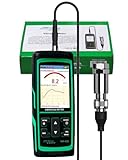
- PROFESSIONAL VIBRATION ANALYZER – VM-428 WITH EXTERNAL SENSOR - Designed for advanced vibration diagnostics on motors, turbines, pumps, compressors and rotating machinery where higher measurement ranges and additional diagnostic parameters are required.
- 5-PARAMETER MACHINE DIAGNOSTICS – A V D FREQUENCY TEMPERATURE - Measures Acceleration 0.1–300 m/s² (peak), Velocity 1–850 mm/s (RMS), Displacement 1–3300 µm (p-p), Frequency 30Hz–14kHz and Temperature, providing multiple diagnostic indicators for machine condition evaluation.
- DUAL FREQUENCY MEASUREMENT CIRCUIT – STRUCTURAL AND HIGH-FREQUENCY MODES - Low frequency mode supports general vibration analysis of machine structures, while high frequency mode allows observation of higher-frequency vibration signals often associated with mechanical wear or bearing conditions.
- REMOTE MAGNETIC SENSOR – STABLE AND REPEATABLE MEASUREMENTS - External piezoelectric shear-type probe with magnetic base allows secure placement on metal housings, supporting stable readings during inspection of motors, gearboxes and rotating equipment.
- ISO MACHINE CONDITION RATING INDICATION - Built-in vibration severity scale based on ISO vibration classification helps technicians visually interpret measured velocity levels during machine condition evaluation.
Include confirmed failures, inspections that found no defect, component replacements, operator observations and the conditions under which each event occurred. If failures are rare, begin with an anomaly-detection baseline rather than pretending that a small number of examples can train a dependable failure classifier.
Windows Errors? Fix Them Before They Spread
Repair common Windows errors and clear accumulated junk for a smoother, more stable PC - no reinstall needed.Free scan · no reinstallOutdated Drivers Are Slowing You Down
One free scan finds every outdated or missing driver and matches the right update for your exact hardware.Free scan · exact hardware match4. Create the data pipeline
A plant-scale architecture generally has sensors and PLCs, edge or gateway ingestion, time-series storage, feature engineering, anomaly or failure models, asset and maintenance-history context, alert management and CMMS, EAM or field-service integration. Microsoft’s manufacturing guidance describes connecting machine and PLC telemetry with AI and machine-learning services and maintenance workflows. Technologies it names for these use cases include Azure AI Services, Azure Machine Learning, Microsoft Fabric, Azure IoT Operations and Dynamics 365 Field Service.
At minimum, preserve an immutable event record containing the asset identifier, timestamp, measurement, unit, operating state and source. IBM documentation gives device ID, timestamp, temperature and status code as example fields that can support failure prediction and recommendations. Add model version, alert threshold, confidence or risk score, acknowledged-by identity, action taken and outcome so the system can be audited.
5. Clean and label the data before modeling
- Synchronize clocks: align sensor, PLC, historian and maintenance-system timestamps, including time-zone and daylight-saving handling.
- Keep stable asset IDs: map replacements and renamed equipment without silently merging two physical assets.
- Check sensor health: flag flatlined, saturated, disconnected or implausibly noisy channels.
- Label operating state: distinguish startup, shutdown, idle, normal production, cleaning and unusual loads.
- Code maintenance events: separate inspection, adjustment, part replacement, failure confirmation and no-fault-found visits.
- Prevent leakage: do not let information recorded after a failure, such as a replacement code or post-repair diagnosis, appear in the model inputs used to predict that event.
Data quality is often more consequential than selecting between two similar algorithms. A technically sophisticated model trained on misaligned or future-contaminated data can look accurate in testing and fail in production.
6. Choose the model type
Anomaly detection
Use anomaly detection when reliable failure labels are scarce. The model learns a normal pattern for each relevant operating state and raises a score when current behavior departs from it. This is useful for previously unseen degradation, but technicians must investigate whether the deviation is a real defect, a process change or a sensor fault.
Recommended Free Tools
Supervised failure prediction
Use a supervised classifier when historical failures are numerous, consistently coded and measured with enough lead time. The output can estimate the probability of a defined failure mode within a specified horizon, such as the next shift or next seven days. State the horizon and operating envelope with every alert.
Rank #3

- 【5-in-1 Diagnosis】The vibration meter supports measurements of Acceleration 0.1–300 m/s² (peak), Velocity 1–850 mm/s (RMS), Displacement 1–3300 µm, Frequency 30 Hz–14 kHz, Temperature 14~140°F. The vibrometer gauge meets the common predictive maintenance and condition check needs in workshops and production sites.
- 【Wide Range of Applications】This digital vibration analyzer is suitable for motors, HVAC systems, pumps, fans, generators, compressors, turbines, bearings, etc. The tester features ISO vibration intensity classification. You can quickly get a preliminary assessment of machine/vehicle vibration. Appropriate for mechanical maintenance technicians, engineers, QC inspectors, or even beginners.
- 【Large Storage & Transmission】This vibration meter supports automatic/manual recording (stores up to 8 MB ≈397,000 data points). It can transfer CSV and BMP files via PC software (compatible with Windows systems) or be used as a small-capacity USB drive. Handy for long-term trend analysis and batch data archiving of equipment records.
- 【Clear Display & Stable Measurement】The easy-to-read backlit screen enables data collection and interpretation under various lighting conditions. It clearly shows line graphs and real-time statistics of maximum/minimum/average values. The separate probe comes with a strong magnetic sensor, which helps access hard-to-reach areas and minimizes the impact of your movements on the results.
- 【User-friendly Design】The vibration detector comes with a portable carrying case for outdoor use. It supports automatic high/low-speed circuit switching, adjustable sampling time, screen brightness, calibration, unit switching, automatic power-off, machine-grade selection, low battery indicator. The included manual provides a detailed explanation of each function. Setup takes only a few seconds.
Remaining-useful-life estimation
Use remaining-useful-life methods when the organization has degradation trajectories and dependable failure or replacement dates. The estimate is a planning aid, not a countdown clock. Changes in duty cycle, repairs, environmental conditions or component design can invalidate an estimate unless the model is retrained or recalibrated.
7. Validate alerts with maintenance technicians
Run the model in a monitored or shadow mode before allowing it to create automatic work orders. For each alert, record the lead time, suspected failure mode, asset state, technician finding, action taken and eventual outcome. Review false positives, missed failures and alerts that arrived too late to matter.
Technicians should also judge whether the recommended inspection is feasible. A theoretically useful vibration alert is not operationally useful if the sensor is inaccessible without a permit, the machine must be running at a particular speed, or the inspection requires a specialist who is unavailable during the warning window.
Adjust thresholds by asset criticality and consequence. A high-cost failure may justify investigating more low-confidence alerts, while a nuisance alert on a noncritical machine can cause alert fatigue. Keep a human approval step for safety-critical actions.
8. Connect the signal to a controlled action
Knowing that an asset may fail is only the beginning. Context such as the failure mode, recent work, safety constraints, production dependencies, inventory and available labor determines the correct response. IBM’s predictive-maintenance documentation describes rules that generate recommendations when equipment has a high probability of failure.
- Generate the alert: store the asset, timestamp, model version, risk score, suspected failure mode, lead-time estimate and evidence window.
- Enrich it: attach recent work orders, last inspection, operating state, safety requirements, production dependencies and relevant manuals or inspection procedures.
- Triage it: route by asset criticality and confidence to an operator, reliability engineer or maintenance planner.
- Approve the response: choose inspection, operating adjustment, planned repair, parts reservation, service booking or shutdown according to site rules.
- Create or update the work order: copy the alert ID and evidence into the CMMS or EAM record so the decision is traceable.
- Close the loop: capture findings, parts used, labor, downtime avoided or incurred and whether the predicted failure was confirmed.
- Feed the result back: use the outcome to improve labels, thresholds, inspection instructions and future model training.
How to measure accuracy and usefulness
There is no single accuracy number that applies to every predictive-maintenance deployment. A model can achieve high overall accuracy by predicting that almost nothing will fail, yet still miss the rare failures that matter. Measure performance against the maintenance decision and the warning horizon.
Rank #4
![[BLE Vibration Sensor] WTVB01-BT50 Smart Vibration Module Ar-duino, 3-axis Vibration(Amplitude+Frequency+Displacement+Speed) Detector, Wireless Acceleration Shock Motor Monitor](https://m.media-amazon.com/images/I/41va7oLvGmL._SL160_.jpg)
- 【Integrated Vibration Sensor】Real-time capture of 3-axis vibration and temperature data: Vibration displacement (0~30000um) + Speed (0~50mm/s) + Amplitude (0~180°) + Operating temperature (-20°C~60°C). Vibration and shock omnidirectional measurements can prevent breakdowns and repair costs.
- 【BLE 5.0 Low Power】 50m transmission distance, approximately 8 hours battery life. Bluetooth 5.0 is compatible with Android/iOS systems. The WITMOTION APP supports connecting sensors on smartphones (up to 4 on the same phone). It can also be connected to a computer via TYPE-C, making it easy for users to choose the best connection.
- 【Easy Install & Use】The wireless design allows the sensors to be installed on machine parts that are difficult to access. A small and portable sensor designed with strap holes at both ends that can be used and go anywhere.
- 【Analysis Vibration Sensor System】Condition monitoring and vibration analysis are seamlessly integrated with WITMOTION PC software, making it quick and easy to analyze and visualize data. Maintenance teams can set it up as needed.
- 【Attitude Measurement More Accurate & Reliable】Sensors integrated R&D fusion algorithm, low noise level, and increasing measurement accuracy ensuring stable data output. WITMOTION has been focusing on the sensor field for 10 years, providing professional attitude measurement solutions globally.
Track these operational measures
- Lead time: elapsed time between the first actionable alert and confirmed failure or required intervention.
- Precision: the share of investigated alerts that identify a real, actionable condition.
- Recall: the share of relevant failures detected before the decision deadline.
- False-alert rate: alerts per asset or operating hour that produce no actionable finding.
- Missed-failure rate: failures that occurred without an adequate warning.
- Calibration: whether a stated risk, such as 0.8, corresponds to roughly that frequency in comparable cases.
- Workflow measures: time from alert to acknowledgment, work-order completion, parts availability and technician-confirmed cause.
- Business measures: unplanned downtime, emergency labor, scrap, expedited freight and calendar-based work avoided, measured against a defined baseline.
Report results separately by asset, failure mode, operating state and alert threshold. A plant-wide average can hide a model that works for one pump family and fails for another. Do not present the Microsoft Garage figure of more than 60 potential outages prevented during a two-month 2024 pilot as a general benchmark; it was a Microsoft-reported internal pilot result.
Design the architecture for safe operation
Edge and connectivity choices
Use an edge or gateway layer when raw sensor streams are high-volume, connectivity is intermittent or low-latency detection matters. It can buffer readings, perform basic feature extraction and reject obviously invalid values before forwarding data. Cloud services are useful for centralized storage, model training and cross-site analysis, but a network outage should not erase local safety procedures or required alarms.
Identity, security and governance
- Use unique identities and least-privilege access for gateways, models, dashboards and maintenance systems.
- Encrypt data in transit and at rest, and retain an audit trail for threshold, model and workflow changes.
- Separate advisory predictions from control-system commands unless a formal safety review authorizes automation.
- Define retention and ownership for sensor data, work-order notes and model outputs.
- Document what happens when a sensor is offline, a model is out of distribution or a maintenance system cannot accept a work order.
Monitor drift
Equipment, recipes, speeds, ambient conditions and maintenance practices change. Monitor the distribution of key features, alert volume, calibration and confirmed outcomes. A sudden change after a bearing redesign or control-logic update may require a new baseline rather than a higher threshold. Revalidate after major repairs, sensor relocation, process changes and software updates.
Automating the path from prediction to maintenance
IBM’s developer tutorial demonstrates a workflow in which predict_failure connects to check_maintenance_cost, order_parts, book_service_slot and notify_driver using BeeAI, watsonx.ai and watsonx Orchestrate. The important design pattern is broader than those product names: a model signal becomes useful when it can check cost and inventory, reserve parts, schedule qualified labor and communicate the decision.
Keep automated actions bounded. For example, a high-risk alert can draft a work order and reserve a part, while a planner approves the repair window. A lower-confidence anomaly can create an inspection task without ordering an expensive component. Require explicit approval for any action that changes a safety interlock, production recipe or shutdown state.
Do these 3 things before closing this tab:
1Clear out junk files and repair common Windows errors2Scan for outdated or missing drivers - takes under a minute3Repair Windows errors before they cause bigger problemsRun a focused pilot before scaling
Define the pilot boundary
Select one asset family, one or two failure modes and a fixed observation period long enough to include normal operating variation. Establish the current downtime, emergency-maintenance, inspection and parts metrics before enabling predictions. Decide in advance what constitutes a useful alert and who owns each response.
Best Value
Prepare the team
Include operators, reliability engineers, maintenance planners, technicians, controls engineers, IT or OT security staff and the person responsible for the CMMS or EAM. Operators know which process states are normal; technicians know whether a recommended inspection can be performed; planners know whether the warning window is actionable.
Scale only after evidence
Expand to additional assets when the pilot demonstrates acceptable lead time, manageable false-alert volume, reliable data capture and a repeatable work-order process. Reuse the pipeline components, but do not assume a threshold or model trained on one asset family transfers unchanged to another.
Common failure modes in AI predictive-maintenance projects
Installing sensors before defining the decision
Collecting every available signal creates storage and integration work without clarifying what anyone will do with an alert. Define the failure mode, warning horizon and response first.
The Tool Desk
Outbyte PC Repair FREEClear out junk files and repair common Windows errorsFree Scan →Outbyte Driver Updater FREEScan for outdated or missing drivers - takes under a minuteDriver Scan →Training on too little or unrepresentative history
A short period containing only one production recipe or one season cannot represent the asset’s operating envelope. Start with anomaly detection when labels are limited and continue collecting confirmed outcomes.
Ignoring maintenance context
A temperature rise immediately after lubrication, a vibration change after alignment work or a current increase during a new recipe may be expected. Include maintenance events and operating-state labels so the model can interpret those changes.
Optimizing a laboratory metric instead of the workflow
An impressive test score is not enough if alerts are not acknowledged, inspections cannot be scheduled or parts are unavailable. Measure time from alert to decision and whether the intervention prevented an unplanned outage.
Letting alerts become automatic shutdowns
Predictive models are probabilistic and can be wrong. Keep human review and established safety systems in control of safety-critical actions until the complete chain has been engineered, tested and approved.
What’s actually slowing this PC down?
Pick the symptom - the matching free tool is one click away.
Practical implementation checklist
- Choose a critical asset and a specific, observable failure mode.
- Define the maintenance decision and minimum useful lead time.
- Map the failure mechanism to vibration, thermal, acoustic, pressure, flow, motor-current or existing PLC signals.
- Record stable asset IDs, synchronized timestamps, units, operating states and sensor-health status.
- Collect normal data across loads, speeds, temperatures and production states.
- Code inspections, confirmed failures, replacements and no-fault findings consistently.
- Select anomaly detection, supervised prediction or remaining-useful-life estimation based on label quality.
- Test for future-data leakage and evaluate by time and asset, not only random rows.
- Run in shadow mode and review lead time, false positives, missed failures and technician feasibility.
- Enrich alerts with recent work, safety constraints, production dependencies, inventory and labor availability.
- Route approved alerts into a CMMS, EAM or field-service workflow with an audit trail.
- Measure plant-specific operational and financial results before expanding.
- Monitor drift after repairs, process changes, sensor changes and model updates.
Bottom line for a first deployment
Start small, instrument the failure mechanism rather than the asset indiscriminately, and treat the model as decision support. The strongest implementations combine a contextual baseline, disciplined data quality, technician validation and a controlled connection from alert to inspection or work order. They report the lead time and outcomes achieved for each asset instead of promising universal accuracy or savings.
Quick Recap
Product prices and availability are accurate as of the date/time indicated and are subject to change. Any price and availability information displayed on Amazon at the time of purchase will apply.

