Before buying laptop RAM, identify the exact model and confirm that its memory is upgradeable, which module type it accepts, and whether you need to add a module or replace existing memory. Laptop RAM is not universal: the manufacturer’s specifications and service instructions should determine what will fit and work.
Check whether your laptop’s RAM can be upgraded
Find the laptop’s full model name and product number, usually printed on a label on the underside or shown in system information. A broad family name is not enough: closely related models can have different memory configurations.
As an Amazon Associate I earn from qualifying purchases.
Look up that exact identifier on the laptop maker’s specification page or in its service manual. Confirm whether memory is socketed, soldered, or a mix of both, and whether the case provides a serviceable route to the memory. Some laptops have no removable RAM or no user-accessible upgrade path. A memory finder can help cross-check the model, but should not replace the manufacturer’s documentation. Kingston also recommends checking compatibility by laptop model: Kingston memory support.
Free tools Windows power users keep installed
One-click scans. No signup required.
Find the slots and decide whether to add or replace
Check how many memory slots the laptop has, how many are occupied, what modules are installed, and the maximum supported total and per-slot capacity. The laptop maker’s service documentation is the best place to confirm the supported configuration. Windows Task Manager may also show memory use and slot information, though it is not a substitute for model-specific specifications.
#1 Best Overall

- A-Tech 16GB RAM Module, DDR4 SO-DIMM 260-Pin, 3200MHz PC4-25600 (PC4-3200AA)
- Non-ECC Unbuffered, JEDEC DDR4 Standard 1.2V Operating Voltage
- Compatible with select Laptop, Notebook, Mini PC, and All-in-One (AIO) systems. Please verify your system's memory type, form factor, and maximum supported capacity before purchasing
- Not compatible with desktop DIMM, non DDR4 memory, or ECC memory types such as RDIMM, LRDIMM, and ECC UDIMM
- Increases available memory capacity to enhance system responsiveness, application performance, and multitasking capabilities.
Add a module to an open slot
If the laptop has an available slot, you may be able to add a compatible module without removing the installed one. Confirm that the new module’s capacity and specifications are supported alongside the existing memory, and check whether the maker recommends a particular arrangement for the memory channels.
Replace existing modules
If all slots are occupied, reaching the desired capacity may require replacing one or more modules. Check the maximum supported configuration and whether the laptop requires or recommends matched modules. Kingston describes both approaches—adding memory in an empty slot or replacing existing modules—as dependent on the system: Desktop and laptop computer memory.
Rank #2

- Boosts System Performance:16GB DDR4 laptop memory that operates at 3200MHz to improve multitasking and system responsiveness for smoother performance
- Easy Installation: Upgrade your laptop RAM with ease—no computer skills required Follow step-by-step how-to guides available at Crucial for a smooth, worry-free installation
- Compatibility Guaranteed: Ensure seamless compatibility with your laptop by using the Crucial System Scanner or Crucial Upgrade Selector—get accurate recommendations for your specific device
- Trusted Micron Quality: Backed by 42 years of memory expertise, this DDR4 RAM is rigorously tested at both component and module levels, ensuring top performance and reliability for your Mac system
- ECC Type = Non-ECC, Form Factor = SODIMM, Pin Count = 260-pin, PC Speed = PC4-25600, Voltage = 1.2V, Rank and Configuration = 1Rx8 or 2Rx8
Match the full RAM specification
Capacity is only one compatibility check. Before ordering, verify all of the following against the exact laptop model:
Recommended Free Tools
- Memory generation: Match the supported generation, such as DDR4 or DDR5. Different generations are not interchangeable.
- Form factor: Most upgradeable laptops use compact SO-DIMM modules, while desktops generally use longer DIMMs. Do not assume a desktop module will fit a laptop.
- Capacity: Check both the supported total memory and the maximum per slot. Do not assume a laptop supports the capacity printed on a module listing.
- Speed and electrical specifications: Confirm the supported speed and voltage or other specifications for the model. A faster advertised module is not automatically a better choice if the laptop does not support it.
- Density and platform support: Older platforms may not recognize some higher-density modules. Some newer DDR5 modules can also depend on chipset or BIOS support, so check the maker’s compatibility information and a reputable model-specific memory finder. Kingston discusses these platform caveats in its memory support guidance.
Buy only when the laptop’s documentation and the intended configuration agree. Kingston’s model-based compatibility guidance is a useful second check, not permission to ignore the laptop maker’s limits.
Rank #3

- Boosts System Performance:64GB DDR4 laptop memory RAM kit (2x32GB) that operates at 3200MHz, 2933MHz, or 2666MHz to improve multitasking and system responsiveness for smoother performance
- Easy Installation: Upgrade your laptop RAM with ease—no computer skills required Follow step-by-step how-to guides available at Crucial for a smooth, worry-free installation
- Compatibility Guaranteed: Ensure seamless compatibility with your laptop by using the Crucial System Scanner or Crucial Upgrade Selector—get accurate recommendations for your specific device
- Trusted Micron Quality: Backed by 42 years of memory expertise, this DDR4 RAM is rigorously tested at both component and module levels, ensuring top performance and reliability
- ECC Type = Non-ECC, Form Factor = SODIMM, Pin Count = 260-pin, PC Speed = PC4-25600, Voltage = 1.2V, Rank and Configuration = 2Rx8
Use this checklist before buying
- Record the laptop’s exact model name and product number.
- Open the manufacturer’s specification page or service manual for that model.
- Confirm whether memory is soldered, socketed, or mixed, and whether the laptop has a documented service procedure.
- Verify the number of slots, installed modules, free slots, and supported total and per-slot capacities.
- Match generation, form factor, supported speed, electrical specifications, and any density or BIOS caveats.
- Choose whether to add a module or replace existing ones; follow any recommended channel or matched-module arrangement.
- Cross-check the planned configuration with a reputable model-specific memory finder before ordering.
Install the module according to the laptop’s service instructions
The procedure below is a general outline for a laptop with removable SO-DIMM memory, not a substitute for the model-specific service manual. Cover access, screw locations, and battery handling vary by laptop. Follow the manufacturer’s instructions; do not force the case open.
- Shut down the laptop and disconnect the power adapter. Remove a battery only if it is removable and the service procedure calls for it.
- Work on a stable surface and use an earthed anti-static wrist strap, or touch an unpainted grounded metal object before handling the module.
- Open the memory access panel or case as directed by the laptop maker. If removing an existing SO-DIMM, release its side clips and let it rise before pulling it from the socket.
- Align the new module’s notch with the socket key. Insert it at roughly a 30-degree angle, then rotate it down until the retaining tabs engage.
- Reassemble the laptop, reconnect power, and check that the system recognizes the expected memory.
These handling and seating steps follow Kingston’s general laptop memory installation guidance; the laptop maker’s instructions govern access and any model-specific steps.
Rank #4
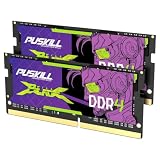
- Smooth 3200MHz Gaming Performance: Give your gaming laptop the speed it deserves. With 3200MHz frequency and CL22-22-22-52 timing, this DDR4 SODIMM kit delivers responsive gameplay in AAA titles and faster level loading compared to stock 2666MHz laptop memory.
- Massive 32GB Dual-Channel Kit (2×16GB): Run your game, Discord, streaming software, and browser tabs simultaneously without stutter or lag. 32GB is the sweet spot for today's most demanding titles. Dual-channel architecture maximizes your laptop CPU's memory bandwidth for smoother multitasking.
- True Plug-and-Play Laptop Upgrade: No BIOS settings. No manual tuning. Just install the two SODIMM modules into your laptop's memory slots, power on, and it runs at 3200MHz automatically. The easiest performance upgrade you'll ever make.
- Cost-Effective Performance Boost: Get premium 32GB capacity and 3200MHz speed at a price that makes sense. Whether you're upgrading an older gaming laptop or building out a new one, PUSKILL delivers the performance you need without breaking your budget.
- What You Get: PUSKILL 32GB DDR4 3200MHz SODIMM Kit (2×16GB), quick-install guide, lifetime warranty, and responsive customer support. Each module is burn-in tested for guaranteed laptop compatibility and stability.
Troubleshoot a failed boot or unrecognized memory
If the laptop does not boot or reports less memory than expected, shut it down and disconnect power before reopening it. Check that the module is compatible with the exact model and fully seated. Then follow the manufacturer’s installation order and troubleshooting instructions.
A BIOS update may resolve some memory-recognition issues, but firmware updates carry risk. Do not update casually: use the laptop manufacturer’s instructions for the exact model. Kingston’s memory troubleshooting guidance also points users to system-specific support.
Best Value

- A-Tech 8GB RAM Module, DDR4 SO-DIMM 260-Pin, 2666MHz / 2667MHz PC4-21300 (PC4-2666V)
- Non-ECC Unbuffered, JEDEC DDR4 Standard 1.2V Operating Voltage
- Compatible with select DDR4 SODIMM capable Laptop, Notebook, Mini PC, and All-in-One (AIO) computer systems. Please verify your system's memory type, form factor, and maximum supported capacity before purchasing
- Not compatible with desktop (DIMM), DDR2, DDR3, DDR5, ECC Registered (RDIMM), ECC Load Reduced (LRDIMM), or ECC Unbuffered (ECC UDIMM) memory types
- Increases available memory capacity to enhance system responsiveness, application performance, and multitasking capabilities.
Know what a RAM upgrade can—and cannot—do
More memory can help when a laptop is running short of physical RAM, especially with several programs or memory-intensive tasks open. It can give those workloads more room to remain active, but it does not guarantee a noticeable improvement in every task. Kingston notes that “Additional memory will not necessarily increase the performance of your computer.” See its memory upgrade FAQ.
For a compatible laptop, prioritize the supported capacity and configuration, then the speed the model can use. The largest capacity or fastest module advertised is not automatically the best choice.
Quick Recap
Product prices and availability are accurate as of the date/time indicated and are subject to change. Any price and availability information displayed on Amazon at the time of purchase will apply.
Do these 3 things before closing this tab:
1Fix the driver behind crashes, sound loss and screen glitches2Repair Windows errors before they cause bigger problems3Scan for outdated or missing drivers - takes under a minute



