Press Windows logo key + Plus (+) to turn on Magnifier. Press Windows logo key + Esc to turn it off. You can also enable it in Settings; the menu path differs between Windows 10 and Windows 11.
Turn on Magnifier from Settings
If you prefer using a mouse or need to locate the feature, open the path for your version of Windows:
As an Amazon Associate I earn from qualifying purchases.
- Windows 11: Select Start > Settings > Accessibility > Magnifier, then switch Magnifier on.
- Windows 10: Select Start > Settings > Ease of Access > Magnifier, then turn it on.
Microsoft documents these paths and keyboard controls for Windows 10 and Windows 11 in its Magnifier guide.
What’s actually slowing this PC down?
Pick the symptom - the matching free tool is one click away.
Adjust the zoom level
With Magnifier on, press Windows logo key + Plus (+) to zoom in or Windows logo key + Minus (-) to zoom out. In Magnifier settings, you can also choose the starting zoom level and the amount each zoom step changes. See Microsoft’s instructions for changing Magnifier’s zoom level.
#1 Best Overall
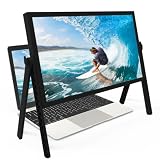
- 21 inch Screen Magnifier: ZULFACY New upgrade laptop screen magnifier. The latest design, using high-definition zoom optical technology, can put the screen display of laptop 3-5 times, for better viewing and experience.This 3D HD screen magnifier is recommended for use in low light environments, and the viewing effect will be more obvious and outstanding(Note: For best results, use in low-light conditions and avoid direct sunlight)
- 3D HD Screen Amplifier: HD vision, eye protection against blue radiation, no power. It will relieve the discomfort and visual fatigue causing by long time focusing on small screen. Perfect for watching movies, streaming, and gaming in stunning high definition. Note:The brightness of the screen of the tablet is brighter and better
- Powerful compatiblty:Our Computer screen Can be applied to 14/15/16/17/18/20/21 laptop/tablet screen magnifier.Can adjust multiple viewing angles, which allows the product to be placed in a variety of ways, such as reading and newspapers, magnifying laptops, magnifying Book,magnifying piano scores, etc
- Folding Design: Its collapsible design allows for easy storage, while the detachable function adds versatility for any activity. Super slim when folded and also can be carried around in your bag. It can be used in various occasions, including living room, bedroom, kitchen and outdoor activities
- High quality material: We make our laptop screen magnifier using the highest quality plexi glass+ ABS to ensure extended durability. Anti Blue Light Screen. We’re convinced you will love your new 3D HD Screen Amplifier
Choose how Magnifier displays the screen
Magnifier offers three views. Use Ctrl + Alt + M to cycle through them, or press a view’s shortcut directly:
- Full screen: Enlarges the screen area. Shortcut: Ctrl + Alt + F.
- Docked: Shows an enlarged area in a docked region of the screen. Shortcut: Ctrl + Alt + D.
- Lens: Provides a movable magnified area. Shortcut: Ctrl + Alt + L.
Try each view and keep the one that works best for the task. Magnifier can also be set to follow the mouse pointer, keyboard focus, text cursor, or Narrator cursor; these tracking options can be combined. The Microsoft Magnifier guide covers the view and tracking options.
Rank #2
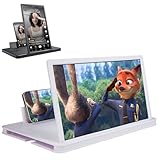
- 【Enhanced Viewing Experience】Transform your smartphone into a cinematic display with this portable screen magnifier. It enlarges your phone's screen by 2–4 times, offering crisp, high-definition visuals that bring videos, games, and content to life for a true theater-like experience
- 【Flexible Viewing Orientations】Designed with an adjustable pull-out mechanism, this magnifier effortlessly supports both landscape and portrait modes. Ideal for watching movies, browsing social media, or making video calls—switch seamlessly to match your preferred viewing style
- 【Reduced Eye Strain, Extended Comfort】Equipped with an advanced HD lens, the magnifier provides clear and gentle visuals that help minimize eye fatigue during prolonged use. Enjoy extended viewing sessions in greater comfort, whether binge-watching shows or reading articles
- 【Compact and Travel-Friendly】Lightweight and foldable, this magnifier is built for portability. It stores flat and can easily fit into bags or pockets—perfect for use at home, on trips, or outdoors. Unfold it anytime for instant big-screen entertainment
- 【Universal Compatibility & Easy Setup】Works with virtually all smartphone models without the need for charging or complicated setup. Ready to use right out of the box—an excellent gift choice for any occasion, delivering an effortless and immersive viewing experience for everyone
Set Magnifier to start automatically
In Magnifier settings, you can choose whether it starts after you sign in or before you sign in. These are optional startup settings, not settings that are automatically enabled for everyone.
The Tool Desk
Outbyte Driver Updater FREEFix the driver behind crashes, sound loss and screen glitchesFind Drivers →Outbyte PC Repair FREERepair Windows errors before they cause bigger problemsFix Now →Use Magnifier with touch or read text aloud
Touch controls
Magnifier supports touch controls for zooming and gestures for moving around the screen. Microsoft’s Magnifier keyboard shortcuts and touch gestures page lists the documented gestures.
Rank #3

- SCREEN MAGNIFIER DIMENSIONS: Length 19 Inch (500MM), height 14.3 Inch (365MM), screen is 21 Inch
- POWERFUL COMPATIBILTY: This mobile phone screen enlarger adopt HD zoom optical technology, Can be applied to laptop/tablet/mobile screen magnifier.
- PROTECTS YOUR EYE: Screen Magnifier Use high definition optical technology to enlarge 3 times on the phone screen, Relieves discomfort and visual fatigue caused by focusing on small screens for long periods.
- HIGH QUALITY MATERIALS: The Screen Magnifying glass uses high-definition optical lens material, and can adjust multiple viewing angles. It can enjoy 3D vision away from the screen
- THE BEST CHOICE FOR CHRISTMAS GIFTS: Simple and stylish design makes this product the best holiday gift choice for your friends or relatives. It can be a technical gift, more suitable for seniors to watch movies and news.
Read screen text aloud
Press Ctrl + Alt + Enter to start reading from the current cursor location, or to pause or resume reading. Press any key to stop. See Microsoft’s guide to using Magnifier reading.
Quick Recap
Best Value
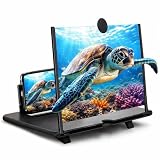
- 【Larger 14 Inch Phone View】Enjoy a bigger and easier viewing experience from your smartphone with this 14 inch phone screen magnifier. It enlarges your phone display by approx. 3–4X, making it suitable for movies, short videos, casual gaming, reading, recipes, video calls, news, and everyday entertainment. Best used indoors or in low-light areas.
- 【Clear HD Acrylic Lens】Built with a transparent acrylic magnifying lens, this phone screen enlarger helps create a wider visual display without using power. The anti-glare and blue-light filtering design helps make longer viewing more comfortable for daily use, family movie time, study breaks, or relaxed bedside watching.
- 【No Power or App Needed】This physical cell phone screen amplifier does not require batteries, charging, Bluetooth, WiFi, or apps. Just open the foldable stand, place your smartphone into the anti-slip holder, adjust the viewing angle, and enjoy a larger screen effect on a desk, table, nightstand, or kitchen counter.
- 【Foldable & Easy to Carry】The slim folding structure makes this portable phone screen magnifier simple to store and convenient to take with you. It is useful for bedrooms, dorm rooms, offices, living rooms, kitchens, hotels, travel, RV trips, and other places where you want a larger phone viewing setup without extra electronics.
- 【Practical Daily Gift Choice】Made with a durable ABS frame and scratch-resistant acrylic lens, this phone screen amplifier stand is designed for repeated everyday use. A thoughtful gift idea for parents, grandparents, students, kids, friends, travelers, and anyone who enjoys watching videos, reading, or browsing on a phone.
Rank #4

- 22 inch Screen Magnifier: The latest laptop screen magnifier. The latest design, using high-definition zoom optical technology, can put the screen display of laptop 3-5 times, for better viewing and experience.This 3D screen magnifier is recommended for use in low light environments, and the viewing effect will be more obvious and outstanding
- 3D HD Screen Amplifier: HD vision, eye protection against blue radiation, no power. It will relieve the discomfort and visual fatigue causing by long time focusing on small screen. Note:The brightness of the screen of the tablet is brighter and better
- POWERFUL COMPATIBILTY:The screen magnifier can be applied to 14/15/16/17/18/20/21Inch laptop/tablet. can adjust multiple viewing angles, which allows the product to be placed in a variety of ways, such as reading and newspapers, magnifying laptops, magnifying piano scores, etc
- Folding Design: Its collapsible design allows for easy storage, while the detachable function adds versatility for any activity. Super slim when folded and also can be carried around in your bag. Suitable for indoor, camping, journey, leisure, anywhere and etc
- THE BEST CHOICE FOR CHRISTMAS GIFTS:Help protect eyes from relatively close viewing distances. Simple and stylish design makes this product the best holiday gift choice for your friends or relatives. It can be a technical gift, more suitable for seniors to watch movies and news
Product prices and availability are accurate as of the date/time indicated and are subject to change. Any price and availability information displayed on Amazon at the time of purchase will apply.




