To verify that network segmentation is blocking lateral movement, test specific permitted and prohibited connections from approved endpoints on both sides of each important boundary. Check the actual connection result, the enforcing firewall, ACL, or endpoint policy, and the corresponding logs or alerts. A timeout alone is not proof: the destination could be offline, the service could be unavailable, or the test may not have used the path you intended.
Define what the boundary should allow
Start with the intended policy, not the VLAN name or the network diagram. A boundary works only if an enforcing control applies the intended rules to real traffic. CISA guidance describes controls such as access control lists (ACLs), firewalls, stateful inspection, VLANs, and demilitarized zones (DMZs); configuration errors or exceptions can undermine the separation.
As an Amazon Associate I earn from qualifying purchases.
For each important source and destination zone, record which business-required connections should work and which should be denied. Specify the source, destination, protocol, and service as precisely as the environment permits. Avoid treating “any” as a useful test case unless that is genuinely the policy under review.
PC Slower Than It Used to Be?
A free scan shows the junk files, broken settings and background clutter dragging Windows down - then fixes them in one click.Free scan · Windows 10 & 11Crashes, No Sound, or Screen Glitches?
Random freezes, missing sound and display glitches usually trace back to one bad driver. Find and replace yours safely.Free scan · under a minute| Source zone and test host | Destination zone and host | Service or protocol | Expected result | Enforcing control | Expected log or alert |
|---|---|---|---|---|---|
| Approved source endpoint | In-scope destination endpoint | Specific service under test | Allowed or denied, according to policy | Firewall, ACL, host policy, or other control | Expected evidence, if logging is configured |
This is a worksheet structure, not a universal port list or policy. Fill it with real hosts and requirements from your environment. Use a current diagram and asset inventory to identify routes, interfaces, management networks, third-party connections, and cloud connections that could provide alternate paths.
#1 Best Overall
![Dualcomm10/100/1000Base-T Gigabit Ethernet Network TAP [ETAP-2003]](https://m.media-amazon.com/images/I/41BN4VAnktL._SL160_.jpg)
- Network Tap for use with 10/100/1000Base-T Ethernet link
- Reliable and high performance. Tested with maximum in-line cable length (200m) at full 1Gbps data throughput with no single packet loss
- Capable of being powered from a computer's USB port with built-in inrush current limiting circuit to prevent the computer from possible damages or disturbances by instantaneous current surge
- Compatible with Power-over-Ethernet (PoE)
- Probably the smallest portable GbE Network Tap available on the market
Plan a safe, authorized test
Get written approval from the network and system owners before sending probes. NIST SP 800-115, Technical Guide to Information Security Testing and Assessment (September 2008), treats rules of engagement as part of test planning. Although it is an established testing-methodology guide rather than a current product configuration manual, its planning advice is relevant: agree on scope, methods, timing, contacts, and how findings will be handled.
- List the in-scope source and destination networks, test endpoints, and specific flows.
- Set a test window, identify an escalation contact, and define stop conditions.
- Agree which methods are permitted and what operational impact requires an immediate pause.
- Coordinate with system owners before testing legacy, fragile, or operational-technology (OT) equipment.
Active discovery sends traffic, can trigger security controls, and may create problems on older or weak systems. Narrow the targets and methods to the approved plan. In OT, coordinate with operators and do not risk process availability or safety for the sake of a test.
Rank #2

- (10/100/1G) Gigabit Bypass network tap / sniffer equivalent to port mirror on a switch.
- The two monitor/sniff ports are isolated from the network being monitored.
- Automatic bypass of device on power fail.
- Power-over-Ethernet (POE) pass-through. Rated at .75A max at 57vdc
- 5v power through USB3 port or 5v wall transformer (or both). ~500ma consumption.
Check the enforcement point and telemetry first
Identify the control that actually enforces each boundary: it may be a network firewall, router ACL, cloud security group, host firewall, endpoint policy, or a combination. Confirm that the relevant rule is attached to the correct interface, zone, route, device group, or policy scope. Look for broad allow rules, unexpected routes, alternate interfaces, shared management paths, and exceptions that could bypass the named boundary.
What’s actually slowing this PC down?
Pick the symptom - the matching free tool is one click away.
Confirm that logging and monitoring are active before testing. CISA guidance recommends monitoring network chokepoints, including between segments, and logging denied traffic. CISA, the FBI, and the Department of Energy also recommend establishing normal traffic baselines when monitoring ICS environments. A missing log is not proof that no traffic reached the control; it may indicate a logging or visibility gap.
Rank #3
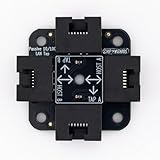
- 40% smaller than standard LAN tap
- Same Throwing Star LAN tap function in a new streamlined design
- Simple device for passively monitoring ethernet based communications
- Updated, intuitive silkscreen and streamlined design
- Every device assembled by hand in the USA with individual inspection and testing
Test representative flows from both sides
Use approved endpoints that represent the systems and routes covered by the policy. Depending on the environment, that may include user workstations, servers, management networks, DMZs, remote-access paths, and OT segments. CISA’s 2022 advisory on state-sponsored Russian cyber actors targeting the energy sector describes lateral-movement techniques involving services such as RDP, VNC, and administrative shares. Test such services only when they are relevant to your environment and explicitly in scope.
- Test an allowed flow. From the approved source endpoint, connect to the designated destination service. Confirm that the business function works and, where possible, that the traffic traverses the intended enforcement point.
- Test a prohibited flow. From the approved source endpoint, attempt only the agreed connection to the in-scope destination. Confirm whether it fails and whether the enforcing control records or alerts on the attempt.
- Repeat where policy context differs. Use additional representative sources if host identity, endpoint policy, routes, or access paths vary. A result from one workstation does not establish that every device in its zone is treated identically.
- Check the reverse direction when required. If the policy is intended to constrain traffic in both directions, test both directions. Stateful firewalls and asymmetric routes can produce different outcomes depending on which side initiates the connection.
Do not expand a scoped connection test into a broad scan unless the written authorization specifically permits it. A representative test should answer a defined policy question, not probe unrelated services.
Distinguish a blocked flow from an unavailable service
A client timeout or failed connection can have several causes: the boundary may have blocked the flow, but the destination might also be offline, the service might not be listening, a route might be missing, or a host policy might have rejected the connection. Treat a failed probe as inconclusive until you have evidence that distinguishes these possibilities.
Rank #4

- Network Tap for use with 10/100Base-T link
- Capable of being powered from a computer's USB port with built-in inrush current limiting circuit to prevent the computer from possible damages or disturbances by instantaneous current surge
- Compatible with PoE. PoE pass-through between two inline ports
- Can also be used as a portable 4-port 10/100 Ethernet switch
- Check that the destination endpoint is live using an approved method.
- Establish, through authorized evidence, that the destination service is available or would respond over a permitted path.
- Match the test time and flow details—such as source, destination, protocol, and ports—to the enforcing rule decision and relevant logs.
- For an expected successful flow, verify that it reached the intended service rather than taking an unintended alternate path.
NIST SP 800-115 discusses limitations in host discovery and the risks of active probing. These limitations are why a single unanswered probe should not be reported as proof that segmentation stopped lateral movement.
Independent reader supportYour contribution helps us test, update, and keep practical guides available for everyone.Record results, remediate, and retest
For each flow, preserve the source and destination, their zones, service or protocol, test time, expected outcome, observed outcome, enforcing rule, log or alert evidence, and any operational impact. This gives the network and system owners enough context to investigate a discrepancy and repeat the test safely.
Best Value

- The SharkTap is a special purpose 10/100/1000Base-T ethernet device that allows you to 'tap into' an ethernet connection. It is intended to be used with the free Wireshark protocol analyzer or equivalent.
- Conventional switches route packets only to the intended destination port, reducing traffic but preventing a third port from seeing all packets. The SharkTap duplicates all packets to or from the Network ports to the TAP port.
- Supports 10, 100 and 1000Base-T, all ports. Power-Over-Ethernet (PoE) pass-through.
- Powered from a USB-B cable (included), draws 350mA or less.
- Other features: Auto-MDIX, so no crossover cables ever needed. Non-conductive enclosure for lab work. Will NOT route packets from TAP to Network ports.
Prioritize unexpected successful connections: they may reveal a path that violates the intended policy. Investigate expected business traffic that is blocked as well; unresolved operational problems can lead to unsafe workarounds or broad exceptions. After a change, rerun the same scoped test and retain before-and-after evidence. NIST SP 800-115 covers analyzing findings and developing mitigations, while CISA guidance emphasizes maintaining network diagrams and monitoring traffic.
Assess coverage beyond the named firewall
Segmentation can be enforced at the network, endpoint, cloud-control-plane, or multiple layers. CISA’s July 29, 2025 announcement on Part One of its zero-trust microsegmentation guidance distinguishes network-based and endpoint-based approaches. When reviewing an implementation, assess where enforcement occurs, what context it can use, and whether all relevant paths are covered.
Quick wins for a faster PC:
Repair Windows errors before they cause bigger problemsFix Now →Scan for outdated or missing drivers - takes under a minuteDriver Scan →- Enforcement coverage: Check whether the control applies to every relevant interface, route, remote-access path, and third-party or cloud connection—not only the boundary shown on a diagram.
- Context and visibility: Network controls may have less visibility into endpoint identity and application workflow than endpoint-based controls. Confirm that the chosen control can enforce the policy you actually need.
- Monitoring: Verify that denied and suspicious cross-zone traffic is recorded at relevant points and that alerts are reviewed.
- Operational maintainability: Consider whether the controls can be safely tested and changed in the specific environment, particularly for OT and legacy systems.
Passive observation can reduce the need to probe fragile devices, but it takes time and may miss hosts that do not communicate during the observation period. Active tests and passive monitoring answer different questions; neither alone establishes that every possible route is covered.
Interpret the result without overclaiming
A successful scoped test provides evidence about the particular endpoints, flow, route, policy state, and time tested. It does not prove that every device or alternate path is isolated. Likewise, an observed block supports the conclusion that the tested traffic was denied only when you can tie the result to the relevant enforcement control rather than an unavailable service or missing route.
CISA’s #StopRansomware Guide says that network segmentation can help contain the impact of an intrusion and prevent or limit malicious actors’ lateral movement. Segmentation is a layer of defense, not a guarantee: CISA also warns that user error or policy failures can undermine it. A device or removable media bridging multiple segments, for example, can defeat intended separation.
Quick Recap
Product prices and availability are accurate as of the date/time indicated and are subject to change. Any price and availability information displayed on Amazon at the time of purchase will apply.
Free tools Windows power users keep installed
One-click scans. No signup required.




