Do these 3 things before closing this tab:
1Scan for outdated or missing drivers - takes under a minute2Repair Windows errors before they cause bigger problems3Fix the driver behind crashes, sound loss and screen glitchesOrbitPS2 Manager helps organize PlayStation 2 and PlayStation 1 game files into a library for Open PS2 Loader (OPL). It is a desktop library manager, not the software that loads games on a PS2. The setup is: install the manager, mount an OPL library folder or drive, import your files, then review the resulting library and settings.
What you need before setup
- A Windows, macOS, or Linux computer. The OrbitPS2 Manager project README lists builds for all three platforms.
- PS2 disc-image files you are entitled to use. The documented import formats are ISO or ZSO for PS2 DVD games and BIN/CUE input for PS2 CD games.
- A destination for the OPL library: either a folder on the computer or an external/USB drive. The destination must also be usable by your intended OPL and console setup.
Download the package for your platform from the project’s current Releases page. The README describes a Windows installer or portable ZIP, a macOS DMG, and Linux AppImage, DEB, or ZIP options. Package availability can change, so use the release page rather than relying on an old version-specific guide. The project describes its current macOS build as unsigned; check current release notes and platform guidance before deciding how to handle an operating-system warning.

As an Amazon Associate I earn from qualifying purchases.
Mount the OPL library location
- Launch OrbitPS2 Manager and choose Mount Directory.
- Select the folder or external/USB drive that will hold the library. Choose a location with room for your files and that your planned OPL setup can access.
- If the selected location does not already have an OPL folder layout, accept the app’s offer to create it. The documented folders are
CD,DVD,VCD,POPS,APPS,ART,CFG, andVMC. - Enable reconnect-on-launch if you want the manager to reconnect to this location automatically. This is optional.
The README does not specify a required drive capacity, filesystem, speed, or device model. Those details depend on the storage and console-side OPL arrangement you plan to use; mounting a location in the desktop manager alone does not establish that a particular PS2 can read it.
Quick wins for a faster PC:
Scan for outdated or missing drivers - takes under a minuteDriver Scan →Clear out junk files and repair common Windows errorsFree Scan →Fix the driver behind crashes, sound loss and screen glitchesFind Drivers →Import your PS2 games
Use the import flow and select the disc type that matches the file. OrbitPS2 Manager documents different handling for DVD and CD images:
#1 Best Overall
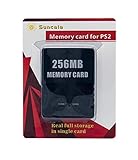
- Upgrade innovation chip that process and save the games faster by 15% than older version, smooth and steady without interruption.
- Fully compatible with Sony Playstation 2 and playstation 2 Slim.
- Improved storage system now compatible with more game than ever.
- Newly design package, fresh and elegant look. Sleek package allows you to easily slip the memory card in and out.
- 60 months worry free warranty. Friendly and supportive customer service is there to answer all your questions within hours.
| Disc type | Input | Library destination and handling |
|---|---|---|
| PS2 DVD | .iso or .zso |
Imported into DVD/. |
| PS2 CD | .bin/.cue |
Converted to a single .iso in CD/. |
The importer can inspect disc images to identify game IDs and names. If it cannot resolve an entry, it flags it for manual review. The project also documents batch import and optional artwork fetching. Check the resulting title and game ID for entries flagged by the app instead of assuming every image was identified correctly.
Review titles, artwork, and metadata
After importing, use search and system filters to find entries, and sort by title or game ID. Grid and list views provide alternate ways to browse the library. A game detail view can show cover art, screenshots, region, format, file size, and metadata when available. The project documents automatic artwork retrieval from the PSX/PS2 OPL Art Database; artwork is a library aid, not a requirement for importing or loading a game.
Rank #2

- Upgrade innovation chip that process and save the games faster by 15% than older version, smooth and steady without interruption.
- Fully compatible with Sony Playstation 2 and playstation 2 Slim.
- Improved storage system now compatible with more game than ever.
- Newly design package, fresh and elegant look. Sleek package allows you to easily slip the memory card in and out.
- 60 months worry free warranty. Friendly and supportive customer service is there to answer all your questions within hours.
Optional: convert PS2 ISO files to ZSO
The project describes ZSO as an LZ4-compressed format compatible with OPL. OrbitPS2 Manager can convert an individual PS2 ISO or run a library-wide conversion. The conversion flow can optionally remove the original ISO after successful conversion.
Free tools Windows power users keep installed
One-click scans. No signup required.
Keep an independent backup until you have checked the converted files in your intended setup. If you use the option to remove originals, the converted copy becomes your only local version unless you have retained a backup elsewhere.
Rank #3
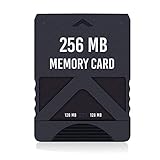
- Never lose saved data again or have to constantly switch between smaller memory cards | 256MB (2043 Block) memory card is perfect even for the most demanding PlayStation 2 games
- Durable, compact design mimics look and feel of original memory cards and is compatible with all PS2 games and systems | Memory card features two switchable data banks to achieve 256 megabyte capacity
- Please Note: To reach full capacity of memory card dual 128 megabyte banks must be switched between | Front facing switch on card must be set to apropriate memory bank prior to turning on console
- Compatible with: PS2 (Playstation 2) consoles only | Will not work with backwards compatible fat PS3 consoles or PSONE (PSX) systems
- Package Contents: 1x PS2 memory card | Works on all models of PS2 including launch, fat and slim console variants
Change per-game OPL settings only when needed
OrbitPS2 Manager can edit an OPL display title, compatibility modes, and virtual memory card assignments. Its project documentation says unknown configuration keys, including keys written by OPL, are preserved. It does not establish a universal set of compatibility options for every game, so do not toggle modes indiscriminately. Validate any game-specific setting against the needs of that game and your setup.
Independent reader supportYour contribution helps us test, update, and keep practical guides available for everyone.Choose internal or external storage
The documented choice is between mounting an internal folder and mounting an external/USB drive. An internal folder can suit a library you want to keep on the computer; a removable drive can make the library location portable. Decide based on available space, portability, and whether the intended OPL arrangement can read the medium. The project does not prescribe a capacity, filesystem, speed, or specific drive.
Rank #4

- TWO SEPARATE 128 MB BANKS, NOT ONE POOL OF 256 MB: The selector on the front of the card chooses which bank the console talks to, and each bank is its own storage area with its own save list. Nothing spans the two, so a file written on one side is invisible from the other. Set the selector first and then turn the console on, because the console reads the position once at start-up and does not look again.
- BUILT FOR PS2 AND FOR THE SLIM, AND FOR NOTHING ELSE: It drops into the memory card slot made for PS2, on every revision from the first SCPH-10000 through to the 90000 series, fat or slim. It is not for the PS One, not for the PSX, and not for a fat PS3 running a disc in backward compatible mode. Those machines use a different card and will not read this one.
- IT IS A STORAGE CARD, AND IT WILL NOT RUN FREEMCBOOT: If the plan is to install a homebrew launcher, this is the wrong card and no amount of formatting will change that. What it does do is hold save files, and a lot of them, which is the job most people actually need a second card for.
- NO BOOT DISC, NO DRIVERS, NOTHING TO INSTALL: Push it into the slot and the console lists it straight away. Save sizes vary by title, and the back of a game case usually prints how many kilobytes a save needs, so you can work out how far one bank will go before you fill it.
- WHAT ARRIVES IS ONE BLACK CARD, 5.6 BY 4.1 BY 0.6 CM: Two habits keep a save file intact on any card of this kind: leave the console powered down while the card goes in or comes out, and do not cut the power while a title is writing.
Installing a PS2 internal HDD is a separate console-side workflow, not a prerequisite for mounting and importing a library in OrbitPS2 Manager. A community guide to that process includes formatting steps that erase existing data, so do not treat it as part of this desktop setup unless you specifically intend to install and configure an internal PS2 HDD: PS2 HDD guide.
Quick Recap
Best Value
What OrbitPS2 Manager does not establish
- It organizes files and selected OPL configuration; it is not itself a PS2 game loader.
- A successful import does not prove that a specific console, storage device, or OPL configuration is compatible.
- The project documentation does not give universal per-game compatibility settings or a required storage specification.
Product prices and availability are accurate as of the date/time indicated and are subject to change. Any price and availability information displayed on Amazon at the time of purchase will apply.




