Free tools Windows power users keep installed
One-click scans. No signup required.
First confirm that your exact doorbell and lock models support the action you want. A shared brand, “Works with” badge, or Matter compatibility does not by itself mean a doorbell can trigger a lock. Check the manufacturers’ current model, firmware, regional, and hub requirements; then pair the devices and test every action while you are home. For security, prefer a doorbell notification followed by a deliberate unlock over unlocking automatically when someone rings.
Check compatibility before you buy or pair
Write down each device’s exact model, hardware revision if applicable, firmware version, app, and country or region. On the manufacturers’ current support pages, look for the specific doorbell-to-lock function—not just general compatibility. Notification, live video, lock status, remote unlocking, voice control, and automation are separate capabilities.
As an Amazon Associate I earn from qualifying purchases.
There are two common routes. A direct manufacturer integration links devices through the maker’s app or account. A shared platform or Matter setup connects accessories through a smart-home ecosystem. The latter may expose lock controls without allowing a doorbell event to control that lock. Verify the exact action and any hub requirement before relying on it.
Do these 3 things before closing this tab:
1Scan for outdated or missing drivers - takes under a minute2Clear out junk files and repair common Windows errors3Fix the driver behind crashes, sound loss and screen glitches- Aqara U100 and Video Doorbell G4: Aqara describes viewing a visitor and unlocking the U100 after a doorbell press. The U100 also lists Apple Home/Home Key and Matter-related compatibility, with hub requirements for some features. See Aqara Smart Lock U100 and Aqara Video Doorbell G4 for the current feature details.
- Selected TP-Link Tapo locks and doorbells: TP-Link documents unlocking from a supported doorbell’s Live View or Video Call page and synchronized notifications. The supported models and firmware are specific, and the list can change; check TP-Link’s support guide before pairing.
- eufy C34/E30 through a Matter ecosystem: eufy’s guide requires a compatible Matter hub in the selected Apple, Alexa, or Google ecosystem. It describes adding the lock to that ecosystem; it does not establish that a doorbell can trigger the lock. See eufy’s Matter setup guide.
Apple says HomeKit accessory communication is authenticated and encrypted, and documents certificate-based identity and encrypted sessions for Matter accessories in Apple homes. That is platform-security context, not a guarantee that a particular doorbell and lock interoperate. Check Apple’s platform security documentation alongside the device makers’ compatibility information.
#1 Best Overall

- 3-in-1 Design: Smart deadbolt lock, video doorbell, and 2K HDR camera in one device. Lock/unlock remotely, see visitors, and get motion or doorbell alerts through the myQ app.
- Face Access: Hands full? Your door unlocks automatically using facial recognition, no keys or phone needed.*
- 24/7 Visibility: 2K HDR video, wide-angle lens, and color night vision let you see every detail day or night.
- Five Ways to Enter: Face Access, fingerprint, PIN, app control, or key, flexibility for any visitor or moment.
- Ultimate Control: Monitor arrivals, manage PINs, and lock/unlock from anywhere with the myQ app.
Set up the devices in a safe order
- Confirm the lock fits and keep a fallback. Follow the chosen lock’s installation guide for your door and deadbolt. Retain the physical key or other fallback provided by the manufacturer, and finish the lock’s standalone setup before adding integrations.
- Secure the router and accounts. Change default router administrator credentials, use Wi-Fi encryption, install router updates, and give each account a unique password. Enable two-factor authentication where available. Consider a separate guest or IoT network if your router supports it, but test device discovery and platform functions after moving devices. The FTC’s home Wi-Fi guidance and smart-home security guidance offer practical steps; NIST also discusses separate networks in its IoT cybersecurity resources.
- Complete native setup first. Add the lock and doorbell to their own manufacturer apps, install available updates, configure household members and access codes, and review camera, audio, and cloud privacy settings. FTC guidance recommends applying device and app updates and using available security features.
- Meet the chosen integration’s requirements. For direct pairing, follow the maker’s current in-app instructions. For a platform or Matter route, confirm the selected hub supports both devices and that the lock functions you need are exposed through that route. Do not assume that adding a lock to Apple Home, Alexa, or Google Home creates a doorbell-to-lock action.
- Pair and test while physically present. Follow the app’s on-screen pairing steps. Test a doorbell press, video or notification, lock status, the intended unlock control, and your physical fallback. Check what happens if internet access or the manufacturer’s cloud is unavailable; an online integration may stop working. TP-Link states that its documented doorbell integration does not support local-only mode.
- Limit access after setup. Give app access only to people who need it, remove former household members, protect access codes, and review sign-in or activity controls if offered. Turn off remote-management or voice features the household will not use.
Make unlocking intentional
A doorbell ring is not proof that the person outside should enter. The safer default is to receive a notification, identify the visitor, and unlock deliberately only when appropriate. Avoid automations that unlock solely because someone rang or appeared on camera.
Check what your exact setup permits: some combinations may offer an unlock button from live view, while others may provide only notifications or lock status. Voice unlocking is not universal. For example, SimpliSafe says its Alexa and Google Assistant integrations can arm its system in a way that causes automatic locking, but voice unlocking is unavailable for security reasons. See SimpliSafe’s voice-assistant support page.
Quick Recap
Best Value

- 3-in-1 Design: Smart deadbolt lock, video doorbell, and 2K HDR camera in one device. Lock/unlock remotely, see visitors, and get motion or doorbell alerts through the myQ app.
- Face Access: Hands full? Your door unlocks automatically using facial recognition, no keys or phone needed.*
- 24/7 Visibility: 2K HDR video, wide-angle lens, and color night vision let you see every detail day or night.
- Five Ways to Enter: Face Access, fingerprint, PIN, app control, or key, flexibility for any visitor or moment.
- Ultimate Control: Monitor arrivals, manage PINs, and lock/unlock from anywhere with the myQ app.
Rank #4
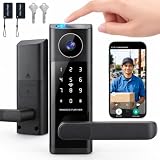
- 🔐 5 WAYS TO UNLOCK: This smart door lock offers 5 ways to unlock your front door—fingerprint (fingerprint door lock), password, IC card, App remote control, or backup key. As a versatile keyless door lock, these multiple entry options make everyday access convenient for family members and authorized guests.
- 🔔 DOORBELL-ACTIVATED VIDEO & REMOTE UNLOCK: When someone presses the doorbell, the App sends an incoming call notification to your phone. Answer the call to view the area outside your front door through the built‑in camera, communicate with the visitor using two‑way audio, and remotely unlock the door when needed. This feature turns your front door lock into a truly interactive electronic door lock for enhanced awareness. (The camera cannot be manually activated for on‑demand viewing.)
- 📱 APP REMOTE CONTROL & 2.4GHZ WIFI: Connect your smart door lock through 2.4GHz WiFi and manage access from your phone. Remotely unlock the door, manage users, provide temporary access, and stay connected with visitors when you're away.
- 🛠️ EASY ALIGNMENT & INSTALLATION: The included auxiliary installation template guides hole placement and alignment, making it easier to position the lock accurately and complete the setup for your front door lock with less guesswork—so you can enjoy your new electronic door lock without installation headaches.
- 🛡️ SMART SECURITY & EASY EVERYDAY ACCESS: Auto‑lock helps secure the door after entry, while the backlit keypad (door keypad locks) and anti‑peeping password function add convenience when entering your PIN. The integrated lever handle provides familiar door operation with smart access, making this a true smart lock with handle that doubles as a reliable home security door lock for daily peace of mind.
Rank #3

- Palm Vein Unlocking: Unlock with advanced security and ultra-fast recognition in just 0.6 seconds. Forgery-resistant palm vein technology scans your unique vein patterns for added protection. All data is securely stored locally on the lock—keeping your privacy in your hands.
- This all-in-one device: A 2K HD camera with an f/1.8 lens for sharp, clear visibility—even at night. A video doorbell with a 150° Head-to-Toe wide-angle view that eliminates blind spots, perfect for monitoring packages or checking on visitors. A smart lock with real-time visitor alerts. Whether it's ensuring your family's safety or giving peace of mind when older people or children are home alone, the FamiLock S3 Max keeps you connected and reassured.
- The Rear Lock Video Screen: The Rear Lock Video Screen allows you to effortlessly check the front door status anytime, without needing a smartphone app. Its simple, intuitive design makes it ideal for the elderly and children, offering a quick and hassle-free way to see who’s at the door. Perfect for households seeking an easy-to-use, app-free solution for monitoring the front entrance.
- Dual Power Supply System: Stay powered with a rechargeable battery offering up to 4 months of full functionality, plus an emergency set of 4 AAA batteries for an extra month of essential functionality in case of power outages.
- Seamless Home Automation with Matter & Apple Home: Easily integrate with the eufy Ecosystem & HomeBase 3 for advanced AI security features. Supports Matter for smooth, secure connections with Apple Home, Google Home, Alexa, and SmartThings—giving you a privacy-first, future-ready smart home experience. [Note: Camera streams are not supported via Matter due to current limitations. For full features and the best experience, please use the eufy App.] Matter is now compatible with HomeBase 3 for simultaneous use. This video lock is not compatible with HomeBase 2.
Rank #2

- Smarter Front-Door Security with Video and Keyless Access: Get a clearer view of visitors with a 2K HD camera and f/1.6 lens, even after dark, and unlock in seconds with fast fingerprint recognition. Designed for everyday convenience and front-door awareness, Video Smart Lock E330 helps you stay connected to entry activity around the clock.
- Easy Access for Family, Guests, and Everyday Entry: Fast fingerprint recognition helps you unlock in seconds, while the eufy Security app, Alexa or Google Voice Assistant, keypad, and physical keys give everyone a convenient way to come and go.
- Remote Control from Anywhere: See who’s at your door and manage access remotely with the eufy Security app. Get real-time notifications for visitors and activity. Thumbnail preview images in push notifications are temporarily stored in the cloud.*
- Reliable Power for Everyday Front-Door Use: A large 10,000mAh rechargeable battery supports your lock and video features with dependable power, so your front door stays ready for daily entry, monitoring, and control.
- Quick to Install, Made to Last: Upgrade your front door in about 15 minutes with no drilling required on most standard US deadbolt setups. With durable construction, BHMA Grade 3 certification, and IP65 weather resistance, Video Smart Lock E330 is built for everyday use.
Keep the setup secure over time
- Apply updates and verify they took. Keep phone apps and device firmware current, and enable automatic updates where available. In a 2020 study involving 40 smart-home users, NIST found inconsistent update transparency and confusion about whether updates had been applied. Check the device app or manufacturer support page rather than assuming an update completed.
- Review users and privacy. Periodically remove people who no longer need access, review codes and household sharing, and check video/audio retention, cloud access, and notification settings. Disable features you do not use.
- Reassess support status. A 2022 NIST survey of 412 smart-home users examined consumer perspectives on loss of manufacturer support; unsupported devices may remain connected when users are not alerted or do not understand the consequences. If support ends, assess whether to replace or retire the device rather than assuming it will remain safe indefinitely. See NIST’s summary of the 2022 study.
- Reset devices when moving into a home. Remove previous administrative access and personal data, factory-reset inherited devices, create new accounts, and check for updates. See FTC advice on using smart-home devices safely.
Product prices and availability are accurate as of the date/time indicated and are subject to change. Any price and availability information displayed on Amazon at the time of purchase will apply.
The Tool Desk
Outbyte Driver Updater FREEFix the driver behind crashes, sound loss and screen glitchesFind Drivers →Outbyte PC Repair FREEClear out junk files and repair common Windows errorsFree Scan →



