What’s actually slowing this PC down?
Pick the symptom - the matching free tool is one click away.
Google Maps can do more than find an address. You can prepare an area for offline driving, organize places for later, save regular trips and control what location activity is associated with your Google Account. Some options depend on your device or Maps activity, so look for the named feature in your current app rather than relying on an identical screen layout everywhere.
1. Download a map area before you lose service
Save an area in Google Maps before a trip where mobile data may be unreliable. Open the offline maps feature in the app, choose the area you need and download it while connected. The available download regions vary, so check that your destination can be saved before you set off.
As an Amazon Associate I earn from qualifying purchases.
Offline maps are a useful backup, but they do not preserve every connected feature. Google’s Android help says offline driving directions do not include traffic information or alternative routes. Offline public transport, cycling and walking directions are unavailable. Check conditions and route options while you still have a connection.
2. Save places in lists for later
When you find a restaurant, landmark or other place you might want to revisit, save it to a list instead of relying on search history or memory. Lists make it easier to group places by trip, neighborhood or purpose.
#1 Best Overall

- 【GPS Satellite Connection】URFRU Navigator was communication with GPS satellites directly, no needs the mobile network. and it can smart corrected the route by GPS signals to provide accurate navigation. 【Note! GPS single can not connection indoor, it should be turn on outdoor for work well.】
- 【Preloaded Maps and Free Updates】Preloaded with the latest North American offline maps (USA, Canada, Mexico), and all the URFRU GPS navigator device was able to update the maps for free lifetime.
- 【Full In-Vehicle GPS Functions】Supports zip code, address, coordinates, favorites, and POI search. Supports multiple route modes: cars, trucks, buses, taxis, bicycles, emergency vehicles, and even pedestrians.
- 【Customized Routes】Smart route planning finds the best way to your destination with accurate maps. Just enter an address, GPS coordinates, or a point of interest (like a parking lot or gas station). Choose from four route options: Fast, Green, Short, or Convenient. For trucks, routes can be customized by vehicle weight, length, height, and width to avoid restricted roads.
- 【Smart Voice Navigation】The GPS provides speed camera alerts, voice-guided route planning, road name announcements, current speed and lane guidance, plus remaining distance and estimated arrival time.
Saved places are private unless you create and share a list. Google’s computer help page sets a limit of 3,000 entries per list. If other people need access, share the list deliberately rather than assuming a saved place is visible to them.
3. Use the Android “You” tab to find places again
On Android, the “You” tab can help you search and filter places you have saved or recently used, and share selected places. What appears there depends partly on your Maps activity, so the available sections may differ from one account to another.
Google says “Nearby saved” can appear when saved places are within 25 km. That makes the tab useful when you are already near a place you bookmarked and cannot remember its name. This guidance is specific to Android; do not expect the same tab or layout on every platform.
Quick wins for a faster PC:
Fix the driver behind crashes, sound loss and screen glitchesFind Drivers →Clear out junk files and repair common Windows errorsFree Scan →Scan for outdated or missing drivers - takes under a minuteDriver Scan →Rank #2
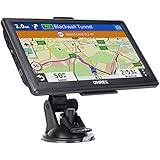
- 【Latest 2026 North America Maps】 OHREX 7" GPS Navigator for Car Truck RV works completely offline without cell service. It comes preloaded with 2026 North America maps (USA, Canada, Mexico) and does not require an internet or cellular connection to navigate.
- 【Free Lifetime Map Updates 】 Get the latest map by connecting OHREX GPS Navigation to the Windows pc. You can also use an exteranl TF Card for map update (with Mac & Windows system). Lifetime Map is free updated without Ads . You can regularly download latest data for maps, speed, and points of interest.
- 【Driver Alerts】 OHREX N700 GPS uses satellite positioning to determine your location and provides turn-by-turn voice guidance, speed camera and real-time alerts even in areas with no cell service — perfect for remote truck and RV routes.
- 【Professional GPS Navigation】 OHREX 7 inch TouchScreen GPS Navigation for Car Truck Motorhome & RV.(1) You can Customize Route According to Your Vehicle’s Weight, Length, Height and Width, Avoid Roads with Width/Height/Weight Restrictions (2) Intelligent Route Planning Fast & Economical. (3) Fast & Accurate GPS Tracking. (4) Displays Current Speed and ETA.
- 【Professional Solution】OHREX GPS navigation supply regular maps upgrades and any question inquiry. USA local brand, established professional technician team in the United States, have been recognized by our customers.
4. Save a frequent trip for quicker directions
On mobile, Google Maps lets you save frequent driving, transit and two-wheeler trips. A saved trip provides quick access to directions and estimated arrival times, which is handy for regular commutes or recurring journeys.
You can save a trip from a directions search or from suggested trips. Look for the save option after selecting a route or when a suggested trip appears; the labels and placement can vary with the app version and device.
5. Treat Incognito mode as an account-activity control
Maps Incognito mode prevents specified Maps activity from being saved to your Google Account, updating Timeline or personalizing Maps. Use it when you do not want that Maps session to affect those account-based features.
Rank #3

- Compact and lightweight GPS handheld navigator boasts an anti-slip design offering a bright 3.2" screen that is sunlight readable, even in bright sunlight, plus, physical buttons provide more versatility in any conditions
- Get multi-GNSS support(GPS+GALILEO+BEIDOU+QZSS) for superior positional accuracy,so you know exactly where you are,location precision within 6 ft
- The handheld GPS navigator uses GPS technology to capture your trip or waypoint so you can guide back to your starting position
- Equip with 3-axis compass and barometric altimeter,follow your bearing on the digital compass, which provides an accurate heading even when stationary
- Hike in any weather with the water-resistant design (rated to IP66) ,Rechargeable battery can provide up to 36 hours of battery life in full charge, recharge easily with a standard USB-C cable
It is not general anonymity. Internet providers, other apps, voice search and other Google services may still save activity. Offline Maps and other features are unavailable while Incognito mode is on, so it is not a substitute for downloading an area in advance.
Free tools Windows power users keep installed
One-click scans. No signup required.
6. Check Timeline settings before relying on location history
Timeline is an opt-in feature and is off by default. When you enable it, precise device location is regularly saved to Timeline on devices where you are signed in and have turned it on. Timeline can be managed or deleted, and it is based on device data; it is not available in Maps on a computer.
Google describes special handling for certain sensitive places in Timeline, but that does not mean all related activity disappears: searches and interactions may still be saved under other settings. Review the controls on your own devices and account before treating Timeline as a complete record or assuming it contains no location history.
Rank #4

- 【GPS Satellite Connection】URFRU Navigator was communication with GPS satellites directly, no needs the mobile network. and it can smart corrected the route by GPS signals to provide accurate navigation. 【Note! GPS single can not connection indoor, it should be turn on outdoor for work well.】
- 【Preloaded Maps and Free Updates】Preloaded with the latest North American offline maps (USA, Canada, Mexico), and all the URFRU GPS navigator device was able to update the maps for free lifetime.
- 【Full In-Vehicle GPS Functions】Supports zip code, address, coordinates, favorites, and POI search. Supports multiple route modes: cars, trucks, buses, taxis, bicycles, emergency vehicles, and even pedestrians.
- 【Customized Routes】Smart route planning finds the best way to your destination with accurate maps. Just enter an address, GPS coordinates, or a point of interest (like a parking lot or gas station). Choose from four route options: Fast, Green, Short, or Convenient. For trucks, routes can be customized by vehicle weight, length, height, and width to avoid restricted roads.
- 【Smart Voice Navigation】The GPS provides speed camera alerts, voice-guided route planning, road name announcements, current speed and lane guidance, plus remaining distance and estimated arrival time.
7. Use an SD card for offline maps only if your Android phone supports it
Google’s Android instructions allow offline map areas to be stored on an SD card. This is an optional way to use removable storage rather than the phone’s internal storage, not a requirement for offline maps.
The instructions specify portable storage on Android 6.0 or higher. Whether this is practical depends on the phone and its storage configuration; check device compatibility before choosing this option.
Recommended Free Tools
Quick Recap
Product prices and availability are accurate as of the date/time indicated and are subject to change. Any price and availability information displayed on Amazon at the time of purchase will apply.




