PC Slower Than It Used to Be?
A free scan shows the junk files, broken settings and background clutter dragging Windows down - then fixes them in one click.Free scan · Windows 10 & 11Crashes, No Sound, or Screen Glitches?
Random freezes, missing sound and display glitches usually trace back to one bad driver. Find and replace yours safely.Free scan · under a minuteYes—an old Android phone can run a small, headless server without root using Termux. It works best for modest services on a trusted local network, not as a dependable, always-on production host: Android may stop background processes, and an aging phone’s battery, heat, Wi-Fi, and hardware all affect reliability.
What “headless server” means on Android
Here, headless means you can leave the phone running a command-line service and connect to it from another device, rather than using the phone’s screen as the interface. Termux provides an Android terminal and Linux-like environment without requiring root, with packages managed through APT. Its available tools include languages such as Python and Node.js. See the Termux project site.
As an Amazon Associate I earn from qualifying purchases.
The phone remains an Android device, not a conventional server platform. Its hardware, Android’s background controls, manufacturer-specific behavior, memory pressure, network connection, and thermal conditions can all interrupt a service. No general uptime or performance figure applies to an unspecified old handset.
Choose a deployment level
| Approach | After reboot | Setup and power considerations | Best fit |
|---|---|---|---|
| Start the process manually in Termux | The process must be started again after a reboot. | Less setup; whether the process survives screen-off or other background limits depends on the phone and its settings. | Trying a service or running it occasionally on a local network. |
| Start the process with Termux:Boot | A boot script can start services after reboot, once Termux:Boot is installed and configured. | Requires an executable script in ~/.termux/boot/, plus device-specific background settings. A wake lock is optional and is not a guarantee against every process kill. |
A small utility you want to restart automatically, while accepting that it still needs monitoring. |
A small service reachable only on your home network is a simpler and safer starting point than an internet-facing server. Public exposure adds security and maintenance responsibilities that boot automation does not solve.
#1 Best Overall

- Scalable capacity for 20 phones Efficiently manage up to 20 devices, enabling large-scale application testing, social media operations, or data automation tasks that were difficult to achieve with traditional setups
- Energy-Efficient Performance Delivers superior computing power per watt, reducing energy consumption while maintaining high performance. Save on long-term operational costs without compromising productivity.
- Battery-Free Design & Overheating Prevention All included devices operate without batteries, eliminating overheating risks and extending hardware lifespan for reliable, uninterrupted operations.
- Smart Cooling & Centralized Control Built-in cooling fans ensure optimal temperature management, while integrated software streamlines multi-device monitoring and control—saving time and minimizing errors.
- Ethernet: [OTG/LAN] can use USB mode, and can also use the network cable of the router to connect the box.Two connection modes can be switched.
Install Termux and the tools your service needs
- Use a consistent, trusted source. Follow the current installation guidance on the official Termux site. Keep Termux and any add-ons, including Termux:Boot, from a compatible source. Add-ons need compatible signing; changing sources may require uninstalling the existing app and add-ons first. Check the project’s Termux:Boot README for its current setup instructions.
- Update packages and install only what you need. Termux uses APT. For example, an SSH-based setup may use OpenSSH; a Python service needs Python. One community home-server example also includes
curl,termux-services, andtermux-api, but those are not required for every server. Its package list and scope are described in the community Android setup guide. - Start the chosen service manually first. Confirm that it runs in Termux before adding boot automation. This separates service problems from startup-script or Android background-setting problems.
Start with SSH or a local service
SSH access
The community guide documents OpenSSH using port 8022. That is an example, not a universal port requirement. Start the SSH server in Termux, then use an SSH client on another device on the same Wi-Fi network, specifying the phone’s current network address and the port configured for your setup. The address can change, and your network arrangement may differ from the guide.
Do not assume that a successful start in Termux means the other device can reach it. Confirm the phone’s current address, use the correct port, and test while both devices are connected to the same trusted network. The example guide explicitly keeps access local rather than exposing the service to the public internet.
Rank #2
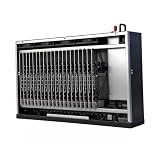
- Scalable capacity for 20 phones Efficiently manage up to 20 devices, enabling large-scale application testing, social media operations, or data automation tasks that were difficult to achieve with traditional setups
- Energy-Efficient Performance Delivers superior computing power per watt, reducing energy consumption while maintaining high performance. Save on long-term operational costs without compromising productivity.
- Battery-Free Design & Overheating Prevention All included devices operate without batteries, eliminating overheating risks and extending hardware lifespan for reliable, uninterrupted operations.
- Smart Cooling & Centralized Control Built-in cooling fans ensure optimal temperature management, while integrated software streamlines multi-device monitoring and control—saving time and minimizing errors.
- Ethernet: [OTG/LAN] can use USB mode, and can also use the network cable of the router to connect the box.Two connection modes can be switched.
Another small service
For a service written in Python or Node.js, install the relevant runtime through Termux’s package manager and start the application manually. Configure it for the network access you actually need, then test from another device. A process that listens only on the phone itself will not necessarily be reachable from other devices; consult the service’s own configuration documentation rather than guessing at a bind address.
What’s actually slowing this PC down?
Pick the symptom - the matching free tool is one click away.
Start services after reboot with Termux:Boot
- Install Termux:Boot from a source compatible with your Termux installation.
- Open Termux:Boot once so Android registers it for boot handling.
- In Termux, create the directory
~/.termux/boot/if it does not already exist. - Create a shell script in that directory containing the commands needed to start your service. The official README example runs
termux-wake-lockfollowed bysshd. The wake-lock command is an optional power-management measure, not a promise that Android or the manufacturer will never stop the process. - Make the script executable, then reboot and test whether the service starts and can be reached. For several services, use a suitable service supervisor or a script that handles each one appropriately.
For the add-on listing and its startup instructions, see F-Droid’s Termux:Boot listing. Its page includes a release entry dated 2024-06-26; check the listing itself for current release information.
Rank #3
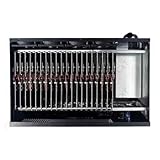
- Complete Package Contents: Each Box purchase includes the hardware (20 Phone motherboard, USB cable, box power cord, phone motherboard)
- Box Phone Farm System Overview: This equipment removes the phone screen, battery, camera, and sim slot, integrating them into a chassis that works with click farm software to achieve group control functions. 1 box contains 20 mobile phone motherboards with fixed size and number. Install the click farm software on your computer to perform batch operations
- Advanced Control Functionality: Install the Click Farm software on your PC to operate the device in batches or operate a mobile phone individually. One person can control 20 mobile phones simultaneously, perform the same task, or execute different tasks separately, easily building a network matrix of thousands of mobile phones for online projects
- Energy Efficient Operation: The voltage is 110V, and when running continuously, one box only consumes approximately 100 watts of power
- Flexible Connectivity Options: OTG/LAN Ethernet connection can use USB mode, and can also use the network cable of the router to connect the box with two switchable connection modes
Adjust Android’s background and battery settings
Android and phone manufacturers can limit apps running in the background, particularly under battery-saving controls. The community setup guide recommends unrestricted battery use for both Termux and Termux:Boot and advises disabling aggressive battery-saver behavior when needed. Menu names and paths vary by manufacturer, so search the phone’s app or battery settings for Termux and Termux:Boot rather than relying on a single UI path.
Test the actual handset: first check access with the screen off, then reboot and check again. A wake lock may help keep the device awake, but it does not eliminate all Android, memory, network, or manufacturer-specific interruptions.
Rank #4

- Scalable capacity for 20 phones Efficiently manage up to 20 devices, enabling large-scale application testing, social media operations, or data automation tasks that were difficult to achieve with traditional setups
- Energy-Efficient Performance Delivers superior computing power per watt, reducing energy consumption while maintaining high performance. Save on long-term operational costs without compromising productivity.
- Battery-Free Design & Overheating Prevention All included devices operate without batteries, eliminating overheating risks and extending hardware lifespan for reliable, uninterrupted operations.
- Smart Cooling & Centralized Control Built-in cooling fans ensure optimal temperature management, while integrated software streamlines multi-device monitoring and control—saving time and minimizing errors.
- Ethernet: [OTG/LAN] can use USB mode, and can also use the network cable of the router to connect the box.Two connection modes can be switched.
Manage heat and an aging battery
- Keep the phone ventilated while it is running and charging; avoid direct sun and enclosed spaces.
- Inspect an aging battery periodically for swelling. Stop using a phone with a swollen battery and handle it according to local battery-safety guidance.
- Use a charger compatible with the phone’s own requirements. The community guide suggests a lower-wattage charger, but does not establish a universal specification or recommend a particular charger model.
Keep the service private by default
Use the local network unless you have a clear reason and the knowledge to secure remote access. Do not forward a router port or expose SSH or another service publicly just because the process is running. Internet exposure requires understanding authentication, software updates, and network security; the cited community example intentionally excludes public access.
Recommended Free Tools
Quick Recap
Best Value

- Farm Empty Box lt can hoid.Motherboards customized per application.(No components included).
- Whats is Box Phone Farm ? It is a piece of equipment that removes the phone screen/battery/camera/sim slot, integrates them into a chassis, and works with click farm software to achieve group control functions. mobile phone motherboards. The size of the box and the number of motherboards are fixed ,Install the click farm software on your computer and you can do batch operations.
- Battery-Free Design & Overheating Prevention All included devices operate without batteries, eliminating overheating risks and extending hardware lifespan for reliable, uninterrupted operations.
- Smart Cooling & Centralized Control Built-in cooling fans ensure optimal temperature management, while integrated software streamlines multi-device monitoring and control—saving time and minimizing errors.
- Ethernet: [OTG/LAN] can use USB mode, and can also use the network cable of the router to connect the box.Two connection modes can be switched.
Product prices and availability are accurate as of the date/time indicated and are subject to change. Any price and availability information displayed on Amazon at the time of purchase will apply.




