Quick wins for a faster PC:
Fix the driver behind crashes, sound loss and screen glitchesFind Drivers →Clear out junk files and repair common Windows errorsFree Scan →Scan for outdated or missing drivers - takes under a minuteDriver Scan →Use two linked but separate evidence streams: estimate local wave exposure with a suitable model such as NOAA’s Wave Exposure Model (WEMo), and measure shoreline position repeatedly with a defined indicator, consistent tidal datum, and a survey method matched to the site. A model output is not a sensor observation, and shoreline movement alone does not prove that restoration caused the change.
The defensible workflow is to set the management question, collect a pre-project baseline and an as-built observation, document all spatial and vertical references, repeat measurements on an objective-driven schedule, and compare restoration areas with appropriate reference locations when attribution matters.
As an Amazon Associate I earn from qualifying purchases.
What wave exposure and shoreline change measurements actually tell you
Wave exposure describes the wind-generated wave conditions a site is likely to experience over a specified area and time period. In an estuary, lake, or other enclosed or semi-enclosed water body, NOAA’s Wave Exposure Model (WEMo) combines wind, bathymetry, and local depth effects to estimate wave height and derived wave energy. Those estimates can be mapped to show spatial differences, tested under chronic or extreme wind scenarios, and used to stratify field sampling.
Recommended Free Tools
Shoreline change is the displacement of a defined shoreline indicator between observation dates. It is a geometric measurement, not a direct measurement of waves. Shoreline position can move because of storms, tides and water levels, sediment supply, currents, vegetation growth or loss, subsidence, and construction as well as because of restoration. Treat the wave analysis and shoreline survey as complementary evidence streams rather than substituting one for the other.
#1 Best Overall

- 【Wide Protocol Compatibility】 SMA26 Plus GNSS RTK capable of receiving and broadcasting signals compatible with CSS(Lora),Transparent, TT450S,Trimtalk, TRMMARK3, SOUTH, SATEL standard radio protocols. ensuring compatibility with a wide range of rover&base stations
- 【Tilt Compensation】 The SMA26 Plus RTK offers tilt measurement accuracy of up to 2.5 cm (at tilt angles ≤30°), after simple initialization, it is suitable for precise measurements in locations with limited signal or restricted space. The maximum tilt measurement angle is 60°
- 【High Capability & Compatibility】The SMA26 Plus is an full-constellation RTK GNSS receiver with wide protocol compatibility, making it compatible with multiple RTK brands. Supporting PPP, PPK, and RTK technologies, it delivers versatile, high-precision performance for a wide range of surveying applications
- 【Smart Handheld Collector】The SMA26 Plus GPS receiver is paired with an Android 14 handheld with 5.45" HD screen, dual SIM, 9000mAh battery, NFC, IP68 protection, dual-band RTK support, and 13MP rear camera
- 【All-in-One Integration】 The SMA26 Plus RTK GNSS receiver features built-in Bluetooth, UHF radio, WiFi, IMU, antenna, and 32GB of storage. It allows for easy switching between base station and rover modes with a single device
Start with the decision your monitoring must support
Write the decision before selecting equipment or imagery. A monitoring plan should identify the restoration feature, shoreline segment, habitat, time horizon, and performance criterion that the observations will inform. California Coastal Commission procedural guidance organizes plans around objectives, features, methods, schedule, reporting, maintenance, and performance criteria. Use the same logic for a small living-shoreline project or a large wetland restoration.
Descriptive monitoring versus attribution
Descriptive monitoring asks, “How did wave conditions and shoreline position vary?” Attribution asks, “Did restoration cause the observed difference?” The second question needs more than repeated maps. Plan reference or control locations, record storms and unusual water levels, and track other drivers such as sediment supply and hydrology. If the project has no suitable reference area or pre-project record, report observed change without assigning a restoration effect.
Define the geographic and temporal scope
- Draw the project footprint and identify adjacent areas that could provide a reference comparison.
- Specify whether exposure represents a seasonal or long-term average, a design storm, an extreme wind event, or another scenario.
- Define the shoreline segment, habitat edge, or engineered feature being measured.
- State the observation dates, the elapsed time between them, and the water-level conditions during each survey.
Measure wave exposure with a model and, where needed, field observations
What NOAA WEMo contributes
NOAA’s Wave Exposure Model is intended for estuaries, lakes, and other enclosed or semi-enclosed waters where wind-generated waves and local depth effects control exposure. It uses shoreline geometry, bathymetry, and wind inputs to estimate wave height, wave energy, and related sediment-movement potential. The current overview describes a rebuilt R-based tool but does not state a release number; check the current NOAA documentation before relying on version-specific functions.
Do these 3 things before closing this tab:
1Scan for outdated or missing drivers - takes under a minute2Repair Windows errors before they cause bigger problems3Fix the driver behind crashes, sound loss and screen glitchesWEMo is a model estimate. It does not become a direct measurement simply because its output is spatially detailed. Check that the site falls within the tool’s geographic and physical scope, that bathymetry is current enough for the project question, and that the wind record represents the period or scenario you intend to analyze. Validation against observations is an important check where data are available.
Prepare the model inputs
- Define the waterbody and shoreline geometry. Use a consistent coordinate reference system and document the data date and source. Small channels, islands, and recently built structures can change fetch and exposure patterns.
- Assemble bathymetry. Record the vertical datum, survey or chart date, grid resolution, interpolation, and any areas where depth is uncertain. Do not merge depth datasets without documenting datum conversions.
- Select wind data and scenarios. Identify the station or reanalysis source, record period of record and temporal resolution, and separate chronic conditions from extreme or storm-surge scenarios.
- Run sensitivity checks. Where practical, test how alternative bathymetry, shoreline geometry, or wind periods affect the exposure pattern. Large changes indicate that the result is input-sensitive and should be interpreted cautiously.
- Save reproducible metadata. Keep the software release, input files, processing settings, coordinate system, vertical datum, scenario definition, and output date with the model results.
Use exposure maps to design sampling
Classify areas by modeled exposure only after checking the input quality and model suitability. Use contrasting exposure classes to place shoreline transects or direct wave observations, rather than sampling only the easiest locations to access. When a restoration assessment needs to know whether sheltered and exposed segments respond differently, preserve those classes in the sampling design and report how boundaries were chosen.
When direct wave observations are necessary
Field observations can test or complement WEMo, especially where local structures, rapidly changing bathymetry, or unusual wave sources are important. The available NOAA material does not prescribe a universal sensor setup. Select instruments and deployment duration from the decision question, then document sensor type, position, elevation, sampling interval, calibration or quality checks, deployment and retrieval dates, and any missing or rejected records. Keep the observation record separate from model output so readers can see which conclusions are measured and which are simulated.
Rank #2

- 【60°Tilt Surveying】E1 Lite GNSS Surveying System with IMU, can initializes in 5 seconds and supports tilt measurements up to 60°, and compatible with regular 5/8" thread poles.
- 【20 Hours Endurance 】E1 Lite rtk handheld gps provides 6700mah over 20 hours of continuous operation on a single charge, with fast Type-C charging. It employs a base station and rover with the (GPS) to attain Centimeter-Level Precision Measurement, High precision with low power consumption, small size easy to carry and operate.
- 【10-15 Kilometers】E1 Lite GNSS RTK Survey equipment with IMU has a long transmission distance, radio range between the rover and the base can reach 10-15 kilometers (6.21-9.32miles). Also E1 Lite can compatible with base stations of other brands in both Radio and CORS mode. Support RTCM v3/CMR correction data transmission.
- 【Robust Signal Tracking】E1 Lite RTK support Full-Constellation Tracking: GPS/GLONASS/Galileo/BDS/QZSS/IRNSS/SBAS etc, an easily obtain fixed RTK solution in seconds even in challenging environments like multipath, trees, and city canyons.
- 【Various Interfaces】E1 Lite gps rtk Innovative integration of multiple connection methods: NFC (Touch connection) /Bluetooth/USB Type-C/WiFi/TNC Connector/RS232 Serial Port. Easily access static data download, Configuration, device Status check, and Firmware Upgrade.Improve your work efficiency by 30%!!
Define shoreline position before collecting repeat data
Choose an operational shoreline indicator
A shoreline is not a single, timeless line. NOAA’s monitoring manual defines shoreline as a boundary at a particular tidal elevation. For wetlands, it identifies the lower or seaward extent of emergent marsh vegetation as a practical edge. Choose the indicator that matches the project objective, write a one-sentence operational definition, and apply that definition at every date.
For example, a wetland project might map the seaward edge of continuous emergent marsh vegetation, while an engineered feature might use a specified toe or crest line. Do not switch from a vegetation edge to a waterline in later imagery simply because one is easier to see. If the indicator must change, treat the new series as a new measurement and explain why the records are not directly comparable.
Use one tidal and vertical reference
Repeat positions must be tied to the same tidal datum. Water level at image or survey acquisition can move the apparent waterline by much more than the true landform change. Record the datum name, vertical reference, water level or tide stage, acquisition time, and any correction or transformation applied. Keep horizontal coordinate reference systems and geodetic control consistent as well.
NOAA’s 2021 monitoring guidance emphasizes datum consistency when comparing dates. The Gulf restoration manuals are regional guidance from 2019 and 2021; apply their concepts only after checking local datum, regulatory, habitat, and survey requirements.
Choose a shoreline measurement method that fits the inference
| Method | Best use | Strengths | Limits and checks |
|---|---|---|---|
| Orthorectified aerial imagery | Mapping an entire project footprint or broad shoreline | Large spatial coverage and repeat mapping from a common image product | Requires accurate georeferencing and orthorectification, a visible and consistently defined indicator, and documentation of acquisition conditions and tidal datum. NOAA’s 2019 Gulf Spill Restoration manual recommends at least 1 m spatial resolution for shoreline-monitoring orthomagery; that recommendation is not an accuracy guarantee. |
| RTK GPS or GNSS ground survey | Small projects, accessible shorelines, or direct mapping of a defined edge | Georeferenced points or continuous shoreline tracks with explicit survey control | Needs suitable equipment, correction source, control or reference stations, datum handling, field access, and trained processing. NOAA lists RTK GPS as a possible approach, not a universal requirement. |
| Fixed transects and reference stakes | Repeated local measurements at wetlands or selected shoreline segments | Simple repeat geometry and efficient targeted observations | Represents only the chosen locations. Layout must capture spatial variation, references must remain stable, and direction, spacing, and shoreline definition must stay consistent. |
Compare methods by required coverage, expected movement scale, shoreline feature, horizontal and vertical reference systems, repeat schedule, access and safety, processing capacity, and total cost. Do not label one method “most accurate” without a project-specific specification and evidence from the actual site.
Build the monitoring timeline around a baseline
Pre-implementation baseline
Collect pre-project data during design and engineering whenever possible. The baseline should use the same shoreline indicator, datum, coordinate system, and processing rules planned for follow-up observations. Record existing structures, vegetation condition, channel geometry, and any nearby reference segments that could remain undisturbed.
Rank #3
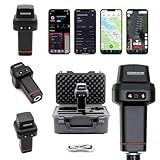
- 【Centimeter-Level RTK Accuracy】GEO-MEASURE delivers real-time centimeter-level positioning (8mm + 1ppm horizontal, 15mm + 1ppm vertical) powered by GEODNET, the world’s largest RTK correction network — no base station required, NTRIP or CORS network connection required. Connect, acquire fix, and start collecting survey-grade data in seconds. Immediate RTK Usage with 21,000+ RTK base stations globally
- 【Built for Professional Surveying】Multi-frequency GNSS tracks GPS, GLONASS, Galileo, and BeiDou across L1/L2/L5 bands with up to 1040 channels for fast initialization and stable RTK lock — even under tree canopy and near structures.
- 【Works With iOS & Android】 Pairs instantly via Bluetooth LE to iPhone and Android — download free on the App Store or Google Play. The GEO-MEASURE app handles satellite monitoring, point collection, path collection, project management, and data export to CSV, KML, GeoJSON, and GPX. No expensive data collector needed. Constantly updated with new features via OTA updates. Cellular connection required for RTK corrections.
- 【Easy for Everyone】 No complicated RTK configuration, no base station setup, no technical expertise required. Turn on, connect to your phone, and you're collecting centimeter-accurate data in under a minute. Professional survey-grade accuracy usable by anyone.
- 【All-Day Battery, All-Weather Tough】 6800 mAh battery delivers up to 24 hours of active use. IP67 rated for dust and water protection, Shock resistance up to 2 meters operational from –30°C to +65°C. USB-C PD charging works from any portable battery pack in the field.
As-built observation
Make an observation immediately after construction or placement and document the final footprint, elevations, materials, and deviations from design. This as-built record separates construction geometry from subsequent natural adjustment. Without it, an apparent “change” between a design drawing and a later survey may combine construction error, settling, and natural movement.
Follow-up timing
Choose repeat dates from the project objective, habitat, expected natural variability, and trustee or permit direction. There is no universal monitoring frequency. A schedule intended to capture storm response differs from one intended to document seasonal vegetation establishment or multi-year shoreline migration. Record notable storms, high-water events, maintenance, and nearby construction between observations so that an unusual interval is interpretable.
Standardize field and image collection
Orthophoto workflow
- Plan acquisition for the shoreline indicator to be visible and for water level to be documented. Record date, time, platform, camera or imagery source, ground sampling distance, cloud or glare conditions, and any obscuration.
- Orthorectify and georeference the imagery using documented control. Keep the coordinate reference system and vertical datum explicit; do not assume an image’s nominal accuracy from its pixel size.
- Map the shoreline indicator using a written interpretation rule. Flag sections hidden by vegetation, shadows, waves, turbidity, or structures rather than drawing an apparently precise line through missing evidence.
- Archive the original imagery, processed orthophoto, control information, digitized line, interpretation notes, and processing software or settings.
RTK GNSS workflow
- Confirm the correction source, coordinate reference system, vertical datum, antenna configuration, and survey-control points before entering the field.
- Check initialization and correction status, occupy known control where available, and record observation time, position quality indicators, and any loss of correction.
- Track the defined shoreline edge in a consistent direction. Log breaks, inaccessible sections, uncertain vegetation boundaries, and changes in the indicator.
- Repeat check shots or control occupations during the survey and after moving between shoreline segments. Store raw observations as well as exported coordinates.
- Process all dates with the same datum transformations, filtering rules, and line-construction method. Keep a record of edits so a later reviewer can reproduce the shoreline.
Fixed transects and stakes
Install stable reference stakes or monuments outside areas likely to erode or be reworked. Establish transects with known coordinates and a documented bearing; keep the compass direction and origin consistent at every visit. USGS work on GPS beach surveys shows why a single line can be insufficient: accurate morphology may require both shore-parallel and shore-normal transects, while dense three-dimensional coverage along long coastal segments can be impractical with conventional land surveys. Match transect density to the inference you intend to make, and do not generalize a few local profiles to an entire shoreline without spatial support.
The Tool Desk
Outbyte PC Repair FREEClear out junk files and repair common Windows errorsFree Scan →Outbyte Driver Updater FREEScan for outdated or missing drivers - takes under a minuteDriver Scan →Calculate and report shoreline movement
Map positions before calculating rates
For each observation date, retain the mapped shoreline and the metadata that explain how it was produced. Then calculate displacement between corresponding positions using a stated method. A simple rate can be expressed as rate = displacement / elapsed time, but report the elapsed time and direction with the value. NOAA’s manual describes shoreline loss and gain in metres per year for its methods; use the same units and state whether positive values represent seaward advance or landward retreat.
Where a shoreline is represented by lines, measure movement along defined transects or normal-to-shoreline transects rather than relying on an unspecified map-distance tool. Where points are used, pair points by stable identifiers or documented spatial rules. Keep the sign convention unchanged across the project.
Do not hide uncertainty
- Report the positional uncertainty associated with imagery control, GNSS observations, digitizing, and shoreline-indicator interpretation.
- Flag movements smaller than the combined uncertainty instead of presenting them as confirmed erosion or accretion.
- Separate gaps caused by inaccessible or obscured shoreline from measured zero change.
- Include a map of observation density so readers can see where conclusions are well supported and where they are not.
Be cautious with annualized rates
An annualized rate compresses a period into one number. It can be useful for comparison, but a short record with one storm may not represent a linear trend. Report the dates, intervening events, and the number of intervals. If movement is episodic or reverses between surveys, show the individual displacements rather than relying on one average.
Rank #4

- 【Full-Constellation, Fixed in Seconds】E1 gnss rtk achieves stable fixed solution rapidly, even in challenging environments like multipath, tree canopy, and city canyons.E1 is equipped with a high-precision GNSS engine for simultaneously tracking GPS, BDS, GLONASS, Galileo, QZSS, IRNSS & SBAS.
- 【RTK Corrections Service/CORS Requirement】The E1 rover must connect to an RTK corrections service or a Continuously Operating Reference Station (CORS). You can purchase a third-party RTK service account or set up a GSM base station to get an RTK FIX solution. Check if your location is covered by CORS; you may need to buy local CORS services.
- 【Over 20hrs Operation】With optimized charging safety and internal battery design, E1 gnss survey equipment offers over 20 hours of continuous operation on a single charge, with fast charging support via Type-C port.
- 【5 Kilometers】E1 RTK GNSS Surveying System with IMU has a long transmission distance, Radio range between the rover and the base can reach 5 kilometers (3.1miles). Also E1 can compatible with base stations of other brands in both Radio and CORS mode. Support RTCM v3/CMR correction data transmission.
- 【60° Tilt, 5s Initialization】Our rtk gps equipped with a new generation IMU module, E1 initializes in just 5 seconds and allows tilt measurements up to 60°, ensuring ±2.5cm accuracy for the entire work.
Use reference locations to evaluate restoration effects
Repeated displacement at a restored shoreline documents change at that shoreline. To evaluate causation, compare it with locations that share regional forcing but lack the restoration intervention, when such locations can be selected responsibly. NOAA’s monitoring guidance notes that reference or control sites can help calibrate and validate remote sensing and characterize spatial variation.
Interpret comparisons alongside:
- storm timing, wave conditions, and unusual water levels;
- sediment supply, dredging, nourishment, or nearby construction;
- hydrologic changes, subsidence, or channel migration;
- vegetation establishment, dieback, or seasonal visibility;
- maintenance, repair, or partial failure of the restoration feature.
The National Park Service describes coastal shoreline markers as products of interacting coastal dynamics. That principle applies even when a restoration project and a reference site show different trajectories. State what the observations demonstrate, identify plausible alternative drivers, and reserve causal claims for designs that can distinguish them.
Quality-control checklist before publishing results
- Question: Is the management decision, shoreline segment, habitat, and performance criterion explicit?
- Baseline: Are pre-implementation and as-built observations available, or is their absence clearly stated?
- Indicator: Is the shoreline feature defined operationally and applied consistently?
- Datums: Are horizontal and vertical reference systems, tidal datum, water level, and acquisition time recorded for every date?
- Exposure: Are WEMo inputs, scenario period, model suitability, and validation checks documented?
- Coverage: Does the sampling density support the spatial claim, or are conclusions limited to measured transects?
- Processing: Are imagery, control, raw GNSS data, digitized lines, software settings, and edits archived?
- Uncertainty: Are positional and interpretation errors reported, with movements below detection separated from confirmed change?
- Events: Are storms, high water, maintenance, and other disturbances listed between observations?
- Attribution: Are reference locations and alternative drivers considered before claiming a restoration effect?
Common failure modes and how to correct them
Calling a WEMo map a measurement
Problem: A modeled exposure surface is presented as if every cell were observed wave height. Correction: Label it as an estimate, describe inputs and scenario, and compare with direct observations where available.
Mixing shoreline indicators
Problem: One date uses a waterline and another uses the marsh edge. Correction: Reprocess both dates with one operational definition or report separate, non-comparable series.
Ignoring datum and tide
Problem: Apparent erosion is inferred from surveys collected at different water levels or referenced to different vertical datums. Correction: transform positions to a common datum, document water-level conditions, and qualify any interval that cannot be corrected.
Windows Errors? Fix Them Before They Spread
Repair common Windows errors and clear accumulated junk for a smoother, more stable PC - no reinstall needed.Free scan · no reinstallOutdated Drivers Are Slowing You Down
One free scan finds every outdated or missing driver and matches the right update for your exact hardware.Free scan · exact hardware matchUsing one transect to represent a shoreline
Problem: A local profile is generalized across a long or heterogeneous project. Correction: add transects that capture exposure and habitat variation, or narrow the inference to the measured segment.
Best Value

- High accuracy 1.5-2m accuracy in SBAS regions
- iOS certified for iPhone and iPad; compatible with Android and Windows
- Field upgradeable to enable RTK services and achieves 1-foot or better accuracy
Overstating a short-term rate
Problem: One storm interval is described as a long-term trend. Correction: show interval-by-interval movement, identify the event, and avoid linear extrapolation.
Confusing change with restoration success
Problem: Any post-project seaward movement is credited to restoration. Correction: use a baseline, as-built record, reference locations, and a documented account of storms, sediment, hydrology, and maintenance.
A practical method-selection decision
| If your primary need is… | Start with… | Add or verify… |
|---|---|---|
| Exposure patterns across an estuary or lake | WEMo with documented wind, shoreline, and bathymetry inputs | Field observations or validation checks where local conditions may depart from model assumptions |
| Shoreline movement across a broad restoration footprint | Repeat orthorectified imagery using the same indicator and datum | Ground control, RTK checks, and targeted transects in obscured or high-value areas |
| A small, accessible project requiring direct edge positions | RTK GNSS survey tied to stable control | Repeat check shots, datum verification, and imagery for context |
| Repeated measurements at selected wetland segments | Fixed transects and stable reference stakes | Additional transects or imagery if spatial variation is greater than the local sample represents |
| A defensible claim about restoration influence | Baseline, as-built, repeated observations, and reference locations | Storm, sediment, hydrology, vegetation, and maintenance records |
What a defensible final report contains
Present an exposure map and shoreline-change results as separate sections, then explain how they inform one another. For exposure, state the model, geographic scope, input dates, wind scenarios, bathymetry and shoreline sources, processing settings, and validation status. For shoreline change, show each mapped date, indicator definition, datum, water-level conditions, method, coverage, uncertainty, and displacement direction and magnitude.
Include the as-built geometry, baseline availability, follow-up schedule, reference-site rationale, and a chronology of storms or other disturbances. A concise statement of limitations is more credible than a precise-looking number unsupported by control, datum consistency, or adequate spatial coverage.
The central rule is simple: measure the feature you defined, reference every observation to the same framework, and match the strength of the causal claim to the design. WEMo can make wave exposure spatially explicit; imagery, RTK GNSS, and fixed transects can document shoreline position; only a monitoring design that accounts for natural variability can say whether restoration changed the trajectory.
Quick Recap
Product prices and availability are accurate as of the date/time indicated and are subject to change. Any price and availability information displayed on Amazon at the time of purchase will apply.

