What’s actually slowing this PC down?
Pick the symptom - the matching free tool is one click away.
Building a trustworthy Web3 Zakat calculator starts with two decisions: which Zakat methodology it implements and whether the calculation actually runs in a smart contract. The available project details do not specify its contract, network, ethers.js version, wallet flow, or calculation architecture, so those cannot be presented as verified features. This guide separates established Zakat guidance and Ethereum behavior from implementation choices you must make explicit in your own code.
Define the Zakat methodology before writing code
A calculator is only as clear as the rules it encodes. Islamic Relief South Africa’s calculator describes a method that totals zakatable assets, deducts short-term liabilities, checks the resulting wealth against nisab, and applies a 2.5% rate when the threshold is met or exceeded. That is the organization’s stated approach, not a universal ruling for every asset or school of jurisprudence. Islamic Relief South Africa’s Zakat calculator identifies gold and silver, cash and savings, investments and shares, money owed to the user, business assets, and stock among the relevant entries.


As an Amazon Associate I earn from qualifying purchases.
For the implementation, turn that guidance into a written policy before making a form or contract. State which asset categories count, how you handle debts, which nisab basis applies, and the rate. A user should be able to inspect those choices without reading Solidity.
Crashes, No Sound, or Screen Glitches?
Random freezes, missing sound and display glitches usually trace back to one bad driver. Find and replace yours safely.Free scan · under a minutePC Slower Than It Used to Be?
A free scan shows the junk files, broken settings and background clutter dragging Windows down - then fixes them in one click.Free scan · Windows 10 & 11- Assets: Decide whether the calculator accepts gold and silver, cash, savings, investments and shares, receivables, business assets, and stock.
- Liabilities: Define which obligations are deductible and when they are due. Islamic Relief South Africa describes deducting short-term liabilities; it notes that long-term mortgage treatment can differ among scholars.
- Nisab: Offer the selected gold or silver basis as a visible methodology choice, or clearly disclose a fixed selection.
- Rate: If following the cited South African calculator approach, apply 2.5% when net zakatable wealth meets or exceeds the selected threshold.
Because liability treatment and other details can be disputed, label the result as an estimate under the displayed method and direct users with personal or complex cases to a qualified scholar.
#1 Best Overall
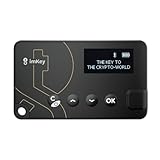
- Top-Tier Security Chip, Bank-Grade Asset Protection: Equipped with an industry-leading Infineon CC EAL 6+ certified security chip, also certified by EMVCo, this chip is widely used in bank payment and identity verification systems. Your private keys are generated and stored entirely offline within the chip, ensuring they never touch the internet. This physically blocks remote hacker attacks and eliminates the risk of private key leakage, building an impregnable first line of defense for your digital assets.
- What You See Is What You Sign, Hardware Button Protection: Every transaction requires manual confirmation via physical buttons on the imKey Pro's clear display. The device intuitively shows key transaction details like the amount and address, ensuring the data hasn't been tampered with during transmission—truly achieving "What You See Is What You Sign." It also features secure PIN code protection and a self-destruct mechanism after multiple incorrect attempts (the private key is wiped after 5 consecutive wrong entries), effectively preventing brute-force attacks even if the device is lost.
- Comprehensive Multi-Chain Asset Support, Access the Web3 Ecosystem: Fully supports major mainnets and Layer 2 networks, including Bitcoin (BTC), Ethereum (ETH), LTC, ATOM, FIL, TRX and more. By adding custom RPCs, you can easily access all EVM-compatible chains like BSC, Polygon, and Avalanche. Furthermore, imKey Pro perfectly supports Layer 2 solutions such as zkSync and Arbitrum, as well as the display and storage of NFTs, meeting all your diverse on-chain needs.
- Cold & Hot Wallet Separation, A Seamless Experience: Utilizing Bluetooth 4.1 wireless technology, it pairs seamlessly with the imToken App on your mobile phone or browser extension wallets on your PC without needing any cables. It combines the ultimate security of a cold wallet (offline private key storage) with the convenience of a hot wallet (online interaction). When a transaction is needed, you sign it offline with your imKey, and the app broadcasts it to the chain. This guarantees asset security without sacrificing the fluidity of use.
- Extremely Thin and Light, A Portable Digital Vault: The device is smaller than a credit card, measuring just 2.3mm thick and weighing approximately 17g. Crafted with a zinc alloy body and a PC panel, it offers a premium feel and is extremely portable. The built-in 33mAh lithium-polymer battery provides a battery life of up to approximately four weeks on a single charge. The package includes the hardware wallet, a USB cable, and mnemonic cards, making it ready to use right out of the box—a secure and reliable gateway to the crypto world.
How to calculate Zakat? Make the steps auditable
A simple calculation flow mirrors the stated methodology: sum the included assets, subtract the liabilities allowed by the selected rules, compare the result with nisab, then calculate the due amount if the threshold is reached. The user interface should show each intermediate value, not only a final number, so someone can see why a result was produced.
- Collect values for every asset category your stated method includes.
- Collect only the liabilities that the displayed rule permits the user to deduct.
- Calculate net zakatable wealth as eligible assets minus eligible liabilities.
- Compare net zakatable wealth with the current monetary value of the selected nisab.
- If wealth meets or exceeds that threshold, calculate 2.5% under the cited Islamic Relief South Africa approach; otherwise show that the threshold was not met.
“Is zakat on income or savings?” is not answered by a label alone: the cited calculator lists cash, savings, investments, receivables, and other categories, while the treatment of particular circumstances depends on the method being followed. Explain how your chosen policy handles each input rather than implying every calculator must treat it identically.
Rank #2

- Instant Ethereum Access — No Wallet Setup Required: Pre-loaded Burner ETH Card gives you immediate Ethereum access without needing an exchange account or complicated wallet setup. Perfect for beginners and experienced crypto users looking for a fast, secure onboarding option.
- Secure, Anonymous & Easy to Activate: No personal information, KYC, or lengthy verification process. Simply follow the activation instructions on the card to claim your ETH safely and privately.
- The Perfect Crypto Gift for Any Occasion: Great for holidays, birthdays, graduations, stocking stuffers, employee rewards, or gifting crypto to someone curious about Web3. A modern way to introduce family and friends to Ethereum.
- Use Your ETH Anywhere Ethereum Is Supported: Once activated, funds transfer to your preferred wallet—MetaMask, Coinbase Wallet, Ledger, Trust Wallet, and more. Spend, trade, stake, or hold your ETH just like any other Ethereum balance.
- Physical Card With Simple Step-By-Step Instructions: Premium-quality physical card includes clear instructions for activating and accessing your ETH. Everything is securely contained inside—no codes printed on receipts.
What is Nisab? Show the basis and date-sensitive value
Islamic Relief Singapore gives nisab measures of 87.48 grams of gold or 612.36 grams of silver, and says the prices of these metals fluctuate. Its guidance is framed according to the Hanafi madhab and attributes a preference for the lower silver threshold to most scholars on that page. Present those as that source’s guidance, not a universal requirement. Islamic Relief Singapore’s Zakat calculator
A gold- or silver-based nisab needs a current market value to become a currency threshold. Display which metal basis is selected, the gram measure used, the currency, and when the price was obtained. If a price feed is unavailable or stale, do not present the resulting threshold as current; show its timestamp or mark it unavailable and explain what the user can do next. The retrieved guidance supports that values fluctuate, not any evergreen currency-denominated threshold.
For a calculator, this is a key design distinction: the gram measure is a methodological input, while its currency equivalent is time-sensitive data. Keep them separate in both the interface and any on-chain data model. If users can select gold or silver, ensure the selected choice is applied consistently to the comparison and displayed in the result.
Choose what runs on-chain—and describe it accurately
The title’s phrase “on-chain” should match what the code actually does. A Web3 application can use a contract to calculate values, or it can calculate in the browser and use Ethereum only for a separate operation. The project details available here do not establish which design is used, so treat calculation location as an implementation decision rather than a verified project feature.
- Application-side calculation: The browser computes the estimate from user inputs. This can avoid publishing personal financial details to a public chain, but the result is not a contract-computed result.
- Contract-side calculation: The application passes inputs to a contract function that computes the result. If a transaction writes those inputs or a result to chain state, the data may become publicly observable and the operation requires a state-changing transaction.
- Hybrid design: The application can calculate privately while a contract handles a distinct on-chain action. Describe the division precisely; do not call the calculation on-chain unless the contract performs it.
Do not send sensitive financial inputs to a public blockchain merely to make a calculator sound decentralized. If contract execution is essential, explain what is stored, what is emitted in events, and what can be inferred from transactions before users connect a wallet.
Recommended Free Tools
Use ethers.js with the correct contract interaction
Ethereum.org distinguishes a contract read from a write: “Reading is a free operation that does not create a transaction and does not change any state on the blockchain.” A write changes state and is submitted as a transaction. Ethereum.org’s guide to interacting with smart contracts
Best Value
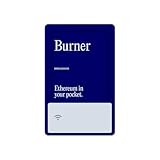
- Instant Ethereum Access — No Wallet Setup Required: Pre-loaded Burner ETH Card gives you immediate Ethereum access without needing an exchange account or complicated wallet setup. Perfect for beginners and experienced crypto users looking for a fast, secure onboarding option.
- Secure, Anonymous & Easy to Activate: No personal information, KYC, or lengthy verification process. Simply follow the activation instructions on the card to claim your ETH safely and privately.
- The Perfect Crypto Gift for Any Occasion: Great for holidays, birthdays, graduations, stocking stuffers, employee rewards, or gifting crypto to someone curious about Web3. A modern way to introduce family and friends to Ethereum.
- Use Your ETH Anywhere Ethereum Is Supported: Once activated, funds transfer to your preferred wallet—MetaMask, Coinbase Wallet, Ledger, Trust Wallet, and more. Spend, trade, stake, or hold your ETH just like any other Ethereum balance.
- Physical Card With Simple Step-By-Step Instructions: Premium-quality physical card includes clear instructions for activating and accessing your ETH. Everything is securely contained inside—no codes printed on receipts.
That difference determines the user experience. A read-only calculation or lookup does not need a transaction confirmation. A state-changing call requires a signer and wallet approval, and the user should be told what the transaction will do. Whether a particular call is a read or write depends on the function and how it is invoked, not simply on whether a wallet is connected.
The contract ABI describes the functions exposed to callers, their inputs and outputs, and contract events. In ethers.js, the ABI and a contract address are used to construct a contract interface; a provider supplies access to Ethereum data, while a signer is used when an operation must authorize a transaction. Ethereum.org lists ethers.js as a JavaScript/TypeScript library and names Infura and Alchemy among possible data-provider options. That general documentation does not establish which provider any particular project uses.
Version matters. The located ethers.js documentation is explicitly for v5 and says v6 documentation is elsewhere. Do not paste v5 snippets into a project without checking its installed dependency and the matching official documentation. The project’s ethers.js version and network are not established here, so neither should be guessed or claimed as a tested setup.
Do these 3 things before closing this tab:
1Repair Windows errors before they cause bigger problems2Fix the driver behind crashes, sound loss and screen glitches3Clear out junk files and repair common Windows errorsMake methodology, data, and execution visible
A useful results screen should let users understand both the religious-method inputs and the technical origin of the answer. Keep the labels plain and provide enough context to reproduce the estimate:
- Show the asset and liability categories included under the selected method.
- Display the chosen gold or silver nisab basis, gram measure, currency conversion, and price timestamp.
- Show eligible assets, eligible liabilities, net wealth, threshold comparison, and calculated amount separately.
- Identify whether the calculation was performed in the application or by a contract.
- If a contract is involved, identify its network and explain whether the interaction is a read or a state-changing transaction.
- Give the user a way to review the methodology and understand that it is not a personalized religious ruling.
These disclosures make a calculator more dependable than a bare number: users can see which inputs drove the result, what may have changed since a price was fetched, and which parts of the process were actually recorded on-chain.
Quick Recap
Product prices and availability are accurate as of the date/time indicated and are subject to change. Any price and availability information displayed on Amazon at the time of purchase will apply.




