Free tools Windows power users keep installed
One-click scans. No signup required.
You can reduce exposure by checking where an app stores entries, what each AI feature sends to its provider, and whether cloud backups preserve copies. Then limit AI processing to features you choose, secure the device and its backups, and avoid sharing details that do not need to leave your control. “Stored locally” does not necessarily mean an entry never leaves the device.
Start by separating storage from AI processing
An app may keep journal entries on your phone but transmit text, audio, transcripts, attachments, or excerpts when you request a recap, transcription, or reflection. Storage location and AI data flow are different questions. Check the specific feature, what information it sends, which provider receives it, and whether you must initiate or approve the transfer.
As an Amazon Associate I earn from qualifying purchases.
Vendor disclosures illustrate why you should check each app rather than assume a standard design: Journary says its iPhone journal is stored on-device and that it has no backend storing journal content; AI Journal says entries are local by default and sent to an AI provider only when the user initiates a feature and has allowed it; Plai says entries are local and may sync to the user’s iCloud, while its backend routes AI requests to OpenAI. These are vendor statements, not independent verification. Journary, AI Journal, Plai
Evaluate the app before entering sensitive details
Read the current privacy policy and inspect the app’s settings. Look for direct answers to these questions:
#1 Best Overall
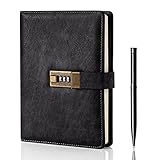
- Diary with Lock: WEMATE lock journal notebook with creative antique metal password lock, and this Locking diary is your own secret space whether it is trade secrets or personal privacy, can be fully protected. Warm Notes: Please remove the black buckle before using the password book with lock
- Suitable Size for Most Needs: The journal with lock has 120 sheets, and 240 pages of 100gsm cream-colored paper, perfect for writing without the worry of ink bleeding through. And it‘s A5 size, 8.6*5.8 inch, and the horizontal line pages perfectly combined to meet diverse writing needs, that allows you to record more memories and secrets.
- Premium Leather: The diary is made with a vintage-inspired cover design with a unique texture. It looks vintage and stylish and touches so soft that you may not willing to put it down or into your bag.The diary is perfect for students, professionals, men, women, girls, and boys
- Vintage Lock: The vintage lock is easy to use, the password is composed of three numbers from 0-to 9, and hundreds of password combinations make your locking journal safe and private enough. The initial password is 0-0-0, and you can follow the instruction card to change your own password
- Best Ideal: Each lock diary comes with a metal pen in a nice box which is ideal for friends, family, lovers, etc. If you fail to open the diary or forget the password, please email us
- Are entries stored on your device, on the app company’s servers, or in both places?
- Which AI features send data off-device, and do they send the original entry, a recording, a transcript, an attachment, or a derived excerpt?
- Must you start or approve AI processing? Can you disable the feature?
- Which AI provider receives the data, and which terms govern its handling?
- Can content be used to improve models? Is that option enabled by default, and can you turn it off?
- Who may access content for support, safety, troubleshooting, or legal reasons?
- What account, diagnostic, or usage information is collected even if entry text is not?
- Does sync use your own cloud account? Who controls the encryption key, and can the service operator decrypt synced data?
- What happens to deleted entries in provider systems, backups, and AI-generated summaries? Can you export your journal before leaving?
Apple’s developer guidance recommends informed consent, transparent explanations, data minimization, user controls, and protecting data stored in apps. Its principle is to “Secure personal data, and respect user preferences for how data is used.” Check the installed app and current operating-system settings, since controls and platform behavior can change. Apple Developer Documentation
Understand provider use, retention, and deletion
Do not treat one AI provider’s policy as a rule for all providers. OpenAI’s consumer-services FAQ says consumer content may be used to improve models depending on settings and describes limited access by authorized personnel or service providers. If an app routes entries to OpenAI, review the applicable terms and settings rather than assuming the app’s local-storage claim answers questions about AI processing. Turning off model-improvement use, where available, does not necessarily turn off AI processing itself. OpenAI consumer-services FAQ
Rank #2

- ✍Diary with Lock--Our WEMATE lock journal notebook with creative antique metal password lock, and this Locking diary is your own secret space whether it is trade secrets or personal privacy, can be fully protected. Warm Notes: Please remove the black buckle before using the password book with lock
- ✍Suitable Size for Most Needs--The journal with lock has 96 sheets, and192 pages which are refillable and thick to avoid ink infiltration. And it‘s A6 size, 6.3*4.3 inch, and the horizontal line pages perfectly combined to meet diverse writing needs, that allows you to record more memories and secrets.
- ✍Premium Leather--The surface is made of high-quality PU leather with a unique texture. It looks vintage and stylish and touches so soft that you may not willing to put it down or into your bag.
- ✍Vintage Lock--The vintage lock is easy to use, the password is composed of three numbers from 0-to 9, and hundreds of password combinations make your locking journal safe and private enough. The initial password is 0-0-0, and you can follow the instruction card to change your own password.
- 🎁 Best Gifts - This diary with lock is a thoughtful and considerate gift that expresses care and appreciation for your family and your freind. If you are still having a headache about choosing a gift,then this journal with lock must be the best gift choice for Birthday, Mother's Day,Fathers Day Gifts. It can help them to protect personal and sensitive information, giving them a safe and private space.
Deletion can involve more than removing an entry from the journal screen. Check separately for the app account, AI provider, cloud sync, device backups, exported files, and generated summaries. Before closing an account, export anything you want to keep and determine which copies require separate deletion.
Secure the phone and any backups
A private journal can still be exposed through an unlocked or unencrypted device, an account compromise, or backup copies. CISA recommends device encryption and secure backups, and notes that physical access to an unencrypted device may expose stored data. Use a strong screen passcode, keep software current, do not leave an unlocked phone unattended, and retain recovery credentials safely. CISA device-security guidance
Rank #3

- Keep It Truly Private, Keep It You: Your thoughts deserve a safe space! ZICOTO’s diary with lock gives you total privacy with a passcode lock - no more snooping! It’s your trusted locked journal for women, made for secrets, dreams, and daily reflections
- Designed to Impress (and Last): Wrapped in a beautiful sage green PU leather with a golden metal lock, the aesthetic notebook with lock looks as good as it feels. A stylish, durable pick for yourself - or the perfect gift among classy diaries
- Smarter Pages, Better Writing: The modern dream journal is smart inside and out! Track your mood, date, and even the weather, while the lined layout keeps your writing neat! And yes, it’s also refillable - so you’ll never run out of space for your thoughts
- Compact Size, Plenty of Space: Measuring 8.5x5.6” with 192 pages, the journal with lock fits effortlessly in a bag while offering plenty of room for journaling, goal-setting & creative ideas. Compact enough to carry anywhere - big enough to capture all your dreams
- Details That Make a Difference: Every feature adds function with the cute diary for women! From the integrated bookmark ribbon and pen holder to the passcode lock with easy setup and refill-ready format - all the thoughtful extras that elevate your experience
Review iCloud, Google Drive, or other backup and sync settings. Identify which account holds the copy, how it is protected, who can access it, and how long deleted material may remain. Journary says its regular encrypted backups can include journal content; encryption alone does not establish that backups are excluded or that data is end-to-end encrypted. Journary’s privacy information
Use AI features selectively
- Before writing: Review the app’s privacy policy and controls; avoid putting highly sensitive details into an app whose data flow you cannot establish.
- Before using an AI feature: Check whether it sends the original text, audio, transcript, or a smaller excerpt. Use the feature only when its benefit is worth that transfer.
- Set provider preferences: If the provider offers a model-improvement control, turn it off if that matches your preference. Confirm separately whether processing still occurs.
- Limit other people’s information: Avoid entering details about someone else that they would not expect to be sent to an app or external AI provider.
- Before deleting or leaving: Check for synced entries, backups, exported files, and generated summaries that may need separate removal.
Reduce shoulder-surfing in public
A privacy screen filter can make it harder for nearby people to read your display while you write in public. It does not stop the app or an AI provider from processing entries, prevent cloud copies, or protect against account compromise. Check compatibility and touch behavior; Australian cybersecurity guidance notes that some filters can affect touch functionality. Australian cybersecurity guidance
Rank #4

- Keep It Truly Private, Keep It You: Your thoughts deserve a safe space! ZICOTO’s diary with lock gives you total privacy with a passcode lock - no more snooping! It’s your trusted locked journal for women, made for secrets, dreams, and daily reflections
- Designed to Impress (and Last): Wrapped in a gorgeous pink PU leather with a golden metal lock, the aesthetic notebook with lock looks as good as it feels. A stylish, durable pick for yourself - or the perfect gift among classy diaries
- Smarter Pages, Better Writing: The modern dream journal is smart inside and out! Track your mood, date, and even the weather, while the lined layout keeps your writing neat! And yes, it’s also refillable - so you’ll never run out of space for your thoughts
- Compact Size, Plenty of Space: Measuring 8.5x5.6” with 192 pages, the journal with lock fits effortlessly in a bag while offering plenty of room for journaling, goal-setting & creative ideas. Compact enough to carry anywhere - big enough to capture all your dreams
- Details That Make a Difference: Every feature adds function with the cute diary for women! From the integrated bookmark ribbon and pen holder to the passcode lock with easy setup and refill-ready format - all the thoughtful extras that elevate your experience
What app disclosures can—and cannot—tell you
Privacy policies and settings describe stated practices; they do not by themselves verify how an app is implemented. The disclosures for the named apps above have not been independently confirmed through inspection of their software or network traffic. Avoid calling an app “completely private” based only on a local-storage or encryption claim. Encryption at rest alone does not prove that data is end-to-end encrypted, excluded from backups, or never transmitted for AI features.
A 2026 preprint on mental-health apps—not all AI journaling apps—reported that 68% of the studied apps failed to disclose at least half of detected trackers, 48% disclosed third-party AI processing, and seven used generic wording that did not identify AI recipients. These are findings within that study’s sample, not estimates for the broader app market or evidence about any particular journaling app. 2026 preprint on mental-health app disclosures
Best Value

- 3-digit metal combination lock ensures private journal security. Robust locking diary protects sensitive entries, ideal as a confidential locked journal for personal reflections and diary privacy
- Premium textured PU leather offers retro durability. Stylish lock journal for women/men with soft-touch finish, combining elegance with practicality in a secure diary notebook format
- 240 bleed-proof 8.6"x5.2" pages for uninterrupted writing. Thick paper quality prevents ink bleed-through, perfect for diarios para mujer or daily journaling in a lockable diary format
- Includes metal pen, side slots, and ribbon bookmark. Complete journal set with lock functions as a thoughtful diary gift for boys/women, enhancing organization and convenience
- Multi-purpose secure journal for personal/private use. Versatile locked diary adapts to adult/teen needs as a confidential notebook with lock for creative writing, planning, or journaling
The FTC’s app-security guidance says developers handling personal information should consider protecting or obscuring it, for example with encryption. That is general security guidance, not a certification of any journaling app. Federal Trade Commission app-security guidance
Quick Recap
Product prices and availability are accurate as of the date/time indicated and are subject to change. Any price and availability information displayed on Amazon at the time of purchase will apply.




