Deploy predictive maintenance as a controlled engineering project, not a sensor-buying exercise. Start with a few high-criticality assets, define the failure modes and maintenance decisions you need to support, instrument those assets with sensors that reflect their failure physics, and establish a normal operating baseline before training models. Keep time-sensitive processing at the device or plant edge, use cloud services for fleet-wide learning and governance, and connect every actionable alert to your CMMS or EAM workflow.
The pilot is successful only when it changes maintenance outcomes: earlier detection, fewer missed failures, less unnecessary work, improved availability, or a measurable reduction in risk and cost. A high anomaly score by itself is not a business result.

As an Amazon Associate I earn from qualifying purchases.
What predictive maintenance with industrial AI sensors actually does
Predictive maintenance (PdM) combines condition sensors, operating context, analytical models, and a maintenance process. Sensors measure physical changes in equipment; software turns those measurements into features or predictions; maintainers decide whether to inspect, repair, adjust, or continue operating.
Recommended Free Tools
The useful output is usually one of three things:
- Anomaly detection: a machine is behaving differently from its established normal state.
- Fault diagnosis: the pattern is consistent with a particular failure mode, such as imbalance, misalignment, bearing damage, cavitation, overheating, or lubrication deterioration.
- Prognosis: the system estimates how degradation may progress, sometimes expressed as remaining useful life (RUL).
Those outputs have different data and validation requirements. An anomaly model can be trained with mostly healthy data, while diagnosis and RUL require reliable fault or maintenance histories and careful labeling. A model should never be allowed to invent a precise failure date when the plant has no evidence to support that level of certainty.
#1 Best Overall

- INDUSTRIAL VIBRATION METER – VM-424 WITH REMOTE SENSOR PROBE - Designed for vibration measurement on motors, pumps, compressors, gearboxes, fans and rotating machinery where direct placement of a handheld meter is difficult. The external sensor allows technicians to reach narrow measurement points while keeping the main unit at a safe and comfortable viewing position.
- 3-IN-1 VIBRATION MEASUREMENT – ACCELERATION VELOCITY DISPLACEMENT - Measures Acceleration 0.1–199.9 m/s² (peak), Velocity 0.1–199.9 mm/s (RMS) and Displacement 0.001–1.999 mm (p-p), enabling technicians to evaluate key vibration parameters used in machine condition monitoring and preventive maintenance inspections.
- DUAL FREQUENCY ACCELERATION MODES – 10HZ–1KHZ AND 1KHZ–3KHZ - Low frequency mode supports general machine vibration evaluation such as imbalance or structural vibration, while high frequency mode helps observe higher-frequency vibration components during mechanical diagnostics.
- REMOTE PIEZOELECTRIC SENSOR – STABLE CONTACT MEASUREMENT - External shear-type accelerometer connected by cable allows precise probe positioning on bearing housings, pump casings and motor frames while the display remains easy to read during measurement.
- INTERCHANGEABLE PROBE TIPS – MAGNETIC, SHORT AND LONG CONTACT - Includes magnetic base tip for hands-free contact on metal surfaces as well as short and long probe tips for measurements on flat surfaces, narrow housings and recessed machine components.
Industrial deployments also differ from laboratory demonstrations. Loads, speeds, product recipes, ambient temperatures, mounting conditions, maintenance practices, and communications outages change the signal. The design therefore has to include data quality, operating-state context, cybersecurity, human review, and an update and rollback process from the beginning.
Start with a bounded pilot and a decision, not a sensor catalog
Choose assets where prediction can change an outcome
Rank candidate assets by consequence of failure, detectability, available intervention time, and the actions a maintainer can take. A high-value pump that can be inspected or repaired during a planned window is usually a better first target than an asset whose failure gives no warning or cannot be acted on.
Good pilot candidates include critical motors, pumps, compressors, gearboxes, and similar rotating machinery. Intel’s predictive-maintenance examples use hydraulic pumps and combine vibration with oil pressure and fluid-speed information, illustrating why the asset and its failure mechanisms should determine the sensing plan.
Free tools Windows power users keep installed
One-click scans. No signup required.
Write the failure-mode and decision statement
For each pilot asset, document:
- The failure modes that matter, such as bearing wear, imbalance, shaft misalignment, seal degradation, cavitation, overheating, or lubrication problems.
- The physical signal expected to change before each failure.
- The minimum lead time maintainers need to inspect, order parts, schedule labor, or safely shut down.
- The alert decision: inspect now, reduce load, schedule work, order a spare, or continue monitoring.
- The acceptable false-alert rate and the consequence of a missed failure.
- The person or team responsible for confirming and closing an alert.
Siemens describes implementation as a progression from scoping and design through deployment, operation, and refinement. NIST likewise recommends tying prognostics and health-management (PHM) use cases to safety, environmental, cost-benefit, and operational goals. Use those goals to define success before selecting hardware.
Set the baseline and success measures
Record current performance for the same assets or comparable assets before the pilot changes the workflow. Useful measures include unplanned downtime, mean time between failures, maintenance cost, emergency labor, spare-parts consumption, inspection hours, production loss, safety exposure, and asset availability. Also measure the analytical process itself: false positives, missed failures, detection lead time, time from alert to action, and time from action to confirmed closure.
Baseline data does not have to be perfect, but its collection method must remain stable. State the period, asset population, operating regime, and accounting treatment so that post-deployment changes can be compared fairly.
Match sensors to failure physics
Vibration is the starting point for rotating equipment
Vibration is often the first modality to evaluate on motors, pumps, compressors, gearboxes, and similar machines because mechanical defects alter the machine’s time- and frequency-domain behavior. Texas Instruments describes an IEPE vibration architecture in which a sensor is mounted to the equipment, analog signal conditioning prepares the signal, an analog-to-digital converter digitizes it, and edge processing analyzes the result. A fast Fourier transform (FFT) is one method for comparing frequency components with failure models.
Outdated Drivers Are Slowing You Down
One free scan finds every outdated or missing driver and matches the right update for your exact hardware.Free scan · exact hardware matchWindows Errors? Fix Them Before They Spread
Repair common Windows errors and clear accumulated junk for a smoother, more stable PC - no reinstall needed.Free scan · no reinstallMounting matters as much as the accelerometer. A loose, poorly oriented, or inconsistently located sensor can create changes that look like machine degradation. Specify the mounting method, axis orientation, coupling surface, cable routing, and inspection procedure. Decide whether the installation must be permanent, portable, wired, or wireless.
Rank #2
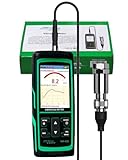
- PROFESSIONAL VIBRATION ANALYZER – VM-428 WITH EXTERNAL SENSOR - Designed for advanced vibration diagnostics on motors, turbines, pumps, compressors and rotating machinery where higher measurement ranges and additional diagnostic parameters are required.
- 5-PARAMETER MACHINE DIAGNOSTICS – A V D FREQUENCY TEMPERATURE - Measures Acceleration 0.1–300 m/s² (peak), Velocity 1–850 mm/s (RMS), Displacement 1–3300 µm (p-p), Frequency 30Hz–14kHz and Temperature, providing multiple diagnostic indicators for machine condition evaluation.
- DUAL FREQUENCY MEASUREMENT CIRCUIT – STRUCTURAL AND HIGH-FREQUENCY MODES - Low frequency mode supports general vibration analysis of machine structures, while high frequency mode allows observation of higher-frequency vibration signals often associated with mechanical wear or bearing conditions.
- REMOTE MAGNETIC SENSOR – STABLE AND REPEATABLE MEASUREMENTS - External piezoelectric shear-type probe with magnetic base allows secure placement on metal housings, supporting stable readings during inspection of motors, gearboxes and rotating equipment.
- ISO MACHINE CONDITION RATING INDICATION - Built-in vibration severity scale based on ISO vibration classification helps technicians visually interpret measured velocity levels during machine condition evaluation.
Add a modality only when it explains a failure
Use additional sensors when they map to a known mechanism or materially improve diagnosis:
| Failure question | Useful measurement | What it can add |
|---|---|---|
| Is the machine overheating? | Temperature or thermal imaging | Confirms thermal stress, cooling problems, or lubrication effects. |
| Is a hydraulic or process condition abnormal? | Pressure, flow, or fluid speed | Separates process changes from mechanical faults; Intel’s hydraulic-pump example uses oil pressure and fluid speed with vibration. |
| Is lubrication degrading or contaminated? | Oil condition or particle measurement | Provides direct evidence of lubricant-related wear. |
| Is there an impact, leak, or high-frequency defect? | Acoustic or ultrasonic sensing | Can reveal events that are not clear in lower-frequency vibration. |
| Did operating speed or load change? | Speed, tachometer, current, or load signals | Provides the context needed to normalize vibration and distinguish load changes from faults. |
STMicroelectronics describes industrial accelerometers, inertial measurement units, and acoustic microphones used in smart sensor nodes and gateways for condition monitoring. The presence of a sensor in a reference design does not make it necessary for every asset; add it only when the signal has a defined role in the failure decision.
Specify the installation environment
For every sensor, check:
- Frequency bandwidth and sampling rate for the fault frequencies you need to observe.
- Temperature range, ingress protection, chemical exposure, shock, and vibration rating.
- Hazardous-area or explosive-atmosphere requirements, if applicable.
- Wired, wireless, or other connectivity constraints, including cable length and power availability.
- Calibration method, calibration interval, and how calibration records attach to the asset.
- Maintainability: access for replacement, connector durability, battery service, and the effect of removing a sensor during maintenance.
Sampling more quickly is not automatically better. It increases data volume and processing demand, while an inadequate bandwidth or poorly mounted sensor can still miss the relevant physics. Define the highest frequency and response time required by the failure mode, then select the acquisition chain around that requirement.
Build a trustworthy data foundation before training
Capture normal operation, not only failures
Models need examples of healthy operation across the regimes in which the plant actually runs. Capture startup, shutdown, idle, low and high load, speed changes, product changes, ambient variation, and planned operating transitions. A model trained only on a single steady state will often flag legitimate production changes as faults.
Record context with every measurement
At minimum, associate each data stream with:
- Asset identity, location, equipment hierarchy, and sensor position.
- Operating state, load, speed, set points, and process conditions.
- Ambient and environmental conditions where they influence the signal.
- Sensor model, firmware, mounting method, calibration status, units, and sampling configuration.
- Maintenance actions, inspection findings, replaced components, lubrication, adjustments, and work-order closure notes.
- Data-quality indicators such as missing samples, saturation, clipping, time synchronization, and communications outages.
Use a consistent asset identifier across the sensor platform, historian, SCADA system, and CMMS or EAM. Without that key, an accurate model can still produce an unusable alert because nobody can reliably connect it to the right machine or work history.
Establish a baseline before anomaly scoring
Create a baseline from verified normal data and document which operating regimes it covers. Baseline creation may involve raw waveform features, spectral features, temperature trends, pressure relationships, or multivariate behavior. Keep the baseline versioned so that a later model can be compared with the one used during the pilot.
Do not treat a vendor demonstration dataset as representative of plant conditions. Demonstration data can illustrate an algorithm, but it cannot establish your asset’s normal range, failure prevalence, sensor installation quality, or maintenance response time.
Do these 3 things before closing this tab:
1Scan for outdated or missing drivers - takes under a minute2Clear out junk files and repair common Windows errors3Fix the driver behind crashes, sound loss and screen glitchesLabel events conservatively
Use maintenance records, inspection results, and confirmed engineering findings to label faults. Distinguish “suspected,” “confirmed,” “repaired,” and “no fault found.” A work order opened because of an alert is not proof that the alert was correct. Preserve the evidence and the reviewer who made the determination.
Rank #3

- 【5-in-1 Diagnosis】The vibration meter supports measurements of Acceleration 0.1–300 m/s² (peak), Velocity 1–850 mm/s (RMS), Displacement 1–3300 µm, Frequency 30 Hz–14 kHz, Temperature 14~140°F. The vibrometer gauge meets the common predictive maintenance and condition check needs in workshops and production sites.
- 【Wide Range of Applications】This digital vibration analyzer is suitable for motors, HVAC systems, pumps, fans, generators, compressors, turbines, bearings, etc. The tester features ISO vibration intensity classification. You can quickly get a preliminary assessment of machine/vehicle vibration. Appropriate for mechanical maintenance technicians, engineers, QC inspectors, or even beginners.
- 【Large Storage & Transmission】This vibration meter supports automatic/manual recording (stores up to 8 MB ≈397,000 data points). It can transfer CSV and BMP files via PC software (compatible with Windows systems) or be used as a small-capacity USB drive. Handy for long-term trend analysis and batch data archiving of equipment records.
- 【Clear Display & Stable Measurement】The easy-to-read backlit screen enables data collection and interpretation under various lighting conditions. It clearly shows line graphs and real-time statistics of maximum/minimum/average values. The separate probe comes with a strong magnetic sensor, which helps access hard-to-reach areas and minimizes the impact of your movements on the results.
- 【User-friendly Design】The vibration detector comes with a portable carrying case for outdoor use. It supports automatic high/low-speed circuit switching, adjustable sampling time, screen brightness, calibration, unit switching, automatic power-off, machine-grade selection, low battery indicator. The included manual provides a detailed explanation of each function. Setup takes only a few seconds.
Choose a device–edge–cloud architecture
What belongs on the sensor device
The device can acquire signals, perform filtering and feature extraction, detect obvious data-quality problems, and run lightweight machine-learning inference. Local processing reduces raw-data transmission and can continue during a temporary network outage. It also requires enough compute, memory, power, and secure storage for the algorithm and its updates.
What belongs at the plant edge
An edge node or industrial gateway can aggregate several sensors, align timestamps, combine sensor data with PLC or historian context, execute richer inference, buffer data, and manage devices. It is the right place for decisions that need low latency, local resilience, or operation when cloud connectivity is intermittent. Edge services can also expose observability, diagnostics, model deployment, and controlled configuration to plant operators.
What belongs in the cloud
Cloud systems are suited to centralized storage, fleet-wide model training, cross-site comparisons, dashboards, orchestration, and model/version management. They provide scale for retraining and help engineering teams compare asset classes without copying every raw waveform to every site.
The Tool Desk
Outbyte PC Repair FREERepair Windows errors before they cause bigger problemsFix Now →Outbyte Driver Updater FREEFix the driver behind crashes, sound loss and screen glitchesFind Drivers →ITU-T Y.4618’s AIoT reference model spans devices, edge nodes, and cloud services. Microsoft’s predictive-maintenance scenario likewise combines edge data processing with cloud analytics. The practical split is not “edge versus cloud” as an exclusive choice: preprocess and make urgent decisions locally, while sending selected features, events, and governed datasets to the cloud for broader analysis.
Use latency, bandwidth, privacy, and resilience to decide
| Requirement | Prefer device or edge | Prefer cloud |
|---|---|---|
| Immediate protective or maintenance decision | Yes; avoid a round trip to a remote service. | Only for non-urgent analysis. |
| Intermittent or expensive connectivity | Buffer and infer locally; upload summaries later. | Use for synchronization when a link is available. |
| Fleet-wide training and cross-site comparison | Use for local feature generation. | Yes; centralize governed datasets and models. |
| Sensitive operational data | Keep raw data local when policy requires. | Send minimized, authorized data. |
| Model deployment and version control | Run the approved version locally. | Coordinate approval, distribution, and rollback centrally. |
Connect alerts to maintenance work
Design the alert contract
An alert should carry enough information for a maintainer to decide what to do. Define severity, confidence or anomaly score, affected asset and sensor, observed trend, operating context, probable failure mode, recommended confirmation step, required lead time, and escalation owner. Include the model version and data-quality status so a reviewer knows whether the result came from a normal sensor stream.
Use a confirmation-and-action workflow
- Detect: the device or edge system identifies a threshold crossing or model deviation.
- Screen: the system checks sensor health, operating state, duplicate alerts, and recent maintenance.
- Review: a qualified maintainer examines the trend, spectrum, process context, and any recommended inspection.
- Decide: continue monitoring, inspect, reduce load, schedule work, or escalate for safety reasons.
- Execute: create or update a CMMS, EAM, SCADA, or historian record with the action, labor, parts, and findings.
- Close and learn: record whether the predicted condition was confirmed, what was repaired, and whether the alert threshold or model needs adjustment.
Do not automatically create a high-priority work order for every anomaly. Alert fatigue can erase the value of a technically accurate model. Use tiers such as advisory, inspection required, and urgent escalation, with explicit response times and authorization rules.
Integrate the systems that contain the truth
Condition-monitoring software should exchange asset identity, operating context, alerts, work orders, inspection findings, and closure status with the CMMS or EAM. SCADA and historians provide process context; the maintenance system provides the record of what actually happened. Reconcile time zones, units, asset hierarchies, and identifiers before calculating model performance.
Validate models and operate them as engineered systems
Separate development, validation, and live monitoring
Keep model-development data separate from validation data and from the live stream used to measure performance. Split by time, asset, or operating regime where appropriate; randomly mixing near-duplicate windows can make performance look better than it will be in production. Validate on the conditions that matter to the maintenance decision, not only on a generic accuracy score.
Rank #4
![[BLE Vibration Sensor] WTVB01-BT50 Smart Vibration Module Ar-duino, 3-axis Vibration(Amplitude+Frequency+Displacement+Speed) Detector, Wireless Acceleration Shock Motor Monitor](https://m.media-amazon.com/images/I/41va7oLvGmL._SL160_.jpg)
- 【Integrated Vibration Sensor】Real-time capture of 3-axis vibration and temperature data: Vibration displacement (0~30000um) + Speed (0~50mm/s) + Amplitude (0~180°) + Operating temperature (-20°C~60°C). Vibration and shock omnidirectional measurements can prevent breakdowns and repair costs.
- 【BLE 5.0 Low Power】 50m transmission distance, approximately 8 hours battery life. Bluetooth 5.0 is compatible with Android/iOS systems. The WITMOTION APP supports connecting sensors on smartphones (up to 4 on the same phone). It can also be connected to a computer via TYPE-C, making it easy for users to choose the best connection.
- 【Easy Install & Use】The wireless design allows the sensors to be installed on machine parts that are difficult to access. A small and portable sensor designed with strap holes at both ends that can be used and go anywhere.
- 【Analysis Vibration Sensor System】Condition monitoring and vibration analysis are seamlessly integrated with WITMOTION PC software, making it quick and easy to analyze and visualize data. Maintenance teams can set it up as needed.
- 【Attitude Measurement More Accurate & Reliable】Sensors integrated R&D fusion algorithm, low noise level, and increasing measurement accuracy ensuring stable data output. WITMOTION has been focusing on the sensor field for 10 years, providing professional attitude measurement solutions globally.
Measure the metrics maintainers need
- False positives: alerts that do not lead to a confirmed issue or useful intervention.
- Missed failures: failures that occurred without an actionable prior alert.
- Detection lead time: time between an actionable alert and the failure or intervention point.
- Alert-to-action time: how quickly a person reviewed and acted on the alert.
- Maintenance impact: avoided emergency work, accelerated planned work, reduced inspection effort, or parts and labor changes.
- Availability and risk: changes in uptime, production loss, safety exposure, or environmental consequence.
NIST’s procedural guide for system-level impact evaluation treats industrial AI as a system whose effects should be assessed at the facility level using risk-based investment analysis. A model with excellent classification metrics can still have negative value if its alerts arrive too late, cannot be acted on, or create more unnecessary work than they prevent.
Set thresholds with operators, then review them
Thresholds should reflect consequence, lead time, operating regime, and the cost of investigation. Use different limits when a machine runs at different speeds or loads if the physics requires it. Review thresholds after repairs, process changes, sensor replacement, and shifts in maintenance practice. Preserve the previous configuration so you can explain when and why an alert policy changed.
Independent reader supportYour contribution helps us test, update, and keep practical guides available for everyone.Secure the complete sensor and AI lifecycle
Protect communications and identity
Use authenticated connections between sensors, gateways, plant systems, and cloud services. Encrypt data in transit and protect stored data according to its operational sensitivity. Give each device an identity and limit privileges so a compromised sensor cannot administer unrelated equipment.
Govern models, data, and updates
Maintain an inventory of firmware, software, models, feature definitions, thresholds, and configuration. Sign or otherwise control updates, require approval for production deployment, and retain a tested rollback path. Record who approved each version, which assets received it, and what changed in its behavior.
ITU-T Y.4618, approved on June 29, 2026, calls for secure communication, mutual authentication and encryption, secure model and data lifecycle management, remote monitoring and diagnostics, automated status monitoring, and secure over-the-air updates for AIoT operations. Apply those controls to the sensor, gateway, interfaces, and cloud service rather than securing only the dashboard.
Keep a human in consequential decisions
IEEE P4501’s Manufacturing Physical AI scope addresses lifecycle terminology, functional requirements under industrial interference such as vibration and dust, secure data governance, and human-system interaction. Its listed reference use cases include predictive maintenance with physical feedback. In practice, define when a person must confirm an alert, what evidence they need, and how an unsafe or incorrect recommendation is overridden and recorded.
Prove predictive-maintenance ROI without overclaiming
Build the calculation from avoided and added costs
Compare the pilot with the pre-deployment baseline. Count measurable benefits such as avoided unplanned downtime, reduced consequential damage, moved work from emergency to planned windows, fewer unnecessary inspections, lower spare-parts waste, and improved availability. Count all costs: sensors and installation, gateways, connectivity, software, cloud storage and compute, calibration, cybersecurity, integration, analyst time, maintainer training, and ongoing model operations.
A simple project view is:
Net benefit = measured benefit − total incremental cost
Best Value
ROI (%) = net benefit ÷ total incremental cost × 100
Use the same accounting period and asset population on both sides. Separate one-time installation from recurring operating cost, and show sensitivity for uncertain benefits such as prevented failures that did not occur during the pilot.
Interpret published figures carefully
Microsoft’s 2026 predictive-maintenance scenario page presents a 50–70% baseline ROI figure. It is a platform-planning scenario, not a universal industry benchmark or a guarantee for a particular plant. Use it only as a planning reference and replace it with measured results from your own baseline as soon as the pilot produces evidence. No authoritative, cross-industry predictive-maintenance success-rate or payback statistic establishes a single expected result for all factories.
Quick wins for a faster PC:
Scan for outdated or missing drivers - takes under a minuteDriver Scan →Repair Windows errors before they cause bigger problemsFix Now →Fix the driver behind crashes, sound loss and screen glitchesFind Drivers →Scale only after operational proof
Before expanding to an asset class or another site, require evidence that the model works across relevant loads, speeds, environmental conditions, and maintenance practices; that alerts lead to timely action; and that the net impact remains positive after support and calibration costs. Expand in controlled stages, retain model and firmware rollback paths, monitor sensor drift and missing data, and revalidate when equipment, process conditions, or maintenance rules change.
Common deployment failures and their fixes
Installing sensors before defining the failure
Symptom: many streams, no clear alert decision, and dashboards that no one uses.
Fix: write the failure-mode, lead-time, response, and success statement first; then instrument only the signals needed to support it.
Training on one operating regime
Symptom: frequent alerts during normal startup, speed changes, or product transitions.
Fix: collect normal data across regimes and include load, speed, and process state as model context.
Ignoring installation and sensor health
Symptom: abrupt changes after a sensor is moved, clipped waveforms, gaps, or impossible values.
Fix: enforce mounting and calibration procedures, retain data-quality flags, and block or downgrade inference when the stream is untrustworthy.
What’s actually slowing this PC down?
Pick the symptom - the matching free tool is one click away.
Sending everything to the cloud
Symptom: high bandwidth cost, delayed alerts, and loss of service during connectivity outages.
Fix: preprocess, buffer, and run time-sensitive inference at the device or edge; send governed features and events upstream.
Stopping at the anomaly score
Symptom: alerts accumulate but no work orders, inspections, or closure evidence follow.
Fix: define severity, confirmation, escalation, work-order creation, and feedback fields before production launch.
Updating models without governance
Symptom: results change but nobody can identify which model or threshold produced them.
Fix: version models, features, firmware, thresholds, and approvals; stage updates, monitor behavior, and keep rollback packages.
Quick Recap
A practical deployment checklist
- One or more high-criticality assets have a documented, detectable, actionable failure mode.
- Required lead time, acceptable false-alert rate, response owner, and success metrics are written down.
- Sensor physics, mounting, bandwidth, sampling, environmental rating, hazardous-area needs, connectivity, calibration, and serviceability are specified.
- Normal operating regimes, failure history, maintenance events, asset identity, and sensor metadata are collected together.
- A baseline is versioned before anomaly or RUL training.
- Device, edge, and cloud responsibilities are assigned for latency, bandwidth, privacy, resilience, training, and versioning.
- Alerts include context, severity, model version, data quality, confirmation steps, and escalation.
- CMMS, EAM, SCADA, and historian identifiers and time conventions are reconciled.
- Validation data is separated from development and live monitoring data.
- False positives, missed failures, lead time, alert-to-action time, maintenance impact, and availability are reviewed.
- Mutual authentication, encryption, controlled updates, audit logs, remote diagnostics, and rollback are implemented.
- Scale-up requires evidence across operating regimes and a positive result against the pre-deployment baseline.
Product prices and availability are accurate as of the date/time indicated and are subject to change. Any price and availability information displayed on Amazon at the time of purchase will apply.
The Tool Desk
Outbyte Driver Updater FREEScan for outdated or missing drivers - takes under a minuteDriver Scan →Outbyte PC Repair FREEClear out junk files and repair common Windows errorsFree Scan →
