Do these 3 things before closing this tab:
1Fix the driver behind crashes, sound loss and screen glitches2Repair Windows errors before they cause bigger problems3Scan for outdated or missing drivers - takes under a minuteYou can connect a cable wall jack straight to a TV with a coaxial cable, then set the TV’s tuner to Cable and run an automatic channel scan. This works only when your cable provider permits direct tuning for your outlet and service; many systems require a set-top box instead.
What you need for a direct connection
- An active cable wall jack provided for your cable service.
- A coaxial cable with connectors that fit the wall jack and TV. Philips specifies a 75-ohm coaxial cable for this connection and notes that one is not supplied with the TV (Philips connection documentation).
- A TV with a coaxial input and a built-in tuner.
The TV input is commonly labeled ANT/CABLE, CABLE/ANT, or similar. Check the TV’s manual if you cannot identify it. Connect one end of the coaxial cable to the wall jack and the other to the TV input. Do not confuse the cable-service wall connection with an over-the-air antenna connection: the TV’s tuner setting needs to match the source.
As an Amazon Associate I earn from qualifying purchases.
Set the TV to Cable and scan
- Open the channel or tuner settings. Menu wording and locations depend on the TV model and software version.
- Choose Cable as the tuner mode. Do not choose Antenna for a cable-provider wall jack.
- Start an automatic channel scan. Some TVs offer a channel type option; TCL’s Google TV guidance specifies Cable mode and Digital & Analog channel type. Philips likewise directs users connecting a wall jack to select the appropriate Cable installation mode and scan (TCL channel scan instructions; Philips channel installation instructions).
- Let the scan finish, then check the channels found. Use the TV’s channel controls to see what is available. The exact labels and options vary across models.
When direct tuning works—and when you need a box
A coaxial input and built-in tuner do not guarantee that a TV can receive the channels in a particular cable subscription. Some cable systems allow a direct connection and scan; many require a provider-supplied set-top box. Provider encryption, service configuration, and account requirements can determine what the TV can tune directly. Check with the cable provider rather than assuming that a wall jack is active or that every subscribed channel will appear (Roku guidance on connecting cable to a TV; TCL guidance on cable or satellite boxes).
| Setup | Device that tunes channels | TV connection and setup |
|---|---|---|
| Direct wall-jack connection, if the provider permits it | The TV’s built-in tuner | Coaxial cable to the TV’s ANT/CABLE input; set tuner mode to Cable and scan. |
| Provider requires a set-top box | The provider’s box | Connect the box to a supported TV input, such as HDMI; turn on the box and select that input on the TV. A TV cable-channel scan is not needed for this setup. |
If your provider requires a box, connect it to the TV with a supported connection such as HDMI, power it on, and select the matching HDMI input using the TV remote. The box—not the TV’s built-in tuner—handles channel tuning.
Quick Recap
Rank #4
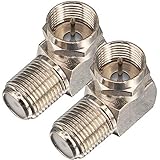
- Ideal for positioning F-Pin cables flush against a compatible wall port or digital audio/video component.
- This coaxial cable connector works with all antenna, satellite receiver and cable TV. Fit for RVers, satellite dish, cable TV, internet, RV trailer, coaxial cable and so on.
- No need to sacrifice wall space or remodel furniture layouts when wiring your home or office,RG6 angled adapter for adapting a RG6 coaxial cable (also refer to as RG6/U cable, RG-6/U cable or RG-6 cable) to 90 degree
- 90° adapter for installations in tight spaces,Use for adapting a RG6 coaxial cable (also refer to as RG6/U cable, RG-6/U cable or RG6 cable, RG58, RG59 and RG11 coaxial (50Ohm) cable.) to 90 degree.
- Package Content : 2 x Coax Coaxial Cable Connection F Type Right Angle Female to Male Adapter
Rank #3

- HIGH QUALITY: We have upgraded this Quick Push On Male to F Female Adapter, This F Type connector is a redesigned new model, the appearance is different from the market, the Quick Push plug there is to do an upgrade, Male side not easy to falling apart,you can check the designed of Quick Push On Male. and the material of our products is full copper, I studied the others review of the customer, the others connectors were falling apart easliy might be material is zinc alloy
- QUICK CONNECT&DISCONNECT: F Type Quick Connect Cable TV Connectors make your F-Pin cables easily connect and disconnect; great for quick hookups on RV cable and satellite cables.F-Pin Push-on Male to Female Connector, Easy Connect and Disconnect
- Applicable : Fits for Antenna, Satellite receiver,cable TV,RVers, Internet, RV Trailer, Coax Cable and so on. extremely low signal attenuation. Accommodates most Male F-Type connectors and wall plates for indoor settings alike.Commonly used on RG58, RG59, RG6, and RG11 coaxial (50Ohm) cable.
- Easy installation: Push on connector is quicker and easier than threaded connector, just pull and push, don't need screwing.
- Package Included: 2 x F-PIN push on male to F female RG6 Coax Cable Connector
Rank #2

- Baluns Transformers: Converts transform 75-ohm coaxial connector cable wire to 300-ohm twin-lead.
- Ultra-High Quality: The surface is electroplated with real Gold, Improves transmission speed, reduces loss, reduces interference, resist oxidation and improves conductivity.
- Simply and Easy: With this adapter, you can make your own homemade antenna. Supports bandwidth 5-900MHz frequency HD TV UHF VHF FM antenna.
- Universal Compatibility: This matching transformer comes with Male "F " connector, Widely work with Radio, HiFI, AV Receiver, TV Antenna, and Mini system: Sangean Cambridge Audio One Pure Evoke Tivoli Audio Demon Roberts Sony Marantz Yamaha Hitachi hi-fi DAB Radio, etc
- 100% GUARANTEE! All Ancable products come with 103% No Questions Asked Guarantee for either a replacement or refund. We care about only putting out high-quality products that satisfy your needs.
#1 Best Overall
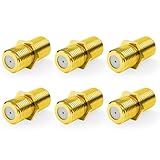
- Seamless Extension & Conversion: This coaxial cable extender extends RG6/satellite cables and converts male to female coaxial outputs
- Ultra-Compact Low-Profile Design: This female to female coaxial connector (0.36x0.82in) installs flush, avoids adjacent port conflicts, perfect for tight spaces
- Pure Copper Gold-Plated Durability: This coax coupler features solid pure copper core with full gold plating, providing excellent corrosion and oxidation resistance, stable in high-humidity and temperature-fluctuating environments
- High Shielding for Pristine 4K Video: This coaxial cable connector delivers 90-135dB EMI shielding, supports Full HD/3D/4K, compatible with DirecTV/Dish Network
- Tool-Free Install & Value 2-Pack: Quick hand-tightened installation. Includes 2 gold-plated cable connectors
If the channel scan finds nothing
- Check that the coaxial cable is firmly attached at both the wall and the TV.
- Confirm the tuner mode is Cable, not Antenna, and run the automatic scan again.
- If the scan still finds no channels, ask the provider whether the outlet is active and whether your account and service support direct tuning or require a box. A TV scan cannot confirm those provider-specific details.
- If you are using a set-top box, make sure it is powered on and that the TV is set to the input where the box is connected. A box setup is not diagnosed by rescanning the TV’s built-in tuner.
Product prices and availability are accurate as of the date/time indicated and are subject to change. Any price and availability information displayed on Amazon at the time of purchase will apply.




