What’s actually slowing this PC down?
Pick the symptom - the matching free tool is one click away.
If keeping your writing on your Mac is the priority, TextWarden is the closest documented Grammarly alternative in this comparison: its project says its English grammar checks run locally using Harper, while its optional AI features use Apple Intelligence on-device. Those are project claims, not independent audit findings. TextWarden also needs Accessibility permission to work in other apps, and its behavior varies by application.
What “local-first” means for a Mac writing assistant
A Mac app is not necessarily a local-processing app. The relevant question is where the text is processed: on your Mac, or by a service elsewhere. On the available product documentation, TextWarden explicitly describes local grammar processing and on-device optional AI. The reviewed pages for LanguageTool for macOS and ProWritingAid Everywhere describe workflow and editing features but do not establish local-only processing.

As an Amazon Associate I earn from qualifying purchases.
TextWarden’s project states, “Nothing you type is sent anywhere.” This is the project’s own privacy statement; it has not been independently audited in the material cited here. Its documentation also says update checks retrieve release information from GitHub without uploading writing or prompts. Local processing does not mean there are no local privacy considerations: the project says logs can contain portions of writing, especially with verbose logging, and advises reviewing diagnostic files before sharing them. TextWarden project documentation
Do these 3 things before closing this tab:
1Fix the driver behind crashes, sound loss and screen glitches2Clear out junk files and repair common Windows errors3Scan for outdated or missing drivers - takes under a minuteHow the Mac options differ
| Option | What its product documentation describes | Local-processing evidence | Practical caveat |
|---|---|---|---|
| TextWarden | Mac-wide English spelling, grammar, punctuation, and style suggestions, plus optional rewrite and compose features | The project says grammar runs locally through Harper and optional Apple Intelligence features run on-device | Requires Accessibility permission for other apps; app behavior varies. Apple Intelligence features have additional OS and hardware requirements. |
| Harper | Offline, open-source English grammar checking | The project describes Harper as offline | The reviewed project page does not establish a complete system-wide consumer Mac app. Harper project |
| LanguageTool for macOS | Integrations for Mail, Word, Slack, Teams, Messages, and Notes, plus shortcut-based checking in other apps and per-app selection | Not established by the reviewed product page | App selection and a privacy-policy reference do not, by themselves, confirm on-device processing. LanguageTool for Mac |
| ProWritingAid Everywhere | Mac desktop integration for popular writing apps and 25+ advertised reports | Not established by the reviewed product page | Its documented emphasis is editing depth, not a verified local-processing promise. ProWritingAid Everywhere |
| Grammarly for Mac | Desktop and browser writing assistance across apps, with controls to turn it off in selected apps | Not established by the reviewed product page | Its Mac availability does not establish that text stays on-device. Grammarly for Mac |
What TextWarden requires
For local grammar checking
The project lists macOS 14 Sonoma or later and either an Intel or Apple Silicon Mac for the app. Its core grammar workflow uses Harper, which the Harper project describes as an “Offline, privacy-first grammar checker.” TextWarden project documentation Harper project
#1 Best Overall

- Customize Your Workflow: The 6 customizable press keys on Huion H640P drawing tablet for pc let you assign your most-used commands—like undo, zoom, brush switch, or save—so you can keep your hands on the tablet and your mind on the art. Whether you're a digital painter switching brushes, or a comic artist zooming in and out, these keys keep your workflow smooth and uninterrupted. Plus, the Huion driver lets you save different shortcut profiles for different apps, so you never have to reconfigure when switching software.
- Professional Pen Performance: Huion H640P drawing pad for computer comes with the battery-free PW100 stylus that's always ready when inspiration strikes. With 8192 levels of pressure sensitivity, every light sketch, or bold stroke responds naturally to your hand—just like a real pen. The 5080 LPI resolution and 233 PPS report rate deliver lag-free, precise strokes, so you can draw confidently without second-guessing your cursor. The pen side buttons help you switch between pen and eraser instantly.
- Compact and Portable: Huion H640P computer graphics tablet features a compact, ultra-portable design at just 0.3 inches thin and 0.61 lbs light, so it slides easily into your backpack—perfect for sketching in coffee shops, taking notes in class, or editing on the go between home and studio. The 6x4 inch active area offers enough room for natural pen movements while fitting comfortably on crowded desks, or lecture hall seats.
- Stable Compatibility: Huion H640P graphic drawing tablet works seamlessly with Mac, Windows, Linux PCs, and Android smartphones/tablets (OS version 6.0 or later). Left-handed friendly, and you just need to flip the tablet and adjust the settings in the driver. Please note: H640P does NOT support iPhone/iPad.
- Move Beyond the Mouse: Huion Inspiroy H640P is a pen tablet that replaces your mouse for more natural, precise control. Freehand draw, take notes, or even play OSU—everything you do with a mouse, you can do better with a pen. The precise tip makes it ideal for detailed photo editing, graphic design, or signing PDF. Meanwhile, the ergonomic pen grip helps you avoid the strain that comes from hours of using a mouse.
For optional Apple Intelligence features
TextWarden’s optional Apple Intelligence features require macOS 26 or later, a supported Apple M-series Mac, and Apple Intelligence enabled. They are separate from the base local grammar checker, so a Mac that meets the app’s general requirements may not meet the AI feature requirements. TextWarden project documentation
Independent reader supportYour contribution helps us test, update, and keep practical guides available for everyone.Check compatibility with the apps you actually use
TextWarden uses Accessibility permission to read and update text fields in other applications. That permission is necessary for its cross-app workflow, but it does not guarantee identical behavior everywhere. The project documents incomplete behavior in some editors and says Google Docs and complex web editors are unsupported by its browser-extension preview. Test your essential apps before depending on it for daily work; consult the project’s app-specific notes for current limitations. TextWarden project documentation
Rank #2

- 🎙️ Hands-Free Voice Typing for Windows & Mac – Powered by iOS & Android dictation technology, AI VoiceWriter allows fast, accurate speech-to-text directly on your desktop. Simply speak, and your words appear in real time. Compatible with Windows 10 & above, macOS 13 & above.
- ✍️ AI Writing Assistant for Effortless Editing – Boost productivity with AI proofreading, rephrasing, and formatting. Perfect for emails, reports, creative writing, and professional content.
- 💻 Works Seamlessly in Any Desktop App – Type with your voice in Microsoft Word, Google Docs, PowerPoint, Teams, emails, and more. Just place your cursor in any text field and start speaking!
- 📱 Mobile App for Enhanced Voice Input – The AI VoiceWriter mobile app enhances voice recognition by using your phone’s microphone as an input device for clearer, more accurate dictation—while typing on your desktop. Supports iOS 15 & above, Android 9.0 & above.
- 🌎 Multilingual Voice Typing & AI Assistance – Supports 33 languages for dictation, plus AI-powered features in Chinese, English, Japanese, Korean, French, German, Spanish, Italian and, Swedish.
If you need a broad list of integrations and controls for deciding which apps are checked, LanguageTool documents a workflow that includes several common Mac apps and shortcut-based checks elsewhere. That is useful evidence about coverage, but the cited page does not say that processing stays on-device. ProWritingAid’s documentation instead highlights desktop integration and its advertised report set. Choose either for workflow or editing features only if its processing arrangements meet your privacy needs; the documentation cited here does not settle that question.
Quick Recap
Best Value
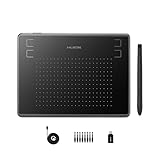
- Huion H430P supports Linux(Ubuntu), MacOS 10.11 and above, Windows 7 and above, and Android 6.0 and above. It can easily connect to your PC, laptop via USB cable for both left and right handed users.
- Digital pen PW201 is battery-free, no need to be charged. 4096 levels of pressure sensitivity with 233pps report rate provides you responsive and natural drawing and handwriting experience with control. 8 replacement nibs are included.
- 135g in weight,6.3mm in thickness,H430P graphics tablet is portable and compact. 4.8x3 inch active area offers perfect creative space for limited desktop areas.4 express keys on the top can be programed to your favourite shortcuts such as Scroll,Undo,Eraser.It will help you work more smoothly and efficiently.
- Compared with computer mouse,it couldn't be easier to draw,edit photos,annotate document,take notes,write formulas and equations with a digital pen. H430P is ideal for collegers and teachers to collaborate, share,interact in online class and video conferencing. No need to install driver for basic writing, annotation and OSU playing.
- H430P pen tablet is compatible with most mainstream drawing softwares like Corel Painter, Adobe Photoshop,Illustrator, SAI and so on. It also work with most softwares for education and business meeting such as Word, PowerPoint, OneNote,Google slides,Zoom,Skype and more.
Rank #4
Rank #3

- [Nature Pen Experience]: The included battery-free stylus PW100 with 8192 levels of pressure sensitivity is light and easy to control with accuracy. If feels like a standard pen, giving you natural drawing experience on the drawing pad for computer. The pen side buttons help you switch between pen and eraser instantly.
- [Customize Your Workflow]: The 8 easy accessable press keys on the H950P drawing tablet for pc can be customized to your favorite shortcut so that your creative work become smoother and more efficient. You also can change the shortcut setting for different apps in Huion driver.
- [Compact and Portable]: H950P digital drawing tablet uses a compact design with 0.3 inch in thickness and 1.76 lbs in weight, making it easy to carry between home, work, class and wherever you go. It is a perfect computer graphics tablet for limited desktop.
- [Multi-OS Compatibility]: Inspiroy H950P graphic drawing tablet works with Mac, Windows and Linux PC as well as Android smartphone or tablet (OS version 6.0 or later). It is also available for left-handed user.
- [Intuitive Mouse Alternative]: H950P drawing tablet with pen makes a great mouse replacement. With this pen tablet, you can sign document, freehand draw, take digital note and do all of the functions of a mouse but better. It helps do precise work and save your wrist from strain.
Which option fits your priority?
- Choose TextWarden as the first option to evaluate if your priority is documented local grammar processing on macOS and you can grant Accessibility permission to the apps where you want it to work.
- Consider Harper as an engine if you want offline English grammar checking and are comfortable that the reviewed project page does not establish a complete system-wide Mac workflow.
- Consider LanguageTool or ProWritingAid for their documented workflows if app coverage or editing reports matter more; confirm their data-processing practices separately before sending sensitive text.
- Do not infer local processing from a Mac app, app-selection controls, or cross-app coverage alone.
Product prices and availability are accurate as of the date/time indicated and are subject to change. Any price and availability information displayed on Amazon at the time of purchase will apply.




