What’s actually slowing this PC down?
Pick the symptom - the matching free tool is one click away.
Check the driver’s source, exact TITAN Xp and Windows compatibility, and digital signature before running it. If the download has unclear origins, an unexpected publisher, or a missing or invalid signature, stop rather than clicking through a warning. A valid signature helps establish who signed a package and whether signed files were changed; it does not prove that an unofficial release is harmless.
Start with NVIDIA’s official driver listing
Use NVIDIA’s driver selector as the baseline for comparison, not a version number quoted by a download site. At the time of the cited listing, NVIDIA offered GeForce Security Update Driver 582.66, released June 16, 2026, for Windows 10 64-bit and Windows 11, and included NVIDIA TITAN Xp among the supported products. NVIDIA describes this security-update driver as serving Maxwell, Volta, and Pascal-series GPUs no longer supported by Game Ready Driver upgrades. Check the current NVIDIA listing again when you are ready to install: versions, dates, and operating-system support can change.

As an Amazon Associate I earn from qualifying purchases.
NVIDIA’s Advanced Driver Search lets you search driver releases and explains its WHQL and beta labels. NVIDIA says WHQL testing involves tests on third-party hardware or software and submission of logs to Microsoft for review; beta releases are still under qualification and may have significant issues. WHQL status is useful evidence, but it cannot certify that a package modified by another party is safe. The TITAN Xp User Guide points owners to NVIDIA’s GeForce software workflow for installing the graphics driver, reinforcing the official source as the reference point.
Check the unofficial package before running it
- Verify the hardware and Windows version. Confirm that the card is a TITAN Xp, then note your Windows edition and architecture. Compare those details with the current NVIDIA listing; the cited 582.66 release lists Windows 10 64-bit and Windows 11.
- Trace the download to its publisher. Prefer a package obtained through NVIDIA’s official selector or GeForce software. Be wary of pages that hide the original publisher, deliver the file through a separate downloader, or make unsupported security or performance promises.
- Inspect the signature before opening the installer. In Windows, open the downloaded file’s Properties and inspect its digital-signature and signer information. Review any Windows Security or installation prompt as well. A valid signature from a recognizable NVIDIA signer is reassuring; a missing or invalid signature, altered-file indication, or unexpected signer is a reason to stop and investigate.
- Check whether the package was repackaged. A third party may rebuild or modify an installer. That can remove the original signature or change package files, and a familiar version string alone does not show that the files match NVIDIA’s release.
- Compare the remaining evidence. Check the source, signer, version, release date, supported GPU and Windows version, WHQL or beta status, and release notes. A claimed feature or benchmark improvement is not evidence of safety.
- If you cannot resolve a warning, do not force the install. Get the driver through NVIDIA’s official page or GeForce software instead. Do not disable signature enforcement or bypass a warning just to install an unofficial build.
What a Windows signature warning means
Microsoft explains that Windows analyzes a driver package’s signature and validates its files against that signature before staging the package. Its documentation distinguishes trusted and untrusted publishers, unknown publisher trust, and invalid signatures or altered files. Depending on the case, Windows may show a prompt; an untrusted publisher is not installed and is logged. Treat a prompt as a reason to investigate, not as a routine step to dismiss. See Microsoft’s driver-signature categories and installation guidance.
A signature check answers limited questions: who signed the package, and whether files covered by the signature still match. It does not establish that every component is benign, that the installer is an unmodified official release, or that the driver is compatible with your system. Evaluate provenance and compatibility alongside the signature.
Independent reader supportYour contribution helps us test, update, and keep practical guides available for everyone.When in doubt, use the official package
If you cannot verify the source, explain an unexpected signer, or resolve an invalid or missing signature, do not install that package. Return to NVIDIA’s driver selector or GeForce software and compare the live release details for your TITAN Xp and Windows version. No published malware-prevalence figure is established here for unofficial TITAN Xp drivers, so a percentage-based risk claim would be misleading.
Quick Recap
Best Value
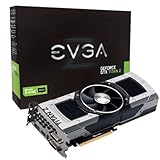
- Base Clock: 705 MHZBoost Clock: 876 MHzMemory Clock: 7000 MHz EffectiveCUDA Cores: 5760Bus Type: PCI-E 3.0Memory Detail: 12288MB GDDR5Memory Bit Width: 768 BitMemory Speed: 0.28nsMemory Bandwidth: 672 GB/s
- NVIDIA SLI ReadyNVIDIA SMX EngineNVIDIA GPU BoostNVIDIA Adaptive Vertical SyncNVIDIA SurroundSupports four concurrent displaysMicrosoft DirectX 12 API (feature level 11_0)Support
- NVIDIA 3D Vision ReadyNVIDIA CUDA TechnologyPCI Express 3.0 SupportOpenGL 4.4 SupportOpenCL SupportNVIDIA FXAA TechnologyNVIDIA TXAA Technology
- Recommended PSU: 700W or greater power supply with a minimum of 42 Amp on the +12 volt rail
Rank #4

- OS Certification : Windows 7 (64 bit), Windows 10 (64 bit) (April 2018 Update or later), Linux 64 bit
- 4609 NVIDIA CUDA cores running at 1770 MegaHertZ boost clock; NVIDIA Turing architecture
- New 72 RT cores for acceleration of ray tracing
- 577 Tensor Cores for AI acceleration; Recommended power supply 650 watts
Rank #3

- [Engine Specs] CUDA Cores: 3072 | Base Clock (MHz): 1000 | Boost Clock (MHz): 1075 | Texture Fill Rate (GigaTexels/sec): 192
- [Memory Specs] Memory Clock: 7.0 Gbps | Standard Memory Config: 12 GB | Interface: GDDR5 | Interface Width: 384-bit | Bandwidth (GB/Sec): 336.5
- [Display Support] Max Digital Resolution: 5120x3200 | Max VGA Resolution: 2048x1536 | Standard Display Connectors: Dual Link DVI-I, HDMI 2.0, 3x DisplayPort 1.2 | Multi Monitors: 4 Displays | HDCP: Yes | Audio Input for HDMI: Internal
- [Graphic Card Dimensions] Height: 4.376 Inches | Length: 10.5 inches | Width: Dual-Width
- [Thermal & Power Specs] Max GPU Temperature (in C): 91 C | Graphics Card Power (W): 250 W | Recommended System Power (W)**: 600 W | Supplementary Power Connectors: 6-pin + 8-pin
Rank #2

- OS Certification-Windows 7 64-bit, Windows 10 64-bit (April 2018 Update or later),Linux 64-bit
- 4608 NVIDIA CUDA cores running at 1770 MHz boost clock. NVIDIA Turing architecture
- New 72 RT cores for acceleration of ray-tracing
- 576 Tensor Cores for AI acceleration
Product prices and availability are accurate as of the date/time indicated and are subject to change. Any price and availability information displayed on Amazon at the time of purchase will apply.




