Quick wins for a faster PC:
Clear out junk files and repair common Windows errorsFree Scan →Scan for outdated or missing drivers - takes under a minuteDriver Scan →Repair Windows errors before they cause bigger problemsFix Now →To edit your character after creation, open Settings > Customization, then review the prompt for an Appearance Change Voucher or a Quna charge before confirming. To change how equipped gear looks, use the separate wardrobe or Closet cosmetic system. The exact menu, eligibility, and cost can vary, so follow what your current client displays.
Choose what you want to change
| Your goal | System to use | What to check |
|---|---|---|
| Change your character’s face, hair, body, or other creator choices | Character customization, reported under Settings > Customization | Eligibility, the displayed price, and whether you have the right voucher |
| Change the visual appearance of equipped gear | The separate wardrobe, Closet, or transmog cosmetic interface | The current menu label, eligible items, and any application cost |
These are different systems: editing your character does not change the appearance of equipped gear. Guides use labels such as “Closet” and “transmog,” so look for the cosmetic interface in your client rather than assuming every build uses the same name.


As an Amazon Associate I earn from qualifying purchases.
Change your character’s appearance
- Open Settings > Customization. Recent guides report this route for reopening the character editor. If the option is unavailable, check your character’s eligibility and any requirements shown in the game.
- Make the changes you want in the editor. NCSOFT’s November 16, 2025 announcement describes more than 200 customization options, including body shape, skin tone, eye color, and muscle definition, and says presets are available. That launch-era description establishes the creator’s breadth, not the exact fields or menus in every current client.
- Review the confirmation prompt. Guides describe an Appearance Change Voucher or a Quna payment as ways to apply the changes. One guide reports a Level 10 requirement and a 600-Quna charge without a voucher, but those details are not established as universal across regions or builds. Use the eligibility and amount displayed by your client.
- Check the finished appearance and the final confirmation before applying it. The available sources do not establish an undo period or refund policy, so do not assume the change can be reversed without another payment or voucher.
Check current in-game notices for voucher availability. A guide updated September 24, 2026, notes that appearance tickets may be distributed during event windows; that is not a guarantee that a ticket is currently available.
Change the appearance of equipped gear
For gear visuals, open the wardrobe or Closet cosmetic system (also described in guides as transmog) instead of the character creator. Select the relevant cosmetic or appearance option in the current interface and inspect the item’s description and any confirmation prompt. Available sources do not establish a complete list of eligible equipment, restrictions, or costs, so rely on the live client for those details.
#1 Best Overall
Do not assume an Appearance Change Voucher edits gear: guides distinguish that character-customization item from gear cosmetics. Read the exact in-game item description before using a similarly named reward.
Keep appearance rules in mind
NCSOFT’s AION 2 operation policy says players are generally free to customize appearances, but prohibits some user-created or distributed appearances and says the company may change or remove prohibited appearances and apply sanctions. An option being available in the editor does not mean every design is allowed. Check the current policy before creating or sharing an appearance.
Quick Recap
Best Value
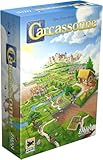
- CLASSIC TILE PLACEMENT: Draw and place landscape tiles to build cities, roads, fields, and monasteries, then deploy meeples as knights, farmers, and monks to claim features and score points.
- STRATEGY FOR ADULTS AND FAMILIES: Carcassonne pairs intuitive rules with meaningful decisions, making it accessible for ages 7+ while still engaging experienced adult board gamers.
- REPLAYABLE MEDIEVAL ADVENTURE: Randomized tile draws create a different landscape every game, bringing fresh puzzles and competitive fun to family game night and casual group play.
- TWO TO FIVE PLAYERS: Built for 2-5 players with an average 35-minute playtime, Carcassonne fits weeknight sessions at home, family gatherings on vacation, and adult board game evenings.
- INCLUDES MINI-EXPANSIONS: The base game comes with The Abbot and The River mini-expansions in the box, adding variety to the classic Carcassonne board game experience from the start.
Rank #4
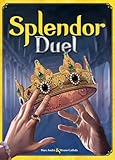
- INTENSE TWO-PLAYER GAMEPLAY: Enter the world of Splendor in an exciting battle designed exclusively for two players. Outwit and outmaneuver your opponent as you race to gain the most prestige points and become the master gemstone merchant.
- STRATEGIC GEMSTONE ACQUISITION: Plan your moves carefully to collect gemstones and construct powerful combinations. Use your resources wisely to purchase development cards and gain an edge over your adversary.
- IMMERSIVE AND COMPACT DESIGN: Splendor Duel features high-quality components, including gemstone tokens, development cards, and noble tiles. The game's compact size makes it perfect for travel or playing on-the-go without sacrificing the immersive gaming experience.
- QUICK AND ENGAGING GAMEPLAY: Enjoy fast-paced gameplay with average playtimes of just 30 minutes. Splendor Duel offers a perfect balance of simplicity and strategic depth, making it accessible for both casual gamers and experienced board game enthusiasts.
- ENDLESS REPLAYABILITY: With a vast array of development cards and different starting setups, no two games of Splendor Duel are alike. Explore various strategies and adapt your tactics to emerge victorious in this exciting gemstone battle.
Rank #3

- The Thrill of Flight: Flying is a strategic and integral part of the game, adding a fresh dynamic to all aspects of the genre, including combat, quests, and exploration.
- Stunning World: Discover a meticulously crafted fantasy world brimming with otherworldly inhabitants, mysterious enemies, and ancient secrets.
- Innovative PvPvE: Aion introduces a new dynamic to MMOs by combining both PvP and PvE gameplay into an exciting new style.
- Intense Visceral Combat: Engage in a spectacular and evolving combat system utilizing combos, skill chains, counterattacks, and spectacular aerial combat.
- Ships in Certified Frustration-Free Packaging
Rank #2
Product prices and availability are accurate as of the date/time indicated and are subject to change. Any price and availability information displayed on Amazon at the time of purchase will apply.
Recommended Free Tools




