To capture a page at the right local time and have it render as though it is in that timezone, configure two things separately: the scheduler’s timezone determines when the job starts, while the browser’s timezone determines what the page sees. Control the runner’s timezone too if your script or logs rely on its local clock. Then keep the browser environment and capture settings consistent, and decide how the scheduler should handle daylight-saving transitions.
Choose what “consistent timezone” means
First decide whether you need a fixed instant worldwide or a steady local wall-clock time. These are different requirements:
As an Amazon Associate I earn from qualifying purchases.
| Schedule choice | Use it when | What to check |
|---|---|---|
| UTC schedule | The capture should run at the same global instant year-round. | Its local clock time will shift when the relevant region changes between standard time and daylight time. |
| IANA local timezone schedule | The capture should run at a steady local time, such as 08:00 in a particular region. | Confirm how the scheduler handles nonexistent spring-forward times and repeated fall-back times. |
| Local scheduler and browser timezone | Both the trigger and page-rendered local time should reflect the same region. | Set both explicitly; the scheduler setting does not configure the browser. |
| UTC scheduler and runner, browser timezone emulation | You want a stable machine clock while the page displays time for another region. | Check the page’s rendered behavior and the runner’s logs separately. |
Use an IANA timezone name such as America/New_York rather than a fixed UTC offset when the intended behavior is local civil time. An offset does not encode the region’s daylight-saving rules.
Crashes, No Sound, or Screen Glitches?
Random freezes, missing sound and display glitches usually trace back to one bad driver. Find and replace yours safely.Free scan · under a minuteWindows Errors? Fix Them Before They Spread
Repair common Windows errors and clear accumulated junk for a smoother, more stable PC - no reinstall needed.Free scan · no reinstallConfigure the scheduler’s clock
The scheduler controls when the screenshot job starts. GitHub Actions interprets scheduled workflows in UTC by default and supports a timezone field with an IANA timezone name. Its documentation says that when a scheduled time is skipped during spring-forward, the run advances to the next valid time. Scheduled workflows have a minimum interval of once every five minutes. See GitHub’s schedule event documentation for current syntax and semantics.
#1 Best Overall

- 【48MP Imaging and 4K Video】This 4K time-lapse camera features a starlight-level 5-megapixel sensor, a 1/2.78" image sensor, and records 48MP images and 4K/10FPS video. It can capture a series of still images, which can then be edited into sped-up videos or short films.
- 【Supports 2.4G WiFi connectivity】Features WiFi control and Bluetooth Low Energy 5.0, allowing for pre-setting and shooting of outdoor time-lapse photography via a WiFi connection on the same frequency band. Requires downloading the mobile app: TrailCam Go.
- 【Simple Three-Step Time-Lapse Photography Setup: Turn off with the three-position toggle switch — Settings — Start Time-Lapse. Experience quick and easy setup. Insert a memory card, and the time-lapse camera will continuously record in a loop, providing a seamless solution for long-duration time-lapse photography.
- 【Three mounting methods】Suitable for different scenarios: The suction cup bracket is suitable for indoor courtyard tiles, the self-tapping screws are suitable for tree trunks and rock crevices, and the claw clips are suitable for mounting on pillars and iron poles. Combined with a windproof and rainproof housing, it is designed specifically for harsh outdoor shooting environments.
- 【Efficient Task Management】To optimize time-lapse footage and save power, you can strategically plan your shooting schedule by setting up to six shooting periods per day, week, or specific dates (e.g., 08:00-17:00). This allows the camera to work only when needed, avoiding ineffective shooting and obtaining ideal footage.
Example: GitHub Actions at 08:00 in New York
This workflow schedules a daily run at 08:00 in the named timezone. Replace the placeholder workflow steps with your capture script. Confirm the current workflow syntax in GitHub’s documentation before deployment.
name: Scheduled screenshot

on:
  schedule:
    - cron: '0 8 * * *'
      timezone: 'America/New_York'

jobs:
  capture:
    runs-on: ubuntu-latest
    steps:
      - uses: actions/checkout@v4
      - uses: actions/setup-node@v4
        with:
          node-version: 22
      - run: npm ci
      - run: node capture.mjs
If the requirement is a fixed global instant instead, use a UTC cron expression and omit the local-time interpretation. A UTC schedule avoids the local-clock shift caused by daylight-saving changes; a local schedule preserves wall-clock time but depends on the scheduler’s transition rules.
systemd timer considerations
systemd calendar expressions can specify UTC or an installed IANA timezone. Its timer documentation also describes an AccuracySec window, within which calendar events may elapse, and RandomizedDelaySec for spreading work. Do not treat a host timer as exact to the second without checking its configuration. See systemd.timer and systemd.time.
Do these 3 things before closing this tab:
1Scan for outdated or missing drivers - takes under a minute2Clear out junk files and repair common Windows errors3Fix the driver behind crashes, sound loss and screen glitchesRank #2
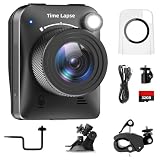
- 【High-Definition 4K Imaging】 Dsoon (TL3000)Timelapse Camera features an advanced chip and fill light technology, ensuring crystal-clear image capture even in challenging low-light conditions. The IPS display is versatile, allowing a 90-degree flip for convenient shooting angle adjustments.
- 【Extra Long-Time Stanby】 Forget the hassle of constantly charging your construction camera. With a remarkable battery life of up to half a year, you can confidently embark on long-term projects without worrying about power. The battery lasts up to 180 days with a 5-minute capture interval.
- 【Effortless Time-lapse Setup】 Experience quick and hassle-free setup! Connect to the power supply, and the time-lapse camera will continuously cycle through shots until the SD card reaches full capacity, providing a seamless solution for extended time-lapse photography.
- 【Versatile Shooting Modes】 Whether you're into timed shooting, video time-lapse, or photo time-lapse, our camera has you covered. With manual macro focus capability, you can capture both macro and infinity shots. Document long-term environmental changes, create short video clips, or even produce entertaining stop-motion Lego animation movies!
- 【Professional-Grade Equipment】 Engineered with IP66 protection and housed in a waterproof casing, this timelapse camera is suitable for both indoor and outdoor use. The comprehensive package includes the Timelapse Camera, Sucker Bracket, Circular Tube Bracket, Nail Bracket, Waterproof Housing, SD card, USB Cable, and User Manual. Capture every moment with confidence and precision
Set browser and runner timezones separately
Playwright’s browser context option timezoneId emulates the timezone visible to browser code, including page behavior that depends on local time. It does not change the operating-system timezone of the test runner. Set the runner’s TZ environment variable when your Node.js script, date calculations, or log formatting should use a controlled local timezone. See Playwright’s locale and timezone emulation documentation.
The following Node.js example is a runnable capture script after installing Playwright and its browser. It controls runner and browser timezone independently, uses an explicit viewport, waits for the page to reach network idle, and saves a full-page PNG.
import { chromium } from 'playwright';

const url = process.env.TARGET_URL ?? 'https://example.com';
const timezoneId = process.env.BROWSER_TIMEZONE ?? 'America/New_York';

const browser = await chromium.launch({ headless: true });
try {
  const context = await browser.newContext({
    viewport: { width: 1440, height: 1000 },
    timezoneId,
    locale: 'en-US'
  });
  const page = await context.newPage();
  await page.goto(url, { waitUntil: 'networkidle', timeout: 60000 });
  await page.screenshot({ path: 'capture.png', fullPage: true, type: 'png' });
  await context.close();
} finally {
  await browser.close();
}
For example, to control the runner’s local clock behavior as well, launch the script with TZ=UTC in the job environment, while retaining timezoneId: 'America/New_York' for the browser. Record the scheduled instant in UTC and, if the requirement is local wall time, log the IANA zone and the resulting local timestamp. This makes it easier to distinguish a scheduling problem from a page-rendering or script-time problem.
Rank #3

- 【1080P High Definition Picture Quality】: Dsoon Time-lapse camera is equipped with an advanced imaging sensor, fill-light technology, and a 110° wide-angle starlight lens, capturing remarkably clear 1080p Full HD videos even in challenging lighting conditions. Whether recording construction progress or tracking weather changes, it delivers vivid details, a broad view, and excellent low-light performance.
- 【Extra Long-Time Standby】: Designed for long-term projects, this time-lapse camera is powered by 12 AAA alkaline batteries (batteries not included Package), providing up to 180 days of continuous operation at 5-minute Time intervals. Thanks to its ultra-low-power design, it eliminates the need for frequent battery replacements, making it ideal for remote construction sites or extended outdoor environmental monitoring. Say goodbye to power limitations and focus on capturing your project’s progress.
- 【Effortless Time-Lapse Setup】: Experience quick and hassle-free setup! Simply install the batteries, and the time-lapse camera will continuously cycle through shots until the SD card reaches full capacity, providing a seamless solution for extended time-lapse photography.
- 【Flexible Shooting with Multiple Modes 】:With functions like timed shooting, video time - lapse, photo sequences, and manual macro focus, it can handle both close - up and distant scenes with ease. It serves as an ideal tool for documenting construction progress, conducting scientific research, or creating stop - motion animations, meeting the diverse needs of professionals and creative enthusiasts.
- 【Professional-Grade Equipment】: This outdoor time-lapse camera features an IP66-rated waterproof casing and durable metal brackets, making it suitable for both indoor and outdoor use. Your package includes: TL2100 Time-Lapse Camera, Wall Bracket, Round Tube Bracket, Clip Bracket, Installation Straps and Ropes, 32GB SD Card, USB Cable, and User Manual. Capture every moment with confidence and precision.
Define the capture contract and keep it stable
A timezone alone does not make screenshots pixel-identical. Playwright notes that rendering can vary with host operating system, browser version, settings, hardware, power source, headless mode, and other factors. Reuse a stable runtime where practical, and treat these settings as part of the capture contract:
- Target URL and any authentication or required request headers.
- Scheduler timezone and intended daylight-saving behavior.
- Runner timezone for script-side local-time operations.
- Browser timezone, locale, browser version, and headless mode.
- Viewport size, device scale, image format, and whether the image covers the viewport or the full page.
- Wait conditions, output path, and any CSS used to hide or normalize dynamic page content.
Playwright’s screenshot API supports viewport and full-page captures, output format, scale, and injected screenshot styles. See the Page screenshot API. Use styles to hide or normalize changing areas only when those areas are irrelevant to the evidence you need; suppressing a clock, price, or status indicator may erase the very change the scheduled capture is meant to document.
Stabilize the page without hiding meaningful changes
Pages may update after navigation because of animation, delayed data, advertisements, rotating content, or client-side rendering. Pick a wait condition that matches the page rather than assuming navigation completion means every visual element is settled. If the page exposes a reliable selector, wait for that selector; if a particular animation is irrelevant, use an injected style to disable it for the screenshot. Avoid a fixed delay as the only readiness check unless the page offers no better signal.
Rank #4

- HD 1080P Video: Brinno time-lapse camera is for documenting construction, nature observations, or outdoor events. With HDR feature enabled, you can record from day to night. Equipped with a 118 degree field of view and storage up to a 128GB Micro SD card.
- Designed for Outdoors: The Adjustable Clamp features 360 degree rotating joint for perfect placement. The IPX4 Water-Resistant housing repels splashing water from any angle. This camera is durable, capable of withstanding various weather conditions.
- Easy to Operate: User-Friendly Menu allows you to schedule & set intervals from a 1.44 inch crystal IPS LCD screen display. Daily Timer allows you to choose recording sessions during working hours. The multilingual interface is available in 8 languages.
- Long Lasting Battery: Never worry about battery power again when shooting long-term projects. BCC300-C requires 4 AA batteries to save power and save your budget. Battery lasts up to 100 days using a 5-min capture interval.
- What’s Included: You’ll receive a TLC300 Brinno time lapse camera, IPX4 water-resistant housing (Model # ATH120), Adjustable Clamp, 2 bungee cords, 4 AA batteries, SD card, lens cover and a Quick Guide manual.
For Playwright Test visual assertions, the screenshot assertion waits until two consecutive screenshots match before comparing against the expected image. That stabilization can help with transient rendering but does not eliminate differences caused by a changed browser or host environment. See Playwright’s visual comparisons documentation.
Independent reader supportYour contribution helps us test, update, and keep practical guides available for everyone.Verify daylight-saving and execution behavior
Before relying on a local schedule, check the selected scheduler’s documentation for spring-forward gaps, fall-back repeated times, missed-run handling, and timing precision. GitHub documents that a skipped spring-forward time advances to the next valid time; do not assume every scheduler or cron implementation behaves the same way. If exact evidence matters, record both the scheduled UTC instant and the intended local timestamp with its IANA zone.
Quick wins for a faster PC:
Fix the driver behind crashes, sound loss and screen glitchesFind Drivers →Repair Windows errors before they cause bigger problemsFix Now →Scan for outdated or missing drivers - takes under a minuteDriver Scan →Run a manual capture and inspect the output before enabling the recurring schedule. Confirm that the job started when intended, the browser reports the intended local time, and the output path and image dimensions match your capture contract.
Best Value
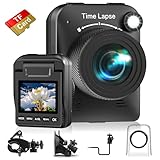
- 【Powerful 4K】 Timelapse camera 4k equipped with advanced chip & fill light can capture images clearly even in low light conditions. IPS display can be flipped 90 degree to adjust the angle, shooting viewing angle is more convenient.
- 【Working Time Up to Half a Year】Never worry about construction camera battery power again when shooting long-term projects. Battery lasts up to 180 days using a 5-min capture interval.
- 【Easy Time Lapse】Quick setup! As long as the power supply is connected, the shooting can be cycled until the SD card storage space is full and stop. Provides a solution for long-term time-lapse photography.
- 【Multipurpose】Timed shooting, Video time lapse shooting, Photo time lapse shooting. Manual macro focus, can shoot macro and infinity. Capture long-term environmental changes, a short video clip, or even a fun stop motion lego animation movie!
- 【Professional Equipment】IP66 protection & waterproof housing allows you to use this camera indoor or outdoor. Package contains: Time-lapse Camera, Sucker Bracket, Circular Tube Bracket, Nail Bracket, Waterproof Housing, SD card, USB Cable, User Manual. (Video format: AVI)
Troubleshooting
- The workflow starts at the wrong hour: Check whether the schedule is interpreted as UTC or has an explicit IANA timezone. Verify the cron expression against the platform’s current documentation.
- The page shows a different local time than expected: Check the browser context’s
timezoneId. A runner’sTZsetting does not substitute for browser timezone emulation. - Script logs use an unexpected time: Set the runner’s
TZenvironment variable if script-side local time matters, and include UTC timestamps to make logs unambiguous. - A run shifts around daylight-saving changes: Determine whether you asked for a fixed UTC instant or a stable local wall-clock time. For local schedules, inspect the scheduler’s handling of missing and repeated times.
- Screenshots differ even though the timezone is unchanged: Compare host image, browser version, viewport, locale, headless mode, and page readiness behavior. Timezone emulation cannot make those variables identical.
- The page is incomplete or still moving: Wait for a meaningful selector or other page-specific readiness condition, then consider an injected screenshot style for irrelevant motion or volatile regions.
- A systemd capture is not exact to the second: Review
AccuracySecand anyRandomizedDelaySecconfigured for the timer.
Or skip the browser setup
ScreenshotNeo can return a website screenshot through one GET request. Its API and capture options are documented at ScreenshotNeo docs.
curl -G "https://api.screenshotneo.com/v1/shot" -d access_key=YOUR_API_KEY --data-urlencode url=https://example.com -o shot.webpScreenshotNeo accepts cookie or consent banners like a visitor and removes more than 60 known consent platforms, newsletter popups, and chat widgets before capture; each of those steps can be turned off. Bot checks, blank pages, failed loads, timeouts, and cache hits are not billed, and response headers identify the page verdict and billing status. Its MCP server provides screenshot tools for AI agents, and the free plan includes 1,000 screenshots a month with no card; paid plans start at $5 for 3,000 shots.
Sign up free for ScreenshotNeo to get 1,000 screenshots a month with no card.
Frequently Asked Questions
Does setting Playwright’s timezone change the scheduled run time?
No. The scheduler determines when the job starts; Playwright’s browser timezone controls the timezone seen by browser code.
Should I schedule in UTC or a local timezone?
Use UTC for a fixed global instant, or an IANA local timezone for a steady regional wall-clock time. Check how your scheduler handles daylight-saving transitions.
Quick Recap
Product prices and availability are accurate as of the date/time indicated and are subject to change. Any price and availability information displayed on Amazon at the time of purchase will apply.




