Outdated Drivers Are Slowing You Down
One free scan finds every outdated or missing driver and matches the right update for your exact hardware.Free scan · exact hardware matchPC Slower Than It Used to Be?
A free scan shows the junk files, broken settings and background clutter dragging Windows down - then fixes them in one click.Free scan · Windows 10 & 11KVM gives a VPS a hardware-assisted virtual-machine environment with its own guest operating system and virtual devices. That can make it easier to run server software that expects a VM, but the KVM label alone does not guarantee a faster site, stronger security, or better uptime. Those outcomes also depend on the hosting provider’s resource allocations, infrastructure, and operations.
What KVM does in a VPS
KVM stands for Kernel-based Virtual Machine. It is Linux virtualization technology that uses processor virtualization extensions to run virtual machines. In a common KVM setup, QEMU works alongside KVM: KVM provides kernel-level virtualization, while QEMU emulates virtual devices such as disks and network cards. Oracle’s Oracle Linux Virtualization Manager Architecture and Planning Guide explains that “KVM enables QEMU to run code in the virtual machine directly on the host CPU.”
As an Amazon Associate I earn from qualifying purchases.
The KVM project describes support for unmodified Linux or Windows guest images, each with private virtualized hardware. In practical terms, a VPS can behave like a separate server environment in which you install and configure supported software. The virtual machine still runs on a physical host, which may also run other customers’ virtual machines.
Benefits a site owner may get
A distinct guest operating system
A VM gives the guest its own operating-system environment and virtual devices, which can suit applications and server configurations designed to run on a virtual machine. The operating systems, images, kernel options, and level of administrative access available to you depend on the hosting plan. The Linux KVM project describes KVM’s support for unmodified Linux and Windows images; that capability does not mean every provider offers every image.
#1 Best Overall
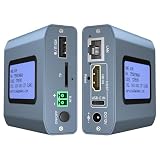
- 【Remote KVM】IP KVM supports remote control of computers and servers without the need for additional software or drivers. Ideal for remote work.
- 【Easy to Use】Simply connect your computer’s HDMI/USB to the IP KVM’s HDMI and USB-C ports, and connect an Ethernet cable to the remote KVM to enable remote control via the app or web interface. This internet-based IP KVM supports PCs, servers, IP cameras, and streaming devices, and is compatible with Windows, macOS, Linux, and Android systems.
- 【Web Login and App】You can access the system remotely via a web-based cloud control platform (which supports custom cloud servers). Additionally, you can access it remotely via the ONE KVM app (which must be downloaded after logging into the IP KVM via a web browser). ONE KVM does not collect any personal information, ensuring your privacy and security.
- 【Remote Power On/Off】Connect the included DuPont cable to the F_PANEL interface on the motherboard and the “ATX” port on the IP KVM to remotely control the computer’s power on/off. (Desktop computers only). Remote power on/off is not supported for laptops.
- 【Built-in ZeroTier】This IP KVM integrates ZeroTier to enable secure peer-to-peer remote access, allowing seamless cross-network KVM control without the need for cumbersome port forwarding or VPN configuration. It is ideal for remote work, IT management, and multi-location device monitoring. (Online upgrade required)
Hardware-assisted execution
KVM can let guest code execute directly on the host CPU with hardware virtualization support. This describes how the virtualization stack works, not a measured improvement in website speed. Page response time and capacity also depend on the CPU allocation, contention from other workloads, storage, network, application, and site configuration.
Isolation mechanisms that can be configured
Linux security controls can help separate virtual-machine processes and resources. Red Hat’s Virtualization Security Guide for Red Hat Enterprise Linux 7 discusses controls including SELinux and sVirt. These are mechanisms administrators can configure; they are not a guarantee that a VPS or hosted site is secure. Red Hat also warns that a compromised hypervisor could put all virtual machines on that host at risk.
Rank #2

- 【16 Port HDMI KVM Switch】This 16 ports KVM switch can control up to 16 computers to share 1 monitor with 1 set of Wired or Wireless keyboard mouse. You can easily switch by panel button,wired remote(included) or RS232 between 16 computers on 1 monitor and share 6 USB 3.0 devices.
- 【KVM Switch with EDID Emulation】 ANGEET 16 Port HDMI KVM switch emulates display EDID, stores resolution/refresh rate, and maintains original window positions across 16 computers—eliminating the window re-arrangement hassle of ordinary KVM switches.
- 【Ultra HD 4K@60Hz】This 16 computers USB 3.0 KVM switch HDMI support resolution up to 4K@60Hz and backward compatible 4K@30Hz, 2560*1440@120Hz. The 4K KVM Switches also work with ultrawide monitors.
- 【 USB 3.0 KVM Switch 】HDMI KVM switch with 6 USB 3.0 ports and SD/TF card slot for sharing keybaord, mouse, printer, U disk and SD/TF card.Supports ultra-fast USB 3.0 data transfer up to 5Gbps.10 times faster than USB2.0, transfer files in seconds.
- 【3 Switching Modes】 This 16 ports HDMI KVM switch supports panel buttons (1-16 corresponding to 16 PCs), 1.5m wired remote (with digital display) and RS232 (baud rate: 115200). LED indicates active device.
Nested virtualization for specialized testing
If the provider enables the necessary CPU features and configuration, nested virtualization can let you run additional VMs inside your VPS. This may help with development or testing environments that need guest virtual machines. Support is provider-dependent, and performance can be lower when relevant features are not enabled. The Linux kernel 5.16 nested virtualization guide describes the mechanics for that kernel version; its details should not be treated as a universal statement about current hosting plans.
What the KVM label does not promise
- A fixed speed improvement: the sources describe KVM’s architecture, but do not establish a controlled website benchmark showing how much faster KVM is than another hypervisor.
- Dedicated physical CPU cores: a virtual CPU allocation does not, by itself, establish that a physical core is reserved for your VPS.
- Specific storage or network performance: KVM does not set a provider’s disk performance, network capacity, latency, or transfer terms.
- Uptime, backups, or recovery: those depend on the provider’s service terms and operational practices, not the hypervisor name.
- Complete security isolation: security also depends on configuration, patching, and host operations; no virtualization technology makes a site immune to compromise.
How to assess a KVM VPS plan
Compare the plan’s stated resources and service terms rather than choosing by hypervisor label alone. Check the following before migrating a site or signing up:
Quick Recap
Best Value

- 16 IN 1 OUT HDMI KVM Switch 4K@30Hz: This HDMI Switch gives you the flexibility of controlling up to 16 HDMI computers from a single USB keyboard, USB mouse, and monitor console. Support resolution up to 3840*2160@30Hz 4:4:4
- USB 2.0 Ports & Auto Switching: With extra standard two USB 2.0 hub ports, it is possible to connect bar code scanner, USB hard drive or other USB devices to KVM just as you have plug these devices directly to computer. Available to use keyboard and mouse without any delay after switching computers. Support auto switching to monitor computers in a specified time interval
- Standard 1U 19-inch rack mount: With 8 Pcs 5ft(1.5m) HDMI USB KVM Dedicated Cable, eliminate the troubles you find matching cable, save your time and extra expenses. It is perfect for standard 1U height and 19-inch Cabinet/Rack Design if you maybe use Cabinet/Rack. With 2 Pcs Rack Ears perfect use for Standard 1U 19-inch Cabinet/Rack
- EDID Emulator: With EDID emulators in every input ports, keep PCs always have correct display information, prevent display settings changed while switching input ports
- 7 Switching Methods: Easy to control KVM via IR remote, front panel key, keyboard hot keys, mouse wheel switching, RS232 port, IP commands and auto detect mode
Rank #4

- 17.3" Full HD Rack Mount KVM Console - Integrates a 17.3" 1080P LCD monitor, keyboard, touchpad, and KVM switch into a space-saving 1U rack drawer. 8 packs USB HDMI cables included. CE, ROHS, REACH, PSE certified
- 8-Port HDMI KVM Switch for Server Management--Control up to 8 HDMI computers or servers with one console. Supports Full HD 1920×1080 video resolution, making it ideal for data centers, server rooms, and IT environments.
- External Monitor Support & Flexible Operation--Features an HDMI console output for connecting an external monitor, allowing convenient server access without opening the rack. Supports front panel buttons, touchpad, hotkeys, and OSD menu control.
- KVM Cascade Capability for System Expansion--Supports cascading multiple KVM units to expand the number of connected servers. A scalable solution for growing data centers, network rooms, and enterprise IT infrastructure
- Designed for Professional 19" Rack Applications--Built for standard 19-inch server racks with a sliding drawer. Support depth 600-810mm (23.6-31.8 inches) , Package inc: 1x 17.3'' LCD KVM, 8x USB HDMI KVM cables, 1x rail set, 1x Power adapter, 1x User manual.
Rank #3

- [Portable O&M Tools] SipeedNanoKVM-USB is a convenient O&M and Multi-Device Collaboration Tool, which can eliminate the need for keyboard and mouse devices and monitors, and can graphically start O&M work through the Chro-me browser using only a PC at hand without downloading software.
- [1080P Video Capturer] Sipeed NanoKVM-USB O&M Collaboration Tool captures HDMI image signals and transfers them to the HOST host computer via USB 3.0. The toolkit can be carried with the user to make it easy to use in outdoor environments such as at work, while traveling, and in the field.
- [Real-time Signal Capture] Sipeed NanoKVM-USB OM Collaboration Server Tool is different from ordinary USB capture card: NanoKVM-USB captures the keystrokes of the HOST side at the same time, and synchronizes them to the target host, so that you don't need to connect to the screen keystrokes in a traditional way to complete all the operations.
- [Support 4K 30HZ Display] Sipeed NanoKVM-USB OM Collaboration Server tool also supports one way HDMI loop out, up to 4K 30HZ, convenient for external connection to large screen. Let users have a better visual experience.
- [USB-A(ISO Udisk) Switch] Sipeed NanoKVM-USB O&M Collaboration Tool comes with a USB-A port that supports HOST/TARGET switching on both sides, which is convenient for transferring data between two computers when an external USB disk is connected, and more functions please feel free to explore.
- CPU and memory: confirm the vCPU and RAM allocation, and whether CPU resources are shared, capped, or dedicated under the provider’s terms.
- Storage: look for the storage type, capacity, and any published performance limits.
- Network: check the server location, bandwidth or transfer limits, and relevant network terms.
- Backups and recovery: establish how often backups run, how restoration works, and what disaster-recovery provisions are included.
- Operating system and access: verify available OS images, kernel choices, and the administrative access you need.
- Support: review support coverage and how the provider handles infrastructure incidents.
- Scaling and migration: understand how to increase resources and what is involved in moving the VPS or its data.
- Nested virtualization: if you need to create VMs inside the VPS, ask the provider to confirm support for your intended setup.
Product prices and availability are accurate as of the date/time indicated and are subject to change. Any price and availability information displayed on Amazon at the time of purchase will apply.
The Tool Desk
Outbyte Driver Updater FREEScan for outdated or missing drivers - takes under a minuteDriver Scan →Outbyte PC Repair FREEClear out junk files and repair common Windows errorsFree Scan →



