The Tool Desk
Outbyte Driver Updater FREEFix the driver behind crashes, sound loss and screen glitchesFind Drivers →Outbyte PC Repair FREEClear out junk files and repair common Windows errorsFree Scan →HBM (high-bandwidth memory) is specialized DRAM built into an AI accelerator’s package. Its wide, fast interface moves data between memory and the processor at high rates, while its capacity determines how much data can stay close to the compute. Those are distinct benefits: more capacity helps fit larger models and runtime state; more bandwidth helps feed compute when data movement is the bottleneck.
What is HBM memory?
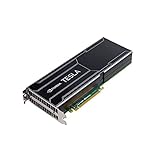
High-bandwidth memory (HBM) is a type of DRAM designed to sit close to a processor, commonly inside the same advanced package as a GPU or AI accelerator. Rather than plugging into a conventional memory slot, HBM uses stacked memory dies connected through a wide interface. This physical arrangement is designed to provide substantial local data-transfer bandwidth.


As an Amazon Associate I earn from qualifying purchases.
HBM is therefore not interchangeable with ordinary PC memory. A desktop DIMM is a removable system-memory module; HBM is part of the accelerator’s package design. The exact HBM generation, capacity, and bandwidth depend on the accelerator model.
Why do AI accelerators use HBM?
AI workloads move large amounts of data. An accelerator needs to keep model data and intermediate or runtime information available while its compute units work. HBM places high-bandwidth memory close to those compute units, helping the processor access local data without relying solely on more distant system memory.
#1 Best Overall

- Graphics Card Interface: Pci E
Capacity determines what can fit
Memory capacity, typically stated in gigabytes per GPU, describes how much data the local HBM can hold. For a large language model, that can include model weights and runtime state such as the key-value (KV) cache used during inference. More capacity can allow a larger model or more runtime state to remain in accelerator memory, although the precise fit depends on the model, workload, software, and how the system distributes work.
Bandwidth determines how quickly data can move
Memory bandwidth, usually stated in terabytes per second, describes the rate at which the GPU can transfer data to and from its local HBM. Higher bandwidth can help when a workload is limited by memory traffic and the processor is waiting for data. It does not guarantee a proportional increase in overall performance: compute capacity, software, parallelism, communication between GPUs, and workload characteristics also affect results.
Capacity and bandwidth answer different questions. Capacity is about how much data can stay nearby; bandwidth is about how quickly that data can be moved. A workload may be constrained by either one or both.
How much HBM do AI accelerators have?
NVIDIA’s HGX reference documentation lists the following specifications for these products. They are vendor-published figures, not a universal specification for all AI accelerators.
| GPU | HBM capacity per GPU | HBM generation | Local memory bandwidth per GPU |
|---|---|---|---|
| H100 | 80 GB | HBM3 | 3.35 TB/s |
| H200 | 141 GB | HBM3e | 4.8 TB/s |
| B200 | 180 GB | HBM3e | Up to 8 TB/s |
These figures describe each GPU’s local HBM, not the bandwidth of links between GPUs. NVIDIA’s HGX documentation lists GPU-to-GPU interconnect specifications separately; those links serve a different purpose. Product specifications can change, so consult NVIDIA’s current HGX documentation and the relevant H200 product page when comparing systems.
Why can HBM supply be tight?
HBM depends on specialized memory production and packaging, so its output is not instantly interchangeable with all other DRAM supply. SK hynix describes HBM as in-package memory for GPUs and accelerators and identifies capacity for its through-silicon-via (TSV) process as necessary for supplying high-density memory. TSVs connect stacked dies vertically. This specialized manufacturing chain helps explain why increasing HBM output involves more than simply making additional conventional memory modules.
Rank #4
Demand planning also matters. Leading AI accelerators use significant HBM capacity, and suppliers and customers make supply plans in advance. In investor materials, Micron said its HBM supply for calendar 2024 was sold out and that most of its 2025 supply had already been allocated. In later materials, the company described strong demand for 2026 and discussions with customers about agreements for that year. These are dated company statements about particular periods, not a measure of current availability across the whole industry.
Quick wins for a faster PC:
Clear out junk files and repair common Windows errorsFree Scan →Fix the driver behind crashes, sound loss and screen glitchesFind Drivers →SK hynix and NVIDIA have also announced a multi-year partnership to co-develop next-generation memory and secure supply for AI infrastructure. That announcement signals strategic planning around future demand; it does not establish a precise market-wide shortage.
Best Value

- All-aluminum metal material - Provides strong and long-lasting support. This is made of all-aluminum metal instead of plastic, can avoid the aging of plastic materials and can be used as a long-term replacement.
- Screw adjustment design - The graphics card bracket design can be compatible with various chassis configurations of traditional and long power supply bays to meet various user hosts.
- Bottom hidden mag.net design - The mag.net hidden in the base is designed for easy installation and more stable standing in the chassis.
- The workmanship of the detail process - The small graphics card support frame is made of three complex processes: polished anode, sandblasted anode and CNC high-speed edge-washing high-gloss process. The full anode process can maintain the durability.
- Tool-free fixing module - The support module is equipped with a cushioning anti-scratch pad and a base high-gloss process.
The available company disclosures do not establish the size of an industry-wide HBM shortfall or current spot-market availability in October 2026. They also do not quantify how much present-day supply pressure comes from wafer capacity, packaging, yields, or customer allocation. It is more accurate to describe the cited statements as evidence of supplier-specific allocation and demand planning during the periods they name than to claim a specific current shortage figure.
Independent reader supportYour contribution helps us test, update, and keep practical guides available for everyone.Can I upgrade a GPU with more HBM?
No—not as a normal user-installed memory upgrade. HBM is integrated into the accelerator package, and its configuration is part of the product design. A buyer choosing an accelerator or system should compare the model’s HBM capacity and bandwidth before purchase; adding a standard PC memory module will not increase the GPU’s HBM.
How to compare HBM-equipped accelerators
When evaluating accelerators, compare specifications in context rather than treating one bandwidth or capacity number as a complete performance verdict:
Do these 3 things before closing this tab:
1Scan for outdated or missing drivers - takes under a minute2Clear out junk files and repair common Windows errors3Fix the driver behind crashes, sound loss and screen glitchesQuick Recap
- Capacity per GPU: Check whether the local memory can accommodate the weights, activations, and runtime state required by your workload.
- Bandwidth per GPU: Compare local HBM transfer rates, keeping them separate from GPU-to-GPU interconnect bandwidth.
- Generation and configuration: Use vendor-confirmed details for the specific product; do not assume every accelerator uses the same HBM generation or stack arrangement.
- Workload bottleneck: Determine whether the workload is constrained by capacity, memory traffic, compute, communication, or a combination.
- System scale: You can add the memory capacities of multiple GPUs to understand the system total, but that does not mean the GPUs share one pool automatically. How that memory can be accessed depends on system design and communication software.
Product prices and availability are accurate as of the date/time indicated and are subject to change. Any price and availability information displayed on Amazon at the time of purchase will apply.




