What’s actually slowing this PC down?
Pick the symptom - the matching free tool is one click away.
Satellite operators track predicted close approaches through an official space-surveillance service, review the latest Conjunction Data Message (CDM), and compare successive risk assessments. An alert means two tracked objects may pass close to one another; it does not mean a collision is certain. The spacecraft owner or operator decides whether to maneuver, using mission procedures and updated data rather than a single alert or universal probability cutoff.
What a conjunction alert tells you
A conjunction assessment predicts when and where two tracked orbital objects will reach their closest approach. The resulting alert identifies a potential close approach, not a confirmed impact. Its estimates can change as tracking observations and orbit data are updated.

As an Amazon Associate I earn from qualifying purchases.
A Conjunction Data Message (CDM) is a standardized format for exchanging conjunction information between people and computer systems. It carries event and orbit information that operators can use to assess a predicted encounter. Review the current CDM and its revisions; an old copied alert may no longer reflect the latest estimate.
Recommended Free Tools
How to track satellite conjunction alerts
For U.S. satellite owners and operators: Space-Track
Space-Track’s documentation for the U.S. basic emergency on-orbit conjunction assessment service says the 18th Space Defense Squadron (18 SDS) screens active satellites against its catalog several times per day. When a close approach meets the service’s emergency reporting criteria, the owner or operator is notified by email and through the Space-Track Operator Panel. CDMs are available on Space-Track.org.
#1 Best Overall

- Advanced Stabilization: Experience military-grade stabilization with 2° & 3° correction angles, ensuring steady viewing in strong winds, on vehicles, boats, and aircraft. Perfect for professional and recreational use in dynamic environments.
- Crystal Clear Precision: High-quality 42mm roof prism design delivers sharp, bright images with 16x magnification. Observe fine details effortlessly without image vibrations, even after physical activity or in unstable conditions.
- Waterproof & Fog-Proof Protection: Rated IPX7 waterproof, these binoculars withstand heavy rain and submersion up to 1 meter for 30 minutes. Nitrogen gas-filled to prevent internal fogging, ensuring clear visuals in any weather.
- Built for Durability: Rugged, lightweight construction designed for the toughest conditions. Enjoy long-term comfort and use, ideal for nature observation, birdwatching, law enforcement, and more.
- Professional-Grade Versatility: Trusted by military and law enforcement worldwide, these binoculars offer unparalleled image stability for land, sea, and air observation, combining high stabilization capacity with fast, accurate image correction.
The same documentation describes this basic emergency service as no-cost and says it does not require an SSA Sharing Agreement or an Orbital Data Request (ODR). To request it, operators are asked to provide contact information, Space-Track usernames, and the catalog numbers and names of their satellites. Contact details, eligibility, criteria, and workflow may change, so check Space-Track’s official “Basic Emergency Collision Avoidance (On-Orbit)” documentation before relying on them.
Other assessment routes
| Route | Access and audience | What it provides | Important limit |
|---|---|---|---|
| Space-Track basic emergency on-orbit service | Satellite owners and operators who provide the account and spacecraft details requested in the service documentation | Email and Operator Panel notifications, plus CDMs for reportable close approaches | Emergency reporting criteria apply; the operator remains responsible for collision-avoidance decisions. |
| Space-Track advanced services | Entities with an SSA Sharing Agreement; an ODR process is also documented | Expanded screening and additional CDM or ephemeris support, depending on service type | Eligibility and data access depend on the current approval process. |
| ESA operational conjunction-risk service | ESA and other supported agency missions, as described by ESA | Analysis using U.S.-provided CDMs and ESA orbit data; event histories and risk metrics in a web interface | It is not described as a general-purpose consumer tracking site. |
| ESA CREAM automation project | Project and prototype context | ESA describes alerting, maneuver-option generation, and coordination support | The project description is not evidence of universal operational availability. |
ESA’s operational event view illustrates the information a professional dashboard can bring together, including collision probability, miss distance, encounter geometry, orbit uncertainties, and event history. ESA’s description concerns its supported missions, not open access for every satellite owner.
Rank #2
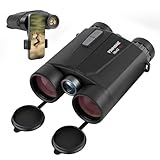
- Precision Engineering: Advanced BAK4 prism and multi-coated lenses ensure bright, sharp images even in low light, while 1m accuracy guarantees reliable distance measuring binoculars performance
- Dual-Function Excellence: Combine crisp 10x42 HD optics with a built-in laser rangefinder binoculars system, delivering instant distance measurements up to 1650 yards and real-time speed tracking for hunting, golf, or wildlife observation
- Rugged & Waterproof: IP65-rated housing withstands harsh weather, making these hunting binoculars with rangefinder suitable for rain, fog, or dusty terrains
- Enhanced Night Vision: Built-in low-light optimization extends usability at dusk and dawn, suitable for tracking game or navigating trails after sunset
- User-Friendly Design: Ergonomic grip, tripod compatibility, and auto-shutoff maximize convenience for extended outdoor adventures. Includes carrying case and strap
How to assess collision risk
Do not judge an event by miss distance or collision probability alone. ESA identifies object dimensions, predicted miss distance, flyby geometry, and orbit uncertainty as relevant factors. Its 2025 standard calls for probabilistic assessment that models uncertainty in position and velocity. The useful question is how the predicted separation compares with the uncertainty and geometry of this particular encounter, using the applicable mission process.
Quick wins for a faster PC:
Repair Windows errors before they cause bigger problemsFix Now →Scan for outdated or missing drivers - takes under a minuteDriver Scan →Clear out junk files and repair common Windows errorsFree Scan →- Miss distance: The predicted separation at closest approach. Interpret it alongside uncertainty and encounter geometry; by itself, it is not a guarantee of safety or collision.
- Collision probability: A model-dependent estimate that depends on the assessment inputs and assumptions. Consider it in context, not as a stand-alone maneuver command.
- Orbit uncertainty and data quality: Uncertainty in the tracked orbits affects how meaningful a predicted separation is. ESA’s 2025 standard requires probabilistic methods that model uncertainty in position and velocity.
- Encounter geometry and object dimensions: The relative approach and the objects’ sizes contribute to the risk assessment.
- Changes between updates: Compare successive analyses and the event history. New observations may move the estimate in either direction; an alert’s risk does not always decline.
- Consequences of a maneuver: Assess whether a proposed maneuver reduces the intended risk without creating a more concerning approach with another object. Maneuvers can also consume limited fuel or disrupt mission operations.
A practical review workflow
- Receive the alert through an appropriate service. For the U.S. basic emergency service, follow Space-Track’s current enrollment and spacecraft-identification instructions; monitor both email and the Space-Track Operator Panel if enrolled.
- Open the latest CDM and its revisions. Identify the predicted time of closest approach (TCA), the objects involved, and the current event estimates. Do not base a decision on a stale copy when newer analysis is available.
- Review the risk inputs together. Examine miss distance, collision probability, orbit uncertainty, encounter geometry, object dimensions, and the history of updates under the mission’s procedures.
- Evaluate a maneuver as a new prediction, not just a command. Space-Track says operators can submit predictive ephemerides in approved formats and coordinate systems for screening. Use the service’s current file-format and maneuver-notification guidance, and check whether the proposed trajectory creates other conjunction risks.
- Continue monitoring through TCA. The Spaceflight Safety Handbook describes continued monitoring through the time of closest approach whether or not the operator proceeds with collision avoidance. Incorporate updated assessments into the mission’s decision process.
Who decides whether a satellite should maneuver?
The spacecraft owner or operator is responsible for the collision-avoidance decision. Space-Track’s “Basic Emergency Collision Avoidance (On-Orbit)” documentation states: “Collision avoidance is the responsibility of the satellite owner/operator, but 18 SDS will support their collision avoidance efforts by screening their predictive ephemeris and providing results in the Conjunction Data Message (CDM) format.” Screening and alerting support the decision; they do not transfer it to the surveillance service.
Why there is no universal probability cutoff
ESA’s 2019 public explainer described a probability greater than “typically 1 in 10,000” as a point at which multiple teams would begin preparing a maneuver for its fleet. That is a dated description of typical ESA practice, not a rule for all spacecraft or even a guarantee that a maneuver will follow for a particular event.
ESA’s Issue 1 standard, with revision date 2025-10-23, makes the context dependence clearer: requirements distinguish normal operations and orbit conditions, and the 10-4 and 10-6 values used in one constellation assessment are not maneuver thresholds. Operators should follow the applicable mission safety case and procedures rather than applying either number as an automatic trigger.
How frequent are alerts?
Alert volume can be high even when most alerts do not result in a maneuver. ESA’s 2019 explainer said a typical low Earth orbit satellite received hundreds of alerts per week, with about two per week per satellite requiring detailed analyst follow-up for ESA’s then-current fleet of low-altitude spacecraft. Those are historical ESA figures, not current global rates or a forecast for an individual satellite. The same 2019 page said most alert risks declined as the week went by and more orbital information was gathered; that general observation is not a guarantee for each event.
Free tools Windows power users keep installed
One-click scans. No signup required.
Quick Recap
Product prices and availability are accurate as of the date/time indicated and are subject to change. Any price and availability information displayed on Amazon at the time of purchase will apply.




