The Tool Desk
Outbyte Driver Updater FREEFix the driver behind crashes, sound loss and screen glitchesFind Drivers →Outbyte PC Repair FREERepair Windows errors before they cause bigger problemsFix Now →Choose a gaming phone and telescopic controller if you already own a capable phone, want cellular connectivity, and prefer one device for calls, navigation, and play. Choose a dedicated handheld if you want controls built in, a larger gaming-oriented screen, better grips, and a device reserved for gaming. Logitech G CLOUD is the most cloud-focused option; Razer Edge adds faster Android hardware and a 144 Hz AMOLED display; Steam Deck is the better choice when local PC games matter almost as much as streaming.
Cloud gaming renders a game on a remote computer and sends the video to your screen, while your controls travel back over the internet. That makes Wi-Fi quality, latency, and service support just as important as the handheld or phone itself.
As an Amazon Associate I earn from qualifying purchases.
What actually changes between a phone and a handheld?
Both devices can display a streamed game, but they solve different problems. A phone is a multipurpose screen you may already own. Adding a physical controller can turn it into a cloud-gaming system without buying another display. A dedicated handheld integrates the display, controls, grips, speakers, battery, and software into one package, so there is less setup before a session.
Quick wins for a faster PC:
Clear out junk files and repair common Windows errorsFree Scan →Fix the driver behind crashes, sound loss and screen glitchesFind Drivers →Repair Windows errors before they cause bigger problemsFix Now →Cloud gaming also reduces the importance of local processing power. The remote server performs the demanding rendering; your device mainly decodes video, sends input, and maintains a stable connection. A premium phone cannot compensate for packet loss, and a purpose-built handheld cannot make a distant data center respond instantly. Hardware still affects screen quality, comfort, battery endurance, and the number of local games you can run, but network conditions determine whether streamed play feels responsive.
#1 Best Overall

- 【All-in-One Handheld】 The ultimate portable console in your hands. Enjoy retro games, remote play, cloud gaming, and Android titles on a lightweight handheld with responsive controls and a stunning 7” display. More than just a game console — it's a powerful all-in-one entertainment device.
- 【Cloud Gaming + Remote Play】 Cloud Gaming – Instantly play AAA titles over Wi-Fi with subscriptions to Xbox Cloud Gaming (Beta), GeForce NOW, Amazon Luna, PlayStation Plus Premium, and Boosteroid. Remote Play – Stream games locally from your own devices using Moonlight, PlayStation Remote Play, Steam Link or PXPlay.【Need buyer's subscriptions to Xbox or PlayStation.】
- 【Emulator Retro Games + Android Games】 Emulation – Enjoy retro classics with enhanced compatibility and smoother performance on PS2, GameCube, and other popular systems. Android Games – Run most local games with ease, offering more ways to play on a larger screen with console-style controls."
- 【Capacitor Digital Joystick + Switchable Modes】 abxylute One Pro is the first handheld to feature cutting-edge digital joysticks—taller, larger, and more advanced, with an extended input range. Switch between Circle Mode for ultra-precise 0.2% tracking, or Square Mode for broader input—tailored to different play styles."
- 【4K Video Output + Dual Speakers】 Connect to an external display or AR glasses for up to 4K gaming with full controller support, or enjoy immersive gameplay on the built-in 1080P 7” display—perfect for couch play or gaming on the go. Upgraded audio drivers deliver deeper, clearer vocals, and rich, immersive sound in every in-game moment."
Phone plus controller: the flexible route
When a phone is the sensible choice
A phone is the lowest-friction financial choice when you already have a recent handset and do not want another screen in your bag. Xbox Cloud Gaming supports compatible Android phones and controllers on Android 12 or later. GeForce NOW also runs through supported Android software. The same handset remains available for calls, navigation, messaging, authentication, and other apps when you finish playing.
Cellular connectivity is the phone route’s biggest practical advantage. A 5G connection can be useful where Wi-Fi is weak or unavailable, although mobile congestion, data caps, and fluctuating signal quality can still cause stutter. You can also use the phone at a desk, in a hotel, or on a commute without carrying a separate internet-enabled device.
Why a physical controller matters
Touch controls work for menus and a small number of games, but virtual buttons cover part of the picture and provide no tactile travel. NVIDIA recommends using a gamepad clip to attach a controller to a phone and says its on-screen virtual gamepad is not recommended for long-term gameplay. Xbox likewise identifies compatible physical controllers for cloud play. For action games, racing, shooters, and anything intended for a console controller, a physical pad is effectively part of the phone setup.
Do these 3 things before closing this tab:
1Fix the driver behind crashes, sound loss and screen glitches2Clear out junk files and repair common Windows errors3Scan for outdated or missing drivers - takes under a minuteA telescopic controller clamps around the phone and draws power from it or connects over Bluetooth, depending on the model. The trade-off is that you may need to remove the controller before putting the phone in a pocket, charging it with a case fitted, or using it for ordinary phone tasks. A separate Bluetooth controller avoids removing the phone from a clip but is less compact.
Phone-route limitations
- The phone’s display is often smaller than a cloud-first handheld’s screen, and aspect-ratio differences can leave unused space around a streamed image.
- Long sessions can feel front-heavy because the phone’s weight sits above or between the controller grips.
- Incoming calls, notifications, battery-saving modes, and background apps can interrupt play unless you enable a gaming or do-not-disturb mode.
- Controller compatibility varies by Android version, game, connection method, and whether the game expects XInput-style controls.
- Battery endurance depends on the phone, screen brightness, cellular radio, controller power draw, and the streaming service; there is no universal runtime figure.
Dedicated handhelds: what you gain
Logitech G CLOUD for cloud-first play
Logitech describes G CLOUD as a lightweight handheld with a 7-inch Full HD touchscreen and ergonomic grips, built to stream thousands of games. Its product information lists Xbox Game Pass Cloud Gaming, NVIDIA GeForce NOW, PC and console remote play, and local Google Play games. Processing is performed on a remote computer for cloud sessions, so the handheld does not need the local hardware required to render a demanding PC title.
An Xbox product listing gives G CLOUD a claimed battery life of more than 12 hours. That is a manufacturer or retailer claim rather than a guaranteed runtime: screen brightness, volume, Wi-Fi conditions, game codec, and background activity all change consumption. G CLOUD is most attractive when your library is primarily in a cloud service or accessed through remote play and you value built-in controls over local Android performance.
Razer Edge for a higher-spec Android handheld
Razer calls Edge a custom-built Android gaming handheld. Its listed hardware includes a Snapdragon G3x chipset, a 6.8-inch 144 Hz AMOLED FHD+ touchscreen, and Kishi V2 Pro controls. The product is positioned for Android, PC, Xbox, and cloud gaming, giving it more headroom for demanding native Android games and a high-refresh display for supported content.
Rank #2

- 1.NOTE: Anbernic RG Rotate Package don’t included Game Card, NO Preload Games , rgrotate needs users to download relevant game by yourself .Powerful T618 8-Core Chip, 3GB RAM + 32GB Storage, Smooth Performance for All Games - Runs games with zero lag or frame drops! Powered by Android 12 system, you can also install streaming apps, social media and other Android software, it's more than just a retro game console.
- 2.Anbernic RG Rotate Built-in AI Features, 2TB TF Card Expansion, WiFi 5 & Bluetooth 5.0, Versatile Functions - One-tap to get game walkthroughs, real-time translation, AI image generation and more! Supports multiplayer online battling, wireless screen projection, 6-axis gyroscope, USB-C to 3.5mm headphone jack, customize your gaming experience however you like.
- 3.Anbernic rg rotate with 3.5" 720*720 Fully-Laminated IPS Touchscreen & Hi-Fi Speaker, Immersive Gaming Experience - The high-resolution display delivers vivid, crisp colors and zero washout even under bright sunlight. Paired with the high-fidelity built-in speaker, every game soundtrack and sound effect comes to life, just like you're back in the 90s arcade.
- 4.Anbernic RG Rotate has 5-Hour Long Battery Life & Full Accessory Kit, Ready to Play Out of Box - 2000mAh rechargeable battery lasts up to 5 hours of continuous gaming on one charge, perfect for all-day trips. The package includes USB charging cable, screen protector, lanyard, extra L2/R2 shoulder buttons, no extra purchases needed, start playing the second you unbox it!
- 5.Anbernic RG Rotate offers two different chassis configurations. The silver model features a full-aluminum chassis, anbernic rg rotate has an extremely metallic appearance. While the black aluminum and ABS material chassis is lighter.RG Rotate Portable for All Occasions - Only 8*8*2.16cm, 0.32kg/0.28kg fits perfectly in your jeans pocket, backpack or purse! as light as your smartphone. Bring it to work breaks, commutes, road trips or camping, get your gaming fix anytime anywhere.
A 144 Hz panel does not make a cloud stream 144 frames per second by itself. The game, streaming tier, network, and service must all deliver a matching frame rate. NVIDIA lists 90/120 FPS and higher-resolution streaming as features of supported devices and plans, with GeForce NOW Ultimate required for features such as 1440p and 90/120 FPS. Verify current retail availability and software support before buying Edge, because those details can change.
Steam Deck when local PC games are equally important
Valve positions Steam Deck as an all-in-one portable PC. It has full-size controls, trackpads, gyro aiming, rear grip buttons, expandable storage, and a 40 Wh battery. For lighter workloads such as game streaming, smaller 2D games, or web browsing, Valve says maximum battery life is approximately seven to eight hours.
Steam Deck is the strongest fit if you want to install and play a Steam library locally as well as stream from Xbox, GeForce NOW, or another computer. Local games consume substantially more power than a video stream, so the same device can have very different runtimes depending on what you launch. Xbox currently lists Steam Deck cloud support as beta. Setting it up is more involved than opening an Android app: Xbox’s instructions require switching to Desktop Mode and configuring Microsoft Edge.
Side-by-side comparison
| Consideration | Phone plus controller | Logitech G CLOUD | Razer Edge | Steam Deck |
|---|---|---|---|---|
| Incremental hardware cost | Lowest when you already own a capable phone; you add a controller | Requires buying a separate handheld, but controls and screen are integrated | Requires buying a separate Android handheld and controller system | Requires buying a portable PC; local storage and accessories can add to the total |
| Display | Depends on your phone | 7-inch Full HD touchscreen | 6.8-inch 144 Hz AMOLED FHD+ touchscreen | Built-in gaming display; size and refresh rate vary by Steam Deck model |
| Controls and ergonomics | Physical controller recommended; controller may need to be removed for phone use | Integrated controls and ergonomic grips | Integrated Kishi V2 Pro controls | Full-size controls, trackpads, gyro, and rear grip buttons |
| Streaming battery information | Depends on phone, brightness, radio, and controller | More than 12 hours claimed on an Xbox product listing; actual runtime varies | Battery figure is not stated on the cited Razer developer page | Approximately 7–8 hours for lighter streaming and similar workloads, according to Valve |
| Local-game capability | Android games supported by the phone | Local Google Play games | Android games with stronger listed hardware | Full local PC gaming from compatible Steam titles |
| Cloud and remote-play support | Xbox Cloud Gaming and GeForce NOW on supported Android software | Xbox Cloud Gaming, GeForce NOW, and PC/Xbox/PS5 remote play listed by Logitech | Android, PC, Xbox, and cloud gaming listed by Razer | Steam streaming and other services; Xbox Cloud Gaming support is currently beta |
| Connectivity flexibility | Wi-Fi plus cellular data, including 5G where available | Wi-Fi-focused handheld; no cellular capability is identified in the cited product details | Android handheld; confirm the exact model’s connectivity before purchase | Wi-Fi-focused portable PC; use a hotspot when supported by your phone |
| Setup complexity | Install the service, pair or attach a controller, and manage phone notifications | Sign in to services and pair Wi-Fi; controls are ready on the device | Sign in to Android and gaming services; more settings may be available | Cloud setup can require Desktop Mode and Microsoft Edge; local Steam setup is built in |
Service compatibility and subscriptions
Xbox Cloud Gaming
Xbox says cloud gaming is a benefit included with most Game Pass plans and works on a compatible, internet-connected device such as a PC, TV, or phone. Its supported-device information includes Android phones and tablets, Logitech G CLOUD, Razer Edge, and Steam Deck beta support. Your subscription determines the available catalog and benefits; buying a handheld does not replace the service requirement.
What’s actually slowing this PC down?
Pick the symptom - the matching free tool is one click away.
On Android, Xbox requires Android 12 or later for compatible phones. A dedicated handheld can reduce setup friction because controls are already attached, but you still need an Xbox account, an eligible Game Pass plan, and a reliable connection. On Steam Deck, the beta path is less direct and currently involves Desktop Mode and Microsoft Edge.
GeForce NOW
GeForce NOW streams games you own or are entitled to through supported storefronts rather than providing one universal console-style catalog. NVIDIA’s current requirements call for at least 15 Mbps for HD at up to 60 frames per second, 25 Mbps for Full HD at 60 frames per second, and 35 Mbps for QHD at 90 or 120 frames per second on supported handhelds. NVIDIA recommends 5 GHz Wi-Fi or Ethernet and requires latency below 80 milliseconds to a data center.
GeForce NOW Ultimate is required for features such as 1440p and 90/120 FPS streaming on supported devices. A high-refresh Razer Edge can display those modes when your plan, game, server, and network all qualify; the panel alone is not enough. On a phone, NVIDIA recommends a physical gamepad clip and does not recommend its virtual gamepad for sustained play.
Rank #3
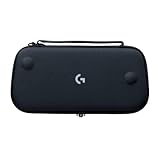
- Stow and Go: Take your Logitech G Cloud Handheld anywhere you want without having to worry about getting it there safely.
- Hand Strap: Attached strap for comfortable carrying. Pick up and go wherever you want to play.
- Detachable Strap: A detachable and size-adjustable strap gives you more options on how you want to carry and secure your Cloud Handheld device.
Network quality matters more than a faster processor
Before replacing hardware, test the connection where you actually play. Xbox recommends at least 20 Mbps for a stable cloud-gaming connection and says 5 GHz Wi-Fi or 5G can be used where available. NVIDIA’s higher-resolution targets require more bandwidth, and both services are sensitive to latency and packet loss.
Free tools Windows power users keep installed
One-click scans. No signup required.
- Bandwidth: A connection can be fast enough for a speed test yet struggle when other devices consume capacity. Pause large downloads and video uploads during play.
- Latency: The round trip to the service data center affects aiming, steering, and menu response. NVIDIA specifies less than 80 ms to its data center.
- Wi-Fi band: Use 5 GHz when you are close enough to the router; 2.4 GHz reaches farther but is more prone to congestion.
- Router placement: Put the router in an open, central location. A stronger signal can improve consistency without buying a new handheld.
- Cellular variability: 5G may be excellent in one location and unstable a few minutes later. Monitor data use if you stream away from Wi-Fi.
If a game freezes, drops resolution, or feels delayed on both a phone and a handheld, upgrade the network path first. Changing devices cannot fix congestion between your home and the service’s data center.
Setup guides
Set up a phone for Xbox Cloud Gaming
- Update the phone to Android 12 or later and install any pending system updates.
- Connect a compatible controller. Attach it with a secure gamepad clip if you want a single handheld-shaped unit; otherwise pair a Bluetooth controller.
- Join a 5 GHz Wi-Fi network or verify that your 5G connection is stable. Keep the phone near the router during the first test.
- Open Xbox Cloud Gaming, sign in with the account tied to your eligible Game Pass plan, and choose a game.
- Disable disruptive notifications or enable Do Not Disturb, then test a game with fast camera movement. If controls do not respond, update the controller firmware, reconnect it, and confirm that Android recognizes the buttons.
Set up a phone for GeForce NOW
- Install the supported GeForce NOW Android software and sign in.
- Attach a physical gamepad with a clip or pair one over Bluetooth. Treat the virtual gamepad as a short-term menu aid rather than a long-session control method.
- Use 5 GHz Wi-Fi where possible and check that the service selects a data center under NVIDIA’s 80 ms latency target.
- Confirm that the game is in a linked, supported storefront library and that your membership tier provides the resolution or frame-rate mode you want.
- Start at a conservative quality setting. Increase resolution or frame rate only after a stable session proves that your bandwidth and latency can sustain it.
Set up a dedicated handheld
- Charge the handheld, install firmware updates, and connect it to your 5 GHz network.
- Sign in to each service separately. A device that supports Xbox Cloud Gaming does not automatically include a Game Pass subscription, and GeForce NOW still requires a linked game library.
- Set screen brightness and sleep timers for the room and session length. Brightness is one of the easiest ways to change streaming endurance.
- Test the controls in a menu and then in a latency-sensitive game. Confirm that every trigger, stick, and shoulder button registers before downloading local games.
- For Steam Deck Xbox cloud play, switch to Desktop Mode and follow Microsoft’s current Edge-based beta setup. Expect more configuration than on Android.
Which device should you buy?
Choose a phone and controller when…
- You already own a capable Android phone and want the smallest additional purchase.
- Cellular connectivity is important for travel or locations without dependable Wi-Fi.
- You want one device for gaming and everyday communication rather than a dedicated gadget.
- You are comfortable attaching or removing a controller and managing notifications.
Choose Logitech G CLOUD when…
- Cloud streaming is your primary use and you want integrated controls immediately available.
- A 7-inch Full HD screen and ergonomic grips are more important than demanding local PC games.
- You want Xbox Cloud Gaming, GeForce NOW, remote play, and local Google Play games in one cloud-oriented handheld.
- You value the product listing’s claimed 12-plus-hour battery figure, while understanding that real runtime varies.
Choose Razer Edge when…
- You want Android gaming hardware with a 6.8-inch 144 Hz AMOLED display.
- You expect to play native Android games as well as stream from Xbox, PC, or a cloud service.
- You are willing to verify current availability, software updates, and the exact connectivity configuration before purchase.
Choose Steam Deck when…
- Installing and playing local PC games is as important as cloud streaming.
- You want full-size controls, trackpads, gyro aiming, rear buttons, expandable storage, and a 40 Wh battery.
- You accept that Xbox Cloud Gaming setup is currently a beta workflow involving Desktop Mode and Microsoft Edge.
- You understand that local 3D games will usually consume more battery than streaming or lightweight 2D titles.
Common problems and fixes
The stream looks blurry or keeps changing quality
Check bandwidth first, stop competing downloads, move to 5 GHz Wi-Fi, and reduce the stream resolution or frame-rate target. NVIDIA’s 15, 25, and 35 Mbps thresholds apply to different output modes; selecting a mode above your connection’s sustained capacity invites adaptation.
Controls feel delayed
Measure latency to the service rather than relying only on a local speed test. Move closer to the router, use Ethernet for a Steam Deck dock when practical, or try a less congested 5 GHz channel. If both devices show the same delay, the network path is the likely limit.
The phone disconnects from the controller
Charge the controller, update its firmware, remove competing Bluetooth pairings, and reconnect it after launching the game service. A physical clip should hold the phone securely without pressing side buttons or obstructing a USB-C port.
Recommended Free Tools
A handheld has battery left but still performs poorly
Battery percentage and stream quality are separate issues. Poor Wi-Fi, high latency, thermal limits, or a service outage can degrade play while the battery remains high. Test another network before assuming the handheld hardware is defective.
Bottom line
A phone with a physical controller is the best value and most flexible route when you already own a good handset and need cellular access. A dedicated handheld is worth the extra hardware when built-in controls, a larger gaming display, and distraction-free ergonomics will make you play more often. Pick Logitech G CLOUD for a cloud-first experience, Razer Edge for a faster Android device with a 144 Hz AMOLED screen, and Steam Deck when local PC gaming belongs in the same purchase. In every case, confirm service compatibility and improve Wi-Fi or latency before spending more on hardware.
Quick Recap
Product prices and availability are accurate as of the date/time indicated and are subject to change. Any price and availability information displayed on Amazon at the time of purchase will apply.

