“Deleting” a Frontpoint sensor can mean three different things: removing it from the system, temporarily bypassing it, or physically detaching it from a surface. Frontpoint’s published guidance explains bypassing and physical take-down, but does not give a sensor-specific account or Control Panel deletion procedure. For adhesive-mounted sensors, Frontpoint recommends slowly working a thin tool between the adhesive and mounting surface.
Choose the right kind of removal
These actions are not interchangeable. Bypassing changes whether a sensor is actively monitored; taking it down removes it from its mounting surface; digital deletion would remove it from the system or account. Frontpoint’s general device-settings article says users can rename or remove devices, but does not establish that this is the procedure for deleting a security sensor or explain what deletion does to monitoring.
As an Amazon Associate I earn from qualifying purchases.
| Action | What it does | Monitoring and alarm effect | Reversibility |
|---|---|---|---|
| Bypass | Temporarily bypasses the sensor; it remains part of the system. | Frontpoint says a bypassed sensor is not actively monitored and will not trigger an alarm if activated while bypassed. | Temporary. Frontpoint says bypass states reset under specified system conditions. |
| Physical take-down | Separates the sensor from its mounting surface. | Not established by the take-down guidance. Detaching it does not itself establish that it has been deleted or that its monitoring status has changed. | The sensor can be remounted; Frontpoint says its Mover’s Kit includes adhesives for remounting sensors. |
| Account or Control Panel deletion | Would remove the device from a system or account, depending on the procedure. | Not stated for a security sensor in Frontpoint’s general device-settings guidance. | Not stated. |
Sources: Frontpoint’s bypass guidance, sensor take-down instructions, moving guidance, and device-settings guidance.
How to take down an adhesive-mounted sensor
Frontpoint recommends using a thin tool to work slowly between the adhesive and the mounting surface. It names a butter knife, putty knife, or dental floss as examples, and says this approach can help remove the sensor without ruining the current adhesive or damaging painted walls. This is vendor guidance, not a guarantee for every surface or adhesive condition.
#1 Best Overall
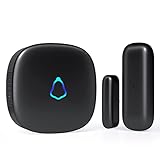
- 😀【Easy to Install】The sensor and receiver are paired already, all you need to do is attach the transmitter, plug the receiver into any standard outlet, pick a tone you like and here we go.
- 🔋【Built to Last】With one standard household AAA battery in equipment and design of Ultra-Low-Power, the sensor can easily last 1-2 years. which allows battery to be replaced less often, save your time and money.
- ✔️【A Must-Have】500FT reliable long working range, perfect entry alert chime when door opens for home and business. What about insecure front door, child safety gate, upstairs window, cabinet, basement door...you tell me.
- 🎵【Mute to 120dB】 58 unique long and short tones with 5 adjustable volume levels. The max volume 120dB is loud enough to be heard anywhere in the house, you will never miss out an alert. Prefer not to be disturbed? Set it to mute.
- 💖【Reliable After-sales】One Year Warranty & Lifetime Friendly Service. We started to make security products since 2004, so we have confidence on the quality of every sold unit. We will never let you down, grab your door dinger now!
- Decide whether the sensor should be bypassed first. If you need it temporarily inactive, use Frontpoint’s bypass procedure rather than assuming physical removal changes its system status.
- Work a thin tool gently into the adhesive. Slowly separate the adhesive from the mounting surface using one of Frontpoint’s named examples: a butter knife, putty knife, or dental floss.
- Continue slowly until the sensor releases. Avoid treating forceful prying as part of Frontpoint’s instructions; the guidance calls for slow separation.
Frontpoint does not specify plastic construction for a putty knife or endorse a particular product. A plastic putty knife is one possible practical choice, but it is not a vendor-specified requirement.
If you are moving the system
Frontpoint’s moving guidance says to disarm the system on moving day, power down the Control Panel, and then carefully remove the sensors. It says the Mover’s Kit includes adhesives for remounting sensors. The guidance does not establish current kit availability or whether its adhesives are sold separately.
Rank #2

- [Note] No gateway required. When configuring a network for the Contact Window and Door Sensor, use a 2.4GHz Wifi connection, 5GHz Wifi is not supported. supports IFTTT.
- [Instant Open/Close Detection And Alert] Check the opening/closing status of doors/windows in real time on your cell phone via Tuya/Smart Life APP. Real-time monitoring, sends instant alerts to your cell phone when doors/windows are open/closed. Good choice for home security and child/pet safety!
- [Intelligent Linkage] The whole house 'moves' by the opening and closing status of the door/window and other opening and closing objects leading. For example, opening the door after checking in at a hotel or opening the door after coming home from work automatically lights up and turns on the air conditioner.
- [Sensor Tamper Alarm] The mobile app will receive timely alerts when a door or window contact sensor is removed and pried up.
- [Custom Naming for Clarity and Non-Confusion] In the Tuya Smart/Smart Life APP, you can customize the names of your door and window sensors so you can view them without confusion.
How to handle digital removal or a temporary bypass
For account or Control Panel deletion
Frontpoint’s device-settings article describes general device management through the app or website and says users can rename or remove devices. It also notes that available settings can vary between the app and website and that device visibility may depend on the service package. It does not provide a security-sensor-specific deletion path or explain the effects on monitoring or service. Ask Frontpoint for instructions for your sensor and setup before treating the general device-removal feature as a confirmed deletion method.
PC Slower Than It Used to Be?
A free scan shows the junk files, broken settings and background clutter dragging Windows down - then fixes them in one click.Free scan · Windows 10 & 11Outdated Drivers Are Slowing You Down
One free scan finds every outdated or missing driver and matches the right update for your exact hardware.Free scan · exact hardware matchFor a temporary bypass
Frontpoint’s bypass article explains how to bypass sensors in the app. A bypassed sensor is not actively monitored and will not trigger an alarm if activated while bypassed. Frontpoint describes bypass as temporary and says bypass states reset under specified system conditions. Follow its app instructions and confirm the sensor’s status in your own system.
Quick Recap
Best Value
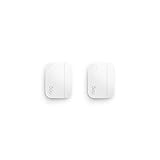
- Get instant mobile alerts when doors and windows open in your home with a Ring Protect subscription (sold separately).
- Now smaller to enable increased placement options.
- Easy installation with no tools required.
- Mounts to door and window frames.
- Includes two 3V CR2032 batteries.
Rank #4

- Get instant mobile alerts when doors and windows open in your home.
- Now smaller to enable increased placement options.
- Easy installation with no tools required.
- See more. Know more. Protect more. - Record 24/7 on your eligible cameras, scroll back in time to rewatch what you missed, get alerts for people and package, and so much more with an compatible Ring Home subscription (sold separately).
- Includes two 3V CR2032 batteries.
Rank #3
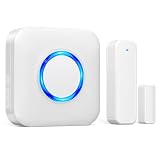
- 【Toddler & Dementia Care Safety】 Keep a watchful eye on your loved ones. This wireless door sensor chime triggers instantly when a door opens, perfectly alerting you if a toddler tries to sneak out of bed or an elderly family member with dementia attempts to wander out of the house
- 【Business Door Entry Chime】 Never miss a customer or visitor again. Ideal as a commercial retail shop doorbell, this door entry chime sounds the moment someone walks into your store or office, welcoming guests while adding a reliable layer of security during busy hours
- 【Ultra-Long 600FT Range & Expandable】 Powered by upgraded wireless tech, our signal reaches up to 600 FT—100 FT further than standard door chime. It easily penetrates walls to cover large homes, detached garages, basements, or deep warehouses. Expandable to pair up to 58 door sensors or receivers for full-home coverage
- 【58 Melodies with Memory Function】 Choose from 58 pleasant chimes and 5 adjustable volume levels (0-110dB). Crucially, you can assign a unique ringtone on this door alarm to different doors, so you know exactly which entrance is triggered. Features a silent LED flash mode for quiet offices or the hearing impaired, and a built-in memory to save your tunes when unplugged
- 【Easy 2-Minute Plug & Play Installation】 Skip the complex wiring. The wireless door alarm receiver and magnetic sensor are pre-paired out of the box. Simply plug the receiver into a standard outlet, peel the heavy-duty double-sided adhesive tape, and stick the contact sensor onto any front door, window frame, or patio slider
Before you proceed
- For an adhesive-mounted sensor, use the slow, thin-tool separation method Frontpoint describes.
- For a move, disarm the system and power down the Control Panel before carefully removing sensors.
- Do not assume physical take-down deletes the sensor from the system or changes whether it is monitored.
- For sensor-specific account or panel deletion steps and consequences, get instructions from Frontpoint.
Product prices and availability are accurate as of the date/time indicated and are subject to change. Any price and availability information displayed on Amazon at the time of purchase will apply.




