Quick wins for a faster PC:
Fix the driver behind crashes, sound loss and screen glitchesFind Drivers →Clear out junk files and repair common Windows errorsFree Scan →Der DualSense Edge bietet die zentralen Funktionen des normalen DualSense und ergänzt sie um rückseitige Tasten, anpassbare Eingaben, speicherbare Profile und austauschbare Stickmodule. Diese Extras sind vor allem dann relevant, wenn Sie Tastenbelegungen oder Stick- und Trigger-Verhalten gezielt auf verschiedene Spiele abstimmen möchten. Wenn Sie diese Anpassungen nicht brauchen, genügt als Vergleichsoption der Standard-DualSense.
Die Unterschiede zwischen DualSense und DualSense Edge im Überblick
| Funktion | DualSense | DualSense Edge |
|---|---|---|
| Haptisches Feedback und adaptive Trigger | Ja, sofern das Spiel die Funktionen unterstützt. PlayStation beschreibt die Funktionen des DualSense. | Ebenfalls vorhanden; die Verfügbarkeit hängt vom Spiel ab. PlayStation führt sie auch für den Edge auf. |
| Rückseitige Tasten und Umbelegung | In der geprüften Produktbeschreibung nicht genannt. | Rückseitige Tasten und anpassbare Tastenbelegung. |
| Stick- und Trigger-Einstellungen | Keine entsprechenden Einstellprofile in der geprüften Produktbeschreibung genannt. | Stickempfindlichkeit sowie Stick- und Trigger-Totzonen lassen sich konfigurieren. |
| Speicherbare, wechselbare Profile | Keine Edge-artigen Schnellwechselprofile in der geprüften Beschreibung genannt. | Konfigurationen speichern und im Spiel wechseln. |
| Wechselbare Stickkappen | In der geprüften Produktbeschreibung nicht genannt. | Drei Kappenformen sind vorgesehen. |
| Austauschbare Stickmodule | In den geprüften Quellen nicht belegt. | Ja. Ersatzmodule sind separat erhältlich und nur mit dem Edge kompatibel. PlayStation nennt die Kompatibilität des Ersatz-Stickmoduls. |
„Nicht genannt“ oder „nicht belegt“ bedeutet hier nicht, dass eine Funktion technisch unmöglich ist. Es bedeutet nur, dass die geprüften offiziellen Angaben sie für den Standard-DualSense nicht ausweisen.
As an Amazon Associate I earn from qualifying purchases.
Was kann der DualSense Edge zusätzlich?
Tasten auf der Rückseite belegen
Beim Edge können Sie Befehle auf rückseitige Tasten legen. So lassen sich wichtige Aktionen einer anderen Taste zuordnen, ohne die übrige Belegung unverändert lassen zu müssen. Welche Belegung sinnvoll ist, hängt vom Spiel und Ihren Vorlieben ab.
Stick- und Trigger-Verhalten einstellen
Der Edge lässt Sie die Stickempfindlichkeit sowie Stick- und Trigger-Totzonen anpassen. Damit können Sie Eingaben auf Ihre gewünschte Reaktion abstimmen. Die Einstellmöglichkeiten belegen jedoch keinen garantierten Wettbewerbsvorteil oder messbaren Leistungsgewinn.
#1 Best Overall

- Ultra Customizable Controls
- Mappable Back Buttons
- DualSense Wireless Controller Features Built In
- Replaceable Stick Modules and Caps
Profile für unterschiedliche Spiele speichern
Mehrere Konfigurationen lassen sich speichern und im laufenden Spiel wechseln. Das kann praktisch sein, wenn Sie für verschiedene Spiele andere Tastenbelegungen oder Empfindlichkeitseinstellungen nutzen möchten, statt jedes Mal alles neu einzustellen.
Stickkappen wechseln und Stickmodule ersetzen
Der Edge wird mit drei Formen von Stickkappen unterstützt, die Sie je nach Griffgefühl austauschen können. Ein Stickmodul lässt sich ebenfalls ersetzen, wenn es defekt ist. Das Ersatzmodul wird separat verkauft und ist laut PlayStation ausschließlich mit dem DualSense Edge kompatibel.
Rank #2

- Aim and move with precision by swapping in fresh stick modules* so you’re always playing with equipment that’s in great shape. Plus, three types of changeable stick caps help you stay comfortable in-game without sacrificing grip or stability.
- Mappable back buttons The DualSense Edge wireless controller’s two swappable sets of back buttons can be configured to any other button input, so you’ve always got game-changing actions and essential controls at your fingertips.
- Adjustable trigger lengths Manually set the travel distance of your left and right triggers for an optimal experience with whatever you’re playing. Fast-paced FPS? Set a shorter travel distance to shoot faster on the field. Competitive racer? Set a longer travel distance for precise throttle control on the track.
- Remappable buttons Remap or even deactivate specific button inputs, so you can create a completely personalized control setup that’s ideal for the game at hand.
- Quick-swap control profiles Once you’ve found your ideal control settings, you can save them to unique profiles and swap between them on-the-fly, so your favourite configurations are always ready when you are.
Welche Funktionen teilen sich beide Controller?
Der Edge übernimmt die zentralen DualSense-Funktionen, darunter haptisches Feedback und adaptive Trigger. Wie stark diese zum Tragen kommen, hängt davon ab, ob ein Spiel sie unterstützt. Auch der Standard-DualSense bietet diese Funktionen in unterstützten Titeln. PlayStation erklärt die Spielabhängigkeit und weitere Controller-Themen im Support.
Lohnt sich der DualSense Edge für Sie?
- Der Edge passt eher zu Ihnen, wenn Sie rückseitige Tasten, individuelle Stick- oder Trigger-Einstellungen, gespeicherte Profile oder austauschbare Stickmodule gezielt nutzen wollen.
- Der Standard-DualSense ist die naheliegende Wahl, wenn Ihnen die üblichen PS5-Controllerfunktionen genügen und Sie keine der dokumentierten Edge-Anpassungen benötigen.
Diese Einordnung beruht auf den dokumentierten Funktionen. Ein aktueller Preisvergleich, eine Aussage zur Akkulaufzeit oder ein unabhängiger Praxistest ist damit nicht verbunden. Deshalb lässt sich daraus kein allgemeines Preis-Leistungsurteil ableiten.
Quick Recap
Best Value
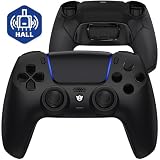
- Design for gamers – Based on official controllers with a custom design made for tactical eSports performance.
- Mappable Back Buttons – Four rear buttons support instant remapping of 15 buttons (X, O, Triangle, Square, Up, Down, Left, Right, L1, L2, R1, R2, L3, R3, Touchpad).
- Next-Gen Precision – Hall Effect joysticks and mouse-click triggers deliver smooth, responsive, and reliable control.
- Customizable Comfort – Includes 8 swappable thumbsticks in two heights and three styles (domed, concave, concave widened).
- Package Included – ULTIMATE Controller, 8 interchangeable thumbsticks, and user manual. Cable and other accessories not included. Not compatible with official charging dock.
Rank #4

- INNOVATIVE MATERIAL - TALONGAMES PS5 Controller Grip Skin is optimized for the different touch-points of your fingers. It is a multi-textured grip created for optimized feel and control. Our PS5 Controller Grip is made with an ultra-comfortable slip-resistant polymer material.
- UNRIVALED QUALITY - Our Controller Grips are very durable. Its unique integrated molding structure not only ensures product performance, but also prolongs life! Provide full protection for your controller and save your money! Controller Grips allows you to enjoy the fun of the game! [Note: To eliminate odor, please expose the grip sticker to air for 48 hours.]
- EXCELLENT FEEL,PERFECT CUTTING - Provides maximum grip ! It is manufactured by advanced equipment, using 3D stereo scanning and professional laser instruments to develop models accurately. Our engineers have created a perfect shape to achieve maximum coverage, which can fit perfectly with your controller! The professionally designed average 0.45mm thickness can provide a more comfortable grip and support for your palm!
- EASY TO APPLY - Our Controller Grips are pre-cut, and users can complete the application within 3 minutes according to the instructions. It uses the removable adhesive technology of 3M in the United States, which can be re-sticked and removed without leaving residue, which is easy to clean and replace. Taking into account the different needs of users, we provide a variety of kinds to choose.
- YOUR BEST CHOICE - Specially designed for PlayStation 5 DualSense Edge Controller, All our efforts are for players to get a better gaming experience! ※WARNING:The inner side of the PS5 DualSense Edge Controller is made of non-slip material (rubber), and it's easy to leave residue after pasting, so please stick it according to your needs.Please note that not only our grip tape but all grip tape will cause this problem. *Note: This product is grip tape only and does not include the controller itself.
Rank #3

- Aim and move with precision by swapping in fresh stick modules* so you’re always playing with equipment that’s in great shape. Plus, three types of changeable stick caps help you stay comfortable in-game without sacrificing grip or stability.
- Mappable back buttons The DualSense Edge wireless controller’s two swappable sets of back buttons can be configured to any other button input, so you’ve always got game-changing actions and essential controls at your fingertips.
- Adjustable trigger lengths Manually set the travel distance of your left and right triggers for an optimal experience with whatever you’re playing. Fast-paced FPS? Set a shorter travel distance to shoot faster on the field. Competitive racer? Set a longer travel distance for precise throttle control on the track.
- Remappable buttons Remap or even deactivate specific button inputs, so you can create a completely personalized control setup that’s ideal for the game at hand.
- Quick-swap control profiles Once you’ve found your ideal control settings, you can save them to unique profiles and swap between them on-the-fly, so your favourite configurations are always ready when you are.
Product prices and availability are accurate as of the date/time indicated and are subject to change. Any price and availability information displayed on Amazon at the time of purchase will apply.




