To download Toyota’s smartphone app, install the official Toyota App from the Apple App Store or Google Play, sign in or register, then choose Add Vehicle. That download does not automatically install or unlock navigation in your car: Toyota’s built-in Cloud Navigation is part of Drive Connect on select vehicles, while Apple CarPlay or Android Auto can display compatible phone navigation apps in supported vehicles. This guide reflects Toyota’s U.S. information.
Choose where you want navigation to run
| Option | Where it runs | What you need |
|---|---|---|
| Toyota App | On your phone, for Toyota account and supported vehicle-connected features | Free app download, an account, and vehicle setup; features depend on the vehicle. Toyota Connected Services |
| Drive Connect Cloud Navigation | In the vehicle’s multimedia system | An active trial or paid subscription and an eligible vehicle. Toyota lists availability on select 2022-and-newer vehicles. Toyota Drive Connect |
| Apple CarPlay or Android Auto | Compatible phone apps displayed through the vehicle multimedia system | A compatible phone and Toyota system; confirm support for your specific vehicle. Toyota phone integration information |
How to download and set up the Toyota App
- Open the app store on your phone. On an iPhone, open the Apple App Store; on an Android phone, open Google Play.
- Search for “Toyota App.” Install the official Toyota application. Toyota describes it as a free download and says it supports Toyota models from 2010 onward; that does not mean every connected feature works on every supported model. Toyota Connected Services
- Open the app and register or sign in. Toyota lists My Toyota, Lexus Drivers, and SmartPath credentials as sign-in options on its app FAQ. Toyota app support
- Tap “Add Vehicle.” Follow the prompts to connect your Toyota to your account. The app’s available features depend on the vehicle and service eligibility. Toyota Connected Services
- Check the vehicle’s Connected Services details. If the vehicle is eligible, Toyota says Drive Connect trial activation may be offered during registration and vehicle addition. Review the terms shown for that vehicle before activating a trial or subscription. Toyota Drive Connect
How to get Toyota’s built-in Cloud Navigation
For navigation built into the Toyota multimedia system, the relevant service is Drive Connect, not a separate Toyota map app download. Toyota describes Drive Connect as including Cloud Navigation, Destination Assist, and Intelligent Assistant. It requires an active trial or paid subscription and is available on select 2022-and-newer vehicles; model year alone does not establish eligibility. Toyota Drive Connect
As an Amazon Associate I earn from qualifying purchases.
Check the Connected Services section of the Toyota App or consult the owner’s manual to verify support for your specific vehicle. Toyota’s public information does not establish one universal model-and-trim list, so use the details tied to your vehicle rather than assuming the service is available because the app installed successfully. Toyota Connected Services
Free tools Windows power users keep installed
One-click scans. No signup required.
Send a destination from the app to the car
Toyota’s Send to Car feature is a way to send a destination to a vehicle that uses Cloud Navigation; it is not an offline map download. In the Toyota App, open My Destinations, search for or select a destination, open its details, and choose Send to Car. The vehicle’s Cloud Navigation requires Drive Connect. Toyota Connected Services
#1 Best Overall

- 【Radio Compatible for Toyota Camry 2012 2013 2014】10 inch HD capacitive touch screen radio, with Android 13 system, has 2GB RAM and 64GB ROM, can be used for Toyota Camry 2012-2014, it comes with all the cables and frame you need, check these years before you buy please. (Including CAN-BUS).
- 【Built-in Wireless CarPlay & Android Auto】Android toyota camry 2014 touch screen Supports CarPlay/Android Auto connect via Bluetooth,project the contents of your phone to the large screen of the host, and you can share your favorite 1080P videos, high-definition pictures, etc. Easily access your phone to make calls, navigate, play music or manage other apps via Siri/Google controls.
- 【1280*720 IPS Screen】Android toyota camry 2013 radio be used 1280*720 HD touchscreen with vibrant colors and sensitive touch response, making it easy to navigate through menus and functions. The IPS technology ensures a wide viewing angle, allowing you to enjoy a great visual experience even from different anglesexperience bright colors and clarity from any angle
- 【Bluetooth Hands-Free & Steering Wheel Controls】Android 2012 camry stereo with the Bluetooth hands-free feature works flawlessly with all Android and iOS phones. Steering wheel controls let you make calls, adjust volume, or switch songs without taking your hands off the wheel—way safer.. Also, if you think the called voice is low, Just plug in the included external mic for clearer sound. It will provide a safer experience for your driving.
- 【Screen Mirroring & FM Radio】Android 2012 toyota camry radio with Screen mirroring lets you cast your phone’s navigation app right onto the in-car display—cutting down on distracting phone checks and boosting safety on the road. Passengers can also enjoy the big screen: stream videos, play games, or use their favorite apps for a more fun ride. Plus, there’s built-in FM radio to tune into all your go-to stations.
Use phone navigation through the Toyota screen
If Drive Connect is unavailable for your vehicle, Apple CarPlay or Android Auto may let you use supported phone navigation apps through compatible Toyota multimedia systems. Compatibility depends on both the phone and the vehicle, so check Toyota’s vehicle-specific setup information before troubleshooting the app itself. Toyota phone integration information
- Toyota’s cited Android Auto information says it is built into Android 10; phones running Android 9 or earlier need to download Android Auto. Confirm current phone and vehicle requirements in the relevant support information.
- Do not attempt Apple CarPlay setup while driving.
If setup or navigation is missing
- The Toyota App installs, but navigation does not appear in the car: The app download and in-car Cloud Navigation are separate. Check whether Drive Connect is available for the vehicle and whether an active trial or subscription is shown.
- Add Vehicle does not show the expected features: Review the Connected Services details for that vehicle in the app and consult the owner’s manual. App support for Toyota models 2010 and newer does not guarantee that all features are available.
- Send to Car is unavailable or the destination does not appear: Confirm that the destination was selected under My Destinations and that the vehicle can use Cloud Navigation through Drive Connect.
- CarPlay or Android Auto will not connect: Verify compatibility for both the phone and the Toyota multimedia system using Toyota’s vehicle-specific support information. Device requirements and availability can vary.
Toyota’s cited pages are U.S. pages. App-store availability and service eligibility may differ by country, and the pages do not specify universal current minimum phone operating-system versions. Check the app-store listing and the Connected Services details displayed for your vehicle for current, device- and vehicle-specific information.
Quick Recap
Best Value

- 【Wireless Apple Carplay & Android Auto】Enjoy seamless wireless carplay and android auto connectivity for your phone's music, map navigation, messages, hands-free Phone Call etc. This portable CarPlay screen for car ensures smooth voice control and effortless integration, making it a versatile car tablet for daily commutes
- 【OTA Updates】Keep your device up to date with over-the-air firmware updates, so you’re always one step ahead. This wireless CarPlay screen automatically pushes new system updates, ensuring long-term compatibility between your phone and Apple CarPlay, Android Auto, and other in-car electronics
- 【Phone Mirroring Link & Four Audio Outputs】This 9-inch CarPlay screen supports mirroring for both iOS and Android phones. The double-DIN car stereo integrates CarPlay functionality while supporting Bluetooth audio, built-in speakers, FM radio, and an AUX port. Enjoy clear, stable music even in noisy environments. Connecting your phone via Bluetooth to the car's Bluetooth system for audio playback through the car speakers is the optimal choice
- 【Real-time GPS Navigation & Backup Camera】The portable Apple carplay screen provides accurate real-time location and GPS navigation without delay when connected to your phone. Allows you to use popular mapping apps such as Google Maps and Waze to provide real-time navigation ( phone connection required). The backup camera accurately and clearly records your entire driving journey, providing you with comprehensive safety protection
- 【Vivid IPS Touchscreen】With a 1280 x 720 resolution, Featuring 550 cd/m² brightness, 1000:1 contrast ratio, and 16.7 million colors, this car tablet reduces glare and offers 18% brighter visuals. Its vibrant, tablet-like display stands out from standard car screens, enhancing visibility for navigation and multimedia
Rank #4

- 【Compatible car models:for Toyota Tacoma 2024 to present】This car radio is designed for Toyota Tacoma 2024 to present models from 2024 to present. It is a 100% standard size replacement. It can replace the original 8-inch screens
- 【High Performance & Advanced Configuration】Equipped with the upgraded Android 14 system, an 8-core CPU, 6GB RAM, and 64GB ROM, this unit delivers enhanced performance and smooth operation. With a 1920*1080 resolution display, enjoy crisp, clear visuals on the 14.6-inch screen for a premium in-car entertainment experience.
- 【Wireless CarPlay & Android Auto】Built-in wireless Apple CarPlay and Android Auto allow seamless integration with your smartphone. With Siri or Google Assistant voice control, you can easily access apps, make hands-free calls, view messages, and use navigation—all while staying focused on the road. This wireless connection improves both convenience and safety.
- 【Premium Audio Quality】Featuring a 16-band equalizer for precise audio tuning, this stereo system allows you to customize your music for the perfect listening experience. It supports AM/FM/RDS radio with manual and automatic station search, and includes a subwoofer and Hi-Fi audio output for superior sound quality during every drive.
- 【GPS Navigation & Wifi/4G Connectivity】Support for Wi-Fi and 4G network connections allows you to access online navigation apps and popular social media platforms like Instagram, YouTube, Facebook, and TikTok. With GPS, you can enjoy both online and offline maps, real-time traffic updates, and advanced route planning, ensuring stress-free navigation.
Rank #3
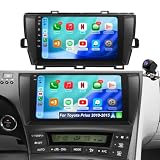
- ✅ 【Compatible Vehicle Models & Years】Car radio optimized for Toyota Prius radio 2010 2011 2012 2013 2014 2015, helping drivers modernize older interiors without dealing with difficult compatibility concerns.(NOTE: 1.Not compatible with Toyota Prius V (2012–2017) or Prius C (2012–2019). 2. If your original radio has JBL, the factory camera won't work—use the camera that comes with this unit. 3. Fits both JBL and non-JBL models.)
- ✅ 【Wireless CarPlay & Android Auto】 Upgrade your truck life, Pickup Truck Owners, tired of plugging in your phone every time you drive? With carplay screen radio for Toyota Prius 2010-2015, wireless CarPlay and Android Auto connect instantly, giving you hands-free access to maps, calls, and music. Built for convenience and safety, this toyota Prius android carplay keeps your focus on the road while staying fully connected.
- ✅ 【Upgrade Android 15 & Quad-Core CPU 64GB ROM System】 Upgrade smarter, Practical Buyers, tired of slow systems and limited storage? With toyota Prius radio 2010-2015, Android 15 and a quad-core CPU with 64GB ROM deliver fast response, smooth multitasking, and reliable space for apps. Built for everyday performance, this replacement radio for Prius keeps your drive efficient and hassle-free.
- ✅ 【Faster 5GWiFi & Bluetooth Connectivity】 Upgrade your ride, Older Vehicle Owners, tired of slow systems and weak connections? With prius android car stereo, faster 5GWiFi brings smooth navigation and streaming, while Bluetooth ensures stable calls and audio without wires. Built to modernize older cars, this Prius car stereo with bluetooth delivers reliable connectivity and a smarter driving experience.
- ✅ 【Online/Offline GPS Navigation & HD Rearview Camera】 Drive smarter, Used Car Buyers, dealing with outdated systems and poor visibility? With prius android head unit, online/offline GPS navigation ensures accurate routes even without signal, while the HD rearview camera improves safety when reversing. Built to upgrade older vehicles, this toyota Prius accessories delivers a modern, confident driving experience.
Rank #2
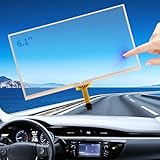
- FUNCTIONALITY RESTORATION and DESIGN ADVANTAGE: If your 6.1-inch Toyota Camry Toyota Corolla Toyota Prius C Toyota RAV4 touch screen is unresponsive, experiencing jumbled touches, phantom images, ghost touches, ghosting, ghosting, unresponsiveness, or poor appearance, this digitizer screen easily restores touch functionality. Its OEM data is designed to ensure an exact match with the for Toyota oem navigation system
- SAVE MONEY and EASY INSTALLATION: This 6.1 in Toyota radio screen is designed to be easy to install, and the screen digitalizer replacement avoids the high cost of replacing an entire radio due to a cracked screen or touch failure. We love cars and we love helping people save money and solve problems, it doesn't require you to go to the dealership for expensive repairs, just watch the video about replacing Camry Corolla navigation touch screen to solve the problem and save thousands of dollars
- COMPATIBILITY and FITMENT: Touchscreen compatible 2014.5 2015 2016 Toyota Camry radio screen, screen digitalizer replacement fits 2014.5-2016 Toyota Corolla OEM screen, Fit Toyota Prius C 2014-2016 and 2014-2018 Toyota RAV4. it fits part number LA061WQ1 display, please double check the OEM number and size before purchasing. Compare with your original car parts to confirm that this monitor screen fits your car. 86140-06190 100328
- RESPONSIVENESS and DURABILITY: Toyota Camry Corolla radio touchscreen meets OEM standards, high light transmission, high visibility, responsive, high touch accuracy.RESNAVSCREN digitizer screen is made of new upgraded material, which is stable, sensitive, responsive and strictly tested to ensure a long service life. to ensure a long service life. It provides a reliable touch experience in both daily use and extreme conditions
- PROBLEM SOLVING and USER EXPERIENCE: By replacing your touchscreen with a RESNAVSCREN, you can easily solve problems such as cracked screens and malfunctioning touches, restoring the normal function of your touch. This not only avoids costly dealer repairs, but also improves the user experience. One replacement solves the problem for good, ensuring your in-car touch is always in top condition
Product prices and availability are accurate as of the date/time indicated and are subject to change. Any price and availability information displayed on Amazon at the time of purchase will apply.




